日本語マニュアル
3.6.6.1 xaoSvcCtx
The OCI connector provides an API similar to the Oracle Call Interface. Applications that are written to use the Oracle Call Interface may be recompiled using EnterpriseDB's OCI connector in order to interact with an Advanced Server database server.
In the following descriptions a term refers to any word or group of words which may be language keywords, user-supplied values, literals, etc. A term’s exact meaning depends upon the context in which it is used.
•
Italic font introduces a new term, typically, in the sentence that defines it for the first time.
•
Fixed-width (mono-spaced) font is used for terms that must be given literally such as SQL commands, specific table and column names used in the examples, programming language keywords, etc. For example, SELECT * FROM emp;
•
Italic fixed-width font is used for terms for which the user must substitute values in actual usage. For example, DELETE FROM table_name;
•
Square brackets [ ] denote that one or none of the enclosed term(s) may be substituted. For example, [ a | b ], means choose one of “a” or “b” or neither of the two.
•
Braces {} denote that exactly one of the enclosed alternatives must be specified. For example, { a | b }, means exactly one of “a” or “b” must be specified.
•
Ellipses ... denote that the proceeding term may be repeated. For example, [ a | b ] ... means that you may have the sequence, “b a a b a”.
•
•
•
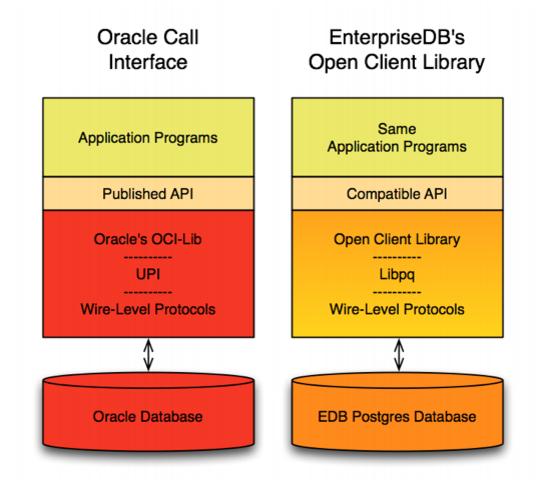
The Open Client Library provides application interoperability with the Oracle Call Interface - an application that was formerly “locked in” can now work with either an EDB Postgres Advanced Server or an Oracle database with minimal to no changes to the application code. The EnterpriseDB implementation of the Open Client Library is written in C.
The following diagram compares the Open Client Library and Oracle Call Interface application stacks.
After downloading the repository configuration file, assume superuser privileges, and use the following command to create the repository configuration file:
The installer creates a repository configuration file named edb.repo; the file resides in /etc/yum.repos.d. The file contains entries for each of the EnterpriseDB repositories; to install the connector, you must enable the entry for the enterprisedb-tools repository:
1.
Replace the user_name and password placeholders in the baseurl specification with your user name and the repository password.
2.
Replace the 0 next to enabled with a 1.
After modifying the content of the repository configuration file, you can use the yum install command to install the connector; use the command:
Each command creates a repository configuration file in the /etc/zypp/repos.d directory. The files are named:
After creating the repository configuration files, use the zypper refresh command to refresh the metadata on your SLES host to include the EnterpriseDB repositories:
When prompted for a User Name and Password, provide your connection credentials for the EnterpriseDB repository. If you need credentials, contact EnterpriseDB at:
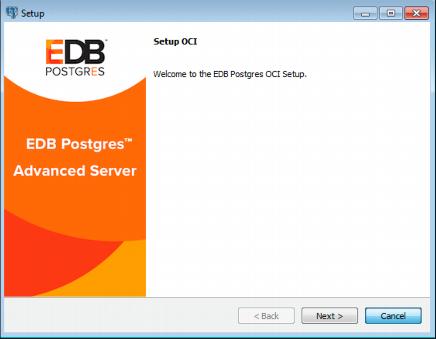
When the Language Selection popup opens, select an installation language and click OK to continue to the Setup window (shown in Figure 2.1).
Click Next to continue.

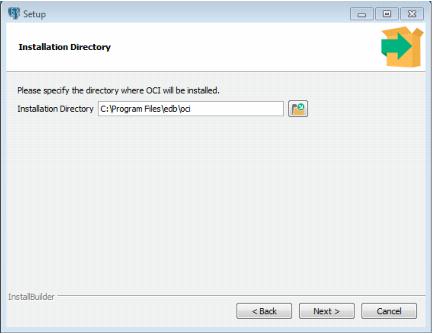
Use the Installation Directory dialog (see Figure 2.2) to specify the directory in which the connector will be installed, and click Next to continue.
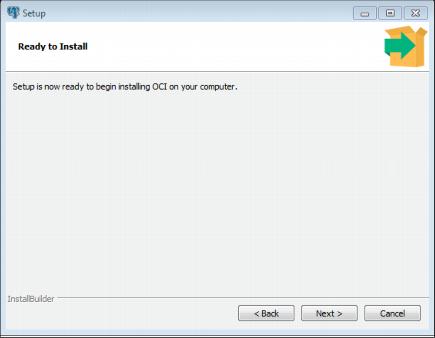
Click Next on the Ready to Install dialog (see Figure 2.3) to start the installation; popup dialogs confirm the progress of the installation wizard.
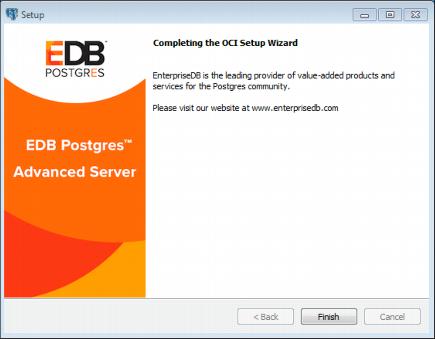
When the wizard informs you that it has completed the setup, click the Finish button to exit the dialog (see Figure 2.4).
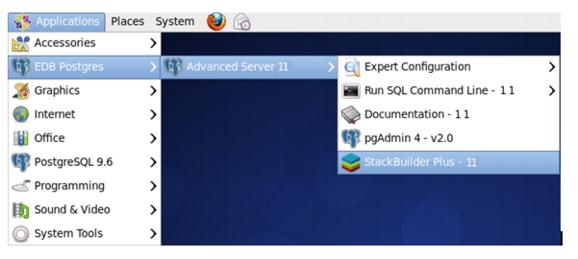
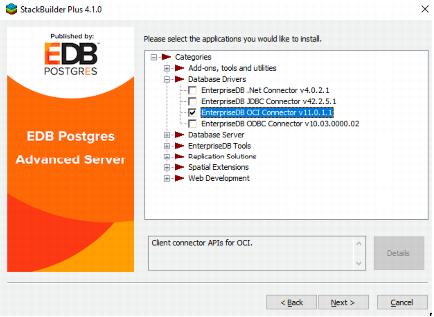
When StackBuilder Plus opens, follow the onscreen instructions. Select the EnterpriseDB OCI Connector option from the Database Drivers node of the tree control (see Figure 2.6).
[//][host][:port][/dbname]
postgres://[user[:password]@][host][:port][/dbname]
[?
param1=value1&...]
postgresql://[user[:password]@][host][:port][/dbname]
[?
param1=value1&...]
user is the name of the connecting user.
password is the password associated with the connecting user.
host is the host name or IP address to which you are connecting; to specify an IPV6 address, enclose the address in square brackets.
port is the port number to which you are connecting.
dbname is the name of the database with which you are connecting.
paramx=valuex pairs specify extra (application-specific) connection properties.
For example, each of the following connection strings establish a connection to the edb database on port 5444 of a system with an IP address of 10.0.0.4:
The files are installed in the oci/lib subdirectory.
The following example compiles and links the sample program edb_demo.c in a Linux environment. The edb_demo.c is located in the oci/samples subdirectory.
1.
Set the ORACLE_HOME and EDB_HOME environment variables.
Set ORACLE_HOME to the complete pathname of the Oracle home directory.
Set EDB_HOME to the complete pathname of the home directory.
2.
Set LD_LIBRARY_PATH to the complete path of libpthread.so. By default, libpthread.so is located in /lib64.
3.
Set LD_LIBRARY_PATH to include the Advanced Server Open Client library. By default, libiconv.so.2 is located in $EDB_HOME/oci/lib.
The Advanced Server Open Client Library supports the use of REF CURSOR's as OUT parameters in PL/SQL procedures that are compatible with Oracle. Support is provided through the following API's:
The following example demonstrates how to invoke a stored procedure that opens a cursor and returns a REF CURSOR as an output parameter. The code sample assumes that a PL/SQL procedure named openCursor (with an OUT parameter of type REF CURSOR) has been created on the database server, and that the required handles have been allocated:
Bind the PL/SQL openCursor OUT parameter:
Use the stmtOpenRefCursor statement handle to call the openCursor procedure:
At this point, the stmtUseRefCursor statement handle contains the reference to the cursor. To obtain the information, define output variables for the ref cursor:
The OCIServerAttach method uses a connection descriptor specified in the dblink parameter of the tnsnames.ora file. Use the tnsnames.ora file, compatible with Oracle databases, to specify database connection addresses. Advanced Server searches the user's home directory for a file named tnsnames.ora. If Advanced Server doesn't find the tnsnames.ora file in the user's home directory, it searches the path specified by TNS_ADMIN.
The sample tnsnames.ora file contains:
Any parameters not included in the sample, are ignored by the Open Client Library. In the sample, SID refers to the database named edb, in the cluster running on server 'localhost' at port 5444.
A C program call to OCIServerAttach that uses the tnsnames.ora file will look like:
If you don't have a tnsnames.ora file, supply the connection string parameter in the form //localhost:5444/edbx.
Get handle attributes. Advanced server supports the following handle attributes: OCI_ATTR_USERNAME, OCI_ATTR_PASSWORD, OCI_ATTR_SERVER, OCI_ATTR_ENV, OCI_ATTR_SESSION, OCI_ATTR_ROW_COUNT, OCI_ATTR_CHARSET_FORM, OCI_ATTR_CHARSET_ID, EDB_ATTR_STMT_LEVEL_TX, OCI_ATTR_MODULE
Set handle attributes. Advanced server supports the following handle attributes: OCI_ATTR_USERNAME, OCI_ATTR_PASSWORD, OCI_ATTR_SERVER, OCI_ATTR_ENV, OCI_ATTR_SESSION, OCI_ATTR_ROW_COUNT, OCI_ATTR_CHARSET_FORM, OCI_ATTR_CHARSET_ID, EDB_ATTR_STMT_LEVEL_TX, OCI_ATTR_MODULE, OCI_ATTR_PREFETCH_ROWS
By default, Advanced Server will treat an empty string as a NULL value. You can use the EDB_ATTR_EMPTY_STRINGS environment attribute to control the behavior of the OCI connector when mapping empty strings. To modify the mapping behavior, use the OCIAttrSet() function to set EDB_ATTR_EMPTY_STRINGS to one of the following:
To find the value of EDB_ATTR_EMPTY_STRINGS, query OCIAttrGet().
Advanced Server supports statements that execute as WITH HOLD cursors. The EDB_ATTR_HOLDABLE attribute specifies which statements execute as WITH HOLD cursors. The EDB_ATTR_HOLDABLE attribute can be set to any of the following three values:
•
EDB_WITH_HOLD - execute as a WITH HOLD cursor
•
EDB_WITHOUT_HOLD - execute using a protocol-level prepared statement
•
OCI_DEFAULT - see the definition that follows
You can set the attribute in an OCIStmt handle or an OCIServer handle. When you create an OCIServer handle or an OCIStmt handle, the EDB_ATTR_HOLDABLE attribute for that handle is set to OCI_DEFAULT.
You can change the EDB_ATTR_HOLDABLE attribute for a handle by calling OCIAttrSet() and retrieve the attribute by calling OCIAttrGet().
When Advanced Server executes a SELECT statement, it examines the EDB_ATTR_HOLDABLE attribute in the OCIServer handle. If that attribute is set to EDB_WITH_HOLD, the query is executed as a WITH HOLD cursor.
If the EDB_ATTR_HOLDABLE attribute in the OCIServer handle is set to EDB_WITHOUT_HOLD, the query is executed as a normal prepared statement.
If the EDB_ATTR_HOLDABLE attribute in the OCIServer handle is set to OCI_DEFAULT, Advanced Server uses the value of the EDB_ATTR_HOLDABLE attribute in the OCIServer handle (if the EDB_ATTR_HOLDABLE attribute in the OCIServer is set to EDB_WITH_HOLD, the query executes as a WITH HOLD cursor, otherwise, the query executes as a protocol-prepared statement).
The EDB_HOLD_CURSOR_ACTION attribute alters the way WITH HOLD cursors are created using the OCI interface. You can set this attribute to any of the following values:
•
EDB_COMMIT_AFTER_CURSOR – commit the transaction after creating the cursor
•
EDB_CURSOR_WITHOUT_XACT_BLK – do not begin a new transaction chain
•
OCI_DEFAULT - see the definition that follows
Each time you execute a statement, the OCI examines the transaction state on the database server. If a transaction is not already in progress, the OCI executes a BEGIN statement to create a new transaction block, and then executes the statement that you provide. The transaction block remains open until you call OCITransCommit() or OCITransRollback().
By default, the database server closes any open cursors when you commit or rollback. If you (or the OCI) declare a cursor that includes the WITH HOLD clause, the cursor result set is persisted on the database server, and you may continue to fetch from that cursor. However, the database server will not persist open cursors when you roll back a transaction. If you try to fetch from a cursor after a ROLLBACK, the database server will report an error.
If your application must read from a WITH HOLD cursor after rolling back a transaction, you can arrange for the OCI to commit the transaction immediately after creating the cursor by setting EDB_HOLD_CURSOR_ACTION to EDB_COMMIT_AFTER_CURSOR prior to creating such a cursor. For example:
It is important to understand that using EDB_COMMIT_AFTER_CURSOR will commit any pending changes.
If your application will not run properly with the extra commits added by EDB_COMMIT_AFTER_CURSOR, you may try setting EDB_ATTR_HOLD_CURSOR_ACTION to EDB_CURSOR_WITHOUT_XACT_BLK. With this action, the OCI will not begin a new transaction chain. If you create a WITH HOLD cursor immediately after committing or rolling back a transaction, the cursor will be created in its own transaction, the database server will commit that transaction, and the cursor will persist.
It is important to understand that you may still experience errors if the cursor declaration is not the first statement within a transaction – if you execute some other statement before declaring the cursor, the WITH HOLD cursor will be created in a transaction block and may be rolled back if an error occurs (or if your application calls OCITransRollback()).
Please note that you can set the EDB_HOLD_CURSOR_ACTION on the server level (OCIServer) or for each statement handle (OCIStmt). If the statement attribute is set to a value other than OCI_DEFAULT, the value is derived from the statement handle, otherwise (if the statement attribute is set to OCI_DEFAULT), the value is taken from the server handle. So you can define a server-wide default action by setting the attribute in the server handle, and leaving the attribute set to OCI_DEFAULT in the statement handles. You can use different values for each statement handle (or server handle) as you see fit.
Unless otherwise instructed, the OCI connector will ROLLBACK the current transaction whenever the server reports an error. If you choose, you can override the automatic ROLLBACK with the edb_stmt_level_tx parameter, which preserves modifications within a transaction, even if one (or several) statements raise an error within the transaction.
You can use the OCIServer attribute with OCIAttrSet() and OCIAttrGet()to enable or disable EDB_ATTR_STMT_LEVEL_TX. By default, edb_stmt_level_tx is disabled. To enable edb_stmt_level_tx, the client application must call OCIAttrSet():
To disable edb_stmt_level_tx:
3.6.6.1 xaoSvcCtx
In order to use the xaoSvcCtx function, extensions in the xaoSvcCtx or xa_open connection string format must be provided as follows:
Oracle_XA{+required_fields ...}
Where required_fields are the following:
HostName=host_ip_address specifies the IP address of the Advanced Server database.
PortNumber=host_port_number specifies the port number on which Advanced Server is running.
SqlNet=dbname specifies the database name.
Acc=P/username/password specifies the database username and password. password may be omitted in which case the field is specified as Acc=P/username/.
AppName=app_id specifies a number that identifies the application.
Convert an array of size OCI_DT_ARRAYLEN to an OCIDateTime descriptor.
Convert the given string to Oracle datetime type in the OCIDateTime descriptor according to the specified format.
Convert an OCIDateTime descriptor to an array.
Implements division of OCIInterval values by OCINumber values.
Implements multiplication of OCIInterval values by OCINumber values.
Converts an OCIInterval value into a OCINumber value.
Converts a OCINumber value into an OCIInterval value.
Adds an OCIInterval value to an OCIDatetime value, resulting in an OCIDatetime value.
Subtracts an OCIInterval value from an OCIDatetime value, resulting in an OCIDatetime value.
Adds NUMBERs.
Assign one NUMBER to another.
Compare NUMBERs.
Decrement a NUMBER.
Divide two NUMBERs.
Increments a NUMBER.
Test if a NUMBER is an integer.
Test if a NUMBER is zero.
Multiply NUMBERs.
Negate a NUMBER.
Round a NUMBER to a specified number of decimal places.
Round a NUMBER to a specified decimal place.
Initialize a NUMBER to Pi.
Initialize a NUMBER to zero.
Subtract NUMBERs.
Convert a NUMBER to an integer.
Convert a NUMBER to a real.
Convert an array of NUMBER to a real array.
Converts a NUMBER to a string.
Truncate a NUMBER at a specified decimal place.
Initialize the OCIFile package.
Terminate the OCIFile package.
Write buflen bytes into the file.
The following table lists the error code mappings defined by the OCI Connector. When the database server reports an error code or condition (shown in the first or second column), the OCI converts the value to the compatible value displayed in the third column.