1.1 What’s New
2 EDB*Plus
2.4 Command Summary
2.4.1 ACCEPT
2.4.2 APPEND
2.4.3 CHANGE
2.4.4 CLEAR
2.4.5 COLUMN
2.4.6 CONNECT
2.4.7 DEFINE
2.4.8 DEL
2.4.9 DESCRIBE
2.4.10 DISCONNECT
2.4.11 EDIT
2.4.12 EXECUTE
2.4.13 EXIT
2.4.14 GET
2.4.15 HELP
2.4.16 HOST
2.4.17 INPUT
2.4.18 LIST
2.4.19 PASSWORD
2.4.20 PAUSE
2.4.21 PROMPT
2.4.22 QUIT
2.4.23 REMARK
2.4.24 SAVE
2.4.25 SET
2.4.26 SHOW
2.4.27 SPOOL
2.4.28 START
2.4.29 UNDEFINE
2.4.30 WHENEVER SQLERROR
This guide describes how to connect to an Advanced Server database using EDB*Plus. EDB*Plus provides a command line user interface to EDB Postgres Advanced Server that accepts SQL commands that allow you to:
1.1 What’s New
In the following descriptions a term refers to any word or group of words which may be language keywords, user-supplied values, literals, etc. A term’s exact meaning depends upon the context in which it is used.
2 EDB*PlusEDB*Plus is a utility program that provides a command line user interface to EDB Postgres Advanced Server. EDB*Plus accepts SQL commands, SPL anonymous blocks, and EDB*Plus commands.EDB*Plus commands are compatible with Oracle SQL*Plus commands and provide various capabilities including:
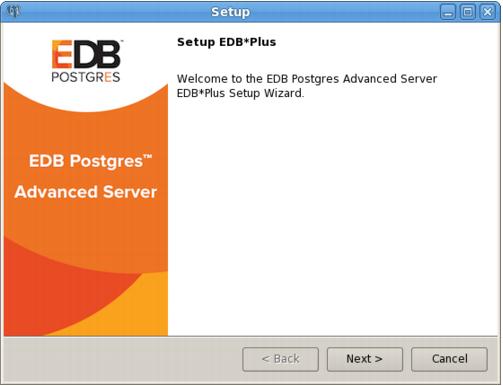
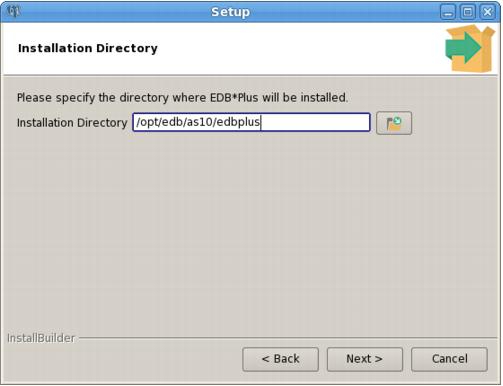
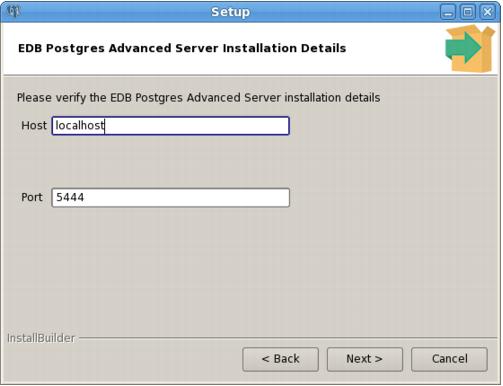
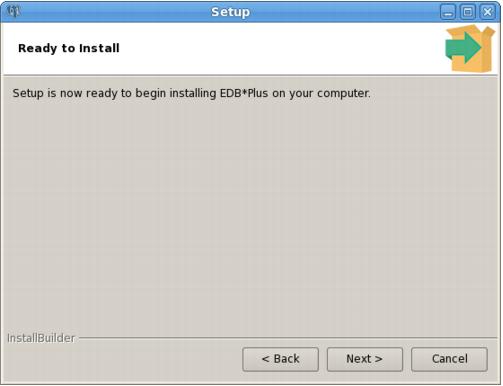
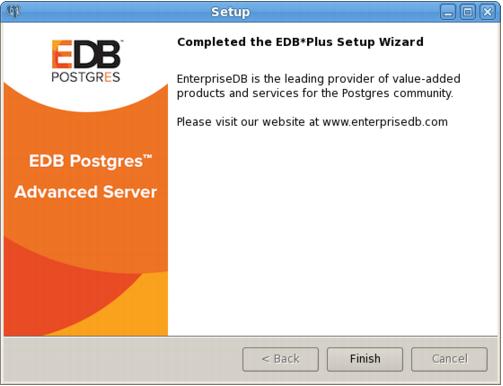
Before installing EDB*Plus, you must first install Java (version 1.7 or later). On a Linux system, you can use the yum package manager to install Java. Open a terminal window, assume superuser privileges, and enter:The package resides in the edbas10 repository. You must create and enable the edbas10 repository to install EDB*Plus. The package that creates the repository is named edb-repo; the package is available from EnterpriseDB at:After downloading and invoking the edb-repo package, navigate to the repository configuration file (/etc/yum.repos.d/edb.repo), and enable the edbas10 repository:By default, the pg_hba.conf file for the RPM installer enforces IDENT authentication. Before invoking EDB*Plus, you must either modify the pg_hba.conf file, changing the authentication method to a form other than IDENT (and restarting the server), or perform the following steps to ensure that an IDENT server is accessible:You must confirm that an identd server is installed and running. You can use the yum package manager to install an identd server by invoking the command:The command should create a file named /etc/xinetd.d/auth that contains:The name specified in the map_name column is a user-defined name that will identify the mapping in the pg_hba.conf file.You must restart the Advanced Server service before invoking EDB*Plus. For detailed information about controlling the Advanced Server service, see the EDB Postgres Advanced Server Installation Guide, available at:Use the Installation Directory field to specify the directory in which you wish to install the EDB*Plus software (see Figure 2.2). Then, click Next to continue.Use fields on the EDB Postgres Advanced Server Installation Details window (see Figure 2.3) to identify the location of the Advanced Server host:
To open an EDB*Plus command line, navigate through the Applications (or Start) menu to the Advanced Server menu, to the Run SQL Command Line menu, and select the EDB*Plus option. You can also invoke EDB*Plus from the operating system command line with the following command:If specified, the EDB*Plus sign-on banner is suppressed along with all prompts.Login information for connecting to the database server and database. login takes the following format. (There must be no white space within the login information.)username is a database username with which to connect to the database.password is the password associated with the specified username. If a password is not provided, but a password is required for authentication, a password file is used if available. If there is no password file or no entry in the password file with the matching connection parameters, then EDB*Plus will prompt for the password. For more information on using password files and authentication methods, see Section 2.4.6.connectstring is the database connection string with the following format:host is the hostname or IP address on which the database server resides. If neither @connectstring nor @variable nor /NOLOG is specified, the default host is assumed to be the localhost. port is the port number receiving connections on the database server. If not specified, the default is 5444. dbname is the name of the database to connect to. If not specified the default is edb. If Internet Protocol version 6 (IPv6) is used for the connection instead of IPv4, then the IP address must be enclosed within square brackets (that is, [ipv6_address]). The following is an example using an IPv6 connection:The pg_hba.conf file for the database server must contain an appropriate entry for the IPv6 connection. The following example shows an entry that allows all addresses:For more information about the pg_hba.conf file, see the PostgreSQL core documentation at:If an SSL connection is desired, then include the ?ssl=true parameter in the connection string. In such a case, the connection string must minimally include host:port, with or without /dbname. If the ssl parameter is not specified, the default is false. See Section 2.3 for instructions on setting up an SSL connection.variable is a variable defined in the login.sql file that contains a database connection string. The login.sql file can be found in the edbplus subdirectory of the Advanced Server home directory.Specify /NOLOG to start EDB*Plus without establishing a database connection. SQL commands and EDB*Plus commands that require a database connection cannot be used in this mode. The CONNECT command can be subsequently given to connect to a database after starting EDB*Plus with the /NOLOG option.scriptfile is the name of a file residing in the current working directory, containing SQL and/or EDB*Plus commands that will be automatically executed after startup of EDB*Plus. ext is the filename extension. If the filename extension is sql, then the .sql extension may be omitted when specifying scriptfile. When creating a script file, always name the file with an extension, otherwise it will not be accessible by EDB*Plus. (EDB*Plus will always assume a .sql extension on filenames that are specified with no extension.)The following example shows user enterprisedb with password, password, connecting to database edb running on a database server on the localhost at port 5444.The following example shows user enterprisedb with password, password, connecting to database edb running on a database server on the localhost at port 5445.Using variable hr_5445 in the login.sql file, the following illustrates how it is used to connect to database hr on localhost at port 5445.The following is the content of the login.sql file used in the previous example.The following example executes a script file, dept_query.sql after connecting to database edb on server localhost at port 5444.The following is the content of file dept_query.sql used in the previous example.
The Java truststore is the file containing the Certificate Authority (CA) certificates with which the Java client (EDB*Plus) uses to verify the authenticity of the server to which it is initiating an SSL connection.The Java keystore is the file containing private and public keys and their corresponding certificates. The keystore is required for client authentication to the server, which is used for the EDB*Plus connection.
Step 1: Create the certificate signing request (CSR).In the following example the generated certificate signing request file is server.csr. The private key is generated as file server.key.Note: When creating the certificate, the value specified for the common name field (designated as CN=enterprisedb in this example) must be the database user name that is specified when connecting to EDB*Plus.In addition, user name maps can be used as defined in the pg_ident.conf file to permit more flexibility for the common name and database user name. Steps 8 and 9 describe the use of user name maps.Step 2: Generate the self-signed certificate.The following generates a self-signed certificate to file server.crt using the certificate signing request file, server.csr, and the private key, server.key, as input.Step 3: Make a copy of the server certificate (server.crt) to be used as the root Certificate Authority (CA) file (root.crt).Step 4: Delete the now redundant certificate signing request (server.csr).Step 5: Move or copy the certificate and private key files to the Advanced Server data directory (for example, /opt/edb/as10/data).Step 6: Set the file ownership and permissions on the certificate files and private key file.Set the ownership to the operating system account that owns the data subdirectory of the database server. Set the permissions so that no other groups or accounts other than the owner can access these files.Step 7: In the postgresql.conf file, make the following modifications.Step 8: Modify the pg_hba.conf file to enable SSL usage on the desired database to which EDB*Plus is to make the SSL connection.In the pg_hba.conf file, the hostssl type indicates the entry is used to validate SSL connection attempts from the client (EDB*Plus).The authentication method is set to cert with the option clientcert=1 in order to require an SSL certificate from the client against which authentication is performed using the common name of the certificate (enterprisedb in this example).The map=sslusers option specifies that a mapping named sslusers defined in the pg_ident.conf file is to be used for authentication. This mapping allows a connection to the database if the common name from the certificate and the database user name attempting the connection match the SYSTEM-USERNAME/PG-USERNAME pair listed in the pg_ident.conf file.The following is an example of the settings in the pg_hba.conf file if the database (edb) must use SSL connections.Step 9: The following shows the user name maps in the pg_ident.conf file related to the pg_hba.conf file by the map=sslusers option. These user name maps permit you to specify database user names edbuser, postgres, or enterprisedb when connecting with EDB*Plus.Step 10: Restart the database server after you have made the changes to the configuration files.
Step 1: Using files server.crt and server.key located under the database server data subdirectory, create copies of these files and move them to the host where EDB*Plus is to be running.Store these files in the desired directory to contain the trusted certificate and keystore files to be generated in the following steps. The suggested location is to create a .postgresql subdirectory under the home user account that will invoke EDB*Plus. Thus, these files will be under the ~/.postgresql directory of the user account that will run EDB*Plus.Step 2: Create an additional copy of edb.crt.Step 3: Create a Distinguished Encoding Rules (DER) format of file edb_root.crt. The generated DER format of this file is edb_root.crt.der. The DER format of the file is required for the keytool program used in Step 4.Step 4: Use the keytool program to create a keystore file (postgresql.keystore) using edb_root.crt.der as the input. This process adds the certificate of the Postgres database server to the keystore file.Note: The file name postgresql.keystore is recommended so that it can be accessed in its default directory location ~/.postgresql/postgresql.keystore, which is under the home directory of the user account invoking EDB*Plus. Also note that the file name suffix can be .jks instead of .keystore (thus, file name postgresql.jks). However, in the remainder of these examples, file name postgresql.keystore is used.For Windows only: The path is %APPDATA%\.postgresql\postgresql.keystoreThe keytool program can be found under the bin subdirectory of the Java Runtime Environment installation.You will be prompted for a new password. Save this password as it must be specified with the PGSSLCERTPASS environment variable.Step 5: Create a PKCS #12 format of the keystore file (postgresql.p12) using files edb.crt and edb.key as input.Note: The file name postgresql.p12 is recommended so that it can be accessed in its default directory location ~/.postgresql/postgresql.p12, which is under the home directory of the user account invoking EDB*Plus.For Windows only: The path is %APPDATA%\.postgresql\postgresql.p12You will be prompted for a new password. Save this password as it must be specified with the PGSSLKEYPASS environment variable.Step 6: If files postgresql.keystore and postgresql.p12 are not already in the ~/.postgresql directory, move or copy them to that location.For Windows only: The directory is %APPDATA%\.postgresqlStep 7: If the default location ~/.postgresql is not used, then the full path (including the file name) to file postgresql.keystore must be set with the PGSSLCERT environment variable, and the full path (including the file name) to file postgresql.p12 must be set with the PGSSLKEY environment variable before invoking EDB*Plus.In addition, if the generated file from Step 4 was not named postgresql.keystore or postgresql.jks then, use the PGSSLCERT environment variable to designate the file name and its location. Similarly, if the generated file from Step 5 was not named postgresql.p12 then, use the PGSSLKEY environment variable to designate the file name and its location.
2.4 Command SummaryThe following sections contains a summary of EDB*Plus commands.2.4.1 ACCEPTThe ACCEPT command displays a prompt and waits for the user’s keyboard input. The value input by the user is placed in the specified variable.ACC[EPT ] variableThe following example creates a new variable named my_name, accepts a value of John Smith, then displays the value using the DEFINE command.2.4.2 APPENDAPPEND is a line editor command that appends the given text to the end of the current line in the SQL buffer.A[PPEND ] textIn the following example, a SELECT command is built-in the SQL buffer using the APPEND command. Note that two spaces are placed between the APPEND command and the WHERE clause in order to separate dept and WHERE by one space in the SQL buffer.2.4.3 CHANGECHANGE is a line editor command performs a search-and-replace on the current line in the SQL buffer.If to/ is specified, the first occurrence of text from in the current line is changed to text to. If to/ is omitted, the first occurrence of text from in the current line is deleted.The following sequence of commands makes line 3 the current line, then changes the department number in the WHERE clause from 20 to 30.2.4.4 CLEARThe CLEAR command removes the contents of the SQL buffer, deletes all column definitions set with the COLUMN command, or clears the screen.Clears the SQL buffer.2.4.5 COLUMNThe COLUMN command controls output formatting. The formatting attributes set by using the COLUMN command remain in effect only for the duration of the current session.If the COLUMN command is specified with no subsequent options, formatting options for current columns in effect for the session are displayed.If the COLUMN command is followed by a column name, then the column name may be followed by one of the following:
{CONTINUE [COMMIT|ROLLBACK|NONE]
|EXIT [SUCCESS|FAILURE|WARNING|n|sub_variable]
[COMMIT|ROLLBACK]}If Advanced Server encounters an error during the execution of a SQL command or PL/SQL block, EDB*Plus performs the action specified in the WHENEVER SQLERROR command:Include the CONTINUE clause to instruct EDB*Plus to perform the specified action before continuing.Include the COMMIT clause to instruct EDB*Plus to COMMIT the current transaction before exiting or continuing.Include the ROLLBACK clause to instruct EDB*Plus to ROLLBACK the current transaction before exiting or continuing.Include the NONE clause to instruct EDB*Plus to continue without committing or rolling back the transaction.Include the EXIT clause to instruct EDB*Plus to perform the specified action and exit if it encounters an error.
Table of Contents