日本語マニュアル
•
Preparing the PEM Database Server - Chapter 3 provides information about preparing the PEM database server to be used with pgBouncer.
•
Configuring pgBouncer - Chapter 4 provides detailed information about configuring pgBouncer to make it work with the PEM database server.
•
Configuring the PEM Agent – Chapter 5 provides detailed information about configuring a PEM agent to connect to pgBouncer.
This document uses the term Postgres to mean either the PostgreSQL or the Advanced Server database.
In the following descriptions a term refers to any word or group of words that are language keywords, user-supplied values, literals, etc. A term’s exact meaning depends upon the context in which it is used.
•
Italic font introduces a new term, typically, in the sentence that defines it for the first time.
•
Fixed-width (mono-spaced) font is used for terms that must be given literally such as SQL commands, specific table and column names used in the examples, programming language keywords, etc. For example, SELECT * FROM emp;
•
Italic fixed-width font is used for terms for which the user must substitute values in actual usage. For example, DELETE FROM table_name;
•
Square brackets [ ] denote that one or none of the enclosed term(s) may be substituted. For example, [ a | b ], means choose one of “a” or “b” or neither of the two.
•
Braces {} denote that exactly one of the enclosed alternatives must be specified. For example, { a | b }, means exactly one of “a” or “b” must be specified.
•
Ellipses ... denote that the proceeding term may be repeated. For example, [ a | b ] ... means that you may have the sequence, “b a a b a”.
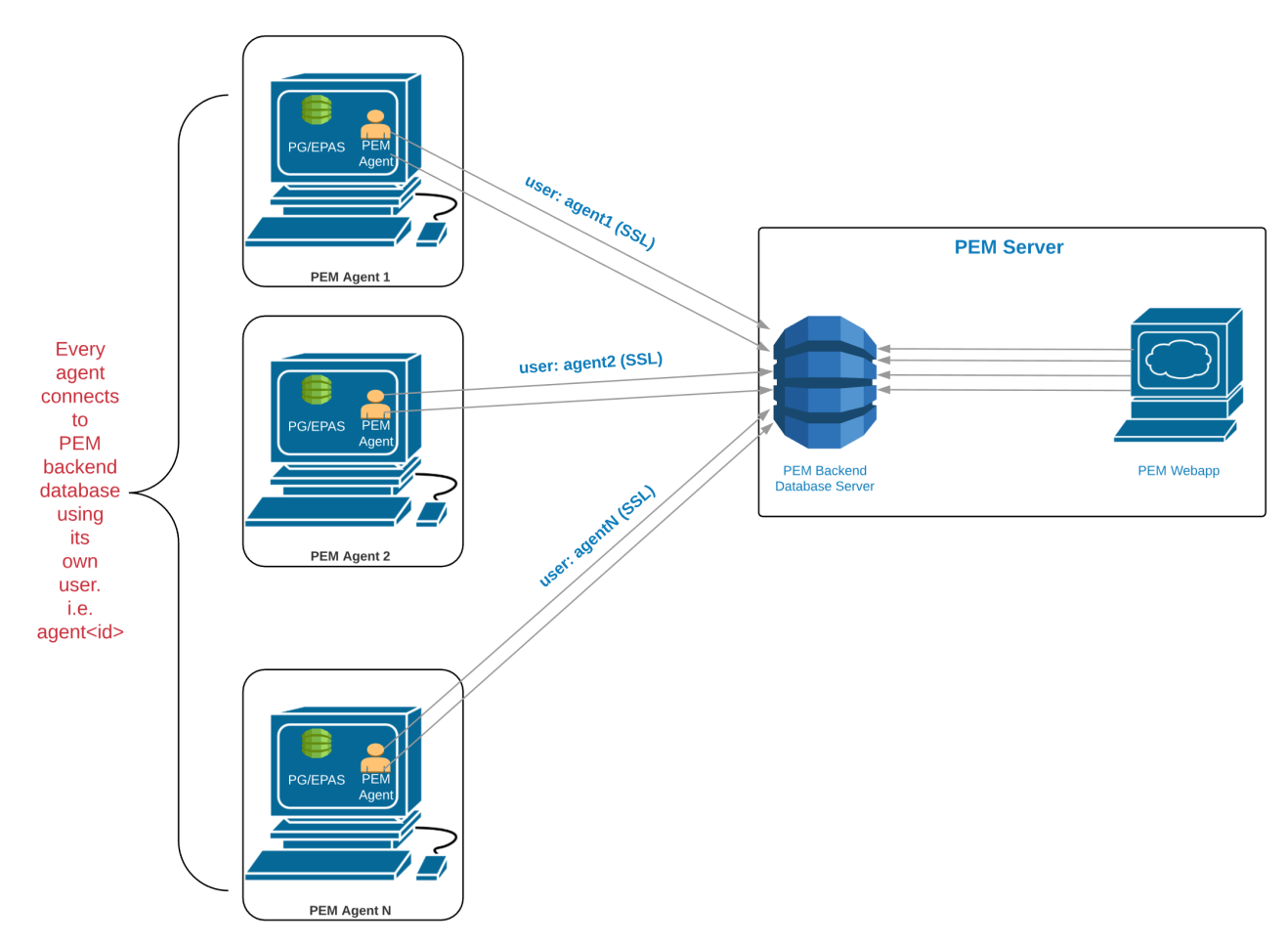
C:\Users\susan\AppData\Local\Temp\vmware-susan\VMwareDnD\afdfbb11\Screen Shot 2019-01-29 at 7.11.16 PM.png
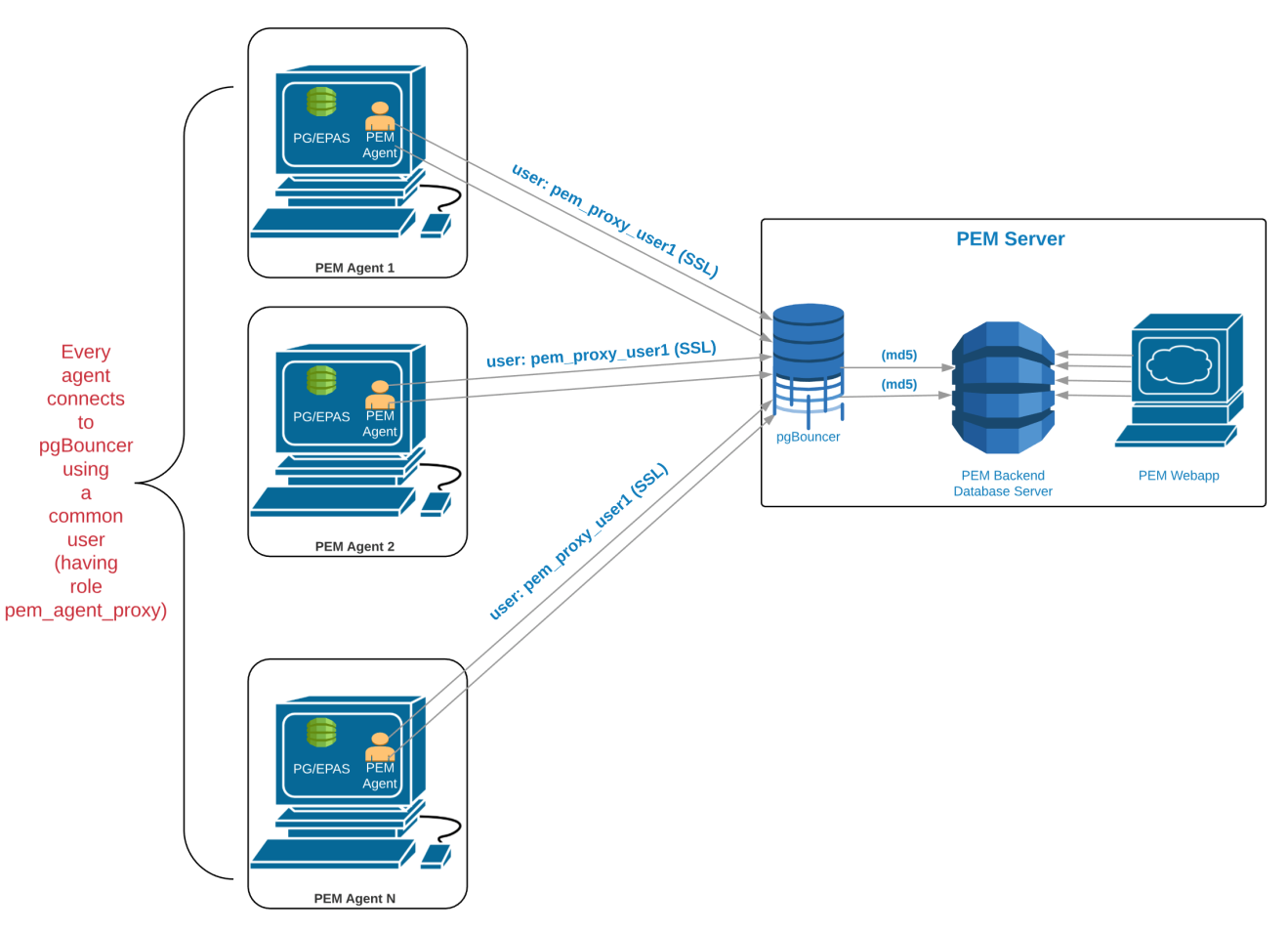
C:\Users\susan\AppData\Local\Temp\vmware-susan\VMwareDnD\bddd8d5e\Screen Shot 2019-01-29 at 7.11.58 PM.png
2.
Create a user named pem_admin1 (a non-super user) with pem_admin and pem_agent_pool role membership on the PEM database server. For example:
3.
Grant CONNECT privilege to the pgbouncer user on the pem database. For example:
4.
Grant USAGE privilege to the pgbouncer user for the pem schema on the pem database. For example:
5.
Grant EXECUTE privilege to the pgbouncer user on the pem.get_agent_pool_auth(text) function in the pem database. For example:
6.
Use the pem.create_proxy_agent_user(varchar) function to create a user named pem_agent_user1 on the PEM database server. For example:
The function will create a user with the same name with a random password, and grant pem_agent and pem_agent_pool roles to the user. This allows pgBouncer to use a proxy user on behalf of the agent.
2.
Change the owner of the etc directory for pgBouncer (where pgbouncer.ini resides) to enterprisedb, and change the directory permissions to 0700. For example:
3.
Change the contents of the pgbouncer.ini or edb-pgbouncer.ini file as follows:
4.
Use the following command to create and update the /etc/edb/pgbouncer1.9/userlist.txt authentication file for pgBouncer.
NOTE: A super user cannot invoke the PEM authentication query function pem.get_proxy_auth(text). If the pem_admin user is a super user, you must add the password to the authentication file, which is enterprisedb in the above example.
5.
Create an HBA file (/etc/edb/pgbouncer1.9/hba_file) for pgBouncer that contains the following content:
6.
Change the owner of the HBA file (/etc/edb/pgbouncer1.9/hba_file) to enterprisedb, and change the directory permissions to 0600. For example:
In above command, the command line argument --pem-agent-user instructs the agent to create an SSL certificate and key pair for the pem_agent_user1 database user in /root/.pem directory. For example:
They will be used by the PEM agent to connect to the PEM database server as pem_agent_user1. It will also create /usr/edb/pem/agent/etc/agent.cfg.