
Introduction to EDB Postgres® Analytics Accelerator#
Use the Analytics Accelerator (PGAA) to explore the analytical capabilities built on EDB Postgres®. This accelerator helps you understand core concepts, explore key technologies such as EDB Postgres® Lakehouse, and learn how to implement analytics with EDB Hybrid Manager (HM).
We integrate modern data architectures and open standards with the reliability and flexibility of Postgres to help you unlock valuable insights.
Conceptual foundations#
Understand the principles and strategies behind modern data analytics and EDB’s approach.
Learn about data architectures (Data Warehouse, Data Lake, Lakehouse) and foundational technologies (columnar storage, vectorized engines, and others).
Explore EDB’s vision for Postgres® analytics and how EDB leverages core technologies.
Review in-depth explanations of EDB analytical features, design choices, and advanced topics across the sections below.
EDB core analytics technologies#
Learn about EDB’s analytics technologies and how they extend Postgres®.
Review the EDB Postgres® Lakehouse solution and its components for enabling analytics on object storage.
Understand how EDB solutions use Apache Iceberg to manage large analytical datasets.
Learn how EDB Postgres® interacts with Delta tables to enable reliable data lakes.
Manage data across storage tiers using EDB Postgres Distributed (PGD) and Lakehouse capabilities to optimize cost and performance.
Use Anywhere (Manual/Reference)#
Lakehouse overview: EDB Postgres Lakehouse Architecture
Open formats: Apache Iceberg Integration With Analytics Accelerator , Delta Lake Integration with Analytics Accelerator
Storage locations: see PGAA functions reference for functions and configuration
Reference: PGAA functions reference , PGAA functions reference , Direct scan , Inspect the benchmark datasets
Use With PGD (Manual/Reference)#
Concepts: Tiered Tables With Analytics Accelerator
Use In Hybrid Manager (Manual/Reference)#
Getting ready: Getting setup for Lakehouse analytics
Provision: Create A Lakehouse Cluster
Catalogs: Configure Analytics Storage and Data Tiering with PGAA and PGD
How-Tos (Runbook-Aligned)#
These guides mirror the runbook flows and code examples.
— Core How-Tos
Where to start#
Start with Analytics Generic Concepts and EDB Postgres Lakehouse Architecture to understand core ideas.
If you’re experimenting with external data, use the No Catalog how-tos.
If you’re integrating with PGD/Tiered Tables or catalogs, follow the PGD and Catalog how-tos.
Postgres Lakehouse is built using a number of technologies:
PostgreSQL
Seafowl , an analytical database
Apache DataFusion , the query engine used by Seafowl
Delta Lake (and specifically delta-rs ), for implementing the storage and retrieval layer of Delta Tables
Level 100#
The most important thing to understand about Postgres Lakehouse is that it separates storage from compute. This design allows you to scale them independently, which is ideal for analytical workloads where queries can be unpredictable and spiky. You wouldn’t want to keep a machine mostly idle just to hold data on its attached hard drives. Instead, you can keep data in object storage (and also in highly compressible formats), and only provision the compute needed to query it when necessary.
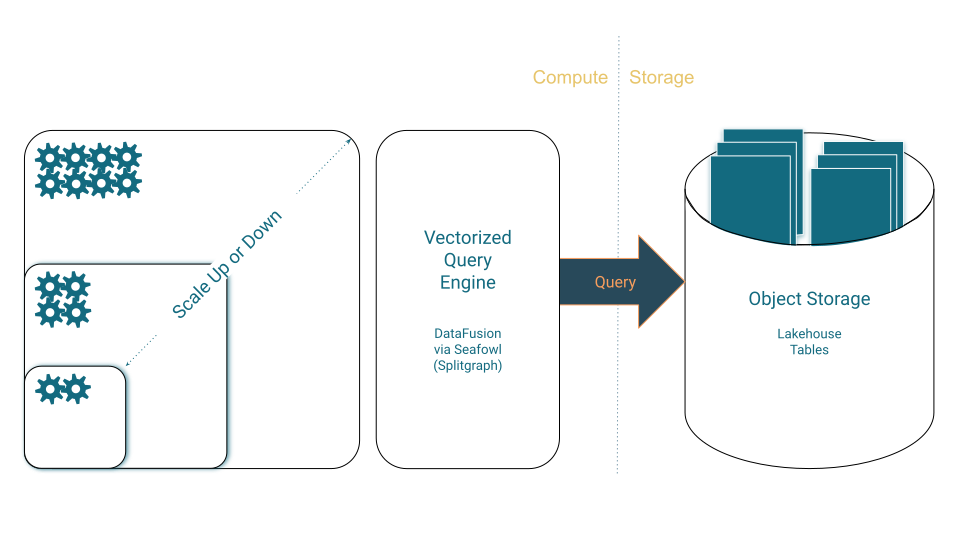
Level 100 Architecture#
On the compute side, a vectorized query engine is optimized to query Lakehouse tables but still fall back to Postgres for full compatibility.
On the storage side, Lakehouse tables are stored using highly compressible columnar storage formats optimized for analytics.
Level 200#
Here’s a slightly more comprehensive diagram of how these services fit together:
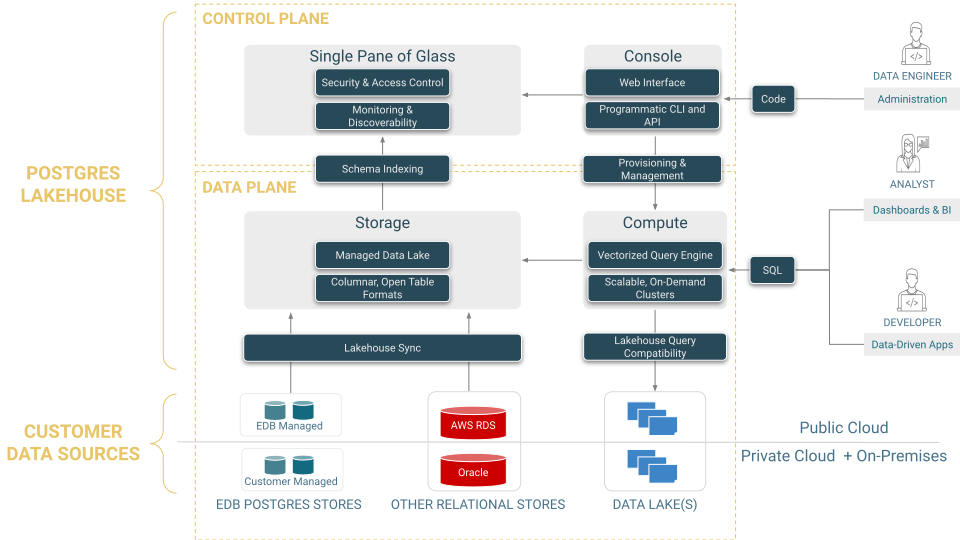
Level 200 Architecture#
Level 300#
Here’s the more detailed, zoomed-in view of “what’s in the box”:
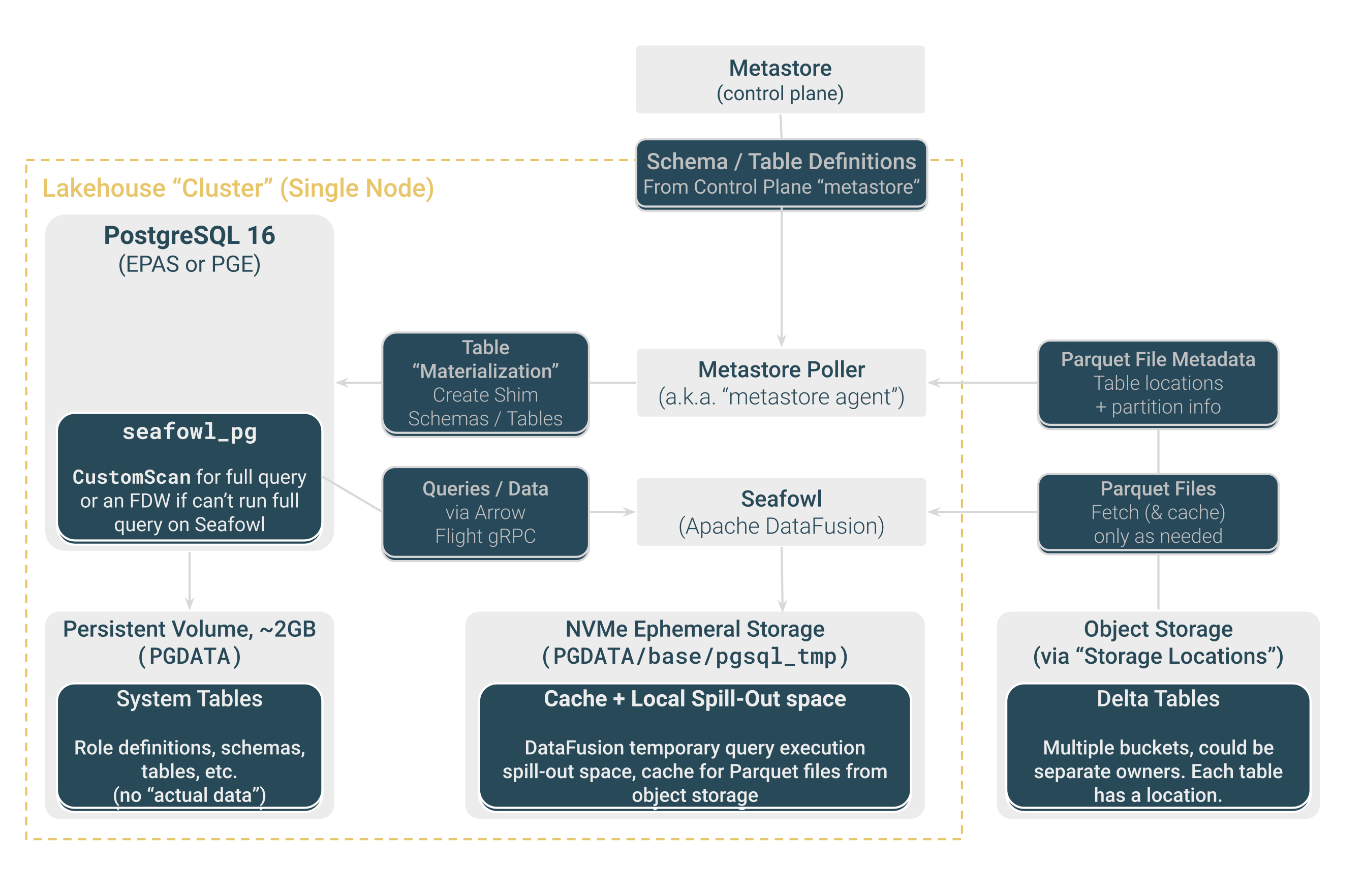
Level 300 Architecture#