Design and architecture
Where to install Barman
One of the foundations of Barman is the ability to operate remotely from the database server, via the network.
Theoretically, you could have your Barman server located in a data centre in another part of the world, thousands of miles away from your PostgreSQL server. Realistically, you do not want your Barman server to be too far from your PostgreSQL server, so that both backup and recovery times are kept under control.
Even though there is no “one size fits all” way to setup Barman, there are a couple of recommendations that we suggest you abide by, in particular:
Install Barman on a dedicated server
Do not share the same storage with your PostgreSQL server
Integrate Barman with your monitoring infrastructure [1]
Test everything before you deploy it to production
A reasonable way to start modelling your disaster recovery architecture is to:
design a couple of possible architectures in respect to PostgreSQL and Barman, such as:
same data centre
different data centre in the same metropolitan area
different data centre
elaborate the pros and the cons of each hypothesis
evaluate the single points of failure (SPOF) of your system, with cost-benefit analysis
make your decision and implement the initial solution
Having said this, a very common setup for Barman is to be installed in the same data centre where your PostgreSQL servers are. In this case, the single point of failure is the data centre. Fortunately, the impact of such a SPOF can be alleviated thanks to two features that Barman provides to increase the number of backup tiers:
geographicalredundancy (introduced in Barman 2.6)
hookscripts
With geographical redundancy, you can rely on a Barman instance that is located in a different data centre/availability zone to synchronise the entire content of the source Barman server. There’s more: given that geo-redundancy can be configured in Barman not only at global level, but also at server level, you can create hybrid installations of Barman where some servers are directly connected to the local PostgreSQL servers, and others are backing up subsets of different Barman installations (cross-site backup). Figure below shows two availability zones (one in Europe and one in the US), each with a primary PostgreSQL server that is backed up in a local Barman installation, and relayed on the other Barman server (defined as passive) for multi-tier backup via rsync/SSH. Further information on geo-redundancy is available in the specific section.
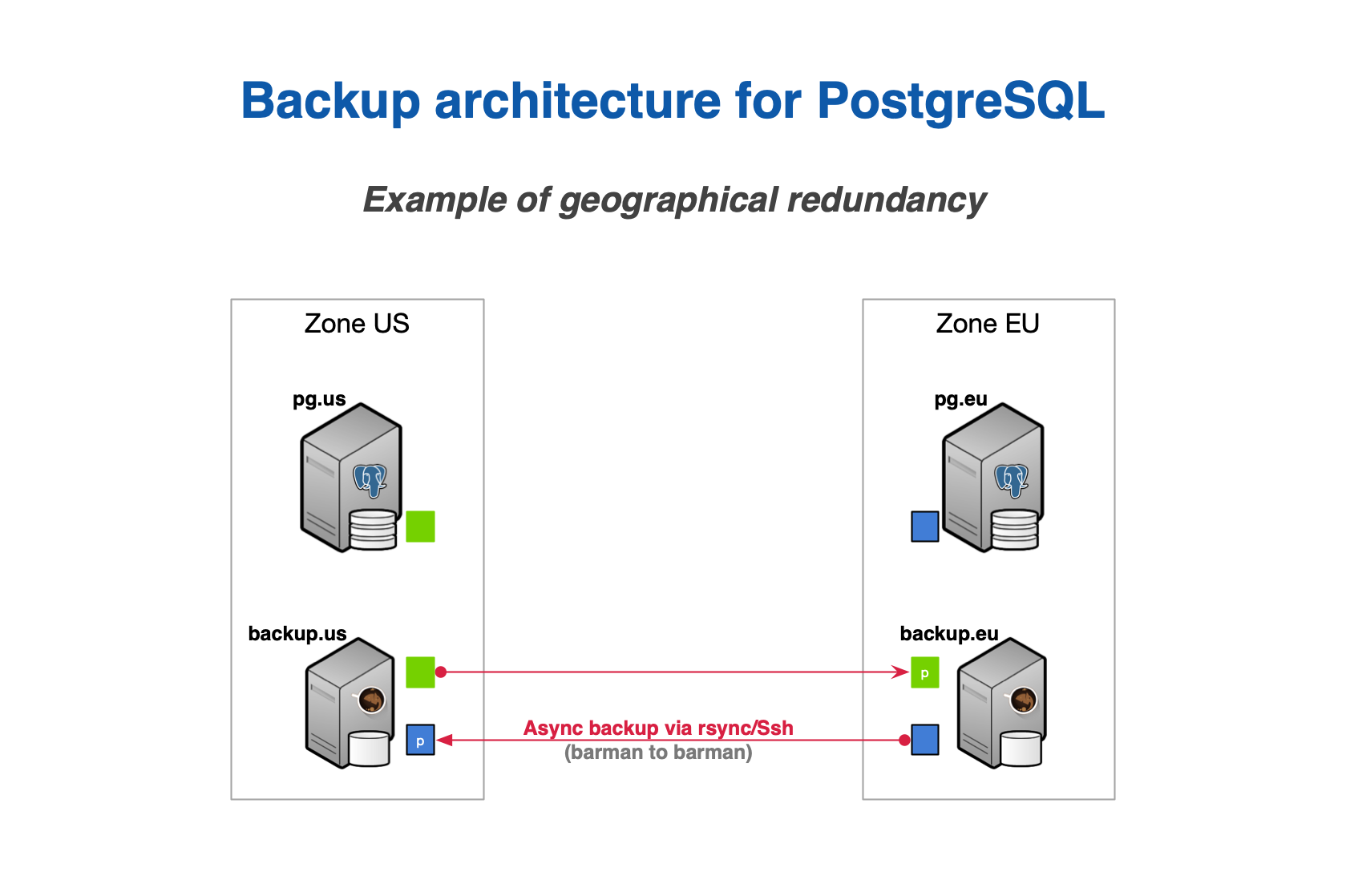
An example of architecture with geo-redundancy:raw-latex:label{georedundancy-design}
Thanks to hook scripts instead, backups of Barman can be exported on
different media, such as tape via tar , or locations, like an S3
bucket in the Amazon cloud.
Remember that no decision is forever. You can start this way and adapt over time to the solution that suits you best. However, try and keep it simple to start with.
One Barman, many PostgreSQL servers
Another relevant feature that was first introduced by Barman is support for multiple servers. Barman can store backup data coming from multiple PostgreSQL instances, even with different versions, in a centralised way. [3]
“Requirements for recovery”.
As a result, you can model complex disaster recovery architectures, forming a “star schema”, where PostgreSQL servers rotate around a central Barman server.
Every architecture makes sense in its own way. Choose the one that resonates with you, and most importantly, the one you trust, based on real experimentation and testing.
From this point forward, for the sake of simplicity, this guide will assume a basic architecture:
one PostgreSQL instance (with host name
pg)one backup server with Barman (with host name
backup)
Streaming backup vs rsync/SSH
Barman is able to take backups using either Rsync, which uses SSH as a
transport mechanism, or pg_basebackup , which uses PostgreSQL’s
streaming replication protocol.
Choosing one of these two methods is a decision you will need to make, however for general usage we recommend using streaming replication for all currently supported versions of PostgreSQL.
Important
Because Barman transparently makes use of pg_basebackup , features such as incremental backup, parallel backup, and deduplication are currently not available. In this case, bandwidth limitation has some restrictions - compared to the traditional method via rsync .
Backup using rsync /SSH is recommended in all cases where
pg_basebackup limitations occur (for example, a very large database
that can benefit from incremental backup and deduplication).
The reason why we recommend streaming backup is that, based on our experience, it is easier to setup than the traditional one. Also, streaming backup allows you to backup a PostgreSQL server on Windows [2] and makes life easier when working with Docker.
The Barman WAL archive
Recovering a PostgreSQL backup relies on replaying transaction logs (also known as xlog or WAL files). It is therefore essential that WAL files are stored by Barman alongside the base backups so that they are available at recovery time. This can be achieved using either WAL streaming or standard WAL archiving to copy WALs into Barman’s WAL archive.
WAL streaming involves streaming WAL files from the PostgreSQL server
with pg_receivewal using replication slots. WAL streaming is able to
reduce the risk of data loss, bringing RPO down to near zero values. It
is also possible to add Barman as a synchronous WAL receiver in your
PostgreSQL cluster and achieve zerodataloss (RPO=0).
Barman also supports standard WAL file archiving which is achieved using
PostgreSQL’s archive_command (either via rsync /SSH, or via
barman-wal-archive from the barman-cli package). With this
method, WAL files are archived only when PostgreSQL switches to a new
WAL file. To keep it simple this normally happens every 16MB worth of
data changes.
It is required that one of WAL streaming or WAL archiving is configured. It is optionally possible to configure both WAL streaming and standard WAL archiving - in such cases Barman will automatically de-duplicate incoming WALs. This provides a fallback mechanism so that WALs are still copied to Barman’s archive in the event that WAL streaming fails.
For general usage we recommend configuring WAL streaming only.
Note
Previous versions of Barman recommended that both WAL archiving and WAL streaming were used. This was because PostreSQL versions older than 9.4 did not support replication slots and therefore WAL streaming alone could not guarantee all WALs would be safely stored in Barman’s WAL archive. Since all supported versions of PostgreSQL now have replication slots it is sufficient to configure only WAL streaming.
Two typical scenarios for backups
In order to make life easier for you, below we summarise the two most typical scenarios for a given PostgreSQL server in Barman.
Bear in mind that this is a decision that you must make for every single server that you decide to back up with Barman. This means that you can have heterogeneous setups within the same installation.
As mentioned before, we will only worry about the PostgreSQL server
(pg ) and the Barman server (backup ). However, in real life,
your architecture will most likely contain other technologies such as
repmgr, pgBouncer, Nagios/Icinga, and so on.
Scenario 1: Backup via streaming protocol
A streaming backup installation is recommended for most use cases - see figure : below.
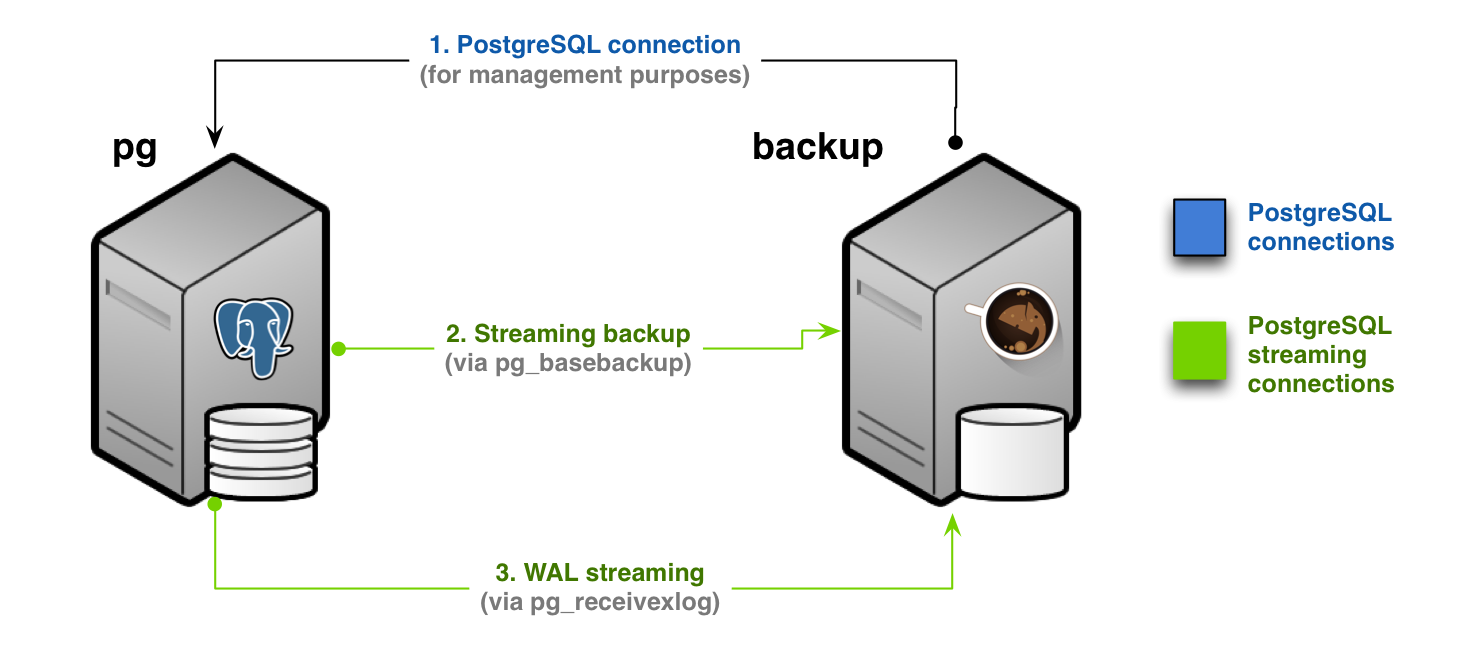
Streaming-only backup (Scenario 1):raw-latex:label{scenario1-design}
In this scenario, you will need to configure:
a standard connection to PostgreSQL, for management, coordination, and monitoring purposes
a streaming replication connection that will be used by both
pg_basebackup(for base backup operations) andpg_receivewal(for WAL streaming)
In Barman’s terminology this setup is known as streaming-only setup as it does not use an SSH connection for backup and archiving operations. This is particularly suitable and extremely practical for Docker environments.
As discussed in The Barman WAL archive , you can configure WAL archiving via SSH in addition to WAL streaming - see figure below.
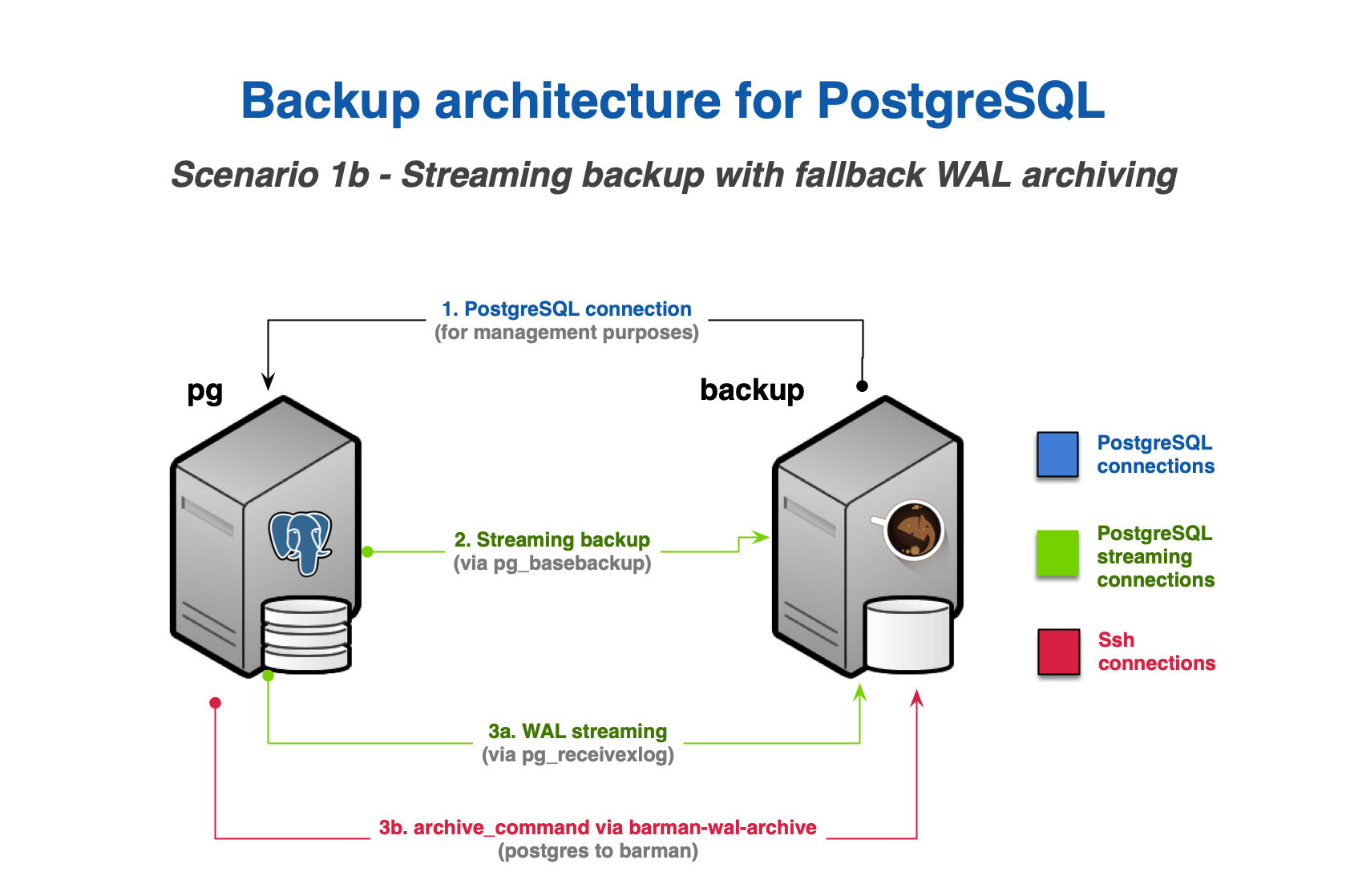
Streaming backup with WAL archiving (Scenario 1b):raw-latex:label{scenario1b-design}
WAL archiving via SSH requires:
an additional SSH connection that allows the
postgresuser on the PostgreSQL server to connect asbarmanuser on the Barman serverthe
archive_commandin PostgreSQL be configured to ship WAL files to Barman
Scenario 2: Backup via rsync /SSH
An rsync /SSH backup installation is required for cases where the
following features are required:
file-level incremental backup
parallel backup
finer control of bandwidth usage, including on a per-tablespace basis
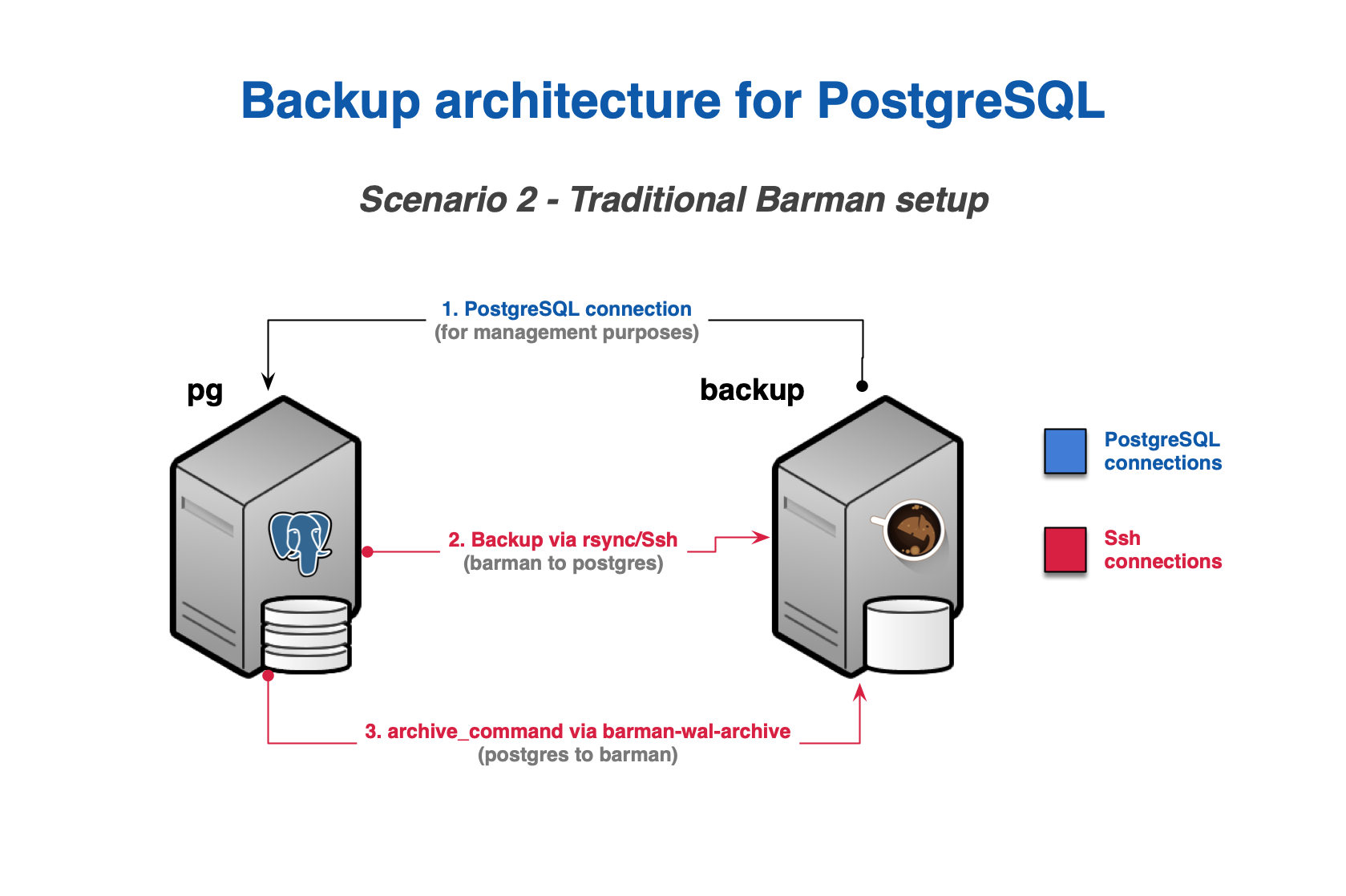
Scenario 2 - Backup via rsync/SSH
In this scenario, you will need to configure:
a standard connection to PostgreSQL for management, coordination, and monitoring purposes
an SSH connection for base backup operations to be used by
rsyncthat allows thebarmanuser on the Barman server to connect aspostgresuser on the PostgreSQL serveran SSH connection for WAL archiving to be used by the
archive_commandin PostgreSQL and that allows thepostgresuser on the PostgreSQL server to connect asbarmanuser on the Barman server
As an alternative to configuring WAL archiving in step 3, you can
instead configure WAL streaming as described in Scenario 1: Backup via streaming protocol . This
will use a streaming replication connection instead of
archive_command and significantly reduce RPO. As with Scenario 1: Backup via streaming protocol
it is also possible to configure both WAL streaming and WAL archiving as
shown in figure below.
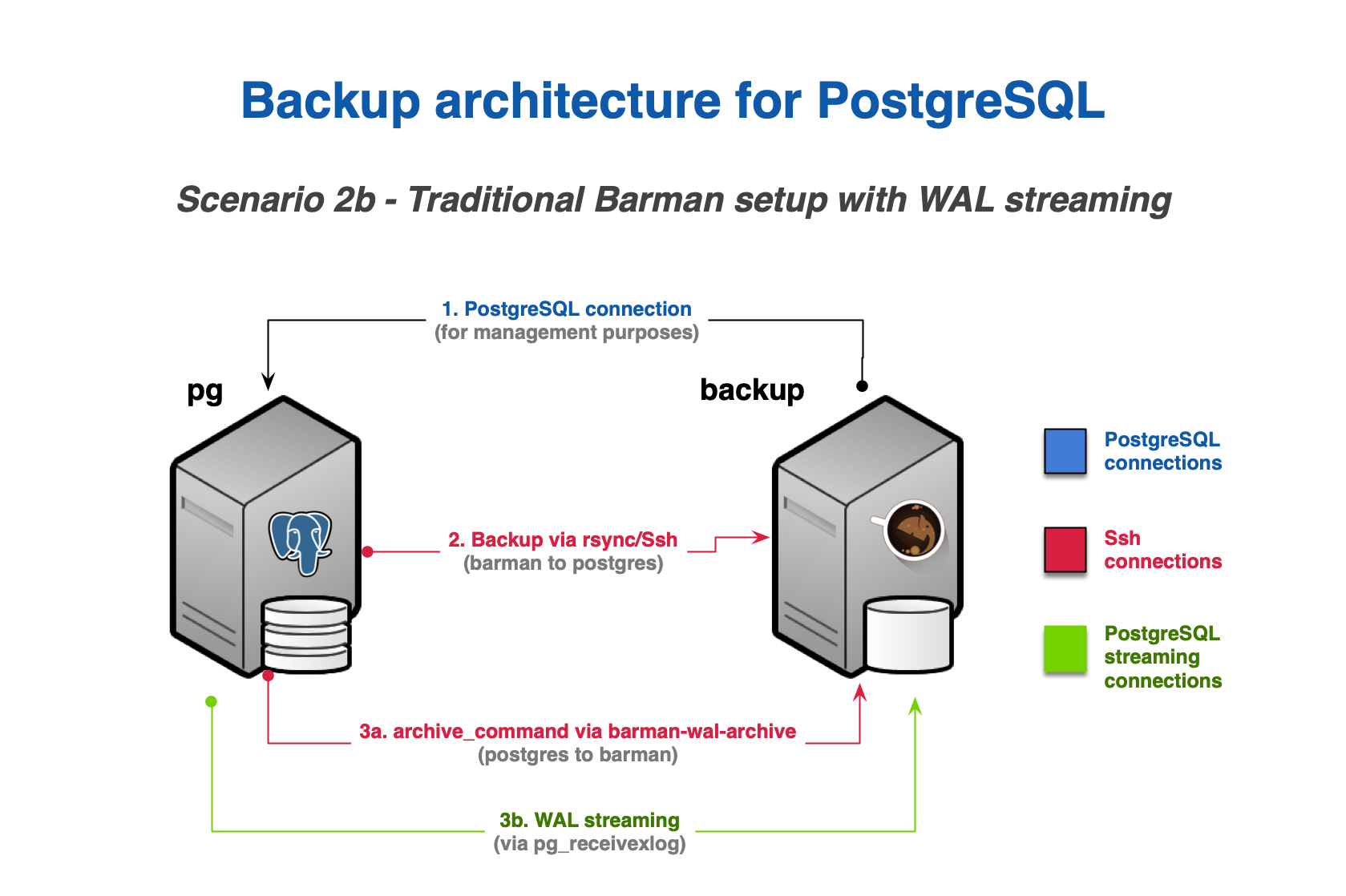
Backup via rsync/SSH with WAL streaming (Scenario 2b):raw-latex:label{scenario2b-design}