Replica clusters
A replica cluster is an independent CloudNativePG Cluster resource
that has the main characteristic to be in replica from another Postgres
instance, ideally also managed by CloudNativePG. Normally, a replica
cluster is in another Kubernetes cluster in another region. Replica
clusters can be cascading too, and they can solely rely on object stores
for replication of the data from the source, as described further down.
The diagram below - taken from the “Architecture” section containing more information about this capability - shows just an example of architecture that you can implement with replica clusters.
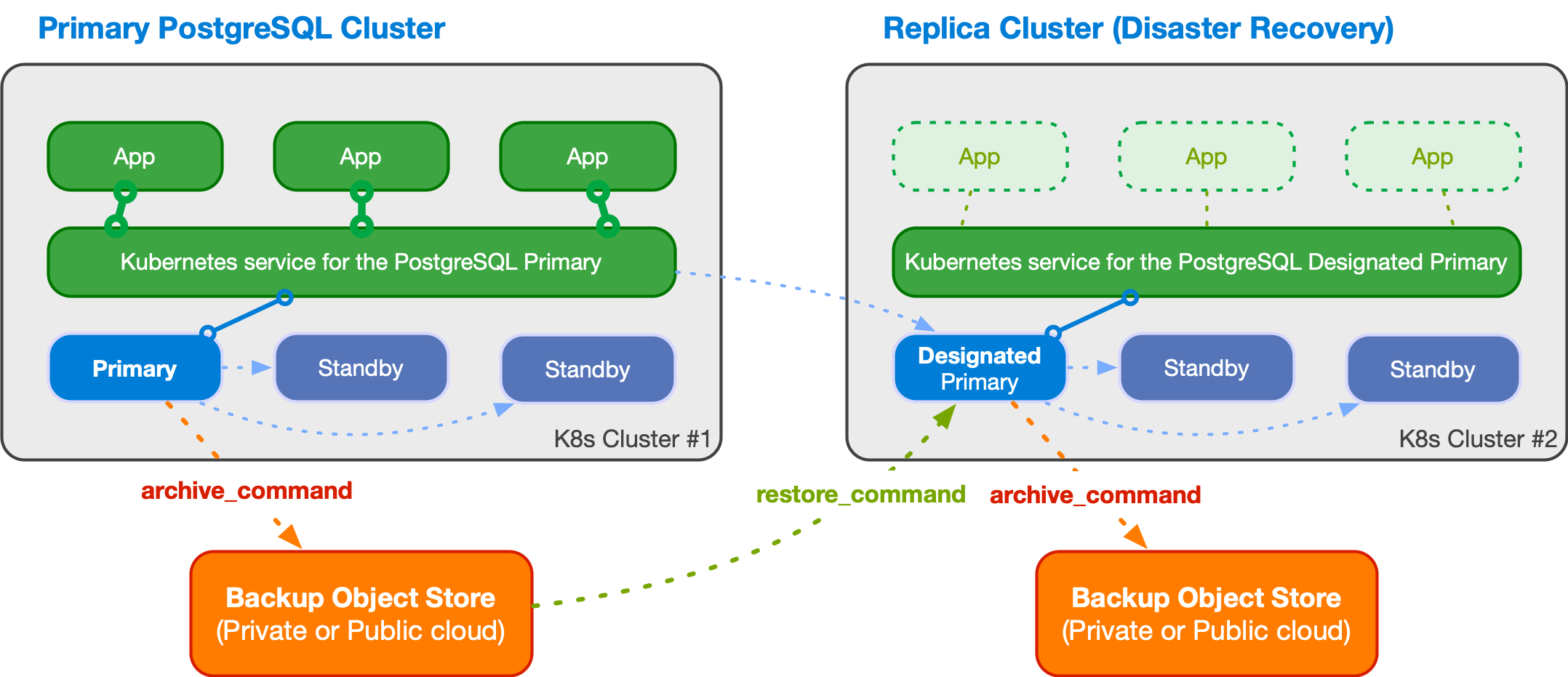
An example of multi-cluster deployment with a primary and a replica cluster
Basic concepts
CloudNativePG relies on the foundations of the PostgreSQL replication framework even when a PostgreSQL cluster is created from an existing one (source) and kept synchronized through the Replica clusters feature. The source can be a primary cluster or another replica cluster (cascading replica cluster).
The first step is to bootstrap the replica cluster, choosing among one of the available methods:
streaming replication, via
pg_basebackuprecovery from a volume snapshot
recovery from a Barman Cloud backup in an object store
Please refer to the Bootstrap
for information on how to clone a PostgreSQL server using either
pg_basebackup (streaming) or recovery (volume snapshot or object
store).
Once the replica cluster’s base backup is available, you need to define how changes are replicated from the origin, through PostgreSQL continuous recovery. There are two options:
use streaming replication between the replica cluster and the source (this will certainly require some administrative and security related work to be done to make sure that the network connection between the two clusters are correctly setup)
use the WAL archive (on an object store) to fetch the WAL files that are regularly shipped from the source to the object store and pulled by
barman-cloud-wal-restorein the replica clusterany of the two
All you have to do is actually define an external cluster.
If the external cluster contains a barmanObjectStore section:
you’ll be able to use the WAL archive, and CloudNativePG will automatically set the
restore_commandin the designated primary instanceyou’ll be able to bootstrap the replica cluster from an object store using the
recoverysection, in case you cannot take advantage of volume snapshots
If the external cluster contains a connectionParameters section:
you’ll be able to bootstrap the replica cluster via streaming replication using the
pg_basebackupsectionCloudNativePG will automatically set the
primary_conninfooption in the designated primary instance, so that a WAL receiver process is started to connect to the source cluster and receive data
The created replica cluster can perform backups in a reserved object store from the designated primary, enabling symmetric architectures in a distributed fashion.
You have full flexibility and freedom to decide your favorite distributed architecture for a PostgreSQL database by choosing:
a private cloud spanning over multiple Kubernetes clusters in different data centers
a public cloud spanning over multiple Kubernetes clusters in different regions
a mix of the previous two (hybrid)
a public cloud spanning over multiple Kubernetes clusters in different regions and on different Cloud Service Providers
Setting up a replica cluster
To set up a replica cluster from a source cluster, we need to create a cluster YAML file and define the following parts accordingly:
define the
externalClusterssection in the replica clusterdefine the bootstrap part for the replica cluster. We can either bootstrap via streaming using the
pg_basebackupsection, or bootstrap from a volume snapshot or an object store using therecoverysectiondefine the continuous recovery part (
.spec.replica) in the replica cluster. All we need to do is to enable the replica mode through option.spec.replica.enabledand set theexternalClustersname in option.spec.replica.source
Example using pg_basebackup
This first example defines a replica cluster using streaming replication in both bootstrap and continuous recovery. The replica cluster connects to the source cluster using TLS authentication.
You can check the sample YAML
in the samples/ subdirectory.
Note the bootstrap and replica sections pointing to the source
cluster.
bootstrap:
  pg_basebackup:
    source: cluster-example

replica:
  enabled: true
  source: cluster-example
In the externalClusters section, remember to use the right namespace
for the host in the connectionParameters sub-section. The
-replication and -ca secrets should have been copied over if
necessary, in case the replica cluster is in a separate namespace.
externalClusters:
- name: <MAIN-CLUSTER>
  connectionParameters:
    host: <MAIN-CLUSTER>-rw.<NAMESPACE>.svc
    user: streaming_replica
    sslmode: verify-full
    dbname: postgres
  sslKey:
    name: <MAIN-CLUSTER>-replication
    key: tls.key
  sslCert:
    name: <MAIN-CLUSTER>-replication
    key: tls.crt
  sslRootCert:
    name: <MAIN-CLUSTER>-ca
    key: ca.crt
Example using a Backup from an object store
The second example defines a replica cluster that bootstraps from an
object store using the recovery section and continuous recovery
using both streaming replication and the given object store. For
streaming replication, the replica cluster connects to the source
cluster using basic authentication.
You can check the sample YAML
for it in the samples/ subdirectory.
Note the bootstrap and replica sections pointing to the source
cluster.
bootstrap:
  recovery:
    source: cluster-example

replica:
  enabled: true
  source: cluster-example
In the externalClusters section, take care to use the right
namespace in the endpointURL and the connectionParameters.host .
And do ensure that the necessary secrets have been copied if necessary,
and that a backup of the source cluster has been created already.
externalClusters:
- name: <MAIN-CLUSTER>
  barmanObjectStore:
    destinationPath: s3://backups/
    endpointURL: http://minio:9000
    s3Credentials:
      …
  connectionParameters:
    host: <MAIN-CLUSTER>-rw.default.svc
    user: postgres
    dbname: postgres
  password:
    name: <MAIN-CLUSTER>-superuser
    key: password
Note
To use streaming replication between the source cluster and the replica cluster, we need to make sure there is network connectivity between the two clusters, and that all the necessary secrets which hold passwords or certificates are properly created in advance.
Example using a Volume Snapshot
If you use volume snapshots and your storage class provides snapshots cross-cluster availability, you can leverage that to bootstrap a replica cluster through a volume snapshot of the source cluster.
The third example defines a replica cluster that bootstraps from a
volume snapshot using the recovery section. It uses streaming
replication (via basic authentication) and the object store to fetch the
WAL files.
You can check the sample YAML
for it in the samples/ subdirectory.
Promoting the designated primary in the replica cluster
To promote the designated primary to primary, all we need to do
is to disable the replica mode in the replica cluster through the option
.spec.replica.enabled
replica:
  enabled: false
  source: cluster-example
Once the replica mode is disabled, the replica cluster and the source cluster will become two separate clusters, and the designated primary in the replica cluster will be promoted to be that cluster’s primary. We can verify the role change using the cnpg plugin, checking the status of the cluster which was previously the replica:
kubectl cnpg -n <cluster-name-space> status cluster-replica-example
Note
Disabling replication is an irreversible operation: once replication is disabled and the designated primary is promoted to primary, the replica cluster and the source cluster will become two independent clusters definitively.