Connection Pooling
- CloudNativePG provides native support for connection pooling with
PgBouncerIntegrationStatus , one of the most popular open sourceconnection poolers
for PostgreSQL, through the Pooler CRD.
In a nutshell, a Pooler in CloudNativePG is a deployment ofPgBouncer
pods that sits between your applications and a PostgreSQL service(for
example the rw service), creating a separate, scalable,
configurable,and highly available databaseaccesslayer .
Architecture
The following diagram highlights how the introduction of a database accesslayer based on PgBouncer changes the architecture of CloudNativePG,like an additional blade in a Swiss Army knife. Instead of directly connectingto the PostgreSQL primary service, applications can now connect to theequivalent service for PgBouncer, enabling reuse of existing connections forfaster performance and better resource management on the PostgreSQL side.
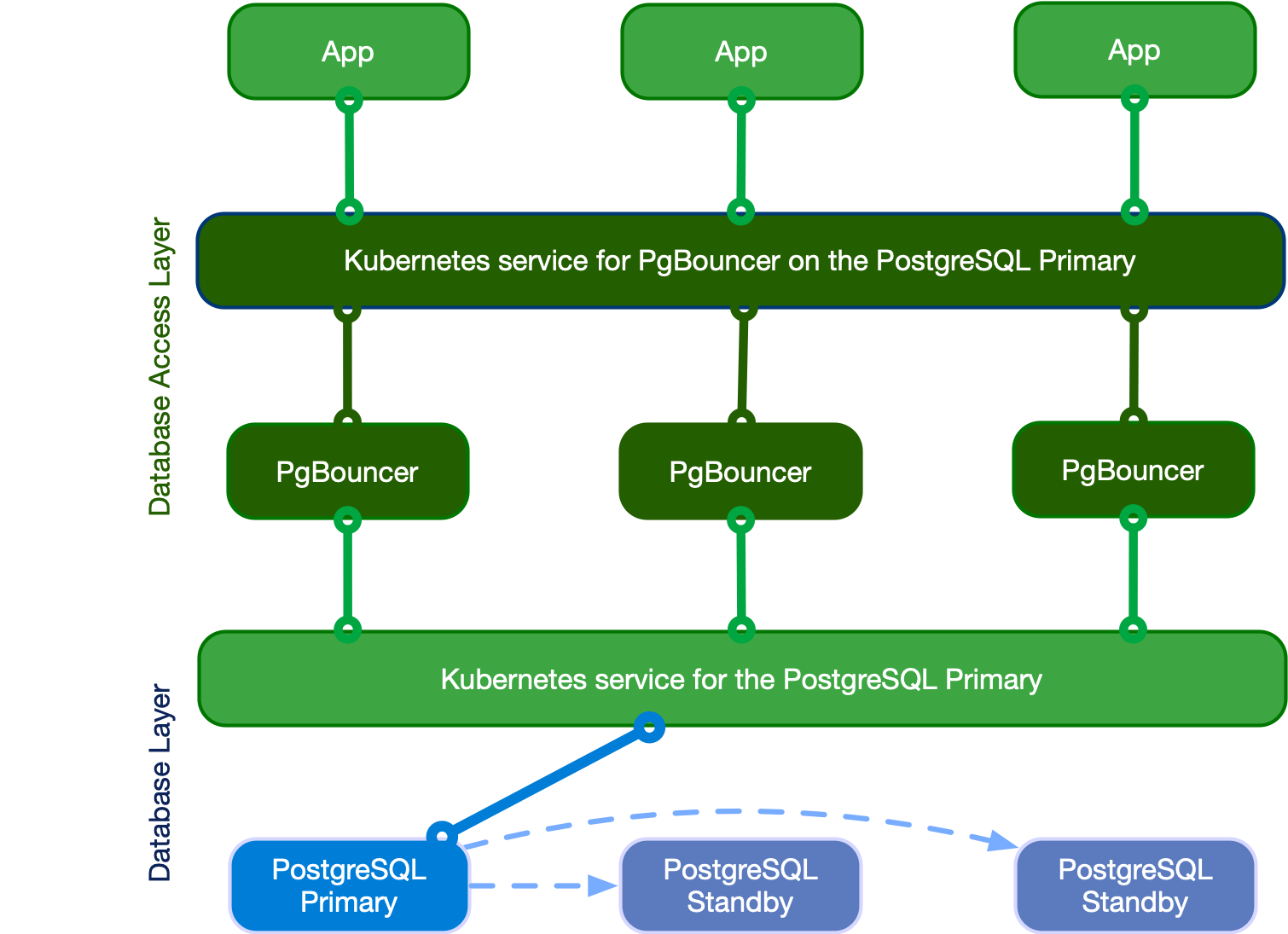
Applications writing to the single primary via PgBouncer
Quickstart
The easiest way to explain how CloudNativePG implements a PgBouncerpooler is through an example:
apiVersion: postgresql.cnpg.io/v1
kind: Pooler
metadata:
  name: pooler-example-rw
spec:
  cluster:
    name: cluster-example

  instances: 3
  type: rw
  pgbouncer:
    poolMode: session
    parameters:
      max_client_conn: "1000"
      default_pool_size: "10"
Important
Pooler name should never match with any Cluster name within the same namespace.
This creates a new Pooler resource called pooler-example-rw (the
name isarbitrary) that is strictly associated with the Postgres
Cluster resource called cluster-example and pointing to the
primary, identified by the read/writeservice ( rw , therefore
cluster-example-rw ).
The Pooler must live in the same namespace of the Postgres
cluster.It consists of a Kubernetes deployment of 3 pods running the
latest stable image of PgBouncer ,configured with the session and accepting up to
1000 connections each - with a default pool size of 10user/database pairs towards PostgreSQL.
Important
The Pooler only sets the * fallback database in PgBouncer, meaning that all parameters in the connection strings passed from the client are relayed to the PostgreSQL server (please refer to [“Section [databases]” in PgBouncer’s documentation](https://www.pgbouncer.org/config.html#section-databases)).
Additionally, CloudNativePG automatically creates a secret with thesame name of the pooler containing the configuration files used with PgBouncer.
Pooler resource lifecycle
Pooler resources are not Cluster -managed resources. You are
supposed tocreate poolers manually when they are needed. Additionally,
you can deploymultiple poolers per PostgreSQL Cluster.
What is important to note is that the lifecycles of the Cluster and
the Pooler resources are currently independent: the deletion of the
Cluster doesn’t imply the automatic deletion of the Pooler , and
viceversa.
Important
Now that you know how a Pooler works, you have full freedom in terms of possible architectures: you can have clusters without poolers, clusters with a single pooler, or clusters with several poolers (i.e. one per application).
Security
Any PgBouncer pooler is transparently integrated with CloudNativePGsupport for in-transit encryption via TLSconnections , both on the client(application) and server (PostgreSQL) side of the pool.
Specifically, PgBouncer automatically reuses the certificates of the
PostgreSQLserver. Moreover, it uses TLS client certificate
authentication to connectto the PostgreSQL server to run the
auth_query for clients’ passwordauthentication (see the
Using authentication below).
Containers run as the pgbouncer system user, and access to the
pgbouncer database is only allowed via local connections, through
peer authentication.
Certificates
By default, PgBouncer pooler will use the same certificates that are used by thecluster itself, but if the user provides those certificates the pooler will acceptsecrets with the following format:
Basic Auth2. TLS3. Opaque
In the Opaque case, it will look for specific keys that needs to be used, those keysare the following:
tls.crt
tls.key
So we can treat this secret as a TLS secret, and start from there.
Authentication
Passwordbasedauthentication is the only supported method for clients ofPgBouncer in CloudNativePG.
Internally, our implementation relies on PgBouncer’s auth_user and
auth_query options. Specifically, the operator:
Important
If you specify your own secrets the operator will not automatically integrate the Pooler.
To manually integrate the Pooler, in the case that you have specified your own secrets, you must run the following queries from inside your cluster.
Create the role:
CREATE ROLE cnpg_pooler_pgbouncer WITH LOGIN;
For each application database, grant the permission for
cnpg_pooler_pgbouncerto connect to it:
GRANT CONNECT ON DATABASE { database name here } TO cnpg_pooler_pgbouncer;
Connect in each application database, then create the authentication function inside each of the application databases:
CREATE OR REPLACE FUNCTION user_search(uname TEXT) RETURNS TABLE (usename name, passwd text) as SELECT usename, passwd FROM pg_shadow WHERE usename=$1; LANGUAGE sql SECURITY DEFINER;

REVOKE ALL ON FUNCTION user_search(text) FROM public;

GRANT EXECUTE ON FUNCTION user_search(text) TO cnpg_pooler_pgbouncer;
PodTemplates
You can take advantage of pod templates specification in the
template section of a Pooler resource. For details, please refer
to `PoolerSpec section <api_reference.md#PoolerSpec>`__ in the API
reference.
Through templates you can configure pods as you like, including
finecontrol over affinity and anti-affinity rules for pods and nodes.By
default, containers use images from ghcr.io/cloudnative-pg/pgbouncer
.
Here an example of Pooler specifying PodAntiAffinity:
apiVersion: postgresql.cnpg.io/v1
kind: Pooler
metadata:
  name: pooler-example-rw
spec:
  cluster:
    name: cluster-example
  instances: 3
  type: rw

  template:
    metadata:
      labels:
        app: pooler
    spec:
      containers: []
      affinity:
        podAntiAffinity:
          requiredDuringSchedulingIgnoredDuringExecution:
          - labelSelector:
              matchExpressions:
              - key: app
                operator: In
                values:
                - pooler
            topologyKey: "kubernetes.io/hostname"
Note
.spec.template.spec.containers has to be explicitly set to [] when not modified, as it’s a required field for a PodSpec . If .spec.template.spec.containers is not set the kubernetes api-server will return the following error when trying to apply the manifest: error validating “pooler.yaml”: error validating data: ValidationError(Pooler.spec.template.spec): missing required field “containers”
Here an example setting resources and changing the used image:
apiVersion: postgresql.cnpg.io/v1
kind: Pooler
metadata:
  name: pooler-example-rw
spec:
  cluster:
    name: cluster-example
  instances: 3
  type: rw

  template:
    metadata:
      labels:
        app: pooler
    spec:
      containers:
        - name: pgbouncer
          image: my-pgbouncer:latest
          resources:
            requests:
              cpu: 0.1
              memory: 100Mi
            limits:
              cpu: 0.5
              memory: 500Mi
High Availability (HA)
Thanks to Kubernetes’ deployments, you can configure your pooler to
runon a single instance or over multiple pods. The exposed service
willmake sure that your clients are randomly distributed over the
availablepods running PgBouncer - which will then automatically manage
and reuseconnections towards the underlying server (if using the rw
service)or servers (if using the ro service with multiple replicas).
Warning
Please be aware of network hops in case your infrastructure spans multiple availability zones with high latency across them. Consider for example the case of your application running in zone 2, connecting to PgBouncer running in zone 3, pointing to the PostgreSQL primary in zone 1.
PgBouncer configuration options
The operator manages most of the configuration options for PgBouncer , allowing you to modify only a subset of them.
Warning
You are responsible to correctly set the value of each option, as the operator does not validate them.
Below you can find a list of the PgBouncer options you are allowed tocustomize. Each of them contains a link to the PgBouncer documentation for thatspecific parameter. Unless differently stated here, the default values are theones directly set by PgBouncer:
Customizations of the PgBouncer configuration are writtendeclaratively
in the .spec.pgbouncer.parameters map.
The operator reacts to the changes in the Pooler specification,and every PgBouncer instance reloads the updated configurationwithout disrupting the service.
Warning
Every PgBouncer pod will have the same configuration, aligned with the parameters in the specification. A mistake in these parameters could disrupt the operability of the whole Pooler. The operator does not validate the value of any option.
Monitoring
The PgBouncer implementation of the Pooler comes with a
defaultPrometheus exporter that automatically makes available
severalmetrics having the cnpg_pgbouncer_ prefix, by running:
SHOW LISTS(prefix:cnpg_pgbouncer_lists)SHOW POOLS(prefix:cnpg_pgbouncer_pools)SHOW STATS(prefix:cnpg_pgbouncer_stats)
Similarly to the CloudNativePG instance, the exporter runs on port
9127 of each pod running PgBouncer, and also provides metrics
related to theGo runtime (with prefix go_* ). You can debug the
exporter on a pod runningPgBouncer through the following command:
kubectl exec -ti <PGBOUNCER_POD> -- curl 127.0.0.1:9127/metrics
An example of the output for cnpg_pgbouncer metrics:
#  HELP cnpg_pgbouncer_collection_duration_seconds Collection time duration in seconds
#  TYPE cnpg_pgbouncer_collection_duration_seconds gauge
cnpg_pgbouncer_collection_duration_seconds{collector="Collect.up"} 0.002443168

#  HELP cnpg_pgbouncer_collections_total Total number of times PostgreSQL was accessed for metrics.
#  TYPE cnpg_pgbouncer_collections_total counter
cnpg_pgbouncer_collections_total 1

#  HELP cnpg_pgbouncer_last_collection_error 1 if the last collection ended with error, 0 otherwise.
#  TYPE cnpg_pgbouncer_last_collection_error gauge
cnpg_pgbouncer_last_collection_error 0

#  HELP cnpg_pgbouncer_lists_databases Count of databases.
#  TYPE cnpg_pgbouncer_lists_databases gauge
cnpg_pgbouncer_lists_databases 1

#  HELP cnpg_pgbouncer_lists_dns_names Count of DNS names in the cache.
#  TYPE cnpg_pgbouncer_lists_dns_names gauge
cnpg_pgbouncer_lists_dns_names 0

#  HELP cnpg_pgbouncer_lists_dns_pending Not used.
#  TYPE cnpg_pgbouncer_lists_dns_pending gauge
cnpg_pgbouncer_lists_dns_pending 0

#  HELP cnpg_pgbouncer_lists_dns_queries Count of in-flight DNS queries.
#  TYPE cnpg_pgbouncer_lists_dns_queries gauge
cnpg_pgbouncer_lists_dns_queries 0

#  HELP cnpg_pgbouncer_lists_dns_zones Count of DNS zones in the cache.
#  TYPE cnpg_pgbouncer_lists_dns_zones gauge
cnpg_pgbouncer_lists_dns_zones 0

#  HELP cnpg_pgbouncer_lists_free_clients Count of free clients.
#  TYPE cnpg_pgbouncer_lists_free_clients gauge
cnpg_pgbouncer_lists_free_clients 49

#  HELP cnpg_pgbouncer_lists_free_servers Count of free servers.
#  TYPE cnpg_pgbouncer_lists_free_servers gauge
cnpg_pgbouncer_lists_free_servers 0

#  HELP cnpg_pgbouncer_lists_login_clients Count of clients in login state.
#  TYPE cnpg_pgbouncer_lists_login_clients gauge
cnpg_pgbouncer_lists_login_clients 0

#  HELP cnpg_pgbouncer_lists_pools Count of pools.
#  TYPE cnpg_pgbouncer_lists_pools gauge
cnpg_pgbouncer_lists_pools 1

#  HELP cnpg_pgbouncer_lists_used_clients Count of used clients.
#  TYPE cnpg_pgbouncer_lists_used_clients gauge
cnpg_pgbouncer_lists_used_clients 1

#  HELP cnpg_pgbouncer_lists_used_servers Count of used servers.
#  TYPE cnpg_pgbouncer_lists_used_servers gauge
cnpg_pgbouncer_lists_used_servers 0

#  HELP cnpg_pgbouncer_lists_users Count of users.
#  TYPE cnpg_pgbouncer_lists_users gauge
cnpg_pgbouncer_lists_users 2

#  HELP cnpg_pgbouncer_pools_cl_active Client connections that are linked to server connection and can process queries.
#  TYPE cnpg_pgbouncer_pools_cl_active gauge
cnpg_pgbouncer_pools_cl_active{database="pgbouncer",user="pgbouncer"} 1

#  HELP cnpg_pgbouncer_pools_cl_cancel_req Client connections that have not forwarded query cancellations to the server yet.
#  TYPE cnpg_pgbouncer_pools_cl_cancel_req gauge
cnpg_pgbouncer_pools_cl_cancel_req{database="pgbouncer",user="pgbouncer"} 0

#  HELP cnpg_pgbouncer_pools_cl_waiting Client connections that have sent queries but have not yet got a server connection.
#  TYPE cnpg_pgbouncer_pools_cl_waiting gauge
cnpg_pgbouncer_pools_cl_waiting{database="pgbouncer",user="pgbouncer"} 0

#  HELP cnpg_pgbouncer_pools_maxwait How long the first (oldest) client in the queue has waited, in seconds. If this starts increasing, then the current pool of servers does not handle requests quickly enough. The reason may be either an overloaded server or just too small of a pool_size setting.
#  TYPE cnpg_pgbouncer_pools_maxwait gauge
cnpg_pgbouncer_pools_maxwait{database="pgbouncer",user="pgbouncer"} 0

#  HELP cnpg_pgbouncer_pools_maxwait_us Microsecond part of the maximum waiting time.
#  TYPE cnpg_pgbouncer_pools_maxwait_us gauge
cnpg_pgbouncer_pools_maxwait_us{database="pgbouncer",user="pgbouncer"} 0

#  HELP cnpg_pgbouncer_pools_pool_mode The pooling mode in use. 1 for session, 2 for transaction, 3 for statement, -1 if unknown
#  TYPE cnpg_pgbouncer_pools_pool_mode gauge
cnpg_pgbouncer_pools_pool_mode{database="pgbouncer",user="pgbouncer"} 3

#  HELP cnpg_pgbouncer_pools_sv_active Server connections that are linked to a client.
#  TYPE cnpg_pgbouncer_pools_sv_active gauge
cnpg_pgbouncer_pools_sv_active{database="pgbouncer",user="pgbouncer"} 0

#  HELP cnpg_pgbouncer_pools_sv_idle Server connections that are unused and immediately usable for client queries.
#  TYPE cnpg_pgbouncer_pools_sv_idle gauge
cnpg_pgbouncer_pools_sv_idle{database="pgbouncer",user="pgbouncer"} 0

#  HELP cnpg_pgbouncer_pools_sv_login Server connections currently in the process of logging in.
#  TYPE cnpg_pgbouncer_pools_sv_login gauge
cnpg_pgbouncer_pools_sv_login{database="pgbouncer",user="pgbouncer"} 0

#  HELP cnpg_pgbouncer_pools_sv_tested Server connections that are currently running either server_reset_query or server_check_query.
#  TYPE cnpg_pgbouncer_pools_sv_tested gauge
cnpg_pgbouncer_pools_sv_tested{database="pgbouncer",user="pgbouncer"} 0

#  HELP cnpg_pgbouncer_pools_sv_used Server connections that have been idle for more than server_check_delay, so they need server_check_query to run on them before they can be used again.
#  TYPE cnpg_pgbouncer_pools_sv_used gauge
cnpg_pgbouncer_pools_sv_used{database="pgbouncer",user="pgbouncer"} 0

#  HELP cnpg_pgbouncer_stats_avg_query_count Average queries per second in last stat period.
#  TYPE cnpg_pgbouncer_stats_avg_query_count gauge
cnpg_pgbouncer_stats_avg_query_count{database="pgbouncer"} 1

#  HELP cnpg_pgbouncer_stats_avg_query_time Average query duration, in microseconds.
#  TYPE cnpg_pgbouncer_stats_avg_query_time gauge
cnpg_pgbouncer_stats_avg_query_time{database="pgbouncer"} 0

#  HELP cnpg_pgbouncer_stats_avg_recv Average received (from clients) bytes per second.
#  TYPE cnpg_pgbouncer_stats_avg_recv gauge
cnpg_pgbouncer_stats_avg_recv{database="pgbouncer"} 0

#  HELP cnpg_pgbouncer_stats_avg_sent Average sent (to clients) bytes per second.
#  TYPE cnpg_pgbouncer_stats_avg_sent gauge
cnpg_pgbouncer_stats_avg_sent{database="pgbouncer"} 0

#  HELP cnpg_pgbouncer_stats_avg_wait_time Time spent by clients waiting for a server, in microseconds (average per second).
#  TYPE cnpg_pgbouncer_stats_avg_wait_time gauge
cnpg_pgbouncer_stats_avg_wait_time{database="pgbouncer"} 0

#  HELP cnpg_pgbouncer_stats_avg_xact_count Average transactions per second in last stat period.
#  TYPE cnpg_pgbouncer_stats_avg_xact_count gauge
cnpg_pgbouncer_stats_avg_xact_count{database="pgbouncer"} 1

#  HELP cnpg_pgbouncer_stats_avg_xact_time Average transaction duration, in microseconds.
#  TYPE cnpg_pgbouncer_stats_avg_xact_time gauge
cnpg_pgbouncer_stats_avg_xact_time{database="pgbouncer"} 0

#  HELP cnpg_pgbouncer_stats_total_query_count Total number of SQL queries pooled by pgbouncer.
#  TYPE cnpg_pgbouncer_stats_total_query_count gauge
cnpg_pgbouncer_stats_total_query_count{database="pgbouncer"} 3

#  HELP cnpg_pgbouncer_stats_total_query_time Total number of microseconds spent by pgbouncer when actively connected to PostgreSQL, executing queries.
#  TYPE cnpg_pgbouncer_stats_total_query_time gauge
cnpg_pgbouncer_stats_total_query_time{database="pgbouncer"} 0

#  HELP cnpg_pgbouncer_stats_total_received Total volume in bytes of network traffic received by pgbouncer.
#  TYPE cnpg_pgbouncer_stats_total_received gauge
cnpg_pgbouncer_stats_total_received{database="pgbouncer"} 0

#  HELP cnpg_pgbouncer_stats_total_sent Total volume in bytes of network traffic sent by pgbouncer.
#  TYPE cnpg_pgbouncer_stats_total_sent gauge
cnpg_pgbouncer_stats_total_sent{database="pgbouncer"} 0

#  HELP cnpg_pgbouncer_stats_total_wait_time Time spent by clients waiting for a server, in microseconds.
#  TYPE cnpg_pgbouncer_stats_total_wait_time gauge
cnpg_pgbouncer_stats_total_wait_time{database="pgbouncer"} 0

#  HELP cnpg_pgbouncer_stats_total_xact_count Total number of SQL transactions pooled by pgbouncer.
#  TYPE cnpg_pgbouncer_stats_total_xact_count gauge
cnpg_pgbouncer_stats_total_xact_count{database="pgbouncer"} 3

#  HELP cnpg_pgbouncer_stats_total_xact_time Total number of microseconds spent by pgbouncer when connected to PostgreSQL in a transaction, either idle in transaction or executing queries.
#  TYPE cnpg_pgbouncer_stats_total_xact_time gauge
cnpg_pgbouncer_stats_total_xact_time{database="pgbouncer"} 0
Like for Clusters , if you are using the Prometheus Operator example you can
configure it to scrape a specific Pooler by defining the following
apiVersion: monitoring.coreos.com/v1
kind: PodMonitor
metadata:
  name: <POOLER_NAME>
spec:
  selector:
    matchLabels:
      cnpg.io/poolerName: <POOLER_NAME>
  podMetricsEndpoints:
  - port: metrics
Logging
Logs are directly sent to standard output, in JSON format, like in thefollowing example:
{
  "level": "info",
  "ts": SECONDS.MICROSECONDS,
  "msg": "record",
  "pipe": "stderr",
  "record": {
    "timestamp": "YYYY-MM-DD HH:MM:SS.MS UTC",
    "pid": "<PID>",
    "level": "LOG",
    "msg": "kernel file descriptor limit: 1048576 (hard: 1048576); max_client_conn: 100, max expected fd use: 112"
  }
}
Pausing connections
The Pooler specification allows you to take advantage of PgBouncer’s
PAUSE and RESUME commands, using only declarative configuration
- via the paused option, by default set to false . When set to
true , the operator internallyinvokes the PAUSE command in
PgBouncer, which:
closes all active connections towards the PostgreSQL server, after waiting for the queries to complete2. pauses any new connection coming from the client
When the paused option is set back to false , the operator will
invoke the RESUME command in PgBouncer, re-opening the taps towards
the PostgreSQLservice defined in the Pooler .
Important
In future versions, the switchover operation will be fully integrated with the PgBouncer pooler, and take advantage of the PAUSE / RESUME features to reduce the perceived downtime by client applications. At the moment, you can achieve the same results by setting the paused attribute to true , then issuing the switchover command through the cnpg , and finally restoring the paused attribute to false .
Limitations
Single PostgreSQL cluster
The current implementation of the pooler is designed to work as part of aspecific CloudNativePG cluster (a service, to be precise). It is notpossible at the moment to create a pooler that spans over multiple clusters.
Controlled configurability
CloudNativePG transparently manages several configuration optionsthat
are used for the PgBouncer layer to communicate with PostgreSQL.
Suchoptions are not configurable from outside and include TLS
certificates,authentication settings, databases section, and
users section. Also,considering the specific use case for the single
PostgreSQL cluster, theadopted criteria is to explicitly list the
options that can be configured byusers.
Note
We have reasons to believe that the adopted solution addresses the majority of use cases, while leaving room for the future implementation of a separate operator for PgBouncer to complete the gamma with more advanced and customized scenarios.