
Connection pooling#
KubernetesのEDB Postgresは、 Pooler
カスタムリソース定義CRDを介して、
PostgreSQLで最も人気のあるオープンソース接続プーラーの1つである
PgBouncer との接続プーリングのネイティブサポートを提供します。
簡単に言うと、KubernetesのEDB
Postgresのプーラーは、アプリケーションとPostgreSQLサービスたとえば
rw
サービスの間にあるPgBouncerポッドの展開です。別個の、スケーラブル、構成可能、高可用性のデータベースアクセスレイヤーを作成します。
アーキテクチャ#
次の図は、PgBouncerに基づくデータベースアクセスレイヤーの導入がKubernetesのEDB Postgresのアーキテクチャをどのように変更するかを強調しています。 PostgreSQLプライマリサービスに直接接続する代わりに、アプリケーションはPgBouncerの同等のサービスに接続できます。この機能により、既存の接続を再利用できるため、PostgreSQL側でのパフォーマンスとリソース管理が向上します。
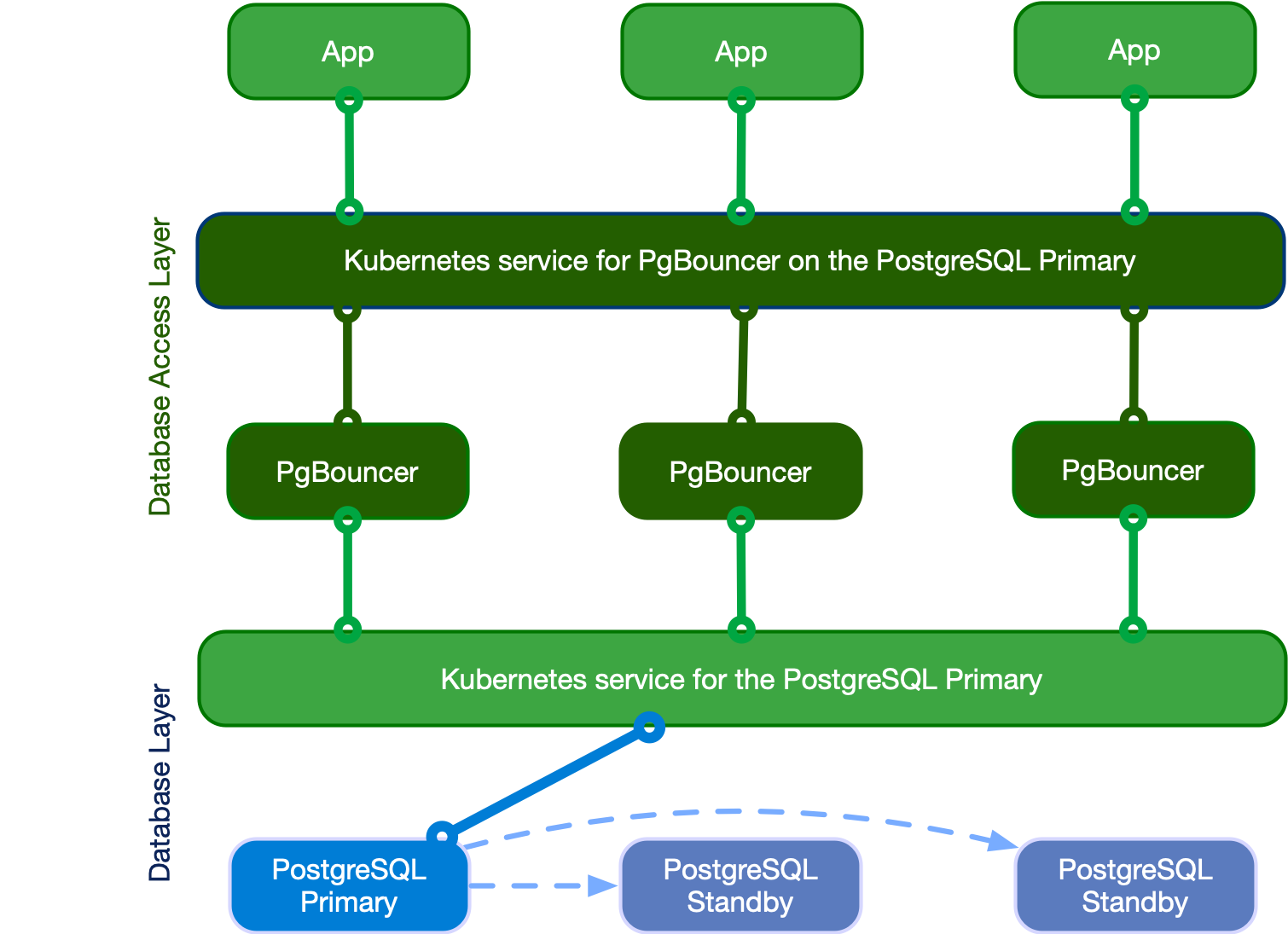
Applications writing to the single primary via PgBouncer#
クイックスタート#
この例は、KubernetesのEDB PostgresがPgBouncerプーラーを実装する方法を示すのに役立ちます。
apiVersion: postgresql.k8s.enterprisedb.io/v1
kind: Pooler
metadata:
  name: pooler-example-rw
spec:
  cluster:
    name: cluster-example

  instances: 3
  type: rw
  pgbouncer:
    poolMode: session
    parameters:
      max_client_conn: "1000"
      default_pool_size: "10"
重要
プーラー名は、同じ名前空間内のクラスター名と同じにすることはできません。
この例では、 cluster-example と呼ばれるPostgres Cluster
リソースに厳密に関連付けられるpooler-example-rw
と呼ばれるPooler
リソースを作成します。これは、読み取り/書き込みサービスrw
、したがってcluster-example-rw
によって識別されるプライマリを指します。
Pooler
リソースは、Postgresクラスターと同じ名前空間に存在する必要があります。これは、
session で構成された
latest stable image of PgBouncer を実行する3つのポッドのKubernetesデプロイメントで構成されています
それぞれ最大1000の接続を受け入れます。デフォルトのプールサイズは、PostgreSQLに対する10ユーザー/データベースペアです。
重要
Pooler リソースは、PgBouncerに`*` フォールバックデータベースのみを設定します。この設定は、クライアントから渡された接続文字列のすべてのパラメーターがPostgreSQLサーバーに中継されることを意味します。詳細については、 ["Section [databases]" in the PgBouncer documentation](https://www.pgbouncer.org/config.html#section-databases)を参照してください。
KubernetesのEDB Postgresは、 PgBouncerで使用される構成ファイルを含むプーラーと同じ名前のシークレットも作成します。
参考
詳細はこちら PgBouncerSpec
APIリファレンスで。
リソースのライフサイクルのプール化#
Pooler
リソースはクラスター管理リソースではありません。プーラーは、必要に応じて手動で作成します。
PostgreSQLクラスターごとに複数のプーラーを展開することもできます。
重要な点は、 Cluster およびPooler
リソースのライフサイクルが現在独立していることです。クラスターの削除はプーラーの削除を意味しません。その逆も同様です。
重要
プーラーがどのように動作するかを理解すると、使用可能なアーキテクチャの点で完全に自由になります。プーラーのないクラスター、単一のプーラーを含むクラスター、または複数のプーラー、つまりアプリケーションごとに1つを含むクラスターを持つことができます。
重要
オペレーターがアップグレードされると、プーラーポッドのローリングアップグレードが実行されます。これは、プーラーポッド内のインスタンスマネージャーもアップグレードされるようにするために必要です。
セキュリティ#
PgBouncerプーラーは、プールのクライアントアプリケーションとサーバーPostgreSQLの両方で、TLS接続を介した転送中の暗号化をサポートするKubernetesのEDB Postgresと透過的に統合されています。
具体的には、PgBouncerはPostgreSQLサーバーの証明書を再利用します。また、TLSクライアント証明書認証を使用してPostgreSQLサーバーに接続し、クライアントのパスワード認証のためにauth_query
を実行します 認証を使用する を参照してください。
コンテナはpgbouncerシステムユーザーとして実行され、pgbouncer
データベースへのアクセスは、ピア認証を介したローカル接続を介してのみ許可されます。
証明書#
デフォルトでは、PgBouncerプーラーは、クラスターが使用するものと同じ証明書を使用します。ただし、これらの証明書を提供した場合、プーラーは次の形式のシークレットを受け入れます。
ベーシック認証
TLS
不透明
不透明の場合、使用する必要がある次の特定のキーを検索します。
tls.crt
tls.key
したがって、このシークレットをTLSシークレットとして扱い、そこから開始できます。
認証#
パスワードベースの認証は、KubernetesのEDB PostgresのPgBouncerのクライアントでサポートされている唯一の方法です。
内部的に、実装はPgBouncerのauth_user およびauth_query
オプションに依存しています。具体的には、演算子
PostgreSQLサーバーに
cnp_pooler_pgbouncerと呼ばれる標準ユーザーを作成しますpostgresデータベースにlookupファンクションを作成し、cnp_pooler_pgbouncerユーザーに実行特権を付与しますPoLAこのユーザーのTLS証明書を発行します
cnp_pooler_pgbouncerをauth_userとして設定しますTLS証明書を使用してPostgreSQLサーバーに対して
cnp_pooler_pgbouncerを認証するようにPgBouncerを構成しますクラスターに関連付けられたプーラーがないことを検出した場合、上記のすべてを削除します
重要
独自のシークレットを指定する場合、オペレーターはプーラーを自動的に統合しません。
独自のシークレットを指定した場合、プーラーを手動で統合するには、クラスター内から次のクエリを実行する必要があります。
最初に、ロールを作成する必要があります。
CREATE ROLE cnp_pooler_pgbouncer WITH LOGIN;
次に、アプリケーションデータベースごとに、cnp_pooler_pgbouncer
に接続する権限を付与します。
GRANT CONNECT ON DATABASE { database name here } TO cnp_pooler_pgbouncer;
最後に、_superuser_として各アプリケーションデータベースに接続し、各アプリケーションデータベース内に認証ファンクションを作成します。
CREATE OR REPLACE FUNCTION public.user_search(uname TEXT)
  RETURNS TABLE (usename name, passwd text)
  LANGUAGE sql SECURITY DEFINER AS
  SELECT usename, passwd FROM pg_catalog.pg_shadow WHERE usename=$1;;

REVOKE ALL ON FUNCTION public.user_search(text)
  FROM public;

GRANT EXECUTE ON FUNCTION public.user_search(text)
  TO cnp_pooler_pgbouncer;
重要
user_search が`SECURITY DEFINER` ファンクションであることを考えると、 postgres ユーザーなどの`SUPERUSER` 特権を持つロールを介して作成する必要があります。
ポッドテンプレート#
Pooler リソースのtemplate
セクションのポッドテンプレート仕様を利用できます。詳細については、APIリファレンスの PoolerSpec を参照してください。
テンプレートを使用して、ポッドとノードのアフィニティおよびアンチアフィニティルールの微制御を含め、必要に応じてポッドを構成できます。デフォルトでは、コンテナはquay.io/enterprisedb/pgbouncer
のイメージを使用します。
この例は、 `PodAntiAffinity`
`を指定するPoolerを示しています。
apiVersion: postgresql.k8s.enterprisedb.io/v1
kind: Pooler
metadata:
  name: pooler-example-rw
spec:
  cluster:
    name: cluster-example
  instances: 3
  type: rw

  template:
    metadata:
      labels:
        app: pooler
    spec:
      containers: []
      affinity:
        podAntiAffinity:
          requiredDuringSchedulingIgnoredDuringExecution:
            - labelSelector:
                matchExpressions:
                  - key: app
                    operator: In
                    values:
                      - pooler
              topologyKey: "kubernetes.io/hostname"
注釈
PodSpec の必須フィールドであるため、変更しない場合は`.spec.template.spec.containers` を`[]` に明示的に設定します。 .spec.template.spec.containers が設定されていない場合、Kubernetes APIサーバーはマニフェストを適用しようとすると次のエラーを返します。error validating "pooler.yaml": error validating data: ValidationError(Pooler.spec.template.spec): missing required field "containers"
この例では、リソースを設定し、使用されるイメージを変更します。
apiVersion: postgresql.k8s.enterprisedb.io/v1
kind: Pooler
metadata:
  name: pooler-example-rw
spec:
  cluster:
    name: cluster-example
  instances: 3
  type: rw

  template:
    metadata:
      labels:
        app: pooler
    spec:
      containers:
        - name: pgbouncer
          image: my-pgbouncer:latest
          resources:
            requests:
              cpu: "0.1"
              memory: 100Mi
            limits:
              cpu: "0.5"
              memory: 500Mi
サービステンプレート#
場合によっては、プーラーには別のラベル、アノテーション、またはサービスタイプの変更が必要になる場合があります。
serviceTemplate フィールドを使用してこれを実現できます。
apiVersion: postgresql.k8s.enterprisedb.io/v1
kind: Pooler
metadata:
  name: pooler-example-rw
spec:
  cluster:
    name: cluster-example
  instances: 3
  type: rw
  serviceTemplate:
    metadata:
      labels:
        app: pooler
    spec:
      type: LoadBalancer
  pgbouncer:
    poolMode: session
    parameters:
      max_client_conn: "1000"
      default_pool_size: "10"
デフォルトで、オペレーターは次のデータを使用してServicePort
を追加します。
ports:
- name: pgbouncer
  port: 5432
  protocol: TCP
  targetPort: pgbouncer
警告
名前`pgbouncer` またはポート`5432` で`ServicePort` を指定すると、デフォルトの`ServicePort` が追加されません。これは、同じ`name` または`port` と同じ`ServicePort` エントリがKubernetesでは許可されず、エラーが発生するためです。
高可用性HA#
Kubernetesの展開のため、単一のインスタンスまたは複数のポッドで実行するようにプーラーを構成できます。公開されたサービスにより、クライアントがPgBouncerを実行している利用可能なポッドにランダムに分散されるようになり、基になるサーバーrw
サービスを使用する場合またはサーバー複数のレプリカでro
サービスを使用する場合への接続を管理および再利用します。
警告
インフラストラクチャが複数のアベイラビリティーゾーンにまたがり、それらの間の遅延が高い場合、ネットワークホップに注意してください。たとえば、ゾーン2で実行され、ゾーン3で実行されているPgBouncerに接続し、ゾーン1のPostgreSQLプライマリをポイントしている場合を検討します。
PgBouncer構成オプション#
オペレーターは configuration options for PgBouncer の大部分を管理し、それらのサブセットのみを変更できます。
警告
オペレーターは検証しないため、各オプションの値を正しく設定する責任があります。
これらはカスタマイズ可能なPgBouncerオプションであり、各パラメーターのPgBouncerドキュメントへのリンクがあります。特に記載のない限り、デフォルト値はPgBouncerによって直接設定された値です。
ignore_startup_parameters
extra_float_digits,optionsに追加します-KubernetesのEDB Postgresが必要log_stats デフォルトで無効になっています
0、以下の モニタリングとメトリック セクションで説明するように、Prometheusエクスポートによって統計が既に収集されている場合
PgBouncer構成のカスタマイズは、.spec.pgbouncer.parameters
マップに宣言的に書き込まれます。
オペレーターはプーラー仕様の変更に対応し、すべてのPgBouncerインスタンスは、サービスを中断せずに更新された構成をリロードします。
警告
すべてのPgBouncerポッドは同じ構成で、仕様のパラメーターに合わせて調整されています。これらのパラメーターを間違えると、プーラー全体の操作性を混乱させる可能性があります。演算子はオプションの値を検証しません。
モニタリング#
Pooler
のPgBouncer実装には、デフォルトのPrometheusエクスポーターが付属しています。次のコマンドを実行して、cnp_pgbouncer_
接頭辞を持ついくつかのメトリックを利用できるようにします。
SHOW LISTS接頭辞cnp_pgbouncer_listsSHOW POOLS接頭辞cnp_pgbouncer_poolsSHOW STATS接頭辞cnp_pgbouncer_stats
KubernetesインスタンスのEDB
Postgresと同様に、エクスポーターは、PgBouncerを実行している各ポッドのポート9127
で実行され、Goランタイム接頭辞go_*
に関連するメトリックも提供します。
注釈
PgBouncerを実行しているポッドでエクスポートされたメトリックを検査できます。手順については、 エクスポートされたメトリックを検査する方法 を参照してください。正しいIPと`9127` ポートを使用していることを確認します。
この例は、cnp_pgbouncer メトリックの出力を示しています。
#  HELP cnp_pgbouncer_collection_duration_seconds Collection time duration in seconds

#  TYPE cnp_pgbouncer_collection_duration_seconds gauge

cnp_pgbouncer_collection_duration_seconds{collector="Collect.up"} 0.002338805

#  HELP cnp_pgbouncer_collection_errors_total Total errors occurred accessing PostgreSQL for metrics.

#  TYPE cnp_pgbouncer_collection_errors_total counter

cnp_pgbouncer_collection_errors_total{collector="sql: Scan error on column index 16, name \"load_balance_hosts\": converting NULL to int is unsupported"} 5

#  HELP cnp_pgbouncer_collections_total Total number of times PostgreSQL was accessed for metrics.

#  TYPE cnp_pgbouncer_collections_total counter

cnp_pgbouncer_collections_total 5

#  HELP cnp_pgbouncer_last_collection_error 1 if the last collection ended with error, 0 otherwise.

#  TYPE cnp_pgbouncer_last_collection_error gauge

cnp_pgbouncer_last_collection_error 0

#  HELP cnp_pgbouncer_lists_databases Count of databases.

#  TYPE cnp_pgbouncer_lists_databases gauge

cnp_pgbouncer_lists_databases 1

#  HELP cnp_pgbouncer_lists_dns_names Count of DNS names in the cache.

#  TYPE cnp_pgbouncer_lists_dns_names gauge

cnp_pgbouncer_lists_dns_names 0

#  HELP cnp_pgbouncer_lists_dns_pending Not used.

#  TYPE cnp_pgbouncer_lists_dns_pending gauge

cnp_pgbouncer_lists_dns_pending 0

#  HELP cnp_pgbouncer_lists_dns_queries Count of in-flight DNS queries.

#  TYPE cnp_pgbouncer_lists_dns_queries gauge

cnp_pgbouncer_lists_dns_queries 0

#  HELP cnp_pgbouncer_lists_dns_zones Count of DNS zones in the cache.

#  TYPE cnp_pgbouncer_lists_dns_zones gauge

cnp_pgbouncer_lists_dns_zones 0

#  HELP cnp_pgbouncer_lists_free_clients Count of free clients.

#  TYPE cnp_pgbouncer_lists_free_clients gauge

cnp_pgbouncer_lists_free_clients 49

#  HELP cnp_pgbouncer_lists_free_servers Count of free servers.

#  TYPE cnp_pgbouncer_lists_free_servers gauge

cnp_pgbouncer_lists_free_servers 0

#  HELP cnp_pgbouncer_lists_login_clients Count of clients in login state.

#  TYPE cnp_pgbouncer_lists_login_clients gauge

cnp_pgbouncer_lists_login_clients 0

#  HELP cnp_pgbouncer_lists_pools Count of pools.

#  TYPE cnp_pgbouncer_lists_pools gauge

cnp_pgbouncer_lists_pools 1

#  HELP cnp_pgbouncer_lists_used_clients Count of used clients.

#  TYPE cnp_pgbouncer_lists_used_clients gauge

cnp_pgbouncer_lists_used_clients 1

#  HELP cnp_pgbouncer_lists_used_servers Count of used servers.

#  TYPE cnp_pgbouncer_lists_used_servers gauge

cnp_pgbouncer_lists_used_servers 0

#  HELP cnp_pgbouncer_lists_users Count of users.

#  TYPE cnp_pgbouncer_lists_users gauge

cnp_pgbouncer_lists_users 2

#  HELP cnp_pgbouncer_pools_cl_active Client connections that are linked to server connection and can process queries.

#  TYPE cnp_pgbouncer_pools_cl_active gauge

cnp_pgbouncer_pools_cl_active{database="pgbouncer",user="pgbouncer"} 1

#  HELP cnp_pgbouncer_pools_cl_active_cancel_req Client connections that have forwarded query cancellations to the server and are waiting for the server response.

#  TYPE cnp_pgbouncer_pools_cl_active_cancel_req gauge

cnp_pgbouncer_pools_cl_active_cancel_req{database="pgbouncer",user="pgbouncer"} 0

#  HELP cnp_pgbouncer_pools_cl_cancel_req Client connections that have not forwarded query cancellations to the server yet.

#  TYPE cnp_pgbouncer_pools_cl_cancel_req gauge

cnp_pgbouncer_pools_cl_cancel_req{database="pgbouncer",user="pgbouncer"} 0

#  HELP cnp_pgbouncer_pools_cl_waiting Client connections that have sent queries but have not yet got a server connection.

#  TYPE cnp_pgbouncer_pools_cl_waiting gauge

cnp_pgbouncer_pools_cl_waiting{database="pgbouncer",user="pgbouncer"} 0

#  HELP cnp_pgbouncer_pools_cl_waiting_cancel_req Client connections that have not forwarded query cancellations to the server yet.

#  TYPE cnp_pgbouncer_pools_cl_waiting_cancel_req gauge

cnp_pgbouncer_pools_cl_waiting_cancel_req{database="pgbouncer",user="pgbouncer"} 0

#  HELP cnp_pgbouncer_pools_load_balance_hosts Number of hosts not load balancing between hosts

#  TYPE cnp_pgbouncer_pools_load_balance_hosts gauge

cnp_pgbouncer_pools_load_balance_hosts{database="pgbouncer",user="pgbouncer"} 0

#  HELP cnp_pgbouncer_pools_maxwait How long the first (oldest) client in the queue has waited, in seconds. If this starts increasing, then the current pool of servers does not handle requests quickly enough. The reason may be either an overloaded server or just too small of a pool_size setting.

#  TYPE cnp_pgbouncer_pools_maxwait gauge

cnp_pgbouncer_pools_maxwait{database="pgbouncer",user="pgbouncer"} 0

#  HELP cnp_pgbouncer_pools_maxwait_us Microsecond part of the maximum waiting time.

#  TYPE cnp_pgbouncer_pools_maxwait_us gauge

cnp_pgbouncer_pools_maxwait_us{database="pgbouncer",user="pgbouncer"} 0

#  HELP cnp_pgbouncer_pools_pool_mode The pooling mode in use. 1 for session, 2 for transaction, 3 for statement, -1 if unknown

#  TYPE cnp_pgbouncer_pools_pool_mode gauge

cnp_pgbouncer_pools_pool_mode{database="pgbouncer",user="pgbouncer"} 3

#  HELP cnp_pgbouncer_pools_sv_active Server connections that are linked to a client.

#  TYPE cnp_pgbouncer_pools_sv_active gauge

cnp_pgbouncer_pools_sv_active{database="pgbouncer",user="pgbouncer"} 0

#  HELP cnp_pgbouncer_pools_sv_active_cancel Server connections that are currently forwarding a cancel request

#  TYPE cnp_pgbouncer_pools_sv_active_cancel gauge

cnp_pgbouncer_pools_sv_active_cancel{database="pgbouncer",user="pgbouncer"} 0

#  HELP cnp_pgbouncer_pools_sv_idle Server connections that are unused and immediately usable for client queries.

#  TYPE cnp_pgbouncer_pools_sv_idle gauge

cnp_pgbouncer_pools_sv_idle{database="pgbouncer",user="pgbouncer"} 0

#  HELP cnp_pgbouncer_pools_sv_login Server connections currently in the process of logging in.

#  TYPE cnp_pgbouncer_pools_sv_login gauge

cnp_pgbouncer_pools_sv_login{database="pgbouncer",user="pgbouncer"} 0

#  HELP cnp_pgbouncer_pools_sv_tested Server connections that are currently running either server_reset_query or server_check_query.

#  TYPE cnp_pgbouncer_pools_sv_tested gauge

cnp_pgbouncer_pools_sv_tested{database="pgbouncer",user="pgbouncer"} 0

#  HELP cnp_pgbouncer_pools_sv_used Server connections that have been idle for more than server_check_delay, so they need server_check_query to run on them before they can be used again.

#  TYPE cnp_pgbouncer_pools_sv_used gauge

cnp_pgbouncer_pools_sv_used{database="pgbouncer",user="pgbouncer"} 0

#  HELP cnp_pgbouncer_pools_sv_wait_cancels Servers that normally could become idle, but are waiting to do so until all in-flight cancel requests have completed that were sent to cancel a query on this server.

#  TYPE cnp_pgbouncer_pools_sv_wait_cancels gauge

cnp_pgbouncer_pools_sv_wait_cancels{database="pgbouncer",user="pgbouncer"} 0

#  HELP cnp_pgbouncer_stats_avg_bind_count Average number of prepared statements readied for execution by clients and forwarded to PostgreSQL by pgbouncer.

#  TYPE cnp_pgbouncer_stats_avg_bind_count gauge

cnp_pgbouncer_stats_avg_bind_count{database="pgbouncer"} 0

#  HELP cnp_pgbouncer_stats_avg_client_parse_count Average number of prepared statements created by clients.

#  TYPE cnp_pgbouncer_stats_avg_client_parse_count gauge

cnp_pgbouncer_stats_avg_client_parse_count{database="pgbouncer"} 0

#  HELP cnp_pgbouncer_stats_avg_query_count Average queries per second in last stat period.

#  TYPE cnp_pgbouncer_stats_avg_query_count gauge

cnp_pgbouncer_stats_avg_query_count{database="pgbouncer"} 0

#  HELP cnp_pgbouncer_stats_avg_query_time Average query duration, in microseconds.

#  TYPE cnp_pgbouncer_stats_avg_query_time gauge

cnp_pgbouncer_stats_avg_query_time{database="pgbouncer"} 0

#  HELP cnp_pgbouncer_stats_avg_recv Average received (from clients) bytes per second.

#  TYPE cnp_pgbouncer_stats_avg_recv gauge

cnp_pgbouncer_stats_avg_recv{database="pgbouncer"} 0

#  HELP cnp_pgbouncer_stats_avg_sent Average sent (to clients) bytes per second.

#  TYPE cnp_pgbouncer_stats_avg_sent gauge

cnp_pgbouncer_stats_avg_sent{database="pgbouncer"} 0

#  HELP cnp_pgbouncer_stats_avg_server_parse_count Average number of prepared statements created by pgbouncer on a server.

#  TYPE cnp_pgbouncer_stats_avg_server_parse_count gauge

cnp_pgbouncer_stats_avg_server_parse_count{database="pgbouncer"} 0

#  HELP cnp_pgbouncer_stats_avg_wait_time Time spent by clients waiting for a server, in microseconds (average per second).

#  TYPE cnp_pgbouncer_stats_avg_wait_time gauge

cnp_pgbouncer_stats_avg_wait_time{database="pgbouncer"} 0

#  HELP cnp_pgbouncer_stats_avg_xact_count Average transactions per second in last stat period.

#  TYPE cnp_pgbouncer_stats_avg_xact_count gauge

cnp_pgbouncer_stats_avg_xact_count{database="pgbouncer"} 0

#  HELP cnp_pgbouncer_stats_avg_xact_time Average transaction duration, in microseconds.

#  TYPE cnp_pgbouncer_stats_avg_xact_time gauge

cnp_pgbouncer_stats_avg_xact_time{database="pgbouncer"} 0

#  HELP cnp_pgbouncer_stats_total_bind_count Total number of prepared statements readied for execution by clients and forwarded to PostgreSQL by pgbouncer

#  TYPE cnp_pgbouncer_stats_total_bind_count gauge

cnp_pgbouncer_stats_total_bind_count{database="pgbouncer"} 0

#  HELP cnp_pgbouncer_stats_total_client_parse_count Total number of prepared statements created by clients.

#  TYPE cnp_pgbouncer_stats_total_client_parse_count gauge

cnp_pgbouncer_stats_total_client_parse_count{database="pgbouncer"} 0

#  HELP cnp_pgbouncer_stats_total_query_count Total number of SQL queries pooled by pgbouncer.

#  TYPE cnp_pgbouncer_stats_total_query_count gauge

cnp_pgbouncer_stats_total_query_count{database="pgbouncer"} 15

#  HELP cnp_pgbouncer_stats_total_query_time Total number of microseconds spent by pgbouncer when actively connected to PostgreSQL, executing queries.

#  TYPE cnp_pgbouncer_stats_total_query_time gauge

cnp_pgbouncer_stats_total_query_time{database="pgbouncer"} 0

#  HELP cnp_pgbouncer_stats_total_received Total volume in bytes of network traffic received by pgbouncer.

#  TYPE cnp_pgbouncer_stats_total_received gauge

cnp_pgbouncer_stats_total_received{database="pgbouncer"} 0

#  HELP cnp_pgbouncer_stats_total_sent Total volume in bytes of network traffic sent by pgbouncer.

#  TYPE cnp_pgbouncer_stats_total_sent gauge

cnp_pgbouncer_stats_total_sent{database="pgbouncer"} 0

#  HELP cnp_pgbouncer_stats_total_server_parse_count Total number of prepared statements created by pgbouncer on a server.

#  TYPE cnp_pgbouncer_stats_total_server_parse_count gauge

cnp_pgbouncer_stats_total_server_parse_count{database="pgbouncer"} 0

#  HELP cnp_pgbouncer_stats_total_wait_time Time spent by clients waiting for a server, in microseconds.

#  TYPE cnp_pgbouncer_stats_total_wait_time gauge

cnp_pgbouncer_stats_total_wait_time{database="pgbouncer"} 0

#  HELP cnp_pgbouncer_stats_total_xact_count Total number of SQL transactions pooled by pgbouncer.

#  TYPE cnp_pgbouncer_stats_total_xact_count gauge

cnp_pgbouncer_stats_total_xact_count{database="pgbouncer"} 15

#  HELP cnp_pgbouncer_stats_total_xact_time Total number of microseconds spent by pgbouncer when connected to PostgreSQL in a transaction, either idle in transaction or executing queries.

#  TYPE cnp_pgbouncer_stats_total_xact_time gauge

cnp_pgbouncer_stats_total_xact_time{database="pgbouncer"} 0
注釈
メトリックをより深く理解するには、PgBouncerのドキュメントを参照してください。
クラスターと同様に、 Prometheus operator's リソース PodMonitor
を使用して特定のプーラーを監視できます。オペレーターがPooler
リソースの.spec.monitoring.enablePodMonitor からtrue
を設定することにより、プーラーを正しくポイントするPodMonitor
を作成できます。デフォルトはfalse です。
重要
自動的に作成される`PodMonitor` の変更は、次の調整サイクルでオペレーターによってオーバーライドされます。カスタマイズする必要がある場合は、次の例に示すように実行できます。
特定のプーラーにPodMonitor
を手動で展開するには、次のように定義し、必要に応じて変更できます。
apiVersion: monitoring.coreos.com/v1
kind: PodMonitor
metadata:
  name: <POOLER_NAME>
spec:
  selector:
    matchLabels:
      k8s.enterprisedb.io/poolerName: <POOLER_NAME>
  podMetricsEndpoints:
    - port: metrics
ロギング#
ログは、次の例のように、JSON形式で標準出力に直接送信されます。
{
  "level": "info",
  "ts": SECONDS.MICROSECONDS,
  "msg": "record",
  "pipe": "stderr",
  "record": {
    "timestamp": "YYYY-MM-DD HH:MM:SS.MS UTC",
    "pid": "<PID>",
    "level": "LOG",
    "msg": "kernel file descriptor limit: 1048576 (hard: 1048576); max_client_conn: 100, max expected fd use: 112"
  }
}
接続の一時停止#
Pooler 仕様では、宣言的構成のみを使用して、PgBouncerのPAUSE
およびRESUME コマンドを利用できます。 paused
オプションを使用してこれを行うことができます。デフォルトではfalse
に設定されています。 true
に設定すると、オペレーターはPgBouncerのPAUSE
コマンドを内部的に呼び出します。
クエリが完了するのを待った後、PostgreSQLサーバーへのアクティブな接続をすべて閉じます。
クライアントからの新しい接続を一時停止します
paused オプションがfalse
にリセットされると、オペレーターはPgBouncerでRESUME
コマンドを呼び出し、Pooler
リソースで定義されたPostgreSQLサービスへのタップを再度開きます。
参考
詳細については、 PAUSE を参照してください。
重要
将来のバージョンでは、スイッチオーバー操作はPgBouncerプーラーと完全に統合され、 PAUSE / RESUME 機能を利用して、クライアントアプリケーションによる知覚的なダウンタイムを削減します。現在、 paused 属性を`true` に設定し、 :ref:``kubectl` の`cnp` プラグインを使用する <kubectl の`cnp` プラグインを使用する>` を介してswitchoverコマンドを発行して、 paused 属性を`false` に復元することにより、同じ結果を得ることができます。
制限事項#
単一のPostgreSQLクラスター#
プーラーの現在の実装は、Kubernetesクラスターサービスの特定のEDB Postgresの一部として動作するように設計されています。現在、複数のクラスターにまたがるプーラーを作成することはできません。
制御された構成可能性#
KubernetesのEDB Postgresは、
PgBouncerレイヤーがPostgreSQLと通信するために使用されるいくつかの構成オプションを透過的に管理します。このようなオプションは外部から構成できず、TLS証明書、認証設定、databases
セクション、およびusers
セクションが含まれます。また、単一のPostgreSQLクラスターの特定のユースケースを考慮して、採用される基準は、ユーザーが構成できるオプションを明示的にリストすることです。
注釈
採用されたソリューションは、大部分のユースケースに対応すると考えられます。これにより、PgBouncerの別のオペレーターを将来的に実装して、より高度なカスタマイズされたシナリオでガンマを完了する余地が残されています。