Cloud Native PostgreSQL
EnterpriseDB
Cloud Native PostgreSQL
Cloud Native PostgreSQL is an operator designed by EnterpriseDB to manage PostgreSQL workloads on any supported Kubernetes cluster running in private, public, or hybrid cloud environments. Cloud Native PostgreSQL adheres to DevOps principles and concepts such as declarative configuration and immutable infrastructure.
It defines a new Kubernetes resource called “Cluster” representing a PostgreSQL cluster made up of a single primary and an optional number of replicas that co-exist in a chosen Kubernetes namespace for High Availability and offloading of read-only queries.
Applications that reside in the same Kubernetes cluster can access the PostgreSQL database using a service which is solely managed by the operator, without having to worry about changes of the primary role following a failover or a switchover. Applications that reside outside the Kubernetes cluster, need to configure an Ingress object to expose the service via TCP.
Cloud Native PostgreSQL works with PostgreSQL and EDB Postgres Advanced and is available under the EnterpriseDB Limited Use License.
You can evaluate Cloud Native PostgreSQL for free. You need a valid license key to use Cloud Native PostgreSQL in production.
!!! IMPORTANT Currently, based on the Operator Capability Levels model, users can expect a “Level III - Full Lifecycle” set of capabilities from the Cloud Native PostgreSQL Operator.
Requirements
Cloud Native PostgreSQL requires Kubernetes 1.16 or higher, tested on AWS, Google, Azure (with multiple availability zones).
Cloud Native PostgreSQL has also been certified for RedHat OpenShift Container Platform (OCP) 4.5+ and is available directly from the RedHat Catalog. OpenShift Container Platform is an open-source distribution of Kubernetes which is maintained and commercially supported by Red Hat.
Supported PostgreSQL versions
PostgreSQL and EDB Postgres Advanced 13, 12, 11 and 10 are currently supported.
Main features
- Direct integration with Kubernetes API server for High Availability, without requiring an external tool
- Self-Healing capability, through:
- failover of the primary instance by promoting the most aligned replica
- automated recreation of a replica
- Planned switchover of the primary instance by promoting a selected replica
- Scale up/down capabilities
- Definition of an arbitrary number of instances (minimum 1 - one primary server)
- Definition of the read-write service, to connect your applications to the only primary server of the cluster
- Definition of the read-only service, to connect your applications to any of the instances for reading workloads
- Support for Local Persistent Volumes with PVC templates
- Reuse of Persistent Volumes storage in Pods
- Rolling updates for PostgreSQL minor versions and operator upgrades
- TLS connections and client certificate authentication
- Continuous backup to an S3 compatible object store
- Full recovery and Point-In-Time recovery from an S3 compatible object store backup
- Support for Synchronous Replicas
- Support for node affinity via
nodeSelector - Standard output logging of PostgreSQL error messages
About this guide
Follow the instructions in the “Quickstart” to test Cloud Native PostgreSQL on a local Kubernetes cluster using Minikube or Kind.
In case you are not familiar with some basic terminology on Kubernetes and PostgreSQL, please consult the “Before you start” section.
!!! Note Although the guide primarily addresses Kubernetes, all concepts can be extended to OpenShift as well.
Before You Start
Before we get started, it is essential to go over some terminology that is specific to Kubernetes and PostgreSQL.
Kubernetes terminology
| Resource | Description |
|---|---|
| Node | A node is a worker machine in Kubernetes, either virtual or physical, where all services necessary to run pods are managed by the control plane node(s). |
| Pod | A pod is the smallest computing unit that can be deployed in a Kubernetes cluster and is composed of one or more containers that share network and storage. |
| Service | A service is an abstraction that exposes as a network service an application that runs on a group of pods and standardizes important features such as service discovery across applications, load balancing, failover, and so on. |
| Secret | A secret is an object that is designed to store small amounts of sensitive data such as passwords, access keys, or tokens, and use them in pods. |
| Storage Class | A storage class allows an administrator to define the classes of storage in a cluster, including provisioner (such as AWS EBS), reclaim policies, mount options, volume expansion, and so on. |
| Persistent Volume | A persistent volume (PV) is a resource in a Kubernetes cluster that represents storage that has been either manually provisioned by an administrator or dynamically provisioned by a storage class controller. A PV is associated with a pod using a persistent volume claim and its lifecycle is independent of any pod that uses it. Normally, a PV is a network volume, especially in the public cloud. A local persistent volume (LPV) is a persistent volume that exists only on the particular node where the pod that uses it is running. |
| Persistent Volume Claim | A persistent volume claim (PVC) represents a request for storage, which might include size, access mode, or a particular storage class. Similar to how a pod consumes node resources, a PVC consumes the resources of a PV. |
| Namespace | A namespace is a logical and isolated subset of a Kubernetes cluster and can be seen as a virtual cluster within the wider physical cluster. Namespaces allow administrators to create separated environments based on projects, departments, teams, and so on. |
| RBAC | Role Based Access Control (RBAC), also known as role-based security, is a method used in computer systems security to restrict access to the network and resources of a system to authorized users only. Kubernetes has a native API to control roles at the namespace and cluster level and associate them with specific resources and individuals. |
| CRD | A custom resource definition (CRD) is an extension of the Kubernetes API and allows developers to create new data types and objects, called custom resources. |
| Operator | An operator is a custom resource that automates those steps that are normally performed by a human operator when managing one or more applications or given services. An operator assists Kubernetes in making sure that the resource’s defined state always matches the observed one. |
| kubectl | kubectl is the command-line tool used to manage a Kubernetes cluster. |
Cloud Native PostgreSQL requires Kubernetes 1.16 or higher.
PostgreSQL terminology
| Resource | Description |
|---|---|
| Instance | A Postgres server process running and listening on a pair “IP address(es)” and “TCP port” (usually 5432). |
| Primary | A PostgreSQL instance that can accept both read and write operations. |
| Replica | A PostgreSQL instance replicating from the only primary instance in a cluster and is kept updated by reading a stream of Write-Ahead Log (WAL) records. A replica is also known as standby or secondary server. PostgreSQL relies on physical streaming replication (async/sync) and file-based log shipping (async). |
| Hot Standby | PostgreSQL feature that allows a replica to accept read-only workloads. |
| Cluster | To be intended as High Availability (HA) Cluster: a set of PostgreSQL instances made up by a single primary and an optional arbitrary number of replicas. |
Cloud terminology
| Resource | Description |
|---|---|
| Region | A region in the Cloud is an isolated and independent geographic area organized in availability zones. Zones within a region have very little round-trip network latency. |
| Zone | An availability zone in the Cloud (also known as zone) is an area in a region where resources can be deployed. Usually, an availability zone corresponds to a data center or an isolated building of the same data center. |
What to do next
Now that you have familiarized with the terminology, you can decide to test Cloud Native PostgreSQL on your laptop using a local cluster before deploying the operator in your selected cloud environment.
Free evaluation
Cloud Native PostgreSQL is available for a free evaluation. The process is different between Vanilla/Community PostgreSQL and EDB Postgres Advanced.
Please refer to the “License and License keys” section for terms and more details.
Evaluating PostgreSQL
By default, Cloud Native PostgreSQL installs the latest available version of Community PostgreSQL. The operator will automatically generate an implicit trial license for the cluster that lasts for 30 days.
This license is ideal for evaluation, proof of concept, integration with CI/CD pipelines, and so on.
PostgreSQL container images are available at quay.io/enterprisedb/postgresql.
Evaluating EDB Postgres Advanced
You can use Cloud Native PostgreSQL with EDB Postgres Advanced too. You need to request a trial license key from the EnterpriseDB website.
EDB Postgres Advanced container images are available at quay.io/enterprisedb/edb-postgres-advanced.
Once you have received the license key, you can use EDB Postgres Advanced by setting in the spec section of the Cluster deployment configuration file:
imageNameto point to thequay.io/enterprisedb/edb-postgres-advancedrepositorylicenseKeyto your license key (in the form of a string)
Please refer to the full example in the configuration samples section.
Use cases
Cloud Native PostgreSQL has been designed to work with applications that reside in the same Kubernetes cluster, for a full cloud native experience.
However, it might happen that, while the database can be hosted inside a Kubernetes cluster, applications cannot be containerized at the same time and need to run in a traditional environment such as a VM.
Case 1: Applications inside Kubernetes
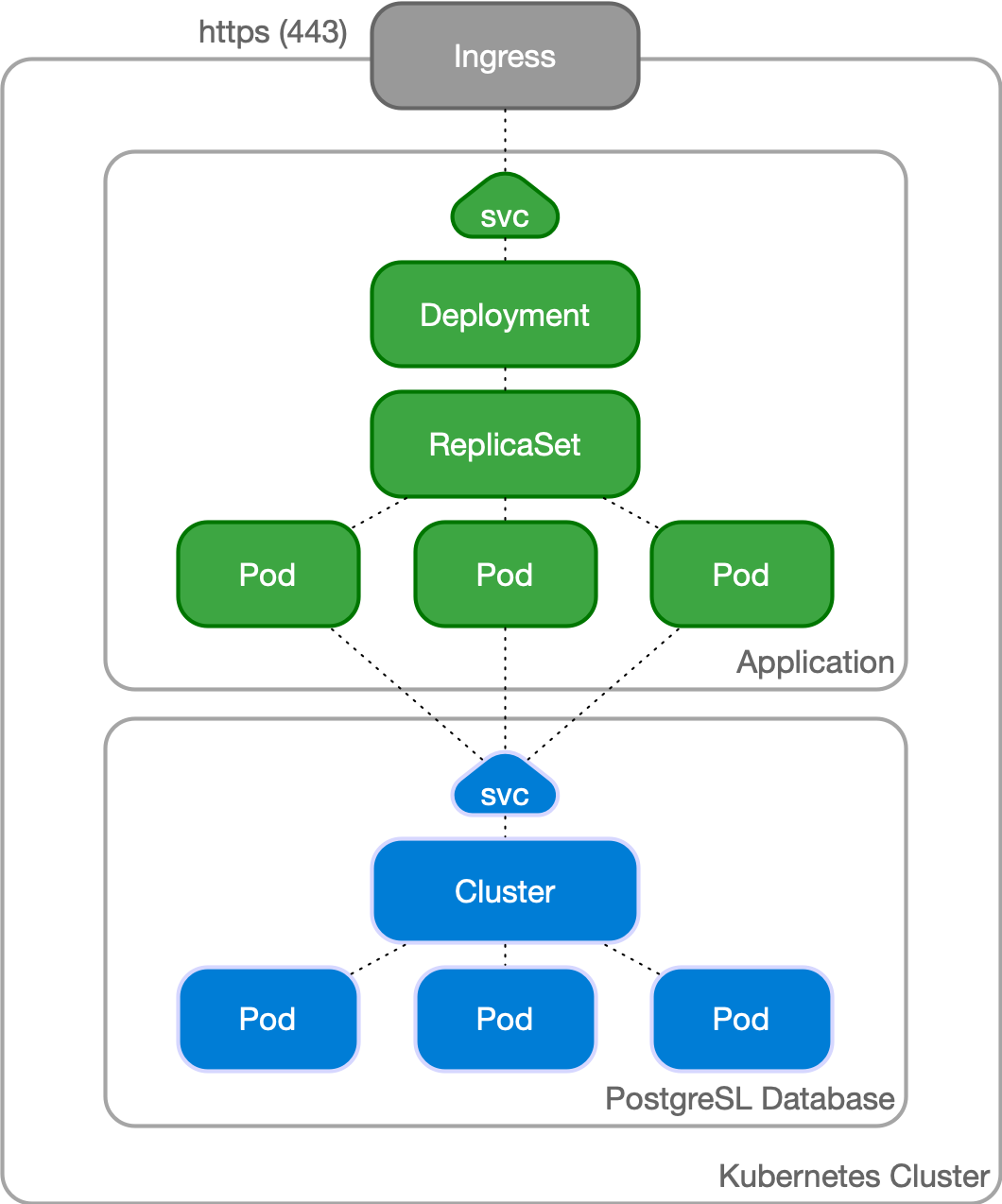
In a typical situation, the application and the database run in the same namespace inside a Kubernetes cluster.
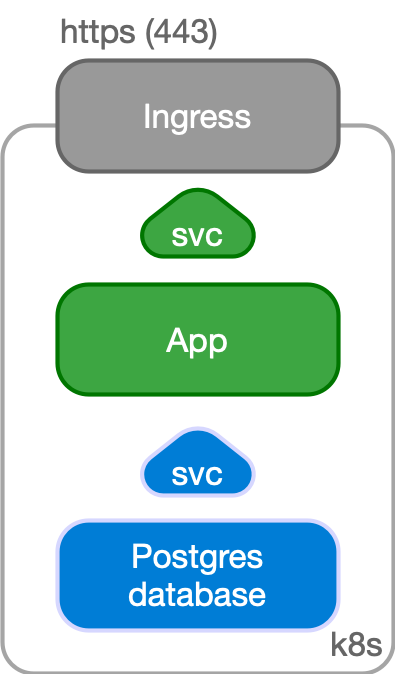
The application, normally stateless, is managed as a standard Deployment, with multiple replicas spread over different Kubernetes node, and internally exposed through a ClusterIP service.
The service is exposed externally to the end user through an Ingress and the provider’s load balancer facility, via HTTPS.
The application uses the backend PostgreSQL database to keep track of the state in a reliable and persistent way. The application refers to the read-write service exposed by the Cluster resource defined by Cloud Native PostgreSQL, which points to the current primary instance, through a TLS connection. The Cluster resource embeds the logic of single primary and multiple standby architecture, hiding the complexity of managing a high availability cluster in Postgres.
Case 2: Applications outside Kubernetes
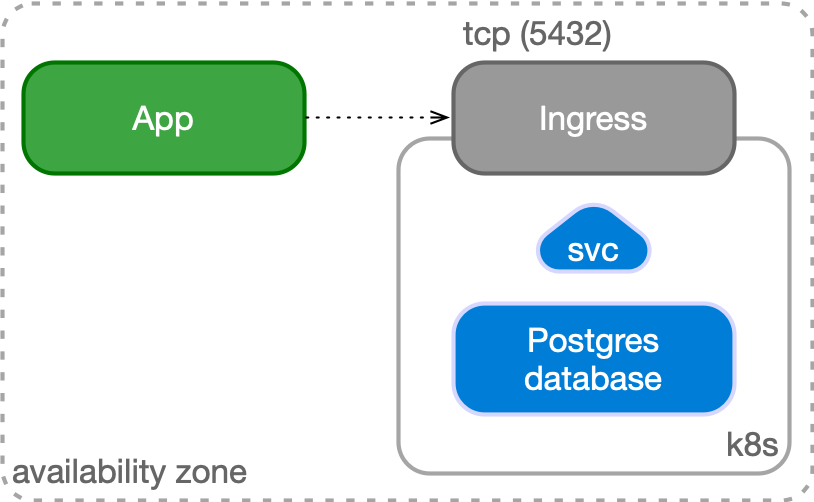
Another possible use case is to manage your PostgreSQL database inside Kubernetes, while having your applications outside of it (for example in a virtualized environment). In this case, PostgreSQL is represented by an IP address (or host name) and a TCP port, corresponding to the defined Ingress resource in Kubernetes.
The application can still benefit from a TLS connection to PostgreSQL.
Architecture
For High Availability goals, the PostgreSQL database management system provides administrators with built-in physical replication capabilities based on Write Ahead Log (WAL) shipping.
PostgreSQL supports both asynchronous and synchronous streaming replication, as well as asynchronous file-based log shipping (normally used as a fallback option, for example, to store WAL files in an object store). Replicas are usually called standby servers and can also be used for read-only workloads, thanks to the Hot Standby feature.
Cloud Native PostgreSQL currently supports clusters based on asynchronous and synchronous streaming replication to manage multiple hot standby replicas, with the following specifications:
- One primary, with optional multiple hot standby replicas for High Availability
- Available services for applications:
-rw: applications connect to the only primary instance of the cluster-ro: applications connect to the only hot standby replicas for read-only-workloads-r: applications connect to any of the instances for read-only workloads
- Shared-nothing architecture recommended for better resilience of the PostgreSQL cluster:
- PostgreSQL instances should reside on different Kubernetes worker nodes and share only the network
- PostgreSQL instances can reside in different availability zones in the same region
- All nodes of a PostgreSQL cluster should reside in the same region
Read-write workloads
Applications can decide to connect to the PostgreSQL instance elected as current primary by the Kubernetes operator, as depicted in the following diagram:
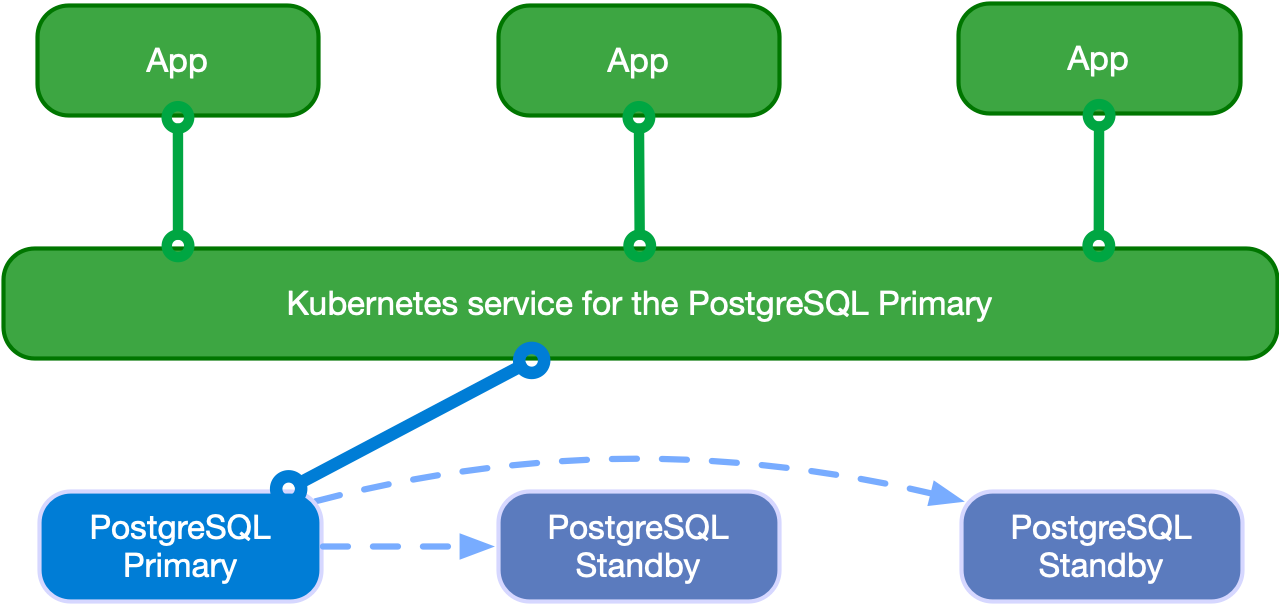
Applications can use the -rw suffix service.
In case of temporary or permanent unavailability of the primary, Kubernetes will move the -rw to another instance of the cluster for high availability purposes.
Read-only workloads
!!! Important Applications must be aware of the limitations that Hot Standby presents and familiar with the way PostgreSQL operates when dealing with these workloads.
Applications can access hot standby replicas through the -ro service made available by the operator. This service enables the application to offload read-only queries from the primary node.
The following diagram shows the architecture:

Applications can also access any PostgreSQL instance at any time through the -r service at connection time.
Application deployments
Applications are supposed to work with the services created by Cloud Native PostgreSQL in the same Kubernetes cluster:
[cluster name]-rw[cluster name]-ro[cluster name]-r
Those services are entirely managed by the Kubernetes cluster and implement a form of Virtual IP as described in the “Service” page of the Kubernetes Documentation.
!!! Hint It is highly recommended to use those services in your applications, and avoid connecting directly to a specific PostgreSQL instance, as the latter can change during the cluster lifetime.
You can use these services in your applications through:
- DNS resolution
- environment variables
As far as the credentials to connect to PostgreSQL are concerned, you can use the secrets generated by the operator.
!!! Warning The operator will create another service, named [cluster name]-any. That service is used internally to manage PostgreSQL instance discovery. It’s not supposed to be used directly by applications.
DNS resolution
You can use the Kubernetes DNS service, which is required by this operator, to point to a given server. You can do that by just using the name of the service if the application is deployed in the same namespace as the PostgreSQL cluster. In case the PostgreSQL cluster resides in a different namespace, you can use the full qualifier: service-name.namespace-name.
DNS is the preferred and recommended discovery method.
Environment variables
If you deploy your application in the same namespace that contains the PostgreSQL cluster, you can also use environment variables to connect to the database.
For example, suppose that your PostgreSQL cluster is called pg-database, you can use the following environment variables in your applications:
PG_DATABASE_R_SERVICE_HOST: the IP address of the service pointing to all the PostgreSQL instances for read-only workloadsPG_DATABASE_RO_SERVICE_HOST: the IP address of the service pointing to all hot-standby replicas of the clusterPG_DATABASE_RW_SERVICE_HOST: the IP address of the service pointing to the primary instance of the cluster
Secrets
The PostgreSQL operator will generate two secrets for every PostgreSQL cluster it deploys:
[cluster name]-superuser[cluster name]-app
The secrets contain the username, password, and a working .pgpass file respectively for the postgres user and the owner of the database.
The -app credentials are the ones that should be used by applications connecting to the PostgreSQL cluster.
The -superuser ones are supposed to be used only for administrative purposes.
Installation
Installation on Kubernetes
Directly using the operator manifest
The operator can be installed like any other resource in Kubernetes, through a YAML manifest applied via kubectl.
You can install the latest operator manifest as follows:
kubectl apply -f \
  https://get.enterprisedb.io/cnp/postgresql-operator-1.2.1.yaml
Once you have run the kubectl command, Cloud Native PostgreSQL will be installed in your Kubernetes cluster.
You can verify that with:
kubectl get deploy -n postgresql-operator-system postgresql-operator-controller-managerUsing the Operator Lifecycle Manager (OLM)
OperatorHub is a community-sourced index of operators available via the Operator Lifecycle Manager, which is a package managing system for operators.
You can install Cloud Native PostgreSQL using the metadata available in the Cloud Native PostgreSQL page from the OperatorHub.io website, following the installation steps listed on that page.
Installation on Openshift
Via the web interface
Log in to the console as kubeadmin and navigate to the Operator → OperatorHub page.
Find the Cloud Native PostgreSQL box scrolling or using the search filter.
Select the operator and click Install. Click Install again in the following Install Operator, using the default settings. For an in-depth explanation of those settings, see the Openshift documentation.
The operator will soon be available in all the namespaces.
Depending on the security levels applied to the OpenShift cluster you may be required to create a proper set of roles and permissions for the operator to be used in different namespaces. For more information on this matter see the Openshift documentation.
Via the oc command line
You can add the subscription to install the operator in all the namespaces as follows:
oc apply -f \
  https://docs.enterprisedb.io/cloud-native-postgresql/latest/samples/subscription.yaml
The operator will soon be available in all the namespaces.
More information on how to install operators via CLI is available in the Openshift documentation.
Details about the deployment
In Kubernetes, the operator is by default installed in the postgresql-operator-system namespace as a Kubernetes Deployment called postgresql-operator-controller-manager. You can get more information by running:
kubectl describe deploy -n postgresql-operator-system postgresql-operator-controller-managerAs any deployment, it sits on top of a replica set and supports rolling upgrades. By default, we currently support only 1 replica. In future versions we plan to support multiple replicas and leader election, as well as taints and tolerations so to enable deployment on the Kubernetes control plane.
In case the node where the pod is running is not reachable anymore, the pod will be rescheduled on another node.
As far as OpenShift is concerned, details might differ depending on the selected installation method.
Quickstart
This section describes how to test a PostgreSQL cluster on your laptop/computer using Cloud Native PostgreSQL on a local Kubernetes cluster in Minikube or Kind.
!!! Tip “Live demonstration” Don’t want to install anything locally just yet? Try a demonstration directly in your browser:
Cloud Native PostgreSQL Operator Interactive Quickstart
RedHat OpenShift Container Platform users can test the certified operator for Cloud Native PostgreSQL on the Red Hat CodeReady Containers (CRC) for OpenShift.
!!! Warning The instructions contained in this section are for demonstration, testing, and practice purposes only and must not be used in production.
Like any other Kubernetes application, Cloud Native PostgreSQL is deployed using regular manifests written in YAML.
By following the instructions on this page you should be able to start a PostgreSQL cluster on your local Kubernetes/Openshift installation and experiment with it.
!!! Important Make sure that you have kubectl installed on your machine in order to connect to the Kubernetes cluster, or oc if using CRC for OpenShift. Please follow the Kubernetes documentation on how to install kubectl or the Openshift one on how to install oc.
!!! Note If you are running Openshift, use oc every time kubectl is mentioned in this documentation. kubectl commands are compatible with oc ones.
Part 1 - Setup the local Kubernetes/Openshift playground
The first part is about installing Minikube, Kind, or CRC. Please spend some time reading about the systems and decide which one to proceed with. After setting up one of them, please proceed with part 2.
Minikube
Minikube is a tool that makes it easy to run Kubernetes locally. Minikube runs a single-node Kubernetes cluster inside a Virtual Machine (VM) on your laptop for users looking to try out Kubernetes or develop with it day-to-day. Normally, it is used in conjunction with VirtualBox.
You can find more information in the official Kubernetes documentation on how to install Minikube in your local personal environment. When you installed it, run the following command to create a minikube cluster:
minikube startThis will create the Kubernetes cluster, and you will be ready to use it. Verify that it works with the following command:
kubectl get nodesYou will see one node called minikube.
Kind
If you do not want to use a virtual machine hypervisor, then Kind is a tool for running local Kubernetes clusters using Docker container “nodes” (Kind stands for “Kubernetes IN Docker” indeed).
Install kind on your environment following the instructions in the Quickstart, then create a Kubernetes cluster with:
kind create cluster --name pgCodeReady Containers (CRC)
Download RedHat CRC and move the binary inside a directory in your PATH.
You can then run the following commands:
crc setup
crc start
The crc start output will explain how to proceed. You’ll then need to execute the output of the crc oc-env command. After that, you can log in as kubeadmin with the printed oc login command. You can also open the web console running crc console. User and password are the same as for the oc login command.
CRC doesn’t come with a StorageClass, so one has to be configured. You can follow the Dynamic volume provisioning wiki page and install rancher/local-path-provisioner.
Part 2 - Install Cloud Native PostgreSQL
Now that you have a Kubernetes or OpenShift installation up and running on your laptop, you can proceed with Cloud Native PostgreSQL installation.
Please refer to the “Installation” section and then proceed with the deployment of a PostgreSQL cluster.
Part 3 - Deploy a PostgreSQL cluster
As with any other deployment in Kubernetes, to deploy a PostgreSQL cluster you need to apply a configuration file that defines your desired Cluster.
The cluster-example.yaml sample file defines a simple Cluster using the default storage class to allocate disk space:
# Example of PostgreSQL cluster
apiVersion: postgresql.k8s.enterprisedb.io/v1
kind: Cluster
metadata:
  name: cluster-example
spec:
  instances: 3

  # Example of rolling update strategy:
  # - unsupervised: automated update of the primary once all
  #                 replicas have been upgraded (default)
  # - supervised: requires manual supervision to perform
  #               the switchover of the primary
  primaryUpdateStrategy: unsupervised

  # Require 1Gi of space
  storage:
    size: 1Gi
!!! Note “There’s more” For more detailed information about the available options, please refer to the “API Reference” section.
In order to create the 3-node PostgreSQL cluster, you need to run the following command:
kubectl apply -f cluster-example.yamlYou can check that the pods are being created with the get pods command:
kubectl get podsBy default, the operator will install the latest available minor version of the latest major version of PostgreSQL when the operator was released. You can override this by setting the imageName key in the spec section of the Cluster definition. For example, to install PostgreSQL 12.5:
apiVersion: postgresql.k8s.enterprisedb.io/v1
kind: Cluster
metadata:
   # [...]
spec:
   # [...]
   imageName: quay.io/enterprisedb/postgresql:12.5
   #[...]
!!! Important The immutable infrastructure paradigm requires that you always point to a specific version of the container image. Never use tags like latest or 13 in a production environment as it might lead to unpredictable scenarios in terms of update policies and version consistency in the cluster.
Cloud Setup
This section describes how to orchestrate the deployment and management of a PostgreSQL High Availability cluster in a Kubernetes cluster in the public cloud using CustomResourceDefinitions such as Cluster. Like any other Kubernetes application, it is deployed using regular manifests written in YAML.
The Cloud Native PostgreSQL Operator is systematically tested on the following public cloud environments:
- Microsoft Azure Kubernetes Service (AKS)
- Amazon Elastic Kubernetes Service (EKS)
- Google Kubernetes Engine (GKE)
Below you can find specific instructions for each of the above environments. Once the steps described on this page have been completed, and your kubectl can connect to the desired cluster, you can install the operator and start creating PostgreSQL Clusters by following the instructions you find in the “Installation” section.
!!! Important kubectl is required to proceed with setup.
Microsoft Azure Kubernetes Service (AKS)
Follow the instructions contained in “Quickstart: Deploy an Azure Kubernetes Service (AKS) cluster using the Azure portal” available on the Microsoft documentation to set up your Kubernetes cluster in AKS.
In particular, you need to configure kubectl to connect to your Kubernetes cluster (called myAKSCluster using resources in myResourceGroup group) through the az aks get-credentials command. This command downloads the credentials and configures your kubectl to use them:
az aks get-credentials --resource-group myResourceGroup --name myAKSCluster!!! Note You can change the name of the myAKSCluster cluster and the resource group myResourceGroup from the Azure portal.
You can use any of the storage classes that work with Azure disks:
defaultmanaged-premium
!!! Seealso “About AKS storage classes” For more information and details on the available storage classes in AKS, please refer to the “Storage classes” section in the official documentation from Microsoft.
Amazon Elastic Kubernetes Service (EKS)
Follow the instructions contained in “Creating an Amazon EKS Cluster” available on the AWS documentation to set up your Kubernetes cluster in EKS.
!!! Important Keep in mind that Amazon puts limitations on how many pods a node can create. It depends on the type of instance that you choose to use when you create your cluster.
After the setup, kubectl should point to your newly created EKS cluster.
By default, a gp2 storage class is available after cluster creation. However, Amazon EKS offers multiple storage types that can be leveraged to create other storage classes for Clusters’ volumes:
gp2: general-purpose SSD volumeio1: provisioned IOPS SSDst1: throughput optimized HDDsc1: cold HDD
!!! Seealso “About EKS storage classes” For more information and details on the available storage classes in EKS, please refer to the “Amazon EBS Volume Types” page in the official documentation for AWS and the “AWS-EBS” page in the Kubernetes documentation.
Google Kubernetes Engine (GKE)
Follow the instructions contained in “Creating a cluster” available on the Google Cloud documentation to set up your Kubernetes cluster in GKE.
!!! Warning Google Kubernetes Engine uses the deprecated kube-dns server instead of the recommended CoreDNS. To work with Cloud Native PostgreSQL Operator, you need to disable kube-dns and replace it with coredns.
To replace kube-dns with coredns in your GKE cluster, follow these instructions:
kubectl scale --replicas=0 deployment/kube-dns-autoscaler --namespace=kube-system
kubectl scale --replicas=0 deployment/kube-dns --namespace=kube-system
git clone https://github.com/coredns/deployment.git
./deployment/kubernetes/deploy.sh | kubectl apply -f -
By default, a standard storage class is available after cluster creation, using standard hard disks. For other storage types, you’ll need to create specific storage classes.
!!! Seealso “About GKE storage classes” For more information and details on the available storage types in GKE, please refer to the “GCE PD” section of the Kubernetes documentation and the “Persistent volumes with Persistent Disks” page and related ones in the official documentation for Google Cloud.
Bootstrap
This section describes the options you have to create a new PostgreSQL cluster and the design rationale behind them.
When a PostgreSQL cluster is defined, you can configure the bootstrap method using the bootstrap section of the cluster specification.
In the following example:
apiVersion: postgresql.k8s.enterprisedb.io/v1
kind: Cluster
metadata:
  name: cluster-example-initdb
spec:
  instances: 3

  bootstrap:
    initdb:
      database: appdb
      owner: appuser

  storage:
    size: 1Gi
The initdb bootstrap method is used.
We currently support the following bootstrap methods:
initdb: initialise an empty PostgreSQL clusterrecovery: create a PostgreSQL cluster restoring from an existing backup and replaying all the available WAL files.
initdb
The initdb bootstrap method is used to create a new PostgreSQL cluster from scratch. It is the default one unless specified differently.
The following example contains the full structure of the initdb configuration:
apiVersion: postgresql.k8s.enterprisedb.io/v1
kind: Cluster
metadata:
  name: cluster-example-initdb
spec:
  instances: 3

  superuserSecret:
    name: superuser-secret

  bootstrap:
    initdb:
      database: appdb
      owner: appuser
      secret:
        name: appuser-secret

  storage:
    size: 1Gi
The above example of bootstrap will:
- create a new
PGDATAfolder using PostgreSQL’s nativeinitdbcommand - set a superuser password from the secret named
superuser-secret - create an unprivileged user named
appuser - set the password of the latter using the one in the
appuser-secretsecret - create a database called
appdbowned by theappuseruser.
Thanks to the convention over configuration paradigm, you can let the operator choose a default database name (app) and a default application user name (same as the database name), as well as randomly generate a secure password for both the superuser and the application user in PostgreSQL.
Alternatively, you can generate your passwords, store them as secrets, and use them in the PostgreSQL cluster - as described in the above example.
The supplied secrets must comply with the specifications of the kubernetes.io/basic-auth type. The operator will only use the password field of the secret, ignoring the username one. If you plan to reuse the secret for application connections, you can set the username field to the same value as the owner.
The following is an example of a basic-auth secret:
apiVersion: v1
data:
  password: cGFzc3dvcmQ=
kind: Secret
metadata:
  name: cluster-example-app-user
type: kubernetes.io/basic-auth
The application database is the one that should be used to store application data. Applications should connect to the cluster with the user that owns the application database.
!!! Important Future implementations of the operator might allow you to create additional users in a declarative configuration fashion.
The superuser and the postgres database are supposed to be used only by the operator to configure the cluster.
In case you don’t supply any database name, the operator will proceed by convention and create the app database, and adds it to the cluster definition using a defaulting webhook. The user that owns the database defaults to the database name instead.
The application user is not used internally by the operator, which instead relies on the superuser to reconcile the cluster with the desired status.
!!! Important For now, changes to the name of the superuser secret are not applied to the cluster.
The actual PostgreSQL data directory is created via an invocation of the initdb PostgreSQL command. If you need to add custom options to that command (i.e., to change the locale used for the template databases or to add data checksums), you can add them to the options section like in the following example:
apiVersion: postgresql.k8s.enterprisedb.io/v1
kind: Cluster
metadata:
  name: cluster-example-initdb
spec:
  instances: 3

  bootstrap:
    initdb:
      database: appdb
      owner: appuser
      options:
      - "-k"
      - "--locale=en_US"
  storage:
    size: 1Gi
Compatibility Features
EDB Postgres Advanced adds many compatibility features to the plain community PostgreSQL. You can find more information about that in the EDB Postgres Advanced.
Those features are already enabled during cluster creation on EPAS and are not supported on the community PostgreSQL image. To disable them you can use the redwood flag in the initdb section like in the following example:
apiVersion: postgresql.k8s.enterprisedb.io/v1
kind: Cluster
metadata:
  name: cluster-example-initdb
spec:
  instances: 3
  imageName: <EPAS-based image>
  licenseKey: <LICENSE_KEY>

  bootstrap:
    initdb:
      database: appdb
      owner: appuser
      redwood: false
  storage:
    size: 1Gi
!!! Important EDB Postgres Advanced requires a valid license key (trial or production) to start.
recovery
The recovery bootstrap mode lets you create a new cluster from an existing backup. You can find more information about the recovery feature in the “Backup and recovery” page.
The following example contains the full structure of the recovery section:
apiVersion: postgresql.k8s.enterprisedb.io/v1
kind: Cluster
metadata:
  name: cluster-example-initdb
spec:
  instances: 3

  superuserSecret:
    name: superuser-secret

  bootstrap:
    recovery:
      backup:
        name: backup-example

  storage:
    size: 1Gi
This bootstrap method allows you to specify just a reference to the backup that needs to be restored.
The application database name and the application database user are preserved from the backup that is being restored. The operator does not currently attempt to backup the underlying secrets, as this is part of the usual maintenance activity of the Kubernetes cluster itself.
In case you don’t supply any superuserSecret, a new one is automatically generated with a secure and random password. The secret is then used to reset the password for the postgres user of the cluster.
By default, the recovery will continue up to the latest available WAL on the default target timeline (current for PostgreSQL up to 11, latest for version 12 and above). You can optionally specify a recoveryTarget to perform a point in time recovery (see the “Point in time recovery” chapter).
Point in time recovery
Instead of replaying all the WALs up to the latest one, we can ask PostgreSQL to stop replaying WALs at any given point in time. PostgreSQL uses this technique to implement point-in-time recovery. This allows you to restore the database to its state at any time after the base backup was taken.
The operator will generate the configuration parameters required for this feature to work if a recovery target is specified like in the following example:
apiVersion: postgresql.k8s.enterprisedb.io/v1
kind: Cluster
metadata:
  name: cluster-restore-pitr
spec:
  instances: 3

  storage:
    size: 5Gi

  bootstrap:
    recovery:
      backup:
        name: backup-example

      recoveryTarget:
        targetTime: "2020-11-26 15:22:00.00000+00"
Beside targetTime, you can use the following criteria to stop the recovery:
targetXIDspecify a transaction ID up to which recovery will proceedtargetNamespecify a restore point (created withpg_create_restore_pointto which recovery will proceed)targetLSNspecify the LSN of the write-ahead log location up to which recovery will proceedtargetImmediatespecify to stop as soon as a consistent state is reached
You can choose only a single one among the targets above in each recoveryTarget configuration.
Additionally, you can specify targetTLI force recovery to a specific timeline.
By default, the previous parameters are considered to be exclusive, stopping just before the recovery target. You can request inclusive behavior, stopping right after the recovery target, setting the exclusive parameter to false like in the following example:
apiVersion: postgresql.k8s.enterprisedb.io/v1
kind: Cluster
metadata:
  name: cluster-restore-pitr
spec:
  instances: 3

  storage:
    size: 5Gi

  bootstrap:
    recovery:
      backup:
        name: backup-example

      recoveryTarget:
        targetName: "maintenance-activity"
        exclusive: false
Resource management
In a typical Kubernetes cluster, pods run with unlimited resources. By default, they might be allowed to use as much CPU and RAM as needed.
Cloud Native PostgreSQL allows administrators to control and manage resource usage by the pods of the cluster, through the resources section of the manifest, with two knobs:
requests: initial requirementlimits: maximum usage, in case of dynamic increase of resource needs
For example, you can request an initial amount of RAM of 32MiB (scalable to 128MiB) and 50m of CPU (scalable to 100m) as follows:
  resources:
    requests:
      memory: "32Mi"
      cpu: "50m"
    limits:
      memory: "128Mi"
      cpu: "100m"
Memory requests and limits are associated with containers, but it is useful to think of a pod as having a memory request and limit. The pod’s memory request is the sum of the memory requests for all the containers in the pod.
Pod scheduling is based on requests and not on limits. A pod is scheduled to run on a Node only if the Node has enough available memory to satisfy the pod’s memory request.
For each resource, we divide containers into 3 Quality of Service (QoS) classes, in decreasing order of priority:
- Guaranteed
- Burstable
- Best-Effort
For more details, please refer to the “Configure Quality of Service for Pods” section in the Kubernetes documentation.
For a PostgreSQL workload it is recommended to set a “Guaranteed” QoS.
To avoid resources related issues in Kubernetes, we can refer to the best practices for “out of resource” handling while creating a cluster:
- Specify your required values for memory and CPU in the resources section of the manifest file. This way, you can avoid the
OOM Killed(where “OOM” stands for Out Of Memory) andCPU throttleor any other resources related issues on running instances. - For your cluster’s pods to get assigned to the “Guaranteed” QoS class, you must set limits and requests for both memory and CPU to the same value.
- Specify your required PostgreSQL memory parameters consistently with the pod resources (as you would do in a VM or physical machine scenario - see below).
- Set up database server pods on a dedicated node using nodeSelector. See the “nodeSelector field of the affinityconfiguration resource on the API reference page”.
You can refer to the following example manifest:
apiVersion: postgresql.k8s.enterprisedb.io/v1
kind: Cluster
metadata:
  name: postgresql-resources
spec:

  instances: 3

  postgresql:
    parameters:
      shared_buffers: "256MB"

  resources:
    requests:
      memory: "1024Mi"
      cpu: 1
    limits:
      memory: "1024Mi"
      cpu: 1

  storage:
    size: 1Gi
In the above example, we have specified shared_buffers parameter with a value of 256MB - i.e., how much memory is dedicated to the PostgreSQL server for caching data (the default value for this parameter is 128MB in case it’s not defined).
A reasonable starting value for shared_buffers is 25% of the memory in your system. For example: if your shared_buffers is 256 MB, then the recommended value for your container memory size is 1 GB, which means that within a pod all the containers will have a total of 1 GB memory that Kubernetes will always preserve, enabling our containers to work as expected. For more details, please refer to the “Resource Consumption” section in the PostgreSQL documentation.
!!! Seealso “Managing Compute Resources for Containers” For more details on resource management, please refer to the “Managing Compute Resources for Containers” page from the Kubernetes documentation.
Security
This section contains information about security for Cloud Native PostgreSQL analyzed at 3 different layers: Code, Container and Cluster.
!!! Warning The information contained in this page must not exonerate you from performing regular InfoSec duties on your Kubernetes cluster. Please familiarize with the “Overview of Cloud Native Security” page from the Kubernetes documentation.
!!! Seealso “About the 4C’s Security Model” Please refer to “The 4C’s Security Model in Kubernetes” blog article to get a better understanding and context of the approach EDB has taken with security in Cloud Native PostgreSQL.
Code
Source code of Cloud Native PostgreSQL is systematically scanned for static analysis purposes, including security problems, using a popular open-source linter for Go called GolangCI-Lint directly in the CI/CD pipeline. GolangCI-Lint can run several linters on the same source code.
One of these is Golang Security Checker, or simply gosec, a linter that scans the abstract syntactic tree of the source against a set of rules aimed at the discovery of well-known vulnerabilities, threats, and weaknesses hidden in the code such as hard-coded credentials, integer overflows and SQL injections - to name a few.
!!! Important A failure in the static code analysis phase of the CI/CD pipeline is a blocker for the entire delivery of Cloud Native PostgreSQL, meaning that each commit is validated against all the linters defined by GolangCI-Lint.
Source code is also regularly inspected through Coverity Scan by Synopsys via EnterpriseDB’s internal CI/CD pipeline.
Container
Every container image that is part of Cloud Native PostgreSQL is automatically built via CI/CD pipelines following every commit. Such images include not only the operator’s, but also the operands’ - specifically every supported PostgreSQL and EDB Postgres Advanced version. Within the pipelines, images are scanned with:
- Dockle: for best practices in terms of the container build process
- Clair: for vulnerabilities found in both the underlying operating system as well as libraries and applications that they run
!!! Important All operand images are automatically rebuilt once a day by our pipelines in case of security updates at the base image and package level, providing patch level updates for the container images that EDB distributes.
The following guidelines and frameworks have been taken into account for container-level security:
- the “Container Image Creation and Deployment Guide”, developed by the Defense Information Systems Agency (DISA) of the United States Department of Defense (DoD)
- the “CIS Benchmark for Docker”, developed by the Center for Internet Security (CIS)
!!! Seealso “About the Container level security” Please refer to “Security and Containers in Cloud Native PostgreSQL” blog article for more information about the approach that EDB has taken on security at container level in Cloud Native PostgreSQL.
Cluster
Security at the cluster level takes into account all Kubernetes components that form both the control plane and the nodes, as well as the applications that run in the cluster (PostgreSQL included).
Pod Security Policies
A Pod Security Policy is the Kubernetes way to define security rules and specifications that a pod needs to meet to run in a cluster. For InfoSec reasons, every Kubernetes platform should implement them.
Cloud Native PostgreSQL does not require privileged mode for containers execution. PostgreSQL servers run as postgres system user. No component whatsoever requires to run as root.
Likewise, Volumes access does not require privileges mode or root privileges either. Proper permissions must be properly assigned by the Kubernetes platform and/or administrators.
Network Policies
The pods created by the Cluster resource can be controlled by Kubernetes network policies to enable/disable inbound and outbound network access at IP and TCP level.
Network policies are beyond the scope of this document. Please refer to the “Network policies” section of the Kubernetes documentation for further information.
PostgreSQL
The current implementation of Cloud Native PostgreSQL automatically creates passwords and .pgpass files for the postgres superuser and the database owner. See the “Secrets” section in the “Architecture” page.
You can use those files to configure application access to the database.
By default, every replica is automatically configured to connect in physical async streaming replication with the current primary instance, with a special user called streaming_replica. The connection between nodes is encrypted and authentication is via TLS client certificates.
Currently, the operator allows administrators to add pg_hba.conf lines directly in the manifest as part of the pg_hba section of the postgresql configuration. The lines defined in the manifest are added to a default pg_hba.conf.
For further detail on how pg_hba.conf is managed by the operator, see the “PostgreSQL Configuration” page of the documentation.
!!! Important Examples assume that the Kubernetes cluster runs in a private and secure network.
Failure Modes
This section provides an overview of the major failure scenarios that PostgreSQL can face on a Kubernetes cluster during its lifetime.
!!! Important In case the failure scenario you are experiencing is not covered by this section, please immediately contact EnterpriseDB for support and assistance.
Liveness and readiness probes
Each pod of a Cluster has a postgres container with a liveness and a readiness probe.
The liveness and readiness probes check if the database is up and able to accept connections using the superuser credentials. The two probes will report a failure if the probe command fails 3 times with a 10 seconds interval between each check.
For now, the operator doesn’t configure a startupProbe on the Pods, since startup probes have been introduced only in Kubernetes 1.17.
The liveness probe is used to detect if the PostgreSQL instance is in a broken state and needs to be restarted. The value in startDelay is used to delay the probe’s execution, which is used to prevent an instance with a long startup time from being restarted.
Storage space usage
The operator will instantiate one PVC for every PostgreSQL instance to store the PGDATA content.
Such storage space is set for reuse in two cases:
- when the corresponding Pod is deleted by the user (and a new Pod will be recreated)
- when the corresponding Pod is evicted and scheduled on another node
If you want to prevent the operator from reusing a certain PVC you need to remove the PVC before deleting the Pod. For this purpose, you can use the following command:
kubectl delete -n [namespace] pvc/[cluster-name]-[serial] --wait=false
kubectl delete -n [namespace] pod/[cluster-name]-[serial]
For example:
$ kubectl delete -n default pvc/cluster-example-1 --wait=false
persistentvolumeclaim "cluster-example-1" deleted

$ kubectl delete -n default pod/cluster-example-1
pod "cluster-example-1" deleted
Failure modes
A pod belonging to a Cluster can fail in the following ways:
- the pod is explicitly deleted by the user;
- the readiness probe on its
postgrescontainer fails; - the liveness probe on its
postgrescontainer fails; - the Kubernetes worker node is drained;
- the Kubernetes worker node where the pod is scheduled fails.
Each one of these failures has different effects on the Cluster and the services managed by the operator.
Pod deleted by the user
The operator is notified of the deletion. A new pod belonging to the Cluster will be automatically created reusing the existing PVC, if available, or starting from a physical backup of the primary otherwise.
!!! Important In case of deliberate deletion of a pod, PodDisruptionBudget policies will not be enforced.
Self-healing will happen as soon as the apiserver is notified.
Readiness probe failure
After 3 failures, the pod will be considered not ready. The pod will still be part of the Cluster, no new pod will be created.
If the cause of the failure can’t be fixed, it is possible to delete the pod manually. Otherwise, the pod will resume the previous role when the failure is solved.
Self-healing will happen after three failures of the probe.
Liveness probe failure
After 3 failures, the postgres container will be considered failed. The pod will still be part of the Cluster, and the kubelet will try to restart the container. If the cause of the failure can’t be fixed, it is possible to delete the pod manually.
Self-healing will happen after three failures of the probe.
Worker node drained
The pod will be evicted from the worker node and removed from the service. A new pod will be created on a different worker node from a physical backup of the primary if the reusePVC option of the nodeMaintenanceWindow parameter is set to off (default: on during maintenance windows, off otherwise).
The PodDisruptionBudget may prevent the pod from being evicted if there is at least one node that is not ready.
Self-healing will happen as soon as the apiserver is notified.
Worker node failure
Since the node is failed, the kubelet won’t execute the liveness and the readiness probes. The pod will be marked for deletion after the toleration seconds configured by the Kubernetes cluster administrator for that specific failure cause. Based on how the Kubernetes cluster is configured, the pod might be removed from the service earlier.
A new pod will be created on a different worker node from a physical backup of the primary. The default value for that parameter in a Kubernetes cluster is 5 minutes.
Self-healing will happen after tolerationSeconds.
Self-healing
If the failed pod is a standby, the pod is removed from the -r service and from the -ro service. The pod is then restarted using its PVC if available; otherwise, a new pod will be created from a backup of the current primary. The pod will be added again to the -r service and to the -ro service when ready.
If the failed pod is the primary, the operator will promote the active pod with status ready and the lowest replication lag, then point the -rwservice to it. The failed pod will be removed from the -r service and from the -ro service. Other standbys will start replicating from the new primary. The former primary will use pg_rewind to synchronize itself with the new one if its PVC is available; otherwise, a new standby will be created from a backup of the current primary.
Manual intervention
In the case of undocumented failure, it might be necessary to intervene to solve the problem manually.
!!! Important In such cases, please do not perform any manual operation without the support and assistance of EnterpriseDB engineering team.
Rolling Updates
The operator allows changing the PostgreSQL version used in a cluster while applications are running against it.
!!! Important Only upgrades for PostgreSQL minor releases are supported.
Rolling upgrades are started when:
the user changes the
imageNameattribute of the cluster specification;after the operator is updated, to ensure the Pods run the latest instance manager;
when a change in the PostgreSQL configuration requires a restart to be applied.
The operator starts upgrading all the replicas, one Pod at a time, starting from the one with the highest serial.
The primary is the last node to be upgraded. This operation is configurable and managed by the primaryUpdateStrategy option, accepting these two values:
unsupervised: the rolling update process is managed by Kubernetes and is entirely automated, with the switchover operation starting once all the replicas have been upgradedsupervised: the rolling update process is suspended immediately after all replicas have been upgraded and can only be completed with a manual switchover triggered by an administrator withkubectl cnp promote [cluster] [pod]. The plugin can be downloaded from thekubectl-cnpproject page on GitHub.
The default and recommended value is unsupervised.
The upgrade keeps the Cloud Native PostgreSQL identity and does not re-clone the data. Pods will be deleted and created again with the same PVCs.
During the rolling update procedure, the services endpoints move to reflect the cluster’s status, so the applications ignore the node that is updating.
Backup and Recovery
The operator can orchestrate a continuous backup infrastructure that is based on the Barman tool. Instead of using the classical architecture with a Barman server, which backup many PostgreSQL instances, the operator will use the barman-cloud-wal-archive and barman-cloud-backup tools. As a result, base backups will be tarballs. Both base backups and WAL files can be compressed and encrypted.
For this, it is required an image with barman-cli-cloud installed. You can use the image quay.io/enterprisedb/postgresql for this scope, as it is composed of a community PostgreSQL image and the latest barman-cli-cloud package.
Cloud credentials
You can archive the backup files in any service whose API is compatible with AWS S3. You will need the following information about your environment:
ACCESS_KEY_ID: the ID of the access key that will be used to upload files in S3ACCESS_SECRET_KEY: the secret part of the previous access keyACCESS_SESSION_TOKEN: the optional session token in case it is required
The access key used must have permission to upload files in the bucket. Given that, you must create a k8s secret with the credentials, and you can do that with the following command:
kubectl create secret generic aws-creds \
  --from-literal=ACCESS_KEY_ID=<access key here> \
  --from-literal=ACCESS_SECRET_KEY=<secret key here>
# --from-literal=ACCESS_SESSION_TOKEN=<session token here> # if required
The credentials will be stored inside Kubernetes and will be encrypted if encryption at rest is configured in your installation.
Configuring the Cluster
S3
Given that secret, you can configure your cluster like in the following example:
apiVersion: postgresql.k8s.enterprisedb.io/v1
kind: Cluster
[...]
spec:
  backup:
    barmanObjectStore:
      destinationPath: "<destination path here>"
      s3Credentials:
        accessKeyId:
          name: aws-creds
          key: ACCESS_KEY_ID
        secretAccessKey:
          name: aws-creds
          key: ACCESS_SECRET_KEY
The destination path can be every URL pointing to a folder where the instance can upload the WAL files, e.g. s3://BUCKET_NAME/path/to/folder.
Other S3-compatible Object Storages providers
In case you’re using S3-compatible object storage, like MinIO or Linode Object Storage, you can specify an endpoint instead of using the default S3 one.
In this example, it will use the bucket bucket of Linode in the region us-east1.
apiVersion: postgresql.k8s.enterprisedb.io/v1
kind: Cluster
[...]
spec:
  backup:
    barmanObjectStore:
      destinationPath: "<destination path here>"
      endpointURL: bucket.us-east1.linodeobjects.com
      s3Credentials:
        [...]
MinIO Gateway
Optionally, you can use MinIO Gateway as a common interface which relays backup objects to other cloud storage solutions, like S3, GCS or Azure. For more information, please refer to MinIO official documentation.
Specifically, the Cloud Native PostgreSQL cluster can directly point to a local MinIO Gateway as an endpoint, using previously created credentials and service.
MinIO secrets will be used by both the PostgreSQL cluster and the MinIO instance. Therefore you must create them in the same namespace:
kubectl create secret generic minio-creds \
  --from-literal=MINIO_ACCESS_KEY=<minio access key here> \
  --from-literal=MINIO_SECRET_KEY=<minio secret key here>
!!! NOTE “Note” Cloud Object Storage credentials will be used only by MinIO Gateway in this case.
!!! Important In order to allow PostgreSQL to reach MinIO Gateway, it is necessary to create a ClusterIP service on port 9000 bound to the MinIO Gateway instance.
For example:
apiVersion: v1
kind: Service
metadata:
  name: minio-gateway-service
spec:
  type: ClusterIP
  ports:
    - port: 9000
      targetPort: 9000
      protocol: TCP
  selector:
    app: minio
!!! Warning At the time of writing this documentation, the official MinIO Operator for Kubernetes does not support the gateway feature. As such, we will use a deployment instead.
The MinIO deployment will use cloud storage credentials to upload objects to the remote bucket and relay backup files to different locations.
Here is an example using AWS S3 as Cloud Object Storage:
apiVersion: apps/v1
kind: Deployment
[...]
    spec:
      containers:
      - name: minio
        image: minio/minio:RELEASE.2020-06-03T22-13-49Z
        args:
        - gateway
        - s3
        env:
        # MinIO access key and secret key
        - name: MINIO_ACCESS_KEY
          valueFrom:
            secretKeyRef:
              name: minio-creds
              key: MINIO_ACCESS_KEY
        - name: MINIO_SECRET_KEY
          valueFrom:
            secretKeyRef:
              name: minio-creds
              key: MINIO_SECRET_KEY
        # AWS credentials
        - name: AWS_ACCESS_KEY_ID
          valueFrom:
            secretKeyRef:
              name: aws-creds
              key: ACCESS_KEY_ID
        - name: AWS_SECRET_ACCESS_KEY
          valueFrom:
            secretKeyRef:
              name: aws-creds
              key: ACCESS_SECRET_KEY
# Uncomment the below section if session token is required
#        - name: AWS_SESSION_TOKEN
#          valueFrom:
#            secretKeyRef:
#              name: aws-creds
#              key: ACCESS_SESSION_TOKEN
        ports:
        - containerPort: 9000
Proceed by configuring MinIO Gateway service as the endpointURL in the Cluster definition, then choose a bucket name to replace BUCKET_NAME:
apiVersion: postgresql.k8s.enterprisedb.io/v1
kind: Cluster
[...]
spec:
  backup:
    barmanObjectStore:
      destinationPath: s3://BUCKET_NAME/
      endpointURL: http://minio-gateway-service:9000
      s3Credentials:
        accessKeyId:
          name: minio-creds
          key: MINIO_ACCESS_KEY
        secretAccessKey:
          name: minio-creds
          key: MINIO_SECRET_KEY
    [...]
Verify on s3://BUCKET_NAME/ the presence of archived WAL files before proceeding with a backup.
On-demand backups
To request a new backup, you need to create a new Backup resource like the following one:
apiVersion: postgresql.k8s.enterprisedb.io/v1
kind: Backup
metadata:
  name: backup-example
spec:
  cluster:
    name: pg-backup
The operator will start to orchestrate the cluster to take the required backup using barman-cloud-backup. You can check the backup status using the plain kubectl describe backup <name> command:
Name:         backup-example
Namespace:    default
Labels:       <none>
Annotations:  API Version:  postgresql.k8s.enterprisedb.io/v1
Kind:         Backup
Metadata:
  Creation Timestamp:  2020-10-26T13:57:40Z
  Self Link:         /apis/postgresql.k8s.enterprisedb.io/v1/namespaces/default/backups/backup-example
  UID:               ad5f855c-2ffd-454a-a157-900d5f1f6584
Spec:
  Cluster:
    Name:  pg-backup
Status:
  Phase:       running
  Started At:  2020-10-26T13:57:40Z
Events:        <none>
When the backup has been completed, the phase will be completed like in the following example:
Name:         backup-example
Namespace:    default
Labels:       <none>
Annotations:  API Version:  postgresql.k8s.enterprisedb.io/v1
Kind:         Backup
Metadata:
  Creation Timestamp:  2020-10-26T13:57:40Z
  Self Link:         /apis/postgresql.k8s.enterprisedb.io/v1/namespaces/default/backups/backup-example
  UID:               ad5f855c-2ffd-454a-a157-900d5f1f6584
Spec:
  Cluster:
    Name:  pg-backup
Status:
  Backup Id:         20201026T135740
  Destination Path:  s3://backups/
  Endpoint URL:      http://minio:9000
  Phase:             completed
  s3Credentials:
    Access Key Id:
      Key:   ACCESS_KEY_ID
      Name:  minio
    Secret Access Key:
      Key:      ACCESS_SECRET_KEY
      Name:     minio
  Server Name:  pg-backup
  Started At:   2020-10-26T13:57:40Z
  Stopped At:   2020-10-26T13:57:44Z
Events:         <none>
!!!Important This feature will not backup the secrets for the superuser and the application user. The secrets are supposed to be backed up as part of the standard backup procedures for the Kubernetes cluster.
Scheduled backups
You can also schedule your backups periodically by creating a resource named ScheduledBackup. The latter is similar to a Backup but with an added field, called schedule.
This field is a Cron schedule specification with a prepended field for seconds. This schedule format is the same used in Kubernetes CronJobs.
This is an example of a scheduled backup:
apiVersion: postgresql.k8s.enterprisedb.io/v1
kind: ScheduledBackup
metadata:
  name: backup-example
spec:
  schedule: "0 0 0 * * *"
  cluster:
    name: pg-backup
The proposed specification will schedule a backup every day at midnight.
WAL archiving
WAL archiving is enabled as soon as you choose a destination path and you configure your cloud credentials.
If required, you can choose to compress WAL files as soon as they are uploaded and/or encrypt them:
apiVersion: postgresql.k8s.enterprisedb.io/v1
kind: Cluster
[...]
spec:
  backup:
    barmanObjectStore:
      [...]
      wal:
        compression: gzip
        encryption: AES256
You can configure the encryption directly in your bucket, and the operator will use it unless you override it in the cluster configuration.
Recovery
You can use the data uploaded to the object storage to bootstrap a new cluster from a backup. The operator will orchestrate the recovery process using the barman-cloud-restore tool.
When a backup is completed, the corresponding Kubernetes resource will contain every information needed to restore it, just like in the following example:
Name:         backup-example
Namespace:    default
Labels:       <none>
Annotations:  API Version:  postgresql.k8s.enterprisedb.io/v1
Kind:         Backup
Metadata:
  Creation Timestamp:  2020-10-26T13:57:40Z
  Self Link:         /apis/postgresql.k8s.enterprisedb.io/v1/namespaces/default/backups/backup-example
  UID:               ad5f855c-2ffd-454a-a157-900d5f1f6584
Spec:
  Cluster:
    Name:  pg-backup
Status:
  Backup Id:         20201026T135740
  Destination Path:  s3://backups/
  Endpoint URL:      http://minio:9000
  Phase:             completed
  s3Credentials:
    Access Key Id:
      Key:   ACCESS_KEY_ID
      Name:  minio
    Secret Access Key:
      Key:      ACCESS_SECRET_KEY
      Name:     minio
  Server Name:  pg-backup
  Started At:   2020-10-26T13:57:40Z
  Stopped At:   2020-10-26T13:57:44Z
Events:         <none>
Given the following cluster definition:
apiVersion: postgresql.k8s.enterprisedb.io/v1
kind: Cluster
metadata:
  name: cluster-restore
spec:
  instances: 3

  storage:
    size: 5Gi

  bootstrap:
    recovery:
      backup:
        name: backup-example
The operator will inject an init container in the first instance of the cluster and the init container will start recovering the backup from the object storage.
When the recovery process is completed, the operator will start the instance to allow it to recover the transaction log files needed for the consistency of the restored data directory.
Once the recovery is complete, the operator will set the required superuser password into the instance. The new primary instance will start as usual, and the remaining instances will join the cluster as replicas.
The process is transparent for the user and it is managed by the instance manager running in the Pods.
You can optionally specify a recoveryTarget to perform a point in time recovery. If left unspecified, the recovery will continue up to the latest available WAL on the default target timeline (current for PostgreSQL up to 11, latest for version 12 and above).
PostgreSQL Configuration
Users that are familiar with PostgreSQL are aware of the existence of the following two files to configure an instance:
postgresql.conf: main run-time configuration file of PostgreSQLpg_hba.conf: clients authentication file
Due to the concepts of declarative configuration and immutability of the PostgreSQL containers, users are not allowed to directly touch those files. Configuration is possible through the postgresql section of the Cluster resource definition by defining custom postgresql.conf and pg_hba.conf settings via the parameters and the pg_hba keys. A reference for custom settings usage is included in the samples, see cluster-example-custom.yaml.
These settings are the same across all instances.
!!! Warning OpenShift users: due to a current limitation of the OpenShift user interface, it is possible to change PostgreSQL settings from the YAML pane only.
The postgresql section
The PostgreSQL instance in the pod starts with a default postgresql.conf file, to which these settings are automatically added:
listen_addresses = '*'
include custom.conf
The custom.conf file will contain the user-defined settings. Refer to the PostgreSQL documentation for more information on the available parameters. The content of custom.conf is automatically generated and maintained by the operator by applying the following sections in this order:
- Global default parameters
- Default parameters that depend on the PostgreSQL major version
- User-provided parameters
- Fixed parameters
The global default parameters are:
logging_collector = 'off'
max_parallel_workers = '32'
max_replication_slots = '32'
max_worker_processes = '32'
The default parameters for PostgreSQL 13 or higher are:
wal_keep_size = '512MB'The default parameters for PostgreSQL 10 to 12 are:
wal_keep_segments = '32'The following parameters are fixed and exclusively controlled by the operator:
archive_command = '/controller/manager wal-archive %p'
archive_mode = 'on'
archive_timeout = '5min'
full_page_writes = 'on'
hot_standby = 'true'
listen_addresses = '*'
port = '5432'
ssl = 'on'
ssl_ca_file = '/tmp/ca.crt'
ssl_cert_file = '/tmp/server.crt'
ssl_key_file = '/tmp/server.key'
unix_socket_directories = '/var/run/postgresql'
wal_level = 'logical'
wal_log_hints = 'on'
Since the fixed parameters are added last, they can’t be overridden by the user via the YAML configuration. Those parameters are required for correct WAL archiving and replication.
Replication settings
The primary_conninfo and recovery_target_timeline parameters are managed automatically by the operator according to the state of the instance in the cluster.
primary_conninfo = 'host=cluster-example-rw user=postgres dbname=postgres'
recovery_target_timeline = 'latest'
The pg_hba section
pg_hba is a list of PostgreSQL Host Based Authentication rules used to create the pg_hba.conf used by the pods.
Since the first matching rule is used for authentication, the pg_hba.conf file generated by the operator can be seen as composed of three sections:
- Fixed rules
- User-defined rules
- Default rules
Fixed rules:
local all all peer

hostssl postgres streaming_replica all cert clientcert=1
hostssl replication streaming_replica all cert clientcert=1
Default rules:
host all all all md5The resulting pg_hba.conf will look like this:
local all all peer

hostssl postgres streaming_replica all cert clientcert=1
hostssl replication streaming_replica all cert clientcert=1

<user defined rules>

host all all all md5
Refer to the PostgreSQL documentation for more information on pg_hba.conf.
Changing configuration
You can apply configuration changes by editing the postgresql section of the Cluster resource.
After the change, the cluster instances will immediately reload the configuration to apply the changes. If the change involves a parameter requiring a restart, the operator will perform a rolling upgrade.
Fixed parameters
Some PostgreSQL configuration parameters should be managed exclusively by the operator. The operator prevents the user from setting them using a webhook.
Users are not allowed to set the following configuration parameters in the postgresql section:
allow_system_table_modsarchive_cleanup_commandarchive_commandarchive_modearchive_timeoutbonjour_namebonjourcluster_nameconfig_filedata_directorydata_sync_retrydynamic_shared_memory_typeevent_sourceexternal_pid_filefull_page_writeshba_filehot_standbyhuge_pagesident_filejit_providerlisten_addresseslog_destinationlog_directorylog_file_modelog_filenamelog_rotation_agelog_rotation_sizelog_truncate_on_rotationlogging_collectorportprimary_conninfoprimary_slot_namepromote_trigger_filerecovery_end_commandrecovery_min_apply_delayrecovery_target_actionrecovery_target_inclusiverecovery_target_lsnrecovery_target_namerecovery_target_timerecovery_target_timelinerecovery_target_xidrecovery_targetrestart_after_crashrestore_commandshared_memory_typessl_ca_filessl_cert_filessl_ciphersssl_crl_filessl_dh_params_filessl_ecdh_curvessl_key_filessl_max_protocol_versionssl_min_protocol_versionssl_passphrase_command_supports_reloadssl_passphrase_commandssl_prefer_server_cipherssslstats_temp_directorysynchronous_standby_namessyslog_facilitysyslog_identsyslog_sequence_numberssyslog_split_messagesunix_socket_directoriesunix_socket_groupunix_socket_permissionswal_levelwal_log_hints
Storage
Storage is a critical component in a database workload. The operator will create a Persistent Volume Claims for each PostgreSQL instance and mount then into the Pods.
The easier way to configure the storage for a PostgreSQL class is to just request storage of a certain size, like in the following example:
apiVersion: postgresql.k8s.enterprisedb.io/v1
kind: Cluster
metadata:
  name: postgresql-storage-class
spec:
  instances: 3
  storage:
    size: 1Gi
Using the previous configuration, the generated PVCs will be satisfied by the default storage class. If the target Kubernetes cluster has no default storage class, or if you need your PVCs to satisfied by a known storage class, you can set it into the custom resource:
apiVersion: postgresql.k8s.enterprisedb.io/v1
kind: Cluster
metadata:
  name: postgresql-storage-class
spec:
  instances: 3
  storage:
    storageClass: standard
    size: 1Gi
Using a custom PVC template
To further customize the generated PVCs, you can provide a PVC template inside the Custom Resource, like in the following example:
apiVersion: postgresql.k8s.enterprisedb.io/v1
kind: Cluster
metadata:
  name: postgresql-pvc-template
spec:
  instances: 3

  storage:
    pvcTemplate:
      accessModes:
        - ReadWriteOnce
      resources:
        requests:
          storage: 1Gi
      storageClassName: standard
      volumeMode: Filesystem
Expanding the storage size used for the instances
Kubernetes has an API allowing expanding PVCs that is enabled by default but needs to be supported by the underlying StorageClass.
To check if a certain StorageClass supports volume expansion you can read the allowVolumeExpansion field for your storage class:
$ kubectl get storageclass -o jsonpath='{$.allowVolumeExpansion}' premium-storage
true
Using the volume expansion Kubernetes feature
Given the storage class supports volume expansion, you can change the size requirement of the Cluster, and the operator will apply the change to every PVC.
If the StorageClass supports online volume resizing the change is immediately applied to the Pods. If the underlying Storage Class doesn’t support that, you’ll need to delete the Pod to trigger the resize.
The best way to proceed is to delete one Pod at a time, starting from replicas and waiting for each Pod to be back up.
Recreating storage
Suppose the storage class doesn’t support volume expansion. In that case, you can still regenerate your cluster on different PVCs by allocating new PVCs with increased storage and then move the database there. This operation is feasible only when the cluster contains more than one node.
While you do that, you need to prevent the operator from changing the existing PVC by disabling the resizeInUseVolumes flag, like in the following example:
apiVersion: postgresql.k8s.enterprisedb.io/v1
kind: Cluster
metadata:
  name: postgresql-pvc-template
spec:
  instances: 3

  storage:
    storageClass: standard
    size: 1Gi
    resizeInUseVolumes: False
To move the entire cluster to a different storage area, you need to recreate all the PVCs and all the Pods. Let’s suppose you have a cluster with three replicas like in the following example:
$ kubectl get pods
NAME                READY   STATUS    RESTARTS   AGE
cluster-example-1   1/1     Running   0          2m37s
cluster-example-2   1/1     Running   0          2m22s
cluster-example-3   1/1     Running   0          2m10s
To recreate the cluster using different PVCs, you can edit the cluster definition to disable resizeInUseVolumes, and then recreate every instance in a different PVC.
As an example, to recreate the storage for cluster-example-3 you can:
$ kubectl delete pvc cluster-example-3 --wait=false
$ kubectl delete pod cluster-example-3 --wait=false
Having done that, the operator will orchestrate the creation of another replica with a resized PVC:
$ kubectl get pods
NAME                           READY   STATUS      RESTARTS   AGE
cluster-example-1              1/1     Running     0          5m58s
cluster-example-2              1/1     Running     0          5m43s
cluster-example-4-join-v2bfg   0/1     Completed   0          17s
cluster-example-4              1/1     Running     0          10s
Configuration Samples
In this section, you can find some examples of configuration files to set up your PostgreSQL Cluster.
cluster-example.yaml: a basic example ofClusterthat uses the default storage class. For demonstration and experimentation purposes on a personal Kubernetes cluster with Minikube or Kind as described in the “Quickstart”.cluster-example-custom.yaml: a basic example ofClusterthat uses the default storage class and custom parameters forpostgresql.confandpg_hba.conffilescluster-storage-class.yaml: a basic example ofClusterthat uses a specified storage class.cluster-pvc-template.yaml: a basic example ofClusterthat uses a persistent volume claim template.cluster-example-full.yaml: an example ofClusterthat sets most of the available options.
For a list of available options, please refer to the “API Reference” page.
Monitoring
For each PostgreSQL instance, the operator provides an exporter of metrics for Prometheus via HTTP, on port 8000. The operator comes with a predefined set of metrics, as well as a highly configurable and customizable system to define additional queries via one or more ConfigMap objects - and, future versions, Secret too.
The exporter can be accessed as follows:
curl http://<pod ip>:8000/metricsAll monitoring queries are:
- transactionally atomic (one transaction per query)
- executed with the
pg_monitorrole
Please refer to the “Default roles” section in PostgreSQL documentation for details on the pg_monitor role.
User defined metrics
Users will be able to define metrics through the available interface that the operator provides. This interface is currently in beta state and only supports definition of custom queries as ConfigMap and Secret objects using a YAML file that is inspired by the queries.yaml file of the PostgreSQL Prometheus Exporter.
Queries must be defined in a ConfigMap to be referenced in the monitoring section of the Cluster definition, as in the following example:
apiVersion: postgresql.k8s.enterprisedb.io/v1
kind: Cluster
metadata:
  name: cluster-example
spec:
  instances: 3

  storage:
    size: 1Gi

  monitoring:
    customQueriesConfigMap:
      - name: example-monitoring
        key: custom-queries
Specifically, the monitoring section looks for an array with the name customQueriesConfigMap, which, as the name suggests, needs a list of ConfigMap key references to be used as the source of custom queries.
For example:
---
apiVersion: v1
kind: ConfigMap
metadata:
  namespace: default
  name: example-monitoring
data:
  custom-queries: |
    pg_replication:
      query: "SELECT CASE WHEN NOT pg_is_in_recovery()
              THEN 0
              ELSE GREATEST (0,
                EXTRACT(EPOCH FROM (now() - pg_last_xact_replay_timestamp())))
              END AS lag"
      primary: true
      metrics:
        - lag:
            usage: "GAUGE"
            description: "Replication lag behind primary in seconds"
The object must have a name and be in the same namespace as the Cluster. Note that the above query will be executed on the primary node, with the following output.
# HELP custom_pg_replication_lag Replication lag behind primary in seconds
# TYPE custom_pg_replication_lag gauge
custom_pg_replication_lag 0
This framework enables the definition of custom metrics to monitor the database or the application inside the PostgreSQL cluster.
Exposing Postgres Services
This section explains how to expose a PostgreSQL service externally, allowing access to your PostgreSQL database from outside your Kubernetes cluster using NGINX Ingress Controller.
If you followed the QuickStart, you should have by now a database that can be accessed inside the cluster via the cluster-example-rw (primary) and cluster-example-r (read-only) services in the default namespace. Both services use port 5432.
Let’s assume that you want to make the primary instance accessible from external accesses on port 5432. A typical use case, when moving to a Kubernetes infrastructure, is indeed the one represented by legacy applications that cannot be easily or sustainably “containerized”. A sensible workaround is to allow those applications that most likely reside in a virtual machine or a physical server, to access a PostgreSQL database inside a Kubernetes cluster in the same network.
!!! Warning Allowing access to a database from the public network could expose your database to potential attacks from malicious users. Ensure you secure your database before granting external access or that your Kubernetes cluster is only reachable from a private network.
For this example, you will use NGINX Ingress Controller, since it is maintained directly by the Kubernetes project and can be set up on every Kubernetes cluster. Many other controllers are available (see the Kubernetes documentation for a comprehensive list).
We assume that:
- the NGINX Ingress controller has been deployed and works correctly
- it is possible to create a service of type
LoadBalancerin your cluster
!!! Important Ingresses are only required to expose HTTP and HTTPS traffic. While the NGINX Ingress controller can, not all Ingress objects can expose arbitrary ports or protocols.
The first step is to create a tcp-services ConfigMap whose data field contains info on the externally exposed port and the namespace, service and port to point to internally.
apiVersion: v1
kind: ConfigMap
metadata:
  name: tcp-services
  namespace: ingress-nginx
data:
  5432: default/cluster-example-rw:5432
Then, if you’ve installed NGINX Ingress Controller as suggested in their documentation, you should have an ingress-nginx service. You’ll have to add the 5432 port to the ingress-nginx service to expose it. The ingress will redirect incoming connections on port 5432 to your database.
apiVersion: v1
kind: Service
metadata:
  name: ingress-nginx
  namespace: ingress-nginx
  labels:
    app.kubernetes.io/name: ingress-nginx
    app.kubernetes.io/part-of: ingress-nginx
spec:
  type: LoadBalancer
  ports:
    - name: http
      port: 80
      targetPort: 80
      protocol: TCP
    - name: https
      port: 443
      targetPort: 443
      protocol: TCP
    - name: postgres
      port: 5432
      targetPort: 5432
      protocol: TCP
  selector:
    app.kubernetes.io/name: ingress-nginx
    app.kubernetes.io/part-of: ingress-nginx
You can use cluster-expose-service.yaml and apply it using kubectl.
!!! Warning If you apply this file directly, you will overwrite any previous change in your ConfigMap and Service of the Ingress
Now you will be able to reach the PostgreSQL Cluster from outside your Kubernetes cluster.
!!! Important Make sure you configure pg_hba to allow connections from the Ingress.
Testing on Minikube
On Minikube you can setup the ingress controller running:
minikube addons enable ingressThen, patch the tcp-service ConfigMap to redirect to the primary the connections on port 5432 of the Ingress:
kubectl patch configmap tcp-services -n kube-system \
  --patch '{"data":{"5432":"default/cluster-example-rw:5432"}}'
You can then patch the deployment to allow access on port 5432. Create a file called patch.yaml with the following content:
spec:
  template:
    spec:
      containers:
      - name: nginx-ingress-controller
        ports:
         - containerPort: 5432
           hostPort: 5432
and apply it to the nginx-ingress-controller deployment:
kubectl patch deployment nginx-ingress-controller --patch "$(cat patch.yaml)" -n kube-systemYou can access the primary from your machine running:
psql -h $(minikube ip) -p 5432 -U postgresClient SSL Connections
Cloud Native PostgreSQL currently creates a Certification Authority (CA) for every cluster. This CA is used to sign the certificates to offer to clients and create a secure connection with them.
Using SSL to connect to pods
Using SSL to connect to the cluster
psql postgresql://cluster-example-rw:5432/app?sslmode=requireThis will generate a secure connection with the rw service of the cluster cluster-example.
Kubernetes Upgrade
Kubernetes clusters must be kept updated. This becomes even more important if you are self-managing your Kubernetes clusters, especially on bare metal.
Planning and executing regular updates is a way for your organization to clean up the technical debt and reduce the business risks, despite the introduction in your Kubernetes infrastructure of controlled downtimes that temporarily take out a node from the cluster for maintenance reasons (recommended reading: “Embracing Risk” from the Site Reliability Engineering book).
For example, you might need to apply security updates on the Linux servers where Kubernetes is installed, or to replace a malfunctioning hardware component such as RAM, CPU, or RAID controller, or even upgrade the cluster to the latest version of Kubernetes.
Usually, maintenance operations in a cluster are performed one node at a time by:
- evicting the workloads from the node to be updated (
drain) - performing the actual operation (for example, system update)
- re-joining the node to the cluster (
uncordon)
The above process requires workloads to be either stopped for the entire duration of the upgrade or migrated on another node.
While the latest case is the expected one in terms of service reliability and self-healing capabilities of Kubernetes, there can be situations where it is advised to operate with a temporarily degraded cluster and wait for the upgraded node to be up again.
In particular, if your PostgreSQL cluster relies on node-local storage - that is storage which is local to the Kubernetes worker node where the PostgreSQL database is running. Node-local storage (or simply local storage) is used to enhance performance.
!!! Note If your database files are on shared storage over the network, you may not need to define a maintenance window. If the volumes currently used by the pods can be reused by pods running on different nodes after the drain, the default self-healing behavior of the operator will work fine (you can then skip the rest of this section).
When using local storage for PostgreSQL, you are advised to temporarily put the cluster in maintenance mode through the nodeMaintenanceWindow option to avoid standard self-healing procedures to kick in, while, for example, enlarging the partition on the physical node or updating the node itself.
!!! Warning Limit the duration of the maintenance window to the shortest amount of time possible. In this phase, some of the expected behaviors of Kubernetes are either disabled or running with some limitations, including self-healing, rolling updates, and Pod disruption budget.
The nodeMaintenanceWindow option of the cluster has two further settings:
inProgress: Boolean value that states if the maintenance window for the nodes is currently in progress or not. By default, it is set to off. During the maintenance window, the reusePVC option below is evaluated by the operator.
reusePVC: Boolean value that defines if an existing PVC is reused or not during the maintenance operation. By default, it is set to on. When enabled, Kubernetes waits for the node to come up again and then reuses the existing PVC; the PodDisruptionBudget policy is temporarily removed. When disabled, Kubernetes forces the recreation of the Pod on a different node with a new PVC by relying on PostgreSQL’s physical streaming replication, then destroys the old PVC together with the Pod. This scenario is generally not recommended unless the database’s size is small, and re-cloning the new PostgreSQL instance takes shorter than waiting.
!!! Note When performing the kubectl drain command, you will need to add the --delete-local-data option. Don’t be afraid: it refers to another volume internally used by the operator - not the PostgreSQL data directory.
End-to-End Tests
Cloud Native PostgreSQL operator is automatically tested after each commit via a suite of End-to-end (E2E) tests. It ensures that the operator correctly deploys and manages the PostgreSQL clusters.
Moreover, the following Kubernetes versions are tested for each commit, ensuring failure and bugs detection at an early stage of the development process:
- 1.20
- 1.19
- 1.18
- 1.17
- 1.16
The following PostgreSQL versions are tested:
- PostgreSQL 13
- PostgreSQL 12
- PostgreSQL 11
- PostgreSQL 10
For each tested version of Kubernetes and PostgreSQL, a Kubernetes cluster is created using kind, and the following suite of E2E tests are performed on that cluster:
- Installation of the operator;
- Creation of a
Cluster; - Usage of a persistent volume for data storage;
- Connection via services, including read-only;
- Scale-up of a
Cluster; - Scale-down of a
Cluster; - Failover;
- Switchover;
- Manage PostgreSQL configuration changes;
- Rolling updates when changing PostgreSQL images;
- Backup and ScheduledBackups execution;
- Synchronous replication;
- Restore from backup;
- Pod affinity using
NodeSelector; - Metrics collection;
- Primary endpoint switch in case of failover in less than 10 seconds;
- Primary endpoint switch in case of switchover in less than 20 seconds;
- Recover from a degraded state in less than 60 seconds.
The E2E tests suite is also run for OpenShift 4.6 and the latest Kubernetes and PostgreSQL releases on clusters created on the following services:
- Google GKE
- Amazon EKS
- Microsoft Azure AKS
Cloud Native PostgreSQL Plugin
Cloud Native PostgreSQL provides a plugin for kubectl to manage a cluster in Kubernetes. The plugin also works with oc in an OpenShift environment.
Install
You can install the plugin in your system with:
curl -sSfL \
  https://github.com/EnterpriseDB/kubectl-cnp/raw/main/install.sh | \
  sudo sh -s -- -b /usr/local/bin
Use
Once the plugin was installed and deployed, you can start using it like this:
kubectl cnp <command> <args...>Status
The status command provides a brief of the current status of your cluster.
kubectl cnp status cluster-exampleCluster in healthy state
Name: cluster-example
Namespace: default
PostgreSQL Image: quay.io/enterprisedb/postgresql:13
Primary instance: cluster-example-1
Instances: 3
Ready instances: 3
Instances status
Pod name Current LSN Received LSN Replay LSN System ID Primary Replicating Replay paused Pending restart
-------- ----------- ------------ ---------- --------- ------- ----------- ------------- ---------------
cluster-example-1 0/6000060 6927251808674721812 ✓ ✗ ✗ ✗
cluster-example-2 0/6000060 0/6000060 6927251808674721812 ✗ ✓ ✗ ✗
cluster-example-3 0/6000060 0/6000060 6927251808674721812 ✗ ✓ ✗ ✗
You can also get a more verbose version of the status by adding --verbose or just -v
kubectl cnp status cluster-example --verboseCluster in healthy state
Name: cluster-example
Namespace: default
PostgreSQL Image: quay.io/enterprisedb/postgresql:13
Primary instance: cluster-example-1
Instances: 3
Ready instances: 3
PostgreSQL Configuration
archive_command = '/controller/manager wal-archive %p'
archive_mode = 'on'
archive_timeout = '5min'
full_page_writes = 'on'
hot_standby = 'true'
listen_addresses = '*'
logging_collector = 'off'
max_parallel_workers = '32'
max_replication_slots = '32'
max_worker_processes = '32'
port = '5432'
ssl = 'on'
ssl_ca_file = '/tmp/ca.crt'
ssl_cert_file = '/tmp/server.crt'
ssl_key_file = '/tmp/server.key'
unix_socket_directories = '/var/run/postgresql'
wal_keep_size = '512MB'
wal_level = 'logical'
wal_log_hints = 'on'
PostgreSQL HBA Rules
# Grant local access
local all all peer
# Require client certificate authentication for the streaming_replica user
hostssl postgres streaming_replica all cert clientcert=1
hostssl replication streaming_replica all cert clientcert=1
# Otherwise use md5 authentication
host all all all md5
Instances status
Pod name Current LSN Received LSN Replay LSN System ID Primary Replicating Replay paused Pending restart
-------- ----------- ------------ ---------- --------- ------- ----------- ------------- ---------------
cluster-example-1 0/6000060 6927251808674721812 ✓ ✗ ✗ ✗
cluster-example-2 0/6000060 0/6000060 6927251808674721812 ✗ ✓ ✗ ✗
cluster-example-3 0/6000060 0/6000060 6927251808674721812 ✗ ✓ ✗ ✗The command also supports output in yaml and json format.
Promote
The meaning of this command is to promote a pod in the cluster to primary, so you can start with maintenance work or test a switch-over situation in your cluster
kubectl cnp promote cluster-example cluster-example-2Certificates
Clusters created using the Cloud Native PostgreSQL operator work with a CA to sign a TLS authentication certificate.
To get a certificate, you need to provide a name for the secret to store the credentials, the cluster name, and a user for this certificate
kubectl cnp certificate cluster-cert --cnp-cluster cluster-example --cnp-user appuserAfter the secrete it’s created, you can get it using kubectl
kubectl get secret cluster-certAnd the content of the same in plain text using the following commands:
kubectl get secret cluster-cert -o json | jq -r '.data | map(@base64d) | .[]'License and License Keys
A license key is always required for the operator to work.
The only exception is when you run the operator with Community PostgreSQL: in this case, if the license key is unset, a cluster will be started with the default trial license - which automatically expires after 30 days.
!!! Important After the license expiration, the operator will cease any reconciliation attempt on the cluster, effectively stopping to manage its status. The pods and the data will still be available.
Company level license keys
A license key allows you to create an unlimited number of PostgreSQL clusters in your installation.
The license key needs to be available in a ConfigMap in the same namespace where the operator is deployed.
In Kubernetes the operator is deployed by default in the postgresql-operator-system namespace. When instead OLM is used (i.e. on OpenShift), the operator is installed by default in the openshift-operators namespace.
Given the namespace name, and the license key, you can create the config map with the following command:
kubectl create configmap -n [NAMESPACE_NAME_HERE] \
    postgresql-operator-controller-manager-config \
    --from-literal=EDB_LICENSE_KEY=[LICENSE_KEY_HERE]
The following command can be used to reload the config map:
kubectl rollout restart deployment -n [NAMESPACE_NAME_HERE] \
    postgresql-operator-controller-manager
The validity of the license key can be checked inside the cluster status.
kubectl get cluster cluster_example -o yaml
[...]
status:
  [...]
  licenseStatus:
    licenseExpiration: "2021-11-06T09:36:02Z"
    licenseStatus: Trial
    valid: true
    isImplicit: false
    isTrial: true
[...]
Cluster level license keys
Each Cluster resource has a licenseKey parameter in its definition. You can find the expiration date, as well as more information about the license, in the cluster status:
kubectl get cluster cluster_example -o yaml
[...]
status:
  [...]
  licenseStatus:
    licenseExpiration: "2021-11-06T09:36:02Z"
    licenseStatus: Trial
    valid: true
    isImplicit: false
    isTrial: true
[...]
A cluster license key can be updated with a new one at any moment, to extend the expiration date or move the cluster to a production license.
Cloud Native PostgreSQL is distributed under the EnterpriseDB Limited Usage License Agreement, available at enterprisedb.com/limited-use-license.
Cloud Native PostgreSQL: Copyright (C) 2019-2021 EnterpriseDB.
Container Image Requirements
The Cloud Native PostgreSQL operator for Kubernetes is designed to work with any compatible container image of PostgreSQL that complies with the following requirements:
- PostgreSQL 10+ executables that must be in the path:
initdbpostgrespg_ctlpg_controldatapg_basebackup
- Barman Cloud executables that must be in the path:
barman-cloud-wal-archivebarman-cloud-wal-restorebarman-cloud-backupbarman-cloud-restorebarman-cloud-backup-list
- Sensible locale settings
No entry point and/or command is required in the image definition, as Cloud Native PostgreSQL overrides it with its instance manager.
!!! Warning Application Container Images will be used by Cloud Native PostgreSQL in a Primary with multiple/optional Hot Standby Servers Architecture only.
EnterpriseDB provides and supports public container images for Cloud Native PostgreSQL and publishes them on Quay.io.
Image tag requirements
While the image name can be anything valid for Docker, the Cloud Native PostgreSQL operator relies on the image tag to detect the Postgres major version carried out by the image.
The image tag must start with a valid PostgreSQL major version number (e.g. 9.6 or 12) optionally followed by a dot and the patch level.
The prefix can be followed by any valid character combination that is valid and accepted in a Docker tag, preceded by a dot, an underscore, or a minus sign.
Examples of accepted image tags:
9.6.19-alpine12.411_11312.3.2.1-1
!!! Warning latest is not considered a valid tag for the image.
Operator Capability Levels
This section provides a summary of the capabilities implemented by Cloud Native PostgreSQL, classified using the “Operator SDK definition of Capability Levels” framework.

Each capability level is associated with a certain set of management features the operator offers:
- Basic Install
- Seamless Upgrades
- Full Lifecycle
- Deep Insights
- Auto Pilot
!!! Note We consider this framework as a guide for future work and implementations in the operator.
Level 1 - Basic Install
Capability level 1 involves installation and configuration of the operator. This category includes usability and user experience enhancements, such as improvements in how users interact with the operator and a PostgreSQL cluster configuration.
!!! Important We consider Information Security part of this level.
Operator deployment via declarative configuration
The operator is installed in a declarative way using a Kubernetes manifest which defines 3 CustomResourceDefinition objects: Cluster, Backup, ScheduledBackup.
PostgreSQL cluster deployment via declarative configuration
A PostgreSQL cluster (operand) is defined using the Cluster custom resource in a fully declarative way. The PostgreSQL version is determined by the operand container image defined in the CR, which is automatically fetched from the requested registry. When deploying an operand, the operator also automatically creates the following resources: Pod, Service, Secret, ConfigMap,PersistentVolumeClaim, PodDisruptionBudget, ServiceAccount, RoleBinding, Role.
Override of operand images through the CRD
The operator is designed to support any operand container image with PostgreSQL inside. By default, the operator uses the latest available minor version of the latest stable major version supported by the PostgreSQL Community and published on Quay.io by EnterpriseDB. You can use any compatible image of PostgreSQL supporting the primary/standby architecture directly by setting the imageName attribute in the CR. The operator also supports imagePullSecretsNames to access private container registries.
Self-contained instance manager
Instead of relying on an external tool such as Patroni or Stolon to coordinate PostgreSQL instances in the Kubernetes cluster pods, the operator injects the operator executable inside each pod, in a file named /controller/manager. The application is used to control the underlying PostgreSQL instance and to reconcile the pod status with the instance itself based on the PostgreSQL cluster topology. The instance manager also starts a web server that is invoked by the kubelet for probes. Unix signals invoked by the kubelet are filtered by the instance manager and, where appropriate, forwarded to the postgres process for fast and controlled reactions to external events. The instance manager is written in Go and has no external dependencies.
Storage configuration
Storage is a critical component in a database workload. Taking advantage of Kubernetes native capabilities and resources in terms of storage, the operator gives users enough flexibility to choose the right storage for their workload requirements, based on what the underlying Kubernetes environment can offer. This implies choosing a particular storage class in a public cloud environment or fine-tuning the generated PVC through a PVC template in the CR’s storage parameter.
Replica configuration
The operator automatically detects replicas in a cluster through a single parameter called instances. If set to 1, the cluster comprises a single primary PostgreSQL instance with no replica. If higher than 1, the operator manages instances -1 replicas, including high availability through automated failover and rolling updates through switchover operations.
Database configuration
The operator is designed to manage a PostgreSQL cluster with a single database. The operator transparently manages access to the database through two Kubernetes services automatically provisioned and managed for read-write and read-only workloads. Using the convention over configuration approach, the operator creates a database called app, by default owned by a regular Postgres user with the same name. Both the database name and the user name can be specified if required. Although no configuration is required to run the cluster, users can customize both PostgreSQL run-time configuration and PostgreSQL Host-Based Authentication rules in the postgresql section of the CR.
Pod Security Policies
For InfoSec requirements, the operator does not need privileged mode for the execution of containers and access to volumes both in the operator and in the operand.
License keys
The operator comes with support for license keys, with the possibility to programmatically define a default behavior in case of the absence of a key. Cloud Native PostgreSQL has been programmed to create an implicit 30-day trial license for every deployed cluster. License keys are signed strings that the operator can verify using an asymmetric key technique. The content is a JSON object that includes the product, the cluster identifiers (namespace and name), the number of instances, the expiration date, and, if required, the credentials to be used as a secret by the operator to pull down an image from a protected container registry. Beyond the expiration date, the operator will stop any reconciliation process until the license key is restored.
Current status of the cluster
The operator continuously updates the status section of the CR with the observed status of the cluster. The entire PostgreSQL cluster status is continuously monitored by the instance manager running in each pod: the instance manager is responsible for applying the required changes to the controlled PostgreSQL instance to converge to the required status of the cluster (for example: if the cluster status reports that pod -1 is the primary, pod -1 needs to promote itself while the other pods need to follow pod -1). The same status is used by Kubernetes client applications to provide details, including the OpenShift dashboard.
Operator’s certification authority
The operator automatically creates a certification authority for itself. It creates and signs with the operator certification authority a leaf certificate to be used by the webhook server, to ensure safe communication between the Kubernetes API Server and the operator itself.
Cluster’s certification authority
The operator automatically creates a certification authority for every PostgreSQL cluster, which is used to issue and renew TLS certificates for the authentication of streaming replication standby servers and applications (instead of passwords). The operator will use the Certification Authority to sign every cluster certification authority.
TLS connections
The operator transparently and natively supports TLS/SSL connections to encrypt client/server communications for increased security using the cluster’s certification authority.
Certificate authentication for streaming replication
The operator relies on TLS client certificate authentication to authorize streaming replication connections from the standby servers, instead of relying on a password (and therefore a secret).
Continuous configuration management
The operator enables users to apply changes to the Cluster resource YAML section of the PostgreSQL configuration and makes sure that all instances are properly reloaded or restarted, depending on the configuration option. Current limitations: changes with ALTER SYSTEM are not detected, meaning that the cluster state is not enforced; proper restart order is not implemented with hot standby sensitive parameters such as max_connections and max_wal_senders.
Multiple installation methods
The operator can be installed through a Kubernetes manifest via kubectl apply, to be used in a traditional Kubernetes installation in public and private cloud environments. Additionally, it can be deployed on OpenShift Container Platform via OperatorHub.
Convention over configuration
The operator supports the convention over configuration paradigm, deciding standard default values while allowing users to override them and customize them. You can specify a deployment of a PostgreSQL cluster using the Cluster CRD in a couple of YAML code lines.
Level 2 - Seamless Upgrades
Capability level 2 is about enabling updates of the operator and the actual workload, in our case PostgreSQL servers. This includes PostgreSQL minor release updates (security and bug fixes normally) as well as major online upgrades.
Upgrade of the operator
You can upgrade the operator seamlessly as a new deployment. A change in the operator does not require a change in the operand - thanks to the instance manager’s injection. The operator can manage older versions of the operand.
Upgrade of the managed workload
The operand can be upgraded using a declarative configuration approach as part of changing the CR and, in particular, the imageName parameter. The operator prevents major upgrades of PostgreSQL while making it possible to go in both directions in terms of minor PostgreSQL releases within a major version (enabling updates and rollbacks).
In the presence of standby servers, the operator performs rolling updates starting from the replicas by dropping the existing pod and creating a new one with the new requested operand image that reuses the underlying storage. Depending on the value of the primaryUpdateStrategy, the operator proceeds with a switchover before updating the former primary (unsupervised) or waits for the user to manually issue the switchover procedure (supervised). Which setting to use depends on the business requirements as the operation might generate some downtime for the applications, from a few seconds to minutes based on the actual database workload.
Display cluster availability status during upgrade
At any time, convey the cluster’s high availability status, for example, OK, Failover in progress, Switchover in progress, Upgrade in progress, or Upgrade failed.
Level 3 - Full Lifecycle
Capability level 3 requires the operator to manage aspects of business continuity and scalability. Disaster recovery is a business continuity component that requires that both backup and recovery of a database work correctly. While as a starting point, the goal is to achieve RPO < 5 minutes, the long term goal is to implement RPO=0 backup solutions. High Availability is the other important component of business continuity that, through PostgreSQL native physical replication and hot standby replicas, allows the operator to perform failover and switchover operations. This area includes enhancements in:
- control of PostgreSQL physical replication, such as synchronous replication, (cascading) replication clusters, and so on;
- connection pooling, to improve performance and control through a connection pooling layer with pgBouncer.
PostgreSQL Backups
The operator has been designed to provide application-level backups using PostgreSQL’s native continuous backup technology based on physical base backups and continuous WAL archiving. Specifically, the operator currently supports only backups on AWS S3 or S3-compatible object stores and gateways like MinIO.
WAL archiving and base backups are defined at the cluster level, declaratively, through the backup parameter in the cluster definition, by specifying an S3 protocol destination URL (for example, to point to a specific folder in an AWS S3 bucket) and, optionally, a generic endpoint URL. WAL archiving, a prerequisite for continuous backup, does not require any further action from the user: the operator will automatically and transparently set the the archive_command to rely on barman-cloud-wal-archive to ship WAL files to the defined endpoint. Users can decide the compression algorithm.
You can define base backups in two ways: on-demand (through the Backup custom resource definition) or scheduled (through the ScheduledBackup customer resource definition, using a cron-like syntax). They both rely on barman-cloud-backup for the job (distributed as part of the application container image) to relay backups in the same endpoint, alongside WAL files.
Both barman-cloud-wal-restore and barman-cloud-backup are distributed in the application container image under GNU GPL 3 terms.
Full restore from a backup
The operator enables users to bootstrap a new cluster (with its settings) starting from an existing and accessible backup taken using barman-cloud-backup. Once the bootstrap process is completed, the operator initiates the instance in recovery mode and replays all available WAL files from the specified archive, exiting recovery and starting as a primary. Subsequently, the operator will clone the requested number of standby instances from the primary.
Point-In-Time Recovery (PITR) from a backup
The operator enables users to create a new PostgreSQL cluster by recovering an existing backup to a specific point-in-time, defined with a timestamp, a label or a transaction ID. This capability is built on top of the full restore one and supports all the options available in PostgreSQL for PITR.
Zero Data Loss clusters through synchronous replication
Achieve Zero Data Loss (RPO=0) in your local High Availability Cloud Native PostgreSQL cluster through quorum based synchronous replication support. The operator provides two configuration options that control the minimum and maximum number of expected synchronous standby replicas available at any time. The operator will react accordingly, based on the number of available and ready PostgreSQL instances in the cluster, through the following formula:
0 <= minSyncReplicas <= maxSyncReplicas < instancesLiveness and readiness probes
The operator defines liveness and readiness probes for the Postgres Containers that are then invoked by the kubelet. They are mapped respectively to the /healthz and /readyz endpoints of the web server managed directly by the instance manager. They both use Go to connect to the cluster and issue a simple query (;) to verify that the server is ready to accept connections.
Rolling deployments
The operator supports rolling deployments to minimize the downtime and, if a PostgreSQL cluster is exposed publicly, the Service will load-balance the read-only traffic only to available pods during the initialization or the update.
Scale up and down of replicas
The operator allows users to scale up and down the number of instances in a PostgreSQL cluster. New replicas are automatically started up from the primary server and will participate in the cluster’s HA infrastructure. The CRD declares a “scale” subresource that allows the user to use the kubectl scale command.
Maintenance window and PodDisruptionBudget for Kubernetes nodes
The operator creates a PodDisruptionBudget resource to limit the number of concurrent disruptions to one. This configuration prevents the maintenance operation from deleting all the pods in a cluster, allowing the specified number of instances to be created. The PodDisruptionBudget will be applied during the node draining operation, preventing any disruption of the cluster service.
While this strategy is correct for Kubernetes Clusters where storage is shared among all the worker nodes, it may not be the best solution for clusters using Local Storage or for clusters installed in a private cloud. The operator allows users to specify a Maintenance Window and configure the reaction to any underlying node eviction. The ReusePVC option in the maintenance window section enables to specify the strategy to be used: allocate new storage in a different PVC for the evicted instance or wait for the underlying node to be available again.
Reuse of Persistent Volumes storage in Pods
When the operator needs to create a pod that has been deleted by the user or has been evicted by a Kubernetes maintenance operation, it reuses the PersistentVolumeClaim if available, avoiding the need to re-clone the data from the primary.
CPU and memory requests and limits
The operator allows administrators to control and manage resource usage by the cluster’s pods, through the resources section of the manifest. In particular requests and limits values can be set for both CPU and RAM.
Level 4 - Deep Insights
Capability level 4 is about observability: in particular, monitoring, alerting, trending, log processing. This might involve the use of external tools such as Prometheus, Grafana, Fluent Bit, as well as extensions in the PostgreSQL engine for the output of error logs directly in JSON format.
Prometheus exporter infrastructure
The instance manager provides a pluggable framework and, via its own web server, exposes an endpoint to export metrics for the Prometheus monitoring and alerting tool. Currently, only basic metrics and the pg_stat_archiver system view for PostgreSQL have been implemented.
Kubernetes events
Record major events as expected by the Kubernetes API, such as creating resources, removing nodes, upgrading, and so on. Events can be displayed through the kubectl describe and kubectl get events command.
Level 5 - Auto Pilot
Capability level 5 is focused on automated scaling, healing and tuning - through the discovery of anomalies and insights emerged from the observability layer.
Automated Failover for self-healing
In case of detected failure on the primary, the operator will change the status of the cluster by setting the most aligned replica as the new target primary. As a consequence, the instance manager in each alive pod will initiate the required procedures to align itself with the requested status of the cluster, by either becoming the new primary or by following it. In case the former primary comes back up, the same mechanism will avoid a split-brain by preventing applications from reaching it, running pg_rewind on the server and restarting it as a standby.
Automated recreation of a standby
In case the pod hosting a standby has been removed, the operator initiates the procedure to recreate a standby server.
API Reference
Cloud Native PostgreSQL extends the Kubernetes API defining the following custom resources:
All the resources are defined in the postgresql.k8s.enterprisedb.io/v1 API.
Please refer to the “Configuration Samples” page" of the documentation for examples of usage.
Below you will find a description of the defined resources:
- Backup
- BackupList
- BackupSpec
- BackupStatus
- AffinityConfiguration
- BackupConfiguration
- BarmanObjectStoreConfiguration
- BootstrapConfiguration
- BootstrapInitDB
- BootstrapRecovery
- Cluster
- ClusterList
- ClusterSpec
- ClusterStatus
- DataBackupConfiguration
- MonitoringConfiguration
- NodeMaintenanceWindow
- PostgresConfiguration
- RecoveryTarget
- RollingUpdateStatus
- S3Credentials
- StorageConfiguration
- WalBackupConfiguration
- ScheduledBackup
- ScheduledBackupList
- ScheduledBackupSpec
- ScheduledBackupStatus
Backup
Backup is the Schema for the backups API
| Field | Description | Scheme | Required |
|---|---|---|---|
| metadata | metav1.ObjectMeta | false | |
| spec | Specification of the desired behavior of the backup. More info: https://git.k8s.io/community/contributors/devel/sig-architecture/api-conventions.md#spec-and-status | BackupSpec | false |
| status | Most recently observed status of the backup. This data may not be up to date. Populated by the system. Read-only. More info: https://git.k8s.io/community/contributors/devel/sig-architecture/api-conventions.md#spec-and-status | BackupStatus | false |
BackupList
BackupList contains a list of Backup
| Field | Description | Scheme | Required |
|---|---|---|---|
| metadata | Standard list metadata. More info: https://git.k8s.io/community/contributors/devel/sig-architecture/api-conventions.md#types-kinds | metav1.ListMeta | false |
| items | List of backups | []Backup | true |
BackupSpec
BackupSpec defines the desired state of Backup
| Field | Description | Scheme | Required |
|---|---|---|---|
| cluster | The cluster to backup | v1.LocalObjectReference | false |
BackupStatus
BackupStatus defines the observed state of Backup
| Field | Description | Scheme | Required |
|---|---|---|---|
| s3Credentials | The credentials to use to upload data to S3 | S3Credentials | true |
| endpointURL | Endpoint to be used to upload data to the cloud, overriding the automatic endpoint discovery | string | false |
| destinationPath | The path where to store the backup (i.e. s3://bucket/path/to/folder) this path, with different destination folders, will be used for WALs and for data | string | true |
| serverName | The server name on S3, the cluster name is used if this parameter is omitted | string | false |
| encryption | Encryption method required to S3 API | string | false |
| backupId | The ID of the Barman backup | string | false |
| phase | The last backup status | BackupPhase | false |
| startedAt | When the backup was started | *metav1.Time | false |
| stoppedAt | When the backup was terminated | *metav1.Time | false |
| error | The detected error | string | false |
| commandOutput | The backup command output | string | false |
| commandError | The backup command output | string | false |
AffinityConfiguration
AffinityConfiguration contains the info we need to create the affinity rules for Pods
| Field | Description | Scheme | Required |
|---|---|---|---|
| enablePodAntiAffinity | Activates anti-affinity for the pods. The operator will define pods anti-affinity unless this field is explicitly set to false | *bool | false |
| topologyKey | TopologyKey to use for anti-affinity configuration. See k8s documentation for more info on that | string | true |
| nodeSelector | NodeSelector is map of key-value pairs used to define the nodes on which the pods can run. More info: https://kubernetes.io/docs/concepts/configuration/assign-pod-node/ | map[string]string | false |
BackupConfiguration
BackupConfiguration defines how the backup of the cluster are taken. Currently the only supported backup method is barmanObjectStore. For details and examples refer to the Backup and Recovery section of the documentation
| Field | Description | Scheme | Required |
|---|---|---|---|
| barmanObjectStore | The configuration for the barman-cloud tool suite | *BarmanObjectStoreConfiguration | false |
BarmanObjectStoreConfiguration
BarmanObjectStoreConfiguration contains the backup configuration using Barman against an S3-compatible object storage
| Field | Description | Scheme | Required |
|---|---|---|---|
| s3Credentials | The credentials to use to upload data to S3 | S3Credentials | true |
| endpointURL | Endpoint to be used to upload data to the cloud, overriding the automatic endpoint discovery | string | false |
| destinationPath | The path where to store the backup (i.e. s3://bucket/path/to/folder) this path, with different destination folders, will be used for WALs and for data | string | true |
| serverName | The server name on S3, the cluster name is used if this parameter is omitted | string | false |
| wal | The configuration for the backup of the WAL stream. When not defined, WAL files will be stored uncompressed and may be unencrypted in the object store, according to the bucket default policy. | *WalBackupConfiguration | false |
| data | The configuration to be used to backup the data files When not defined, base backups files will be stored uncompressed and may be unencrypted in the object store, according to the bucket default policy. | *DataBackupConfiguration | false |
BootstrapConfiguration
BootstrapConfiguration contains information about how to create the PostgreSQL cluster. Only a single bootstrap method can be defined among the supported ones. initdb will be used as the bootstrap method if left unspecified. Refer to the Bootstrap page of the documentation for more information.
| Field | Description | Scheme | Required |
|---|---|---|---|
| initdb | Bootstrap the cluster via initdb | *BootstrapInitDB | false |
| recovery | Bootstrap the cluster from a backup | *BootstrapRecovery | false |
BootstrapInitDB
BootstrapInitDB is the configuration of the bootstrap process when initdb is used Refer to the Bootstrap page of the documentation for more information.
| Field | Description | Scheme | Required |
|---|---|---|---|
| database | Name of the database used by the application. Default: app. |
string | true |
| owner | Name of the owner of the database in the instance to be used by applications. Defaults to the value of the database key. |
string | true |
| secret | Name of the secret containing the initial credentials for the owner of the user database. If empty a new secret will be created from scratch | *corev1.LocalObjectReference | false |
| redwood | If we need to enable/disable Redwood compatibility. Requires EPAS and for EPAS defaults to true | *bool | false |
| options | The list of options that must be passed to initdb when creating the cluster | []string | false |
BootstrapRecovery
BootstrapRecovery contains the configuration required to restore the backup with the specified name and, after having changed the password with the one chosen for the superuser, will use it to bootstrap a full cluster cloning all the instances from the restored primary. Refer to the Bootstrap page of the documentation for more information.
| Field | Description | Scheme | Required |
|---|---|---|---|
| backup | The backup we need to restore | corev1.LocalObjectReference | true |
| recoveryTarget | By default the recovery will end as soon as a consistent state is reached: in this case that means at the end of a backup. This option allows to fine tune the recovery process | *RecoveryTarget | false |
Cluster
Cluster is the Schema for the PostgreSQL API
| Field | Description | Scheme | Required |
|---|---|---|---|
| metadata | metav1.ObjectMeta | false | |
| spec | Specification of the desired behavior of the cluster. More info: https://git.k8s.io/community/contributors/devel/sig-architecture/api-conventions.md#spec-and-status | ClusterSpec | false |
| status | Most recently observed status of the cluster. This data may not be up to date. Populated by the system. Read-only. More info: https://git.k8s.io/community/contributors/devel/sig-architecture/api-conventions.md#spec-and-status | ClusterStatus | false |
ClusterList
ClusterList contains a list of Cluster
| Field | Description | Scheme | Required |
|---|---|---|---|
| metadata | Standard list metadata. More info: https://git.k8s.io/community/contributors/devel/sig-architecture/api-conventions.md#types-kinds | metav1.ListMeta | false |
| items | List of clusters | []Cluster | true |
ClusterSpec
ClusterSpec defines the desired state of Cluster
| Field | Description | Scheme | Required |
|---|---|---|---|
| description | Description of this PostgreSQL cluster | string | false |
| imageName | Name of the container image | string | false |
| postgresUID | The UID of the postgres user inside the image, defaults to 26 |
int64 | false |
| postgresGID | The GID of the postgres user inside the image, defaults to 26 |
int64 | false |
| instances | Number of instances required in the cluster | int32 | true |
| minSyncReplicas | Minimum number of instances required in synchronous replication with the primary. Undefined or 0 allow writes to complete when no standby is available. | int32 | false |
| maxSyncReplicas | The target value for the synchronous replication quorum, that can be decreased if the number of ready standbys is lower than this. Undefined or 0 disable synchronous replication. | int32 | false |
| postgresql | Configuration of the PostgreSQL server | PostgresConfiguration | false |
| bootstrap | Instructions to bootstrap this cluster | *BootstrapConfiguration | false |
| superuserSecret | The secret containing the superuser password. If not defined a new secret will be created with a randomly generated password | *corev1.LocalObjectReference | false |
| imagePullSecrets | The list of pull secrets to be used to pull the images. If the license key contains a pull secret that secret will be automatically included. | []corev1.LocalObjectReference | false |
| storage | Configuration of the storage of the instances | StorageConfiguration | false |
| startDelay | The time in seconds that is allowed for a PostgreSQL instance to successfully start up (default 30) | int32 | false |
| stopDelay | The time in seconds that is allowed for a PostgreSQL instance node to gracefully shutdown (default 30) | int32 | false |
| affinity | Affinity/Anti-affinity rules for Pods | AffinityConfiguration | false |
| resources | Resources requirements of every generated Pod. Please refer to https://kubernetes.io/docs/concepts/configuration/manage-resources-containers/ for more information. | corev1.ResourceRequirements | false |
| primaryUpdateStrategy | Strategy to follow to upgrade the primary server during a rolling update procedure, after all replicas have been successfully updated: it can be automated (unsupervised - default) or manual (supervised) |
PrimaryUpdateStrategy | false |
| backup | The configuration to be used for backups | *BackupConfiguration | false |
| nodeMaintenanceWindow | Define a maintenance window for the Kubernetes nodes | *NodeMaintenanceWindow | false |
| licenseKey | The license key of the cluster. When empty, the cluster operates in trial mode and after the expiry date (default 30 days) the operator will cease any reconciliation attempt. For details, please refer to the license agreement that comes with the operator. | string | false |
| monitoring | The configuration of the monitoring infrastructure of this cluster | *MonitoringConfiguration | false |
ClusterStatus
ClusterStatus defines the observed state of Cluster
| Field | Description | Scheme | Required |
|---|---|---|---|
| instances | Total number of instances in the cluster | int32 | false |
| readyInstances | Total number of ready instances in the cluster | int32 | false |
| instancesStatus | Instances status | map[utils.PodStatus][]string | false |
| latestGeneratedNode | ID of the latest generated node (used to avoid node name clashing) | int32 | false |
| currentPrimary | Current primary instance | string | false |
| targetPrimary | Target primary instance, this is different from the previous one during a switchover or a failover | string | false |
| pvcCount | How many PVCs have been created by this cluster | int32 | false |
| jobCount | How many Jobs have been created by this cluster | int32 | false |
| danglingPVC | List of all the PVCs created by this cluster and still available which are not attached to a Pod | []string | false |
| initializingPVC | List of all the PVCs that are being initialized by this cluster | []string | false |
| licenseStatus | Status of the license | licensekey.Status | false |
| writeService | Current write pod | string | false |
| readService | Current list of read pods | string | false |
| phase | Current phase of the cluster | string | false |
| phaseReason | Reason for the current phase | string | false |
DataBackupConfiguration
DataBackupConfiguration is the configuration of the backup of the data directory
| Field | Description | Scheme | Required |
|---|---|---|---|
| compression | Compress a backup file (a tar file per tablespace) while streaming it to the object store. Available options are empty string (no compression, default), gzip or bzip2. |
CompressionType | false |
| encryption | Whenever to force the encryption of files (if the bucket is not already configured for that). Allowed options are empty string (use the bucket policy, default), AES256 and aws:kms |
EncryptionType | false |
| immediateCheckpoint | Control whether the I/O workload for the backup initial checkpoint will be limited, according to the checkpoint_completion_target setting on the PostgreSQL server. If set to true, an immediate checkpoint will be used, meaning PostgreSQL will complete the checkpoint as soon as possible. false by default. |
bool | false |
| jobs | The number of parallel jobs to be used to upload the backup, defaults to 2 | *int32 | false |
MonitoringConfiguration
MonitoringConfiguration is the type containing all the monitoring configuration for a certain cluster
| Field | Description | Scheme | Required |
|---|---|---|---|
| customQueriesConfigMap | The list of config maps containing the custom queries | []corev1.ConfigMapKeySelector | false |
| customQueriesSecret | The list of secrets containing the custom queries | []corev1.SecretKeySelector | false |
NodeMaintenanceWindow
NodeMaintenanceWindow contains information that the operator will use while upgrading the underlying node.
This option is only useful when the chosen storage prevents the Pods from being freely moved across nodes.
| Field | Description | Scheme | Required |
|---|---|---|---|
| inProgress | Is there a node maintenance activity in progress? | bool | true |
| reusePVC | Reuse the existing PVC (wait for the node to come up again) or not (recreate it elsewhere) | *bool | true |
PostgresConfiguration
PostgresConfiguration defines the PostgreSQL configuration
| Field | Description | Scheme | Required |
|---|---|---|---|
| parameters | PostgreSQL configuration options (postgresql.conf) | map[string]string | false |
| pg_hba | PostgreSQL Host Based Authentication rules (lines to be appended to the pg_hba.conf file) | []string | false |
RecoveryTarget
RecoveryTarget allows to configure the moment where the recovery process will stop. All the target options except TargetTLI are mutually exclusive.
| Field | Description | Scheme | Required |
|---|---|---|---|
| targetTLI | The target timeline ("latest", "current" or a positive integer) | string | false |
| targetXID | The target transaction ID | string | false |
| targetName | The target name (to be previously created with pg_create_restore_point) |
string | false |
| targetLSN | The target LSN (Log Sequence Number) | string | false |
| targetTime | The target time, in any unambiguous representation allowed by PostgreSQL | string | false |
| targetImmediate | End recovery as soon as a consistent state is reached | *bool | false |
| exclusive | Set the target to be exclusive (defaults to true) | *bool | false |
RollingUpdateStatus
RollingUpdateStatus contains the information about an instance which is being updated
| Field | Description | Scheme | Required |
|---|---|---|---|
| imageName | The image which we put into the Pod | string | true |
| startedAt | When the update has been started | metav1.Time | false |
S3Credentials
S3Credentials is the type for the credentials to be used to upload files to S3
| Field | Description | Scheme | Required |
|---|---|---|---|
| accessKeyId | The reference to the access key id | corev1.SecretKeySelector | true |
| secretAccessKey | The reference to the secret access key | corev1.SecretKeySelector | true |
StorageConfiguration
StorageConfiguration is the configuration of the storage of the PostgreSQL instances
| Field | Description | Scheme | Required |
|---|---|---|---|
| storageClass | StorageClass to use for database data (PGDATA). Applied after evaluating the PVC template, if available. If not specified, generated PVCs will be satisfied by the default storage class |
*string | false |
| size | Size of the storage. Required if not already specified in the PVC template. Changes to this field are automatically reapplied to the created PVCs. Size cannot be decreased. | string | true |
| resizeInUseVolumes | Resize existent PVCs, defaults to true | *bool | false |
| pvcTemplate | Template to be used to generate the Persistent Volume Claim | *corev1.PersistentVolumeClaimSpec | false |
WalBackupConfiguration
WalBackupConfiguration is the configuration of the backup of the WAL stream
| Field | Description | Scheme | Required |
|---|---|---|---|
| compression | Compress a WAL file before sending it to the object store. Available options are empty string (no compression, default), gzip or bzip2. |
CompressionType | false |
| encryption | Whenever to force the encryption of files (if the bucket is not already configured for that). Allowed options are empty string (use the bucket policy, default), AES256 and aws:kms |
EncryptionType | false |
ScheduledBackup
ScheduledBackup is the Schema for the scheduledbackups API
| Field | Description | Scheme | Required |
|---|---|---|---|
| metadata | metav1.ObjectMeta | false | |
| spec | Specification of the desired behavior of the ScheduledBackup. More info: https://git.k8s.io/community/contributors/devel/sig-architecture/api-conventions.md#spec-and-status | ScheduledBackupSpec | false |
| status | Most recently observed status of the ScheduledBackup. This data may not be up to date. Populated by the system. Read-only. More info: https://git.k8s.io/community/contributors/devel/sig-architecture/api-conventions.md#spec-and-status | ScheduledBackupStatus | false |
ScheduledBackupList
ScheduledBackupList contains a list of ScheduledBackup
| Field | Description | Scheme | Required |
|---|---|---|---|
| metadata | Standard list metadata. More info: https://git.k8s.io/community/contributors/devel/sig-architecture/api-conventions.md#types-kinds | metav1.ListMeta | false |
| items | List of clusters | []ScheduledBackup | true |
ScheduledBackupSpec
ScheduledBackupSpec defines the desired state of ScheduledBackup
| Field | Description | Scheme | Required |
|---|---|---|---|
| suspend | If this backup is suspended of not | *bool | false |
| schedule | The schedule in Cron format, see https://en.wikipedia.org/wiki/Cron. | string | true |
| cluster | The cluster to backup | v1.LocalObjectReference | false |
ScheduledBackupStatus
ScheduledBackupStatus defines the observed state of ScheduledBackup
| Field | Description | Scheme | Required |
|---|---|---|---|
| lastCheckTime | The latest time the schedule | *metav1.Time | false |
| lastScheduleTime | Information when was the last time that backup was successfully scheduled. | *metav1.Time | false |
| nextScheduleTime | Next time we will run a backup | *metav1.Time | false |
Credits
Cloud Native PostgreSQL (Operator for Kubernetes/OpenShift) has been designed, developed, and tested by the EnterpriseDB Cloud Native team:
- Gabriele Bartolini
- Jonathan Battiato
- Francesco Canovai
- Leonardo Cecchi
- Valerio Del Sarto
- Niccolò Fei
- Jonathan Gonzalez
- Danish Khan
- Anand Nednur
- Marco Nenciarini
- Gabriele Quaresima
- Jitendra Wadle
- Adam Wright