Supported Failover and Failure Scenarios
Failover Manager monitors a cluster for failures that may or may not
result in failover.
Failover Manager supports a very specific and limited set of failover
scenarios. Failover can occur:
Failover Manager makes every attempt to verify the accuracy of these
conditions. If agents cannot confirm that the Primary database or node
has failed, Failover Manager will not perform any failover actions on
the cluster.
Failover Manager also supports a no auto-failover mode for
situations where you want Failover Manager to monitor and detect
failover conditions, but not perform an automatic failover to a Standby.
In this mode, a notification is sent to the administrator when failover
conditions are met. To disable automatic failover, modify the cluster
properties file, setting the auto.failover parameter to false.
Failover Manager will alert an administrator to situations that require
administrator intervention, but that do not merit promoting a Standby
database to Primary.
Primary Database is Down
If the agent running on the Primary database node detects a failure of
the Primary database, Failover Manager begins the process of confirming
the failure.
If the agent on the Primary node detects that the Primary database has
failed, all agents attempt to connect directly to the Primary database.
If an agent can connect to the database, Failover Manager sends a
notification about the state of the Primary node. If no agent can
connect, the Primary agent declares database failure and releases the VIP
(if applicable).
If no agent can reach the virtual IP address or the database server,
Failover Manager starts the failover process. The Standby agent on the
most up-to-date node runs a fencing script (if applicable), promotes the
Standby database to Primary database, and assigns the virtual IP address
to the Standby node. Any additional Standby nodes are configured to
replicate from the new primary unless auto.reconfigure is set to false.
If applicable, the agent runs a post-promotion script.
Returning the Node to the Cluster
To recover from this scenario without restarting the entire cluster, you
should:
Restart the database on the original Primary node as a Standby
database.
Invoke the efm resume command on the original Primary node.
Returning the Node to the Role of Primary
After returning the node to the cluster as a Standby, you can easily
return the node to the role of Primary:
If the cluster has more than one Standby node, use the efm set-priority
command to set the node’s failover priority to 1.
Invoke the efm promote -switchover command to
promote the node to its original role of Primary node.
Standby Database is Down
If a Standby agent detects a failure of its database, the agent notifies
the other agents; the other agents confirm the state of the database.
After returning the Standby database to a healthy state, invoke the efm
resume command to return the Standby to the cluster.
Primary Agent Exits or Node Fails
If the Failover Manager Primary agent crashes or the node fails, a
Standby agent will detect the failure and (if appropriate) initiate a
failover.
If an agent detects that the Primary agent has left, all agents attempt
to connect directly to the Primary database. If any agent can connect to
the database, an agent sends a notification about the failure of the
Primary agent. If no agent can connect, the agents attempt to ping the
virtual IP address to determine if it has been released.
If no agent can reach the virtual IP address or the database server,
Failover Manager starts the failover process. The Standby agent on the
most up-to-date node runs a fencing script (if applicable), promotes the
Standby database to Primary database, and assigns the virtual IP address
to the Standby node; if applicable, the agent runs a post-promotion
script. Any additional Standby nodes are configured to replicate from
the new primary unless auto.reconfigure is set to false.
If this scenario has occurred because the primary has been isolated from
network, the Primary agent will detect the isolation and release the
virtual IP address and create the recovery.conf file. Failover Manager
will perform the previously listed steps on the remaining nodes of the
cluster.
To recover from this scenario without restarting the entire cluster, you
should:
Restart the original Primary node.
Bring the original Primary database up as a Standby node.
Start the service on the original Primary node.
Please note that stopping an agent does not signal the cluster that the
agent has failed.
Standby Agent Exits or Node Fails
If a Standby agent exits or a Standby node fails, the other agents will
detect that it is no longer connected to the cluster.
When the failure is detected, the agents attempt to contact the database
that resides on the node; if the agents confirm that there is a problem,
Failover Manager sends the appropriate notification to the
administrator.
If there is only one Primary and one Standby remaining, there is no
failover protection in the case of a Primary node failure. In the case of
a Primary database failure, the Primary and Standby agents can agree that
the database failed and proceed with failover.
Dedicated Witness Agent Exits / Node Fails
The following scenario details the actions taken if a dedicated Witness
(a node that is not hosting a database) fails.
When an agent detects that the Witness node cannot be reached, Failover
Manager notifies the administrator of the state of the Witness.
Note: If the witness fails and the cluster only has two nodes, then there is no failover protection because the standby node has no way to know if the primary failed or was disconnected. In a two node cluster, if the primary database fails but the nodes are still connected, failover will still occur since the standby can confirm the condition of the primary database.
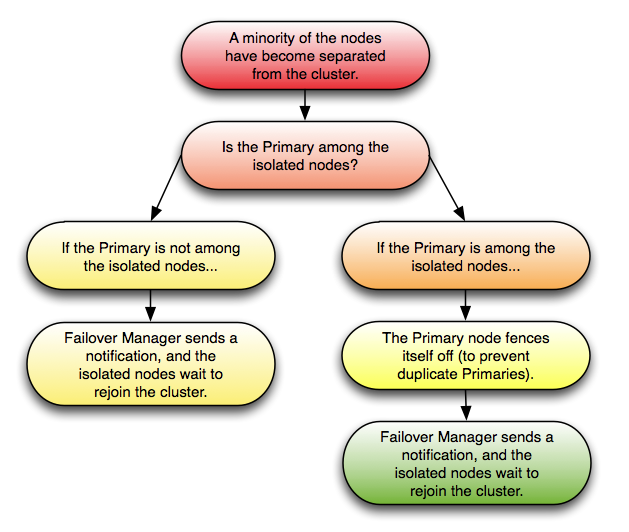
Nodes Become Isolated from the Cluster
The following scenario details the actions taken if one or more nodes (a
minority of the cluster) become isolated from the majority of the
cluster.
If one or more nodes (but less than half of the cluster) become isolated
from the rest of the cluster, the remaining cluster behaves as if the
nodes have failed. The agents attempt to discern if the Primary node is
among the isolated nodes; it is, the Primary fences itself off from the
cluster, while a Standby node (from within the cluster majority) is
promoted to replace it. Other Standby nodes are configured to replicate
from the new primary unless auto.reconfigure is set to false.
Failover Manager then notifies an administrator, and the isolated nodes
rejoin the cluster when they are able. When the nodes rejoin the
cluster, the failover priority may change.