Advanced Server JDBC Connector Overview
Sun Microsystems created a standardized interface for connecting Java applications to databases known as Java Database Connectivity (JDBC). The Advanced Server JDBC Connector connects a Java application to a Postgres database.
JDBC Driver Types
There are currently four different types of JDBC drivers, each with their own specific implementation, use and limitations. The Advanced Server JDBC Connector is a Type 4 driver.
Type 1 Driver
This driver type is the JDBC-ODBC bridge.
It is limited to running locally.
Must have ODBC installed on computer.
Must have ODBC driver for specific database installed on computer.
Generally can’t run inside an applet because of Native Method calls.
Type 2 Driver
This is the native database library driver.
Uses Native Database library on computer to access database.
Generally can’t run inside an applet because of Native Method calls.
Must have database library installed on client.
Type 3 Driver
100% Java Driver, no native methods.
Does not require pre-installation on client.
Can be downloaded and configured on-the-fly just like any Java class file.
Uses a proprietary protocol for talking with a middleware server.
Middleware server converts from proprietary calls to DBMS specific calls
Type 4 Driver
100% Java Driver, no native methods.
Does not require pre-installation on client.
Can be downloaded and configured on-the-fly just like any Java class file.
Unlike Type III driver, talks directly with the DBMS server.
Converts JDBC calls directly to database specific calls.
The JDBC Interface
Following figure shows the core API interfaces in the JDBC specification and
how they relate to each other. These interfaces are implemented in the
java.sql package.
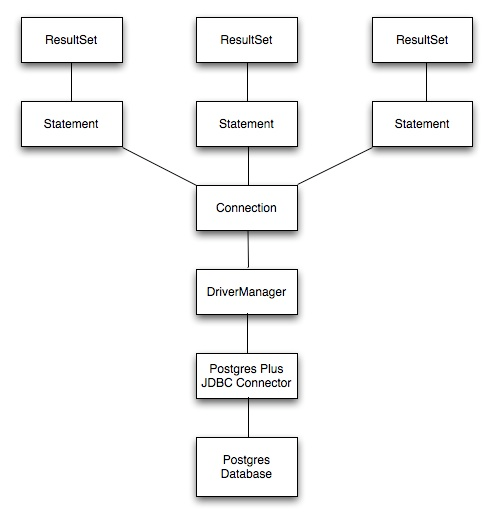
JDBC Class Relationships
JDBC Classes and Interfaces
The core API is composed of classes and interfaces; these classes and interfaces work together as shown below:

Core Classes and Interfaces
The JDBC DriverManager
The figure below depicts the role of the DriverManager class in a typical JDBC application. The DriverManager acts as the bridge between a Java
application and the backend database and determines which JDBC driver to
use for the target database.
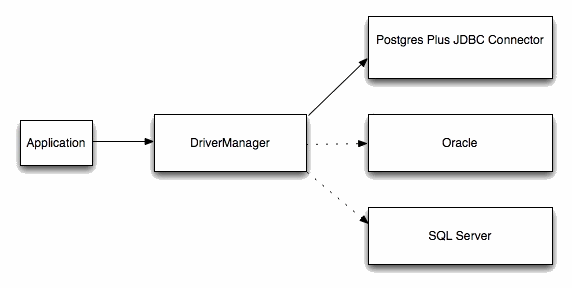
DriverManager/Drivers
Advanced Server JDBC Connector Compatibility
EDB provides support for multiple JRE/JDK versions by providing appropriate JDBC drivers for each version of Java Virtual Machine. Use the following table to determine compatibility between your JRE/JDK version and the Advanced Server Driver.
Table – Advanced Server JDBC Driver Compatibility
JRE/JDK Version(s) |
JDBC Specification |
Advanced Server JDBC Driver |
Community JDBC Driver |
|---|---|---|---|
1.4, 1.5 (see Note 1) |
3 |
edb-jdbc15.jar |
postgresql-9.3.1103.JDBC3.jar |
1.6 (see Note 2) |
4 |
edb-jdbc16.jar |
postgresql-42.2.9.jre6.jar |
1.7 |
4.1 |
edb-jdbc17.jar |
postgresql-42.2.9.jre7.jar |
1.8 |
4.2 |
edb-jdbc18.jar |
postgresql-42.2.9.jar |
Note
JRE/JDK versions 1.4 and 1.5 are no longer supported by the Advanced Server JDBC Connector as the JDBC driver file
edb-jdbc15.jaris no longer provided.The
edb-jdbc16.jarfile is not available for Linux on PowerPC 64 little endian (ppc64le), Debian/Ubuntu and RHEL 8 platforms.The
edb-jdbc17.jarfile is not available for Debian/Ubuntu and RHEL 8 platforms.Community version numbers are based on the
pgjdbcversion, not the PostgreSQL version.Advanced Server JDBC releases are decoupled with EDB Postgres Advanced Server releases.
The following JDBC Compatibility rules apply:
From Community website: “The PostgreSQL JDBC driver has some unique properties that you should be aware of before starting to develop any code for it. The current development driver supports six server versions and six java environments. This doesn’t mean that every feature must work in every combination, but a reasonable behaviour must be provided for non-supported versions. While this extra compatibility sounds like a lot of work, the actual goal is to reduce the amount of work by maintaining only one code base.”
From the
pgjdbcreadme file: “PgJDBC regression tests are run against all PostgreSQL versions since 8.4, including “build PostgreSQL from git master” version. Don’t assume pgjdbc 9.4.x is only PostgreSQL 9.4 compatible.”
For the supported community versions, see the PostgreSQL JDBC Driver website.