Overview of the Migration Portal home page
The Migration Portal home page provides quick access to migration tools.
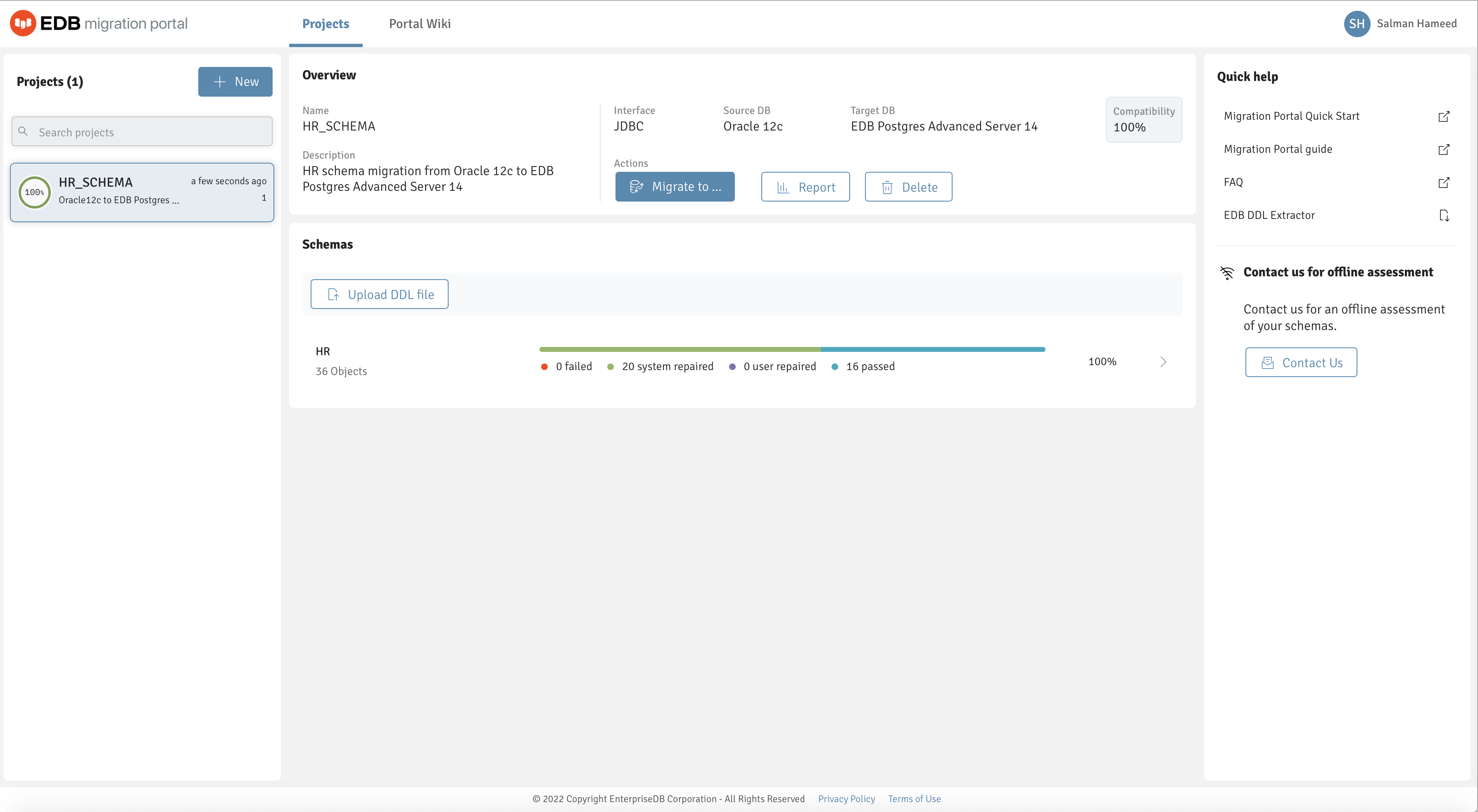
The Migration Portal home page.
The Migration Portal home page allows access to the following Migration Portal features:
Projects : The Projects panel displays a list of assessed projects.
Createproject : Select +New to create a project.
Searchprojects : Use the Search box to search for projects.
Overview : The Overview panel provides details about the selected project and displays the compatibility percentage after schema assessment.
Migrateto : Select Migrateto either to download an EDB Postgres Advanced Server compatible
.sqlfile or migrate a schema to an EDB Postgres Advanced Server on premises or in the cloud. For more information, see Schema migration .Report : Select Report to view and download the schema assessment report.
Delete : Select Delete to delete a selected project.
Warningsign : A warning message appears if a project or a schema is less than 70% compatible or any DDL doesn’t succeed after multiple attempts.
UploadDDLfile : Select Uploadnewschema to upload a new DDL file.
Schemas : The Schemas panel displays the assessment result from an uploaded DDL file.
Quickhelp : The Quick help panel contains quick links to a few required resources.
PortalWiki : Select PortalWiki to access links to product information and more help guides.