
Overview of the Migration Portal home page#
The Migration Portal home page provides quick access to migration tools.
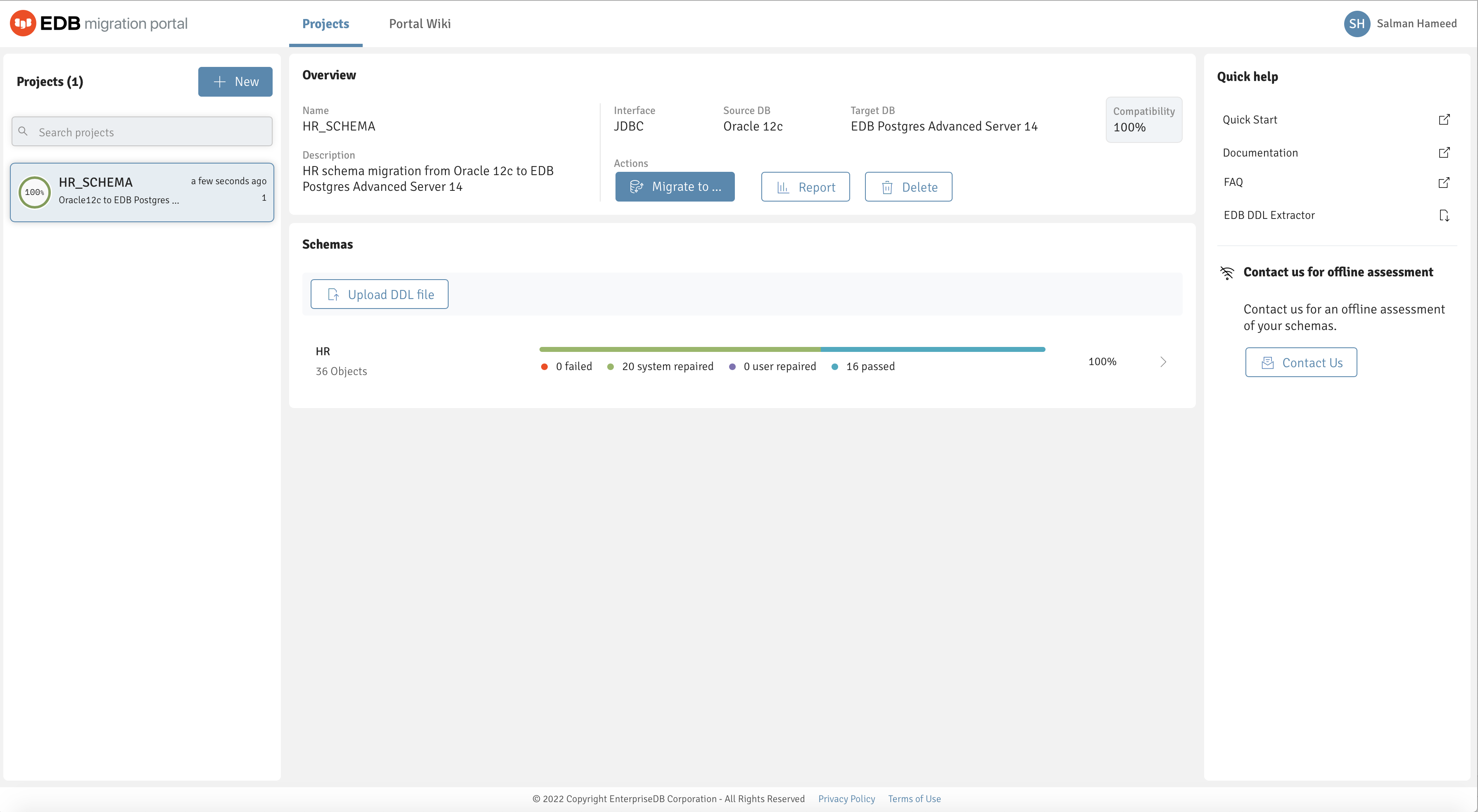
The Migration Portal home page.#
The Migration Portal home page allows access to the following Migration Portal features:
Projects: The Projects panel displays a list of assessed projects.
Create project: Select + New to create a project.
Search projects: Use the Search box to search for projects.
Overview: The Overview panel provides details about the selected project and displays the compatibility percentage after schema assessment.
Migrate to: Select Migrate to either to download an EDB Postgres Advanced Server compatible
.sqlfile or migrate a schema to an EDB Postgres Advanced Server on premises or in the cloud. For more information, see Performing a schema migration .Report: Select Report to view and download the schema assessment report.
Delete: Select Delete to delete a selected project.
Warning sign: A warning message appears if a project or a schema is less than 70% compatible or any DDL doesn’t succeed after multiple attempts.
Upload DDL file: Select Upload new schema to upload a new DDL file.
Schemas: The Schemas panel displays the assessment result from an uploaded DDL file.
Quick help: The Quick help panel contains quick links to a few required resources.
Portal Wiki: Select Portal Wiki to access links to product information and more help guides.