Performing a Schema Extraction
Prerequisites
Before extracting a schema, you must download the latest EDB DDL
Extractor script from the Migration Portal Projects page or from the
link provided in the DDL Extractor guide in the Portal Wiki. The script
can be run in SQL Developer or SQL*Plus. It uses Oracle’s
DBMS_METADATA built-in package to extract DDLs for different objects
under schemas (specified while running the script). The EDB DDL
extractor creates the DDL file uploaded to the portal and analyzed for
EDB Postgres compatibility.
Note!! Note You must have
CONNECTandSELECT_CATALOG_ROLEroles andCREATE TABLEprivilege.
For SQL*Plus
Connect to SQL*Plus and run the command:
SQL>@edb_ddl_extractor.sqlProvide the schema name and the path or directory in which the extractor will store the extracted DDL. When extracting multiple schemas, use a comma (
‘,’) as a delimiter.
Note!! Note If you want to extract all the user schemas from the current database, do not mention any schema names while extracting. However, it is recommended to mention the schema names that you would like to extract.
If you want to extract dependent objects from other schemas, enter
yesorno.For example, on Linux:
Enter a comma separated list of schemas to be extracted (Default all schemas): HR, SCOTT, FINANCE

Location for output file (Default current location) : /home/oracle/extracted_ddls/

WARNING:

Given schema(s) list may contain objects which are dependent on objects from other schema(s), not mentioned in the list.` `Assessment may fail for such objects. It is suggested to extract all dependent objects together.

Extract dependent object from other schemas?(yes/no) (Default no / Ignored for all schemas option): yes
On Windows:
Enter comma separated list of schemas to be extracted (Default all schemas): HR, SCOTT, FINANCE

Location for output file (Default current location) : c:\Users\Example\Desktop\

WARNING:

Given schema(s) list may contain objects which are dependent on objects from other schema(s), not mentioned in the list.` `Assessment may fail for such objects. It is suggested to extract all dependent objects together.

Extract dependent object from other schemas?(yes/no) (Default no / Ignored for all schemas option): yes
For SQL Developer
Connect to the SQL server and run the following command:

Enter the path for Linux or Windows.
Figure 3-1: Enter the path for Linux or Windows
Enter a comma-separated list of schemas:
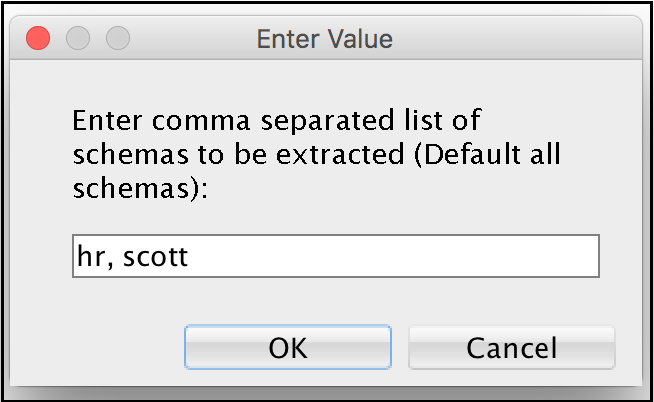
Provide a list of schemas.
Figure 3-2: Provide a list of schemas
Enter the path for the output file:
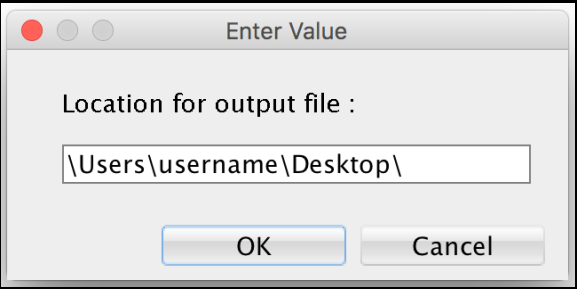
Specify the output file path.
Figure 3-3: Specify the output file path
Enter (yes/no) to extract dependant objects:
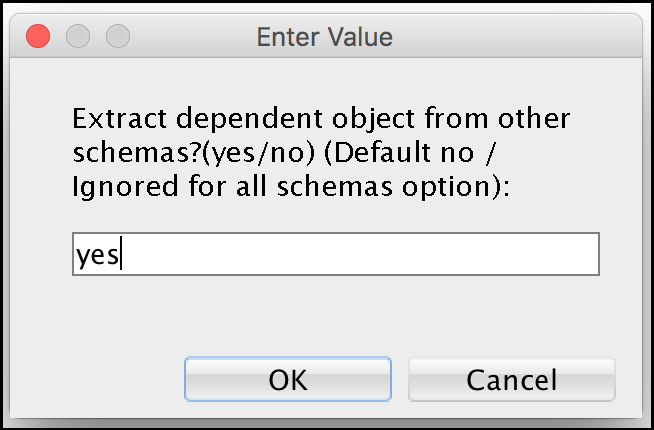
Extracting dependent objects.
Figure 3-4: Extracting dependent objects
Note!! Note You can also enter single schema name in both SQL*Plus and SQL Developer.
The script then iterates through the object types in the source database
and once the task is completed, the .SQL output is stored at the entered
location, i.e., c:\Users\Example\Desktop\.
Additional Notes
The EDB DDL Extractor script does not extract objects restored using
Flashbackand still have names likeBIN$b54+4XlEYwPgUAB/AQBWwA==$0. If you want to extract these objects, you must change the name of the objects and re-run the extraction process.DDL Extractor extracts
nologgingtables as normal tables. Once these tables are migrated to EDB Postgres Advanced Server, WAL log files will be created.DDL Extractor creates Global Temporary tables to store the schema names and their dependency information. These tables are dropped at the end of successful extraction.
DDL Extractor script does not extract schemas whose name starts with
PG_because PostgreSQL does not support it. If you want to extract these schemas, you must change name of schema before extraction.
Supported Object Types
The Migration Portal supports the migration of the following object types:
Synonyms
DB Links
Types and Type Body
Sequences
Tables
Constraints
Indexes (Except LOB indexes and indexes on materialized views)
Views
Materialized Views
Triggers
Functions
Procedures
Packages
Note!! Note COMMENTS on Columns, Tables, and Materialized Views are also supported.
Unsupported Object Types
Editions
Operators
Schedulers
LOB indexes and Indexes on Materialized Views
XML Schemas
Profiles
Role and Object Grants
Tablespaces
Directories
Users
RLS Policy
Queues
Oracle System Schemas
EDB DDL Extractor script will ignore the following system schemas while extracting from Oracle:
ANONYMOUS |
APEX_PUBLIC_USER |
APEX_030200 |
APEX_040000 |
APEX_040000 |
APPQOSSYS |
AUDSYS |
BI |
CTXSYS |
DMSYS |
DBSNMP |
DIP |
DVF |
DVSYS |
EXFSYS |
FLOWS_FILES |
FLOWS_020100 |
GSMADMIN_INTERNAL |
GSMCATUSER |
GSMUSER |
IX |
LBACSYS |
MDDATA |
MDSYS |
MGMT_VIEW |
OE |
OJVMSYS |
OLAPSYS |
ORDPLUGINS |
ORDSYS |
ORDDATA |
OUTLN |
ORACLE_OCM |
OWBSYS |
OWBYSS_AUDIT |
PM |
RMAN |
SH |
SI_INFORMTN_SCHEMA |
SPATIAL_CSW_ADMIN_USR |
SPATIAL_WFS_ADMIN_USR |
SYS |
SYSBACKUP |
SYSDG |
SYSKM |
SYSTEM SYSMAN |
TSMSYS WKPROXY |
WKSYS |
WK_TEST XS$NULL |
WMSYS |
XDB |