‘Quick start on Debian 11’
Use this quick start to create a highly available demo cluster using EDB
Postgres Advanced Server or EDB Postgres Extended Server version 15 on
Debian 11. The etcd hosts will be called etcd1 , etcd2 , and
etcd3 . The two database nodes in streaming replication are
pg-patroni1 and pg-patroni2 .
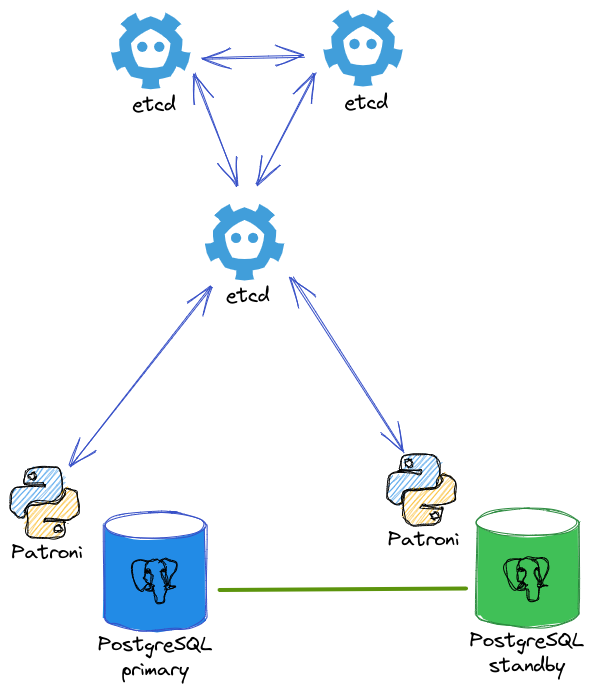
Demo diagram
Etcd
See ‘Installing and configuring etcd’ to install and set up etcd.
EDB Postgres Advanced or Extended Server
On both pg-patroni1 and pg-patroni2 hosts, install your
preferred Postgres flavor. See EDB Postgres Advanced Server or EDB Postgres Extended Server for more
information about installing these products using the EDB repository.
The Postgres flavor you choose determines your environment variables.
For EDB Postgres Advanced Server, use the following settings:
export PGPORT=5444
export PGUSER=enterprisedb
export PGGROUP=enterprisedb
export PGDATA="/var/lib/edb-as/15/main"
export PGBIN="/usr/lib/edb-as/15/bin"
export PGSOCKET="/var/run/edb-as"
For EDB Postgres Extended Server, use the following settings:
export PGPORT=5432
export PGUSER=postgres
export PGGROUP=postgres
export PGDATA="/var/lib/edb-pge/15/data"
export PGBIN="/usr/lib/edb-pge/15/bin"
export PGSOCKET="/var/run/edb-pge"
Patroni bootstraps (creates) the initial Postgres cluster and is in
charge of starting the service. Make sure systemctl is disabled for
this service, and remove the Postgres cluster created during the
installation:
$ sudo systemctl stop edb-as@15-main.service
$ sudo systemctl disable edb-as@15-main.service
$ sudo rm -fr /var/lib/edb-as/15/main
```  or

```bash
$ sudo systemctl stop edb-pge-15.service
$ sudo systemctl disable edb-pge-15.service
$ sudo rm -fr /var/lib/edb-pge/15/data
Watchdog
Patroni is the component interacting with the watchdog device. Set the
permissions of the software watchdog on both pg-patroni1 and
pg-patroni2 hosts:
$ cat <<EOF | sudo tee /etc/udev/rules.d/99-watchdog.rules
KERNEL=="watchdog", OWNER="$PGUSER", GROUP="$PGGROUP"
EOF
$ sudo sh -c echo "softdog" >> /etc/modules-load.d/softdog.conf
$ sudo modprobe softdog
$ sudo chown $PGUSER:$PGGROUP /dev/watchdog
Patroni
On both pg-patroni1 and pg-patroni2 hosts, install Patroni and
its dependencies for etcd. See ‘Installing Patroni’ .
Define the Patroni configuration in /etc/patroni.yml :
$ CLUSTER_NAME="demo-cluster-1"
$ MY_NAME=$(hostname --short)
$ MY_IP=$(hostname -I | awk  {print $1})
$ cat <<EOF | sudo tee /etc/patroni.yml
scope: $CLUSTER_NAME
namespace: /db/
name: $MY_NAME

restapi:
  listen: "0.0.0.0:8008"
  connect_address: "$MY_IP:8008"
  authentication:
    username: patroni
    password: mySupeSecretPassword

etcd3:
    hosts:
    - etcd1:2379
    - etcd2:2379
    - etcd3:2379

bootstrap:
  dcs:
    ttl: 30
    loop_wait: 10
    retry_timeout: 10
    maximum_lag_on_failover: 1048576
    postgresql:
      use_pg_rewind: true
      use_slots: true
      parameters:
        archive_mode: "on"
        archive_command: "/bin/true"

  initdb:
  - encoding: UTF8
  - data-checksums
  - auth-local: peer
  - auth-host: scram-sha-256

  pg_hba:
  - host replication replicator 0.0.0.0/0 scram-sha-256
  - host all all 0.0.0.0/0 scram-sha-256

  # Some additional users which needs to be created after initializing new cluster
  users:
    admin:
      password: admin%
      options:
        - createrole
        - createdb

postgresql:
  listen: "0.0.0.0:$PGPORT"
  connect_address: "$MY_IP:$PGPORT"
  data_dir: $PGDATA
  bin_dir: $PGBIN
  pgpass: /tmp/pgpass0
  authentication:
    replication:
      username: replicator
      password: confidential
    superuser:
      username: $PGUSER
      password: my-super-password
    rewind:
      username: rewind_user
      password: rewind_password
  parameters:
    unix_socket_directories: "$PGSOCKET,/tmp"

watchdog:
  mode: required
  device: /dev/watchdog
  safety_margin: 5

tags:
  nofailover: false
  noloadbalance: false
  clonefrom: false
  nosync: false
EOF
Note
In the postgresql: authentication: section in the example, a superuser is created during initialization (initdb) and later used by Patroni to connect to the database. The replication user is created and used by the standby servers to access the replication source by way of streaming replication. Finally, a rewind user is created and is used with pg_rewind when needed. We then recommend changing those passwords in the example configuration to match your password policy.
$MY_IP and $MY_NAME are specific to the local host. Otherwise,
the patroni.yml configuration is the same on all Patroni nodes.
Patroni expects to find the postgres binary in the bin_dir
location, while the EDB Postgres Advanced Server binary is called
edb-postgres . Create a symbolic link to let Patroni find that
binary:
$ sudo ln -s /usr/lib/edb-as/15/bin/edb-postgres /usr/lib/edb-as/15/bin/postgres
Depending on the Patroni installation source, a systemd file might already have been created. Define your own file with the accurate system user, group, and configuration path:
$ cat <<EOF | sudo tee /etc/systemd/system/patroni.service
[Unit]
Description=Runners to orchestrate a high-availability Postgres
After=syslog.target network.target

[Service]
Type=simple
User=$PGUSER
Group=$PGGROUP
EnvironmentFile=-/etc/patroni_env.conf
ExecStart=patroni /etc/patroni.yml
ExecReload=/bin/kill -s HUP \$MAINPID
KillMode=process
TimeoutSec=30
Restart=no

[Install]
WantedBy=multi-user.target
EOF

$ sudo systemctl daemon-reload
$ sudo systemctl enable patroni
$ sudo systemctl start patroni
Start the Patroni service first on pg-patroni1 so it becomes the
leader of your Postgres cluster, and then start pg-patroni2 .
To list the members of the cluster, use the patronictl command:
$ patronictl -c /etc/patroni.yml list
+ Cluster: demo-cluster-1 (7104275668989116902) ----+----+-----------+
| Member      | Host            | Role    | State   | TL | Lag in MB |
+-------------+-----------------+---------+---------+----+-----------+
| pg-patroni1 | 192.168.121.61  | Leader  | running |  1 |           |
| pg-patroni2 | 192.168.121.135 | Replica | running |  1 |         0 |
+-------------+-----------------+---------+---------+----+-----------+
The Patroni REST API is available on port 8008 .
With EDB Postgres Advanced Server, after the database cluster is running, some other systemd dependencies might need a reset. Use the following commands to perform the resets:
$ sudo systemctl restart edb-as15-pgagent.service
$ sudo systemctl reset-failed
HAProxy
For the purpose of this example, install HAProxy on both pg-patroni1
and pg-patroni2 hosts:
$ sudo apt-get install -y haproxy
$ sudo systemctl stop haproxy
$ sudo cp /etc/haproxy/haproxy.cfg /etc/haproxy/haproxy.cfg.bck
$ cat <<EOF | sudo tee /etc/haproxy/haproxy.cfg
global
    maxconn 100

defaults
    log    global
    mode    tcp
    retries 2
    timeout client 30m
    timeout connect 4s
    timeout server 30m
    timeout check 5s

listen stats
    mode http
    bind *:7000
    stats enable
    stats uri /

listen read-write
    bind *:5000
    option httpchk OPTIONS /read-write
    http-check expect status 200
    default-server inter 3s fall 3 rise 2 on-marked-down shutdown-sessions
    server pg-patroni1 pg-patroni1:$PGPORT maxconn 100 check port 8008
    server pg-patroni2 pg-patroni2:$PGPORT maxconn 100 check port 8008

listen read-only
    balance roundrobin
    bind *:5001
    option httpchk OPTIONS /replica
    http-check expect status 200
    default-server inter 3s fall 3 rise 2 on-marked-down shutdown-sessions
    server pg-patroni1 pg-patroni1:$PGPORT maxconn 100 check port 8008
    server pg-patroni2 pg-patroni2:$PGPORT maxconn 100 check port 8008
EOF

$ sudo systemctl enable haproxy
$ sudo systemctl start haproxy
There are two sections: read-write, using port 5000 , and read-only,
using port 5001 . All Postgres hosts are included in both sections
because they are all potential candidates to be either primary or
standby. For HAProxy to know the role each host currently has, it
queries the Patroni REST API:
$ curl -s http://pg-patroni1:8008
{
  "state": "running",
  "postmaster_start_time": "2022-06-30 07:45:55.427895+00:00",
  "role": "master",
  "server_version": 140400,
  "xlog": {
    "location": 67108960
  },
  "timeline": 1,
  "replication": [
    {
      "usename": "replicator",
      "application_name": "pg-patroni2",
      "client_addr": "192.168.121.229",
      "state": "streaming",
      "sync_state": "async",
      "sync_priority": 0
    }
  ],
  "dcs_last_seen": 1656575356,
  "database_system_identifier": "7114936110138668110",
  "patroni": {
    "version": "2.1.3",
    "scope": "demo-cluster-1"
  }
}
Note
By using the /replica endpoint, Patroni redirects only to a standby server. Use /read-only to also include the primary.
You can now use port 5000 and port 5001 to choose between
read-write or read-only connections:
$ psql -U admin -d postgres -h pg-patroni1 -p 5000 -c "SELECT pg_is_in_recovery();"
 pg_is_in_recovery
- ------------------
 f
(1 row)

$ psql -U admin -d postgres -h pg-patroni1 -p 5001 -c "SELECT pg_is_in_recovery();"
 pg_is_in_recovery
- ------------------
 t
(1 row)