Managing a PEM Agent
The sections that follow provide information about the behavior and management of a PEM agent.
Agent Privileges
By default, the PEM agent is installed with root privileges for the
operating system host and superuser privileges for the database server.
These privileges allow the PEM agent to invoke unrestricted probes on
the monitored host and database server about system usage, retrieving
and returning the information to the PEM server.
Please note that PEM functionality diminishes as the privileges of the
PEM agent decrease. For complete functionality, the PEM agent should run
as root. If the PEM agent is run under the database server’s service
account, PEM probes will not have complete access to the statistical
information used to generate reports, and functionality will be limited
to the capabilities of that account. If the PEM agent is run under
another lesser-privileged account, functionality will be limited even
further.
If you limit the operating system privileges of the PEM agent, some of the PEM probes will not return information, and the following functionality may be affected:
Probe or Action |
Operating System |
PEM Functionality Affected |
Data And Logfile Analysis |
Linux/ Windows |
The Postgres Expert will be unable to access complete information. |
Session Information |
Linux |
The per-process statistics will be incomplete. |
PG HBA |
Linux/ Windows |
The Postgres Expert will be unable to access complete information. |
Service restart functionality |
Linux/ Windows |
The Audit Log Manager, Server Log Manager Log Analysis Expert and PEM may be unable to apply requested modifications. |
Package Deployment |
Linux/ Windows |
PEM will be unable to run downloaded installation modules. |
Batch Task |
Windows |
PEM will be unable to run scheduled batch jobs in Windows. |
Collect data from server (root access required) |
Linux/ Windows |
Columns such as swap usage, CPU usage, IO read, IO write will be displayed as 0 in the session activity dashboard. |
Note
The above-mentioned list is not comprehensive, but should provide an overview of the type of functionality that will be limited.
If you restrict the database privileges of the PEM agent, the following PEM functionality may be affected:
Probe |
Operating System |
PEM Functionality Affected |
Audit Log Collection |
Linux/Windows |
PEM will receive empty data from the PEM database. |
Server Log Collection |
Linux/Windows |
PEM will be unable to collect server log information. |
Database Statistics |
Linux/Windows |
The Database/Server Analysis dashboards will contain incomplete information. |
Session Waits/System Waits |
Linux/Windows |
The Session/System Waits dashboards will contain incomplete information. |
Locks Information |
Linux/Windows |
The Database/Server Analysis dashboards will contain incomplete information. |
Streaming Replication |
Linux/Windows |
The Streaming Replication dashboard will not display information. |
Slony Replication |
Linux/Windows |
Slony-related charts on the Database Analysis dashboard will not display information. |
Tablespace Size |
Linux/Windows |
The Server Analysis dashboard will not display complete information. |
xDB Replication |
Linux/Windows |
PEM will be unable to send xDB alerts and traps. |
If the probe is querying the operating system with insufficient
privileges, the probe may return a permission denied error.
If the probe is querying the database with insufficient privileges, the
probe may return a permission denied error or display the returned data
in a PEM chart or graph as an empty value.
When a probe fails, an entry will be written to the log file that contains the name of the probe, the reason the probe failed, and a hint that will help you resolve the problem.
You can view probe-related errors that occurred on the server in the
Probe Log dashboard, or review error messages in the PEM worker log
files. On Linux, the default location of the log file is:
/var/log/pem/worker.log
On Windows, log information is available on the Event Viewer.
Agent Configuration
A number of user-configurable parameters and registry entries control the behavior of the PEM agent. You may be required to modify the PEM agent’s parameter settings to enable some PEM functionality. After modifying values in the PEM agent configuration file, you must restart the PEM agent to apply any changes.
With the exception of the PEM_MAXCONN parameter, we strongly recommend
against modifying any of the configuration parameters or registry
entries listed below without first consulting EDB support
experts unless the modifications are required to enable PEM
functionality.
On Linux systems, PEM configuration options are stored in the agent.cfg file, located
in /usr/edb/pem/agent/etc. The agent.cfg file contains the following entries:
Parameter Name |
Description |
Default Value |
|---|---|---|
pem_host |
The IP address or hostname of the PEM server. |
127.0.0.1. |
pem_port |
The database server port to which the agent connects to communicate with the PEM server. |
Port 5432. |
pem_agent |
A unique identifier assigned to the PEM agent. |
The first agent is ‘1’, the second agent is ‘2’, and so on. |
agent_ssl_key |
The complete path to the PEM agent’s key file. |
/root/.pem/agent.key |
agent_ssl_crt |
The complete path to the PEM agent’s certificate file. |
/root/.pem/agent.crt |
agent_flag_dir |
Used for HA support. Specifies the directory path checked for requests to take over monitoring another server. Requests are made in the form of a file in the specified flag directory. |
Not set by default. |
log_level |
Log level specifies the type of event that will be written to the PEM log files. |
warning |
log_location |
Specifies the location of the PEM worker log file. |
127.0.0.1. |
agent_log_location |
Specifies the location of the PEM agent log file. |
/var/log/pem/agent.log |
long_wait |
The maximum length of time (in seconds) that the PEM agent will wait before attempting to connect to the PEM server if an initial connection attempt fails. |
30 seconds |
short_wait |
The minimum length of time (in seconds) that the PEM agent will wait before checking which probes are next in the queue (waiting to run). |
10 seconds |
alert_threads |
The number of alert threads to be spawned by the agent. |
Set to 1 for the agent that resides on the host of the PEM server; 0 for all other agents. |
enable_smtp |
When set to true for multiple PEM Agents (7.13 or lesser) and PEM backend database (9.4 or lesser) then it may send more duplicate emails. Whereas for PEM Agents (7.14 or higher) and PEM backend database (9.5 or higher) then it may send lesser duplicate emails. |
true for PEM server host; false for all others. |
enable_snmp |
When set to true for multiple PEM Agents (7.13 or lesser) and PEM backend database (9.4 or lesser) then it may send more duplicate traps. Whereas for PEM Agents (7.14 or higher) and PEM backend database (9.5 or higher) then it may send lesser duplicate traps. |
true for PEM server host; false for all others. |
enable_nagios |
When set to true, Nagios alerting is enabled. |
true for PEM server host; false for all others. |
enable_webhook |
When set to true, Webhook alerting is enabled. |
true for PEM server host; false for all others. |
max_webhook_retries |
Set maximum number of times pemAgent should retry to call webhooks on failure. |
Default 3. |
connect_timeout |
The max time in seconds (a decimal integer string) that the agent will wait for a connection. |
Not set by default; set to 0 to indicate the agent should wait indefinitely. |
allow_server_restart |
If set to TRUE, the agent can restart the database server that it monitors. Some PEM features may be enabled/disabled, depending on the value of this parameter. |
false |
max_connections |
The maximum number of probe connections used by the connection throttler. |
0 (an unlimited number) |
connection_lifetime |
Use ConnectionLifetime (or connection_lifetime) to specify the minimum number of seconds an open but idle connection is retained. This parameter is ignored if the value specified in MaxConnections is reached and a new connection (to a different database) is required to satisfy a waiting request. |
By default, set to 0 (a connection is dropped when the connection is idle after the agent’s processing loop). |
allow_batch_probes |
If set to TRUE, the user will be able to create batch probes using the custom probes feature. |
false |
heartbeat_connection |
When set to TRUE, a dedicated connection is used for sending the heartbeats. |
false |
batch_script_dir |
Provide the path where script file (for alerting) will be stored. |
/tmp |
connection_custom_setup |
Use to provide SQL code that will be invoked when a new connection with a monitored server is made. |
Not set by default. |
ca_file |
Provide the path where the CA certificate resides. |
Not set by default. |
batch_script_user |
Provide the name of the user that should be used for executing the batch/shell scripts. |
None |
webhook_ssl_key |
The complete path to the webhook’s SSL client key file. |
|
webhook_ssl_crt |
The complete path to the webhook’s SSL client certificate file. |
|
webhook_ssl_crl |
The complete path of the CRL file to validate webhook server certificate. |
|
webhook_ssl_ca_crt |
The complete path to the webhook’s SSL ca certificate file. |
|
allow_insecure_webhooks |
When set to true, allow webhooks to call with insecure flag. |
false |
On 64 bit Windows systems, PEM registry entries are located in:
HKEY_LOCAL_MACHINE\Software\Wow6432Node\EnterpriseDB\PEM\agent
The registry contains the following entries:
Parameter Name |
Description |
Default Value |
PEM_HOST |
The IP address or hostname of the PEM server. |
127.0.0.1. |
PEM_PORT |
The database server port to which the agent connects to communicate with the PEM server. |
Port 5432. |
AgentID |
A unique identifier assigned to the PEM agent. |
The first agent is ‘1’, the second agent is ‘2’, and so on. |
AgentKeyPath |
The complete path to the PEM agent’s key file. |
%APPDATA%\Roaming\pem\ agent.key. |
AgentCrtPath |
The complete path to the PEM agent’s certificate file. |
%APPDATA%\Roaming\pem\ agent.crt |
AgentFlagDir |
Used for HA support. Specifies the directory path checked for requests to take over monitoring another server. Requests are made in the form of a file in the specified flag directory. |
Not set by default. |
LogLevel |
Log level specifies the type of event that will be written to the PEM log files. |
warning |
LongWait |
The maximum length of time (in seconds) that the PEM agent will wait before attempting to connect to the PEM server if an initial connection attempt fails. |
30 seconds |
shortWait |
The minimum length of time (in seconds) that the PEM agent will wait before checking which probes are next in the queue (waiting to run). |
10 seconds |
AlertThreads |
The number of alert threads to be spawned by the agent. |
Set to 1 for the agent that resides on the host of the PEM server; 0 for all other agents. |
EnableSMTP |
When set to true, the SMTP email feature is enabled. |
true for PEM server host; false for all others. |
EnableSNMP |
When set to true, the SNMP trap feature is enabled. |
true for PEM server host; false for all others. |
EnableWebhook |
When set to true, Webhook alerting is enabled. |
true for PEM server host; false for all others. |
MaxWebhookRetries |
Set maximum number of times pemAgent should retry to call webhooks on failure. |
Default 3. |
ConnectTimeout |
The max time in seconds (a decimal integer string) that the agent will wait for a connection. |
Not set by default; if set to 0, the agent will wait indefinitely. |
AllowServerRestart |
If set to TRUE, the agent can restart the database server that it monitors. Some PEM features may be enabled/disabled, depending on the value of this parameter. |
true |
MaxConnections |
The maximum number of probe connections used by the connection throttler. |
0 (an unlimited number) |
ConnectionLifetime |
Use ConnectionLifetime (or connection_lifetime) to specify the minimum number of seconds an open but idle connection is retained. This parameter is ignored if the value specified in MaxConnections is reached and a new connection (to a different database) is required to satisfy a waiting request. |
By default, set to 0 (a connection is dropped when the connection is idle after the agent’s processing loop). |
AllowBatchProbes |
If set to TRUE, the user will be able to create batch probes using the custom probes feature. |
false |
HeartbeatConnection |
When set to TRUE, a dedicated connection is used for sending the heartbeats. |
false |
BatchScriptDir |
Provide the path where script file (for alerting) will be stored. |
/tmp |
ConnectionCustomSetup |
Use to provide SQL code that will be invoked when a new connection with a monitored server is made. |
Not set by default. |
ca_file |
Provide the path where the CA certificate resides. |
Not set by default. |
AllowBatchJobSteps |
If set to true,the batch/shell scripts will be executed using Administrator user account. |
None |
WebhookSSLKey |
The complete path to the webhook’s SSL client key file. |
|
WebhookSSLCrt |
The complete path to the webhook’s SSL client certificate file. |
|
WebhookSSLCrl |
The complete path of the CRL file to validate webhook server certificate. |
|
WebhookSSLCaCrt |
The complete path to the webhook’s SSL ca certificate file. |
|
AllowInsecureWebhooks |
When set to true, allow webhooks to call with insecure flag. |
false |
Agent Properties
The PEM Agent Properties dialog provides information about the PEM agent
from which the dialog was opened; to open the dialog, right-click on an
agent name in the PEM client tree control, and select Properties from
the context menu.
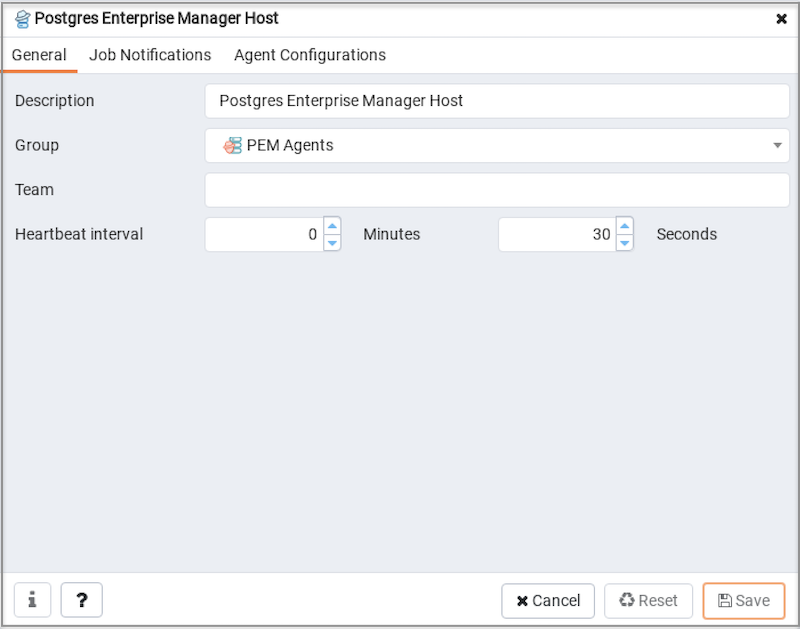
PEM Agent Properties dialog - General tab
Use fields on the PEM Agent Properties dialog to review or modify
information about the PEM agent:
The
Descriptionfield displays a modifiable description of the PEM agent. This description is displayed in the tree control of the PEM client.You can use groups to organize your servers and agents in the PEM client tree control. Use the
Groupdrop-down listbox to select the group in which the agent will be displayed.Use the
Teamfield to specify the name of the group role that should be able to access servers monitored by the agent; the servers monitored by this agent will be displayed in the PEM client tree control to connected team members. Please note that this is a convenience feature. The Team field does not provide true isolation, and should not be used for security purposes.The
Heartbeat intervalfields display the length of time that will elapse between reports from the PEM agent to the PEM server. Use the selectors next to theMinutesorSecondsfields to modify the interval.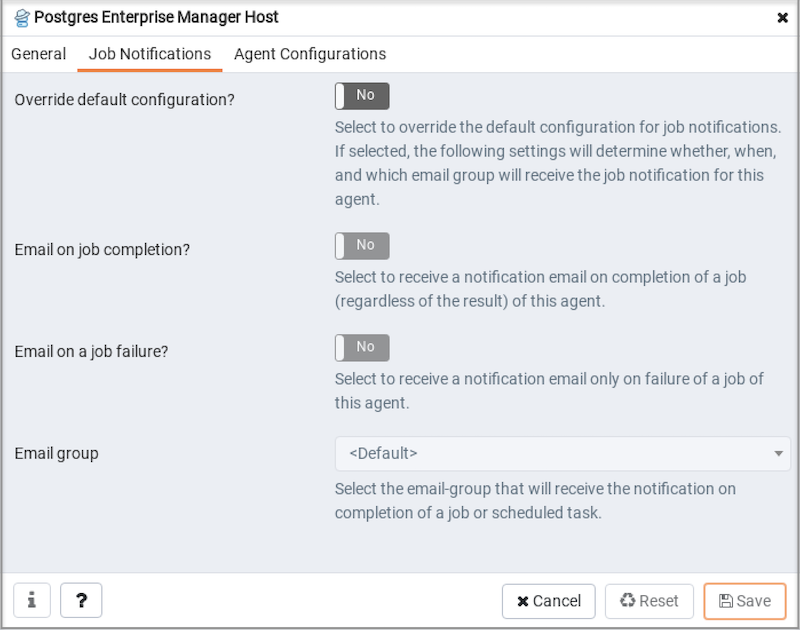
PEM Agent Properties dialog - Job Notifications tab
Use the fields on the
Job Notificationstab to configure the email notification settings on agent level:Use the
Override default configuration?switch to specify if you want the agent level job notification settings to override the default job notification settings. If you selectYesfor this switch, you can use the rest of the settings on this dialog to define when and to whom the job notifications should be sent. Please note that the rest of the settings on this dialog work only if you enable theOverride default configuration?switch.Use the
Email on job completion?switch to specify if the job notification should be sent on the successful job completion.Use the
Email on a job failure?switch to specify if the job notification should be sent on the failure of a job.Use the
Email groupfield to specify the email group to whom the job notification should be sent.
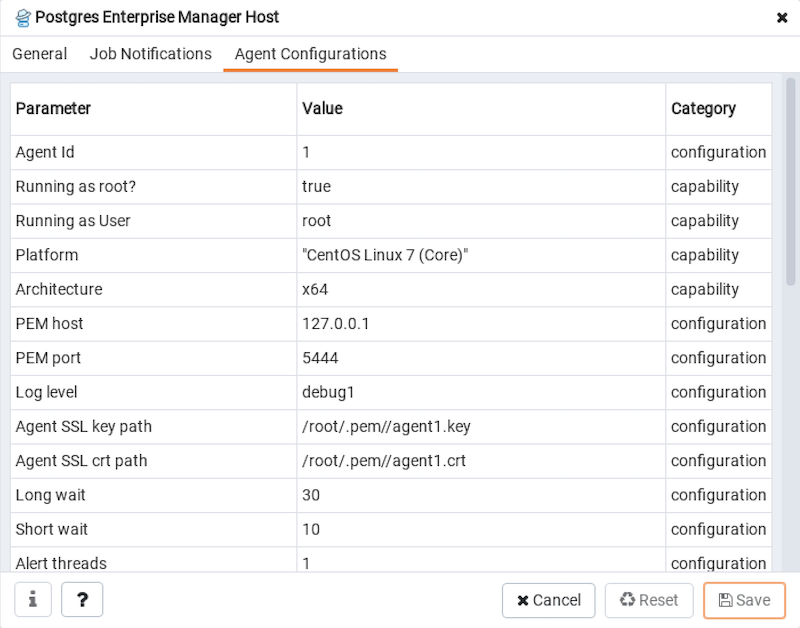
PEM Agent Properties dialog - Agent Configurations tab
The
Agent Configurationstab displays all the current configurations and capabilities of a agent.The
Parametercolumn displays a list of parameters.The
Valuecolumn displays the current value of the corresponding parameter.The
Categorycolumn displays the category of the corresponding parameter; it can be eitherconfigurationorcapability.