5.6 Handling Errors
8.6.1 Using an Object Type
8.6.2 Using a Collection
In the following descriptions a term refers to any word or group of words which may be language keywords, user-supplied values, literals, etc. A term’s exact meaning depends upon the context in which it is used.
Figure 2.1 shows the core API interfaces in the JDBC specification and how they relate to each other. These interfaces are implemented in the java.sql package.
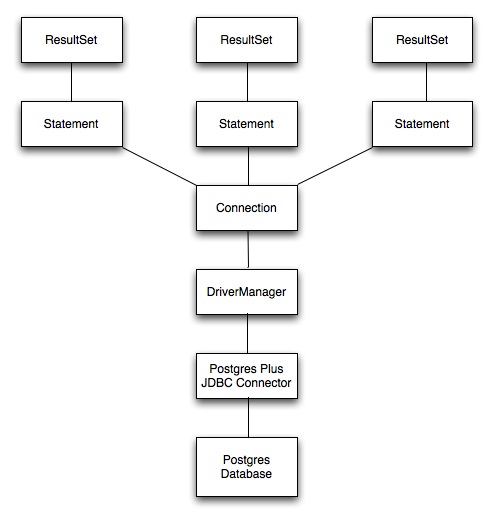
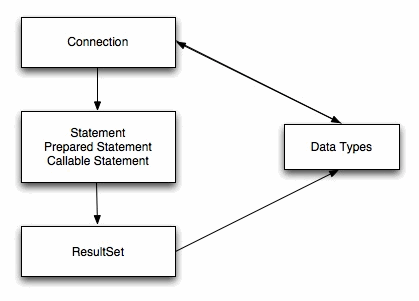
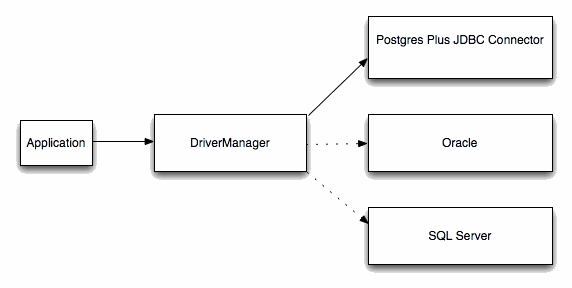
Figure 2.3 depicts the role of the DriverManager class in a typical JDBC application. The DriverManager acts as the bridge between a Java application and the backend database and determines which JDBC driver to use for the target database.
Detailed installation instructions are available through the associated Docs link on the same page.
The name of the package that creates the repository file for Advanced Server is edb-repo. You can download the package at:After downloading the repository configuration file, assume superuser privileges, and use the following command to create the repository configuration file:The installer creates a repository configuration file named edb.repo; the file resides in /etc/yum.repos.d. The file contains entries for each of the EnterpriseDB repositories; to install the connector, you must enable the entry for the enterprisedb-tools repository:
Each command creates a repository configuration file in the /etc/zypp/repos.d directory. The files are named:After creating the repository configuration files, use the zypper refresh command to refresh the metadata on your SLES host to include the EnterpriseDB repositories:When prompted for a User Name and Password, provide your connection credentials for the EnterpriseDB repository. If you need credentials, contact EnterpriseDB at:
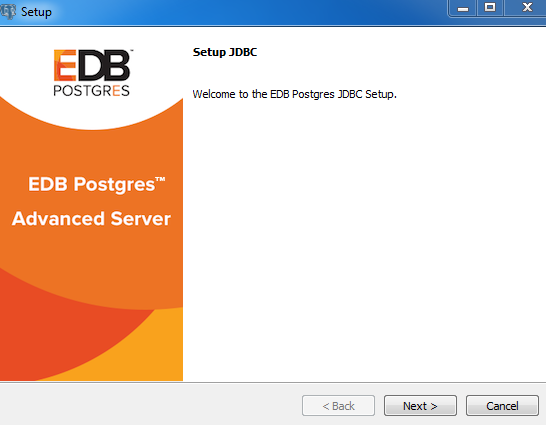
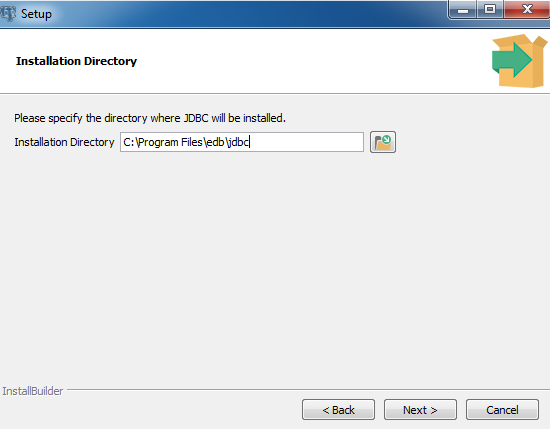
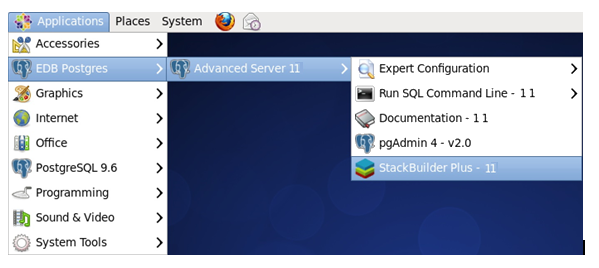
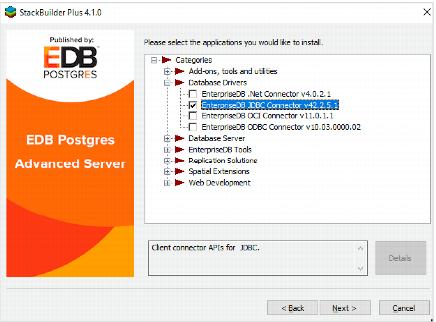
To install a DEB package on a Debian or Ubuntu host, you must have credentials that allow access to the EnterpriseDB repository. To request credentials for the repository, visit the EnterpriseDB Advanced Downloads page at:The following steps will walk you through on using the EnterpriseDB apt repository to install a DEB package. When using the commands, replace the username and password with the credentials provided by EnterpriseDB.This section demonstrates using the Installation Wizard to install the Connectors on a Windows system. (Download the installer, and then, right-click on the installer icon, and select Run As Administrator from the context menu.)When the Language Selection popup opens, select an installation language and click OK to continue to the Setup window (shown in Figure 3.1).Click Next to continue.Use the Installation Directory dialog (see Figure 3.2) to specify the directory in which the connector will be installed, and click Next to continue.Click Next on the Ready to Install dialog (see Figure 3.3) to start the installation; popup dialogs confirm the progress of the installation wizard.When the wizard informs you that it has completed the setup, click the Finish button to exit the dialog (see Figure 3.4).You can also use StackBuilder Plus to add or update the connector on an existing Advanced Server installation; to open StackBuilder Plus, select StackBuilder Plus from the Windows Apps menu or through Linux Applications menu (see Figure 3.5).When StackBuilder Plus opens, follow the onscreen instructions. Select the EnterpriseDB JDBC Connector option from the Database Drivers node of the tree control (see Figure 3.6).
With Java and the Advanced Server JDBC Connector in place, a Java application can access an Advanced Server database. Listing 1.1 creates an application that executes a query and prints the result set.
The Advanced Server JDBC driver is written in Java and is distributed in the form of a compiled JAR (Java Archive) file. Use the Class.forName() method to load the driver. The forName() method dynamically loads a Java class at runtime. When an application calls the forName() method, the JVM (Java Virtual Machine) attempts to find the compiled form (the bytecode) that implements the requested class.The Advanced Server JDBC driver is named com.edb.Driver:After loading the bytecode for the driver, the driver registers itself with another JDBC class (named DriverManager) that is responsible for managing all the JDBC drivers installed on the current system.If the JVM is unable to locate the named driver, it throws a ClassNotFound exception (which is intercepted with a catch block near the end of the program). The DriverManager is designed to handle multiple JDBC driver objects. You can write a Java application that connects to more than one database system via JDBC. The next section explains how to select a specific driver.
After the driver has loaded and registered itself with the DriverManager, the ListEmployees class can attempt to connect to the database server, as shown in the following code fragment:All JDBC connections start with the DriverManager. The DriverManager class offers a static method called getConnection() that is responsible for creating a connection to the database. When you call the getConnection() method, the DriverManager must decide which JDBC driver to use to connect to the database; that decision is based on a URL (Uniform Resource Locator) that you pass to getConnection().The first component in a JDBC URL is always jdbc. When using the Advanced Server JDBC Connector, the second component (the driver) is edb.jdbc:edb:<database>
In addition to the standard connection parameters, the Advanced Server JDBC driver supports connection properties that control behavior specific to EnterpriseDB. You can specify these properties in the connection URL or as a Properties object parameter passed to DriverManager.getConnection(). Listing 1.2 demonstrates how to use a Properties object to specify additional connection properties:Note: By default the combination of SSL=true and setting the connection URL parameter sslfactory=org.postgresql.ssl.NonValidatingFactory encrypts the connection but does not validate the SSL certificate. To enforce certificate validation, you must use a Custom SSLSocketFactory.For more details about writing a Custom SSLSocketFactory, refer to:
The Advanced Server JDBC Connector supports option preferSyncSecondary for the targetServerType connection property as listed in Table 5‑2.Note: Use of the targetServerType values slave, preferSlave, and preferSyncSlave all provide the same corresponding set of functionality as values secondary, preferSecondary, and preferSyncSecondary, however the “slave” values have been deprecated. It is advised to use the “secondary” values.The preferSyncSecondary option provides a preference for synchronous, standby servers for failover connection, and thus ignoring asynchronous servers.jdbc:edb://master:port,secondary_1:port_1,secondary_2:port_2,.../
database?targetServerType=preferSyncSecondaryThe IP address or a name assigned to the master database server followed by its port number. If master is a name, it must be specified with its IP address in the /etc/hosts file on the host running the Java program. Note: The master database server can be specified in any location in the list. It does not have to precede the secondary database servers.The IP address or a name assigned to a standby, secondary database server followed by its port number. If secondary_n is a name, it must be specified with its IP address in the /etc/hosts file on the host running the Java program.The following characteristics apply to the preferSyncSecondary option:
After loading the Advanced Server JDBC Connector driver and connecting to the server, the code in the sample application builds a JDBC Statement object, executes an SQL query, and displays the results.A Statement object sends SQL statements to a database. There are three kinds of Statement objects. Each is specialized to send a particular type of SQL statement:
The JDBC Connector (Advanced Server version 9.6 and later) supports the use of named parameters when instantiating a CallableStatement object. This syntax is an extension of JDBC supported syntax, and does not conform to the JDBC standard.You can use a CallableStatement object to pass parameter values to a stored procedure. You can assign values to IN, OUT, and INOUT parameters with a CallableStatement object.When using the CallableStatement class, you can use ordinal notation or named notation to specify values for an actual arguments. You must set a value for each IN or INOUT parameter marker in a statement.When using ordinal notation to pass values to a CallableStatement object, you should use the setter method that corresponds to the parameter type. For example, when passing a STRING value, use the setString setter method. Each parameter marker within a statement (?) represents an ordinal value. When using ordinal parameters, you should pass the actual parameter values to the statement in the order that the formal arguments are specified within the procedure definition.You can also use named parameter notation when specifying argument values for a CallableStatement object. Named parameter notation allows you to supply values for only those parameters that are required by the procedure, omitting any parameters that have acceptable default values. You can also specify named parameters in any order.When using named notation, each parameter name should correspond to a COLUMN_NAME returned by a call to the DatabaseMetaData.getProcedureColumns method. You should use the => token when including a named parameter in a statement call.Use the registerOutParameter method to identify each OUT or INOUT parameter marker in the statement.The following examples demonstrate using the CallableStatement method to provide parameters to a procedure with the following signature:
A ResultSet object is the primary storage mechanism for the data returned by an SQL statement. Each ResultSet object contains both data and metadata (in the form of a ResultSetMetaData object). ResultSetMetaData includes useful information about results returned by the SQL command: column names, column count, row count, column length, and so on.To access the row data stored in a ResultSet object, an application calls one or more getter methods. A getter method retrieves the value in particular column of the current row. There are many different getter methods; each method returns a value of a particular type. For example, the getString() method returns a STRING type; the getDate() method returns a Date, and the getInt() method returns an INT type. When an application calls a getter method, JDBC tries to convert the value into the requested type.Each ResultSet keeps an internal pointer that points to the current row. When the executeQuery() method returns a ResultSet, the pointer is positioned before the first row; if an application calls a getter method before moving the pointer, the getter method will fail. To advance to the next (or first) row, call the ResultSet’s next() method. ResultSet.next() is a boolean method; it returns TRUE if there is another row in the ResultSet or FALSE if you have moved past the last row.After moving the pointer to the first row, the sample application uses the getString() getter method to retrieve the value in the first column and then prints that value. Since ListEmployees calls rs.next() and rs.getString() in a loop, it processes each row in the result set. ListEmployees exits the loop when rs.next() moves the pointer past the last row and returns FALSE.When using the ResultSet interface, remember:
Every JDBC object consumes some number of resources. A ResultSet object, for example, may contain a copy of every row returned by a query; a Statement object may contain the text of the last command executed, and so forth. It’s usually a good idea to free up those resources when the application no longer needs them. The sample application releases the resources consumed by the Result, Statement, and Connection objects by calling each object’s close() method:
5.6 Handling ErrorsWhen connecting to an external resource (such as a database server), errors are bound to occur; your code should include a way to handle these errors. Both JDBC and the Advanced Server JDBC Connector provide various types of error handling. The ListEmployees class (Listing 1.1) demonstrates how to handle an error using try/catch blocks.When a JDBC object throws an error (an object of type SQLException or of a type derived from SQLException), the SQLException object exposes three different pieces of error information:
In the previous example ListEmployees executed a SELECT statement using the Statement.executeQuery() method. executeQuery() was designed to execute query statements so it returns a ResultSet that contains the data returned by the query. The Statement class offers a second method that you should use to execute other types of commands (UPDATE, INSERT, DELETE, and so forth). Instead of returning a collection of rows, the executeUpdate() method returns the number of rows affected by the SQL command it executes.The signature of the executeUpdate() method is:Provide this method a single parameter of type String, containing the SQL command that you wish to execute.
NOTE: the following example is not a complete application, only a method - the samples in the remainder of this document do not include the code required to set up and tear down a Connection. To experiment with the example, you must provide a class that invokes the sample code.The updateEmployee() method expects a single argument from the caller, a Connection object that must be connected to an Advanced Server database.:Next, updateEmployee() prompts the user for an employee name and number:updateEmployee() concatenates the values returned by console.readline() into an INSERT statement and pass the result to the executeUpdate() method.For example, if the user enters an employee number of 6000 and a name of Jones, the INSERT statement passed to executeUpdate() will look like this:The executeUpdate() method returns the number of rows affected by the SQL statement (an INSERT typically affects one row, but an UPDATE or DELETE statement can affect more). If executeUpdate() returns without throwing an error, the call to System.out.println displays a message to the user that shows the number of rows affected.
You can use executeUpdate() with any SQL command that does not return a result set. Some simple syntax examples using executeUpdate() with SQL commands follow:stmt.executeUpdate("DROP TABLE tablename");fieldname2 VARCHAR2(30))");
With a little extra work, you can add a graphical user interface to a program - the next example (Listing 1.4) demonstrates how to write a Java application that creates a JTable (a spreadsheet-like graphical object) and copies the data returned by a query into that JTable.NOTE: The following sample application is a method, not a complete application. To call this method, provide an appropriate main() function and wrapper class.Before writing the showEmployees() method, you must import the definitions for a few JDK-provided classes:The showEmployees() method expects a Connection object to be provided by the caller; the Connection object must be connected to the Advanced Server:showEmployees() creates a Statement and uses the executeQuery() method to execute an SQL query that generates an employee list:As you would expect, executeQuery() returns a ResultSet object. The ResultSet object contains the metadata that describes the shape of the result set (that is, the number of rows and columns in the result set, the data type for each column, the name of each column, and so forth). You can extract the metadata from the ResultSet by calling the getMetaData() method:Next, showEmployees() creates a Vector (a one dimensional array) to hold the column headers and then copies each header from the ResultMetaData object into the vector:With the column headers in place, showEmployees() extracts each row from the ResultSet and copies it into a new vector (named rows). The rows vector is actually a vector of vectors: each entry in the rows vector contains a vector that contains the data values in that row. This combination forms the two-dimensional array that you will need to build a JTable. After creating the rows vector, the program reads through each row in the ResultSet (by calling rs.next()). For each column in each row, a getter method extracts the value at that row/column and adds the value to the rowValues vector. Finally, showEmployee() adds each rowValues vector to the rows vector:At this point, the vector (labels) contains the column headers, and a second two-dimensional vector (rows) contains the data for the table. Now you can create a JTable from the vectors and a JFrame to hold the JTable:The showEmployees() method includes a catch block to intercept any errors that may occur and display an appropriate message to the user:The result of calling the showEmployees() method is shown in Figure 6.1:Figure 6.1 - The showEmployees Window
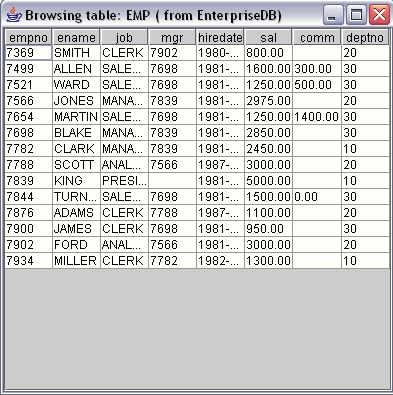
The previous example created a graphical user interface that displayed a result set in a JTable. Now we will switch gears and show you some of the more advanced features of the Advanced Server JDBC Connector.
The Advanced Server JDBC driver retrieves the results of a SQL query as a ResultSet object. If a query returns a large number of rows, using a batched ResultSet will:When you reduce the fetch size of a ResultSet object, the driver doesn’t copy the entire ResultSet across the network (from the server to the client). Instead, the driver requests a small number of rows at a time; as the client application moves through the result set, the driver fetches the next batch of rows from the server.Batched result sets cannot be used in all situations. Not adhering to the following restrictions will make the driver silently fall back to fetching the whole ResultSet at once:
Limiting the batch size of a ResultSet object can speed the retrieval of data and reduce the resources needed by a client-side application. Listing 1.5 creates a Statement object with a batch size limited to five rows.The call to conn.setAutoCommit(false) ensures that the server won’t close the ResultSet before you have a chance to retrieve the first row. After preparing the Connection, you can construct a Statement object:Remember, while the ResultSet contains all of the rows in the table, they are only fetched from the server five rows at a time. From the client’s point of view, the only difference between a batched result set and an unbatched result set is that a batched result may return the first row in less time.Next, we will look at another feature (the PreparedStatement) that you can use to increase the performance of certain JDBC applications.
Many applications execute the same SQL statement over and over again, changing one or more of the data values in the statement between each iteration. If you use a Statement object to repeatedly execute a SQL statement, the server must parse, plan, and optimize the statement every time. JDBC offers another Statement derivative, the PreparedStatement to reduce the amount of work required in such a scenario.Listing 1.6 demonstrates invoking a PreparedStatement that accepts an employee ID and employee name and inserts that employee information in the emp table:Instead of hard-coding data values in the SQL statement, you insert placeholders to represent the values that will change with each iteration. Listing 1.6 shows an INSERT statement that includes two placeholders (each represented by a question mark):With the parameterized SQL statement in hand, the AddEmployee() method can ask the Connection object to prepare that statement and return a PreparedStatement object:At this point, the PreparedStatement has parsed and planned the INSERT statement, but it does not know what values to add to the table. Before executing the PreparedStatement, you must supply a value for each placeholder by calling a setter method. setObject() expects two arguments:The AddEmployee() method prompts the user for an employee ID and name and calls setObject() with the values supplied by the user:And then asks the PreparedStatement object to execute the statement:If the SQL statement executes as expected, AddEmployee() displays a message that confirms the execution. If the server encounters an exception, the error handling code displays an error message.
A stored procedure is a module that is written in EnterpriseDB’s SPL and stored in the database. A stored procedure may define input parameters to supply data to the procedure and output parameters to return data from the procedure. Stored procedures execute within the server and consist of database access commands (SQL), control statements, and data structures that manipulate the data obtained from the database.The CallableStatement class provides a way for a Java program to call stored procedures. A CallableStatement object can have a variable number of parameters used for input (IN parameters), output (OUT parameters), or both (IN OUT parameters).Each question mark serves as a placeholder for a parameter. The stored procedure determines if the placeholders represent IN, OUT, or IN OUT parameters and the Java code must match. We will show you how to supply values for IN (or IN OUT) parameters and how to retrieve values returned in OUT (or IN OUT) parameters in a moment.Listing 1.7-a shows a stored procedure that increases the salary of each employee by 10%. increaseSalary expects no arguments from the caller and does not return any information:Listing 1.7-b demonstrates how to invoke the increaseSalary procedure:To invoke a stored procedure from a Java application, use a CallableStatement object. The CallableStatement class is derived from the Statement class and, like the Statement class, you obtain a CallableStatement object by asking a Connection object to create one for you. To create a CallableStatement from a Connection, use the prepareCall() method:As the name implies, the prepareCall() method prepares the statement, but does not execute it. As you will see in the next example, an application typically binds parameter values between the call to prepareCall() and the call to execute(). To invoke the stored procedure on the server, call the execute() method.This stored procedure (increaseSalary) did not expect any IN parameters and did not return any information to the caller (using OUT parameters) so invoking the procedure is simply a matter of creating a CallableStatement object and then calling that object’s execute() method.The next section demonstrates how to invoke a stored procedure that requires data (IN parameters) from the caller.The code in the next example first creates and then invokes a stored procedure named empInsert; empInsert requires IN parameters that contain employee information: empno, ename, job, sal, comm, deptno, and mgr. empInsert then inserts that information into the emp table.Each placeholder (?) in the command (commandText) represents a point in the command that is later replaced with data:The setObject() method binds a value to an IN or IN OUT placeholder. Each call to setObject() specifies a parameter number and a value to bind to that parameter:After supplying a value for each placeholder, this method executes the statement by calling the execute() method.The next example creates and invokes an SPL stored procedure called deptSelect. This procedure requires one IN parameter (department number) and returns two OUT parameters (the department name and location) corresponding to the department number. The code in Listing 1.9-a creates the deptSelect procedure:Listing 1.9-b shows the Java code required to invoke the deptSelect stored procedure:Each placeholder (?) in the command (commandText) represents a point in the command that is later replaced with data:The setObject() method binds a value to an IN or IN OUT placeholder. When calling setObject() you must identify a placeholder (by its ordinal number) and provide a value to substitute in place of that placeholder:The JDBC type of each OUT parameter must be registered before the CallableStatement object can be executed. Registering the JDBC type is done with the registerOutParameter() method.After executing the statement, the CallableStatement’s getter method retrieves the OUT parameter values: to retrieve a VARCHAR value, use the getString() getter method.In the current example GetDeptInfo() registers two OUT parameters and (after executing the stored procedure) retrieves the values returned in the OUT parameters. Since both OUT parameters are defined as VARCHAR values, GetDeptInfo() uses the getString() method to retrieve the OUT parameters.The code in the next example creates and invokes a stored procedure named empQuery defined with one IN parameter (p_deptno), two IN OUT parameters (p_empno and p_ename) and three OUT parameters (p_job, p_hiredate and p_sal). empQuery then returns information about the employee in the two IN OUT parameters and three OUT parameters.Listing 1.10-b demonstrates invoking the empQuery procedure, providing values for the IN parameters, and handling the OUT and IN OUT parameters:Each placeholder (?) in the command (commandText) represents a point in the command that is later replaced with data:The setInt() method is a type-specific setter method that binds an Integer value to an IN or IN OUT placeholder. The call to setInt() specifies a parameter number and provides a value to substitute in place of that placeholder:Before executing the CallableStatement, you must register the JDBC type of each OUT parameter by calling the registerOutParameter() method.Remember, before calling a procedure with an IN parameter, you must assign a value to that parameter with a setter method. Before calling a procedure with an OUT parameter, you register the type of that parameter; then you can retrieve the value returned by calling a getter method. When calling a procedure that defines an IN OUT parameter, you must perform all three actions:
A REF CURSOR is a cursor variable that contains a pointer to a query result set returned by an OPEN statement. Unlike a static cursor, a REF CURSOR is not tied to a particular query. You may open the same REF CURSOR variable any number of times with the OPEN statement containing different queries; each time, a new result set is created for that query and made available via the cursor variable. A REF CURSOR can also pass a result set from one procedure to another.Advanced Server supports the declaration of both strongly-typed and weakly-typed REF CURSORs. A strongly-typed cursor must declare the shape (the type of each column) of the expected result set. You can only use a strongly-typed cursor with a query that returns the declared columns; opening the cursor with a query that returns a result set with a different shape will cause the server to throw an exception. On the other hand, a weakly-typed cursor can work with a result set of any shape.The stored procedure shown in Listing 1.11-a (getEmpNames) builds two REF CURSORs on the server; the first REF CURSOR contains a list of commissioned employees in the emp table, while the second REF CURSOR contains a list of salaried employees in the emp table:The RefCursorSample() method (see Listing 1.11-b) invokes the getEmpName() stored procedure and displays the names returned in each of the two REF CURSOR variables:A CallableStatement prepares each REF CURSOR (commissioned and salaried). Each cursor is returned as an IN OUT parameter of the stored procedure, getEmpNames():The call to registerOutParameter() registers the parameter type (Types.REF) of the first REF CURSOR (commissioned) :Another call to registerOutParameter() registers the second parameter type (Types.REF) of the second REF CURSOR (salaried) :A call to stmt.execute() executes the statement:The getObject() method retrieves the values from the first parameter and casts the result to a ResultSet. Then, RefCursorSample iterates through the cursor and prints the name of each commissioned employee:The same getter method retrieves the ResultSet from the second parameter and RefCursorExample iterates through that cursor, printing the name of each salaried employee:
The BYTEA data type stores a binary string in a sequence of bytes; digital images and sound files are often stored as binary data. Advanced Server can store and retrieve binary data via the BYTEA data type.The following Java sample stores BYTEA data in an Advanced Server database and then demonstrates how to retrieve that data. The example requires a bit of setup; Listings 1.12-a, 1.12-b, and 1.12-c create the server-side environment for the Java example.Listing 1.12-a creates a table (emp_detail) that stores BYTEA data. emp_detail contains two columns: the first column stores an employee’s ID number (type INT) and serves as the primary key for the table; the second column stores a photograph of the employee in BYTEA format.And finally, Listing 1.12-c creates a function (GET_PIC) that returns the photograph for a given employee:Listing 1.13 shows a Java method that invokes the ADD_PIC procedure (see Listing 1.12-b) to copy a photograph from the client file system to the emp_detail table on the server.InsertPic() prompts the user for an employee number and the name of an image file:If the requested file does not exist, InsertPic() displays an error message and terminates:Next, InsertPic() prepares a CallableStatement object (stmt) that calls the ADD_PIC procedure. The first placeholder (?) represents the first parameter expected by ADD_PIC (p_empno); the second placeholder represents the second parameter (p_photo). To provide actual values for those placeholders, InsertPic() calls two setter methods. Since the first parameter is of type INTEGER, InsertPic() calls the setInt() method to provide a value for p_empno. The second parameter is of type BYTEA, so InsertPic() uses a binary setter method; in this case, the method is setBinaryStream():If all goes well, InsertPic() displays a message verifying that the image has been added to the table. If an error occurs, the catch block displays a message to the user:Now that you know how to insert BYTEA data from a Java application, Listing 1.14 demonstrates how to retrieve BYTEA data from the server.GetPic() starts by prompting the user for an employee ID number:Next, GetPic() prepares a CallableStatement with one IN parameter and one OUT parameter. The first parameter is the OUT parameter that will contain the photograph retrieved from the database. Since the photograph is BYTEA data, GetPic() registers the parameter as a Type.BINARY. The second parameter is the IN parameter that holds the employee number (an INT), so GetPic() uses the setInt() method to provide a value for the second parameter.Next, GetPic() uses the getBytes getter method to retrieve the BYTEA data from the CallableStatement:The FileOutputStream object writes the binary data that contains the photograph to the destination filename:Finally, GetPic() displays a message confirming that the file has been saved at the new location:
The SQL CREATE TYPE command is used to create a user-defined object type, which is stored in the Advanced Server database. The CREATE TYPE command is also used to create a collection, commonly referred to as an array, which is also stored in the Advanced Server database.The basic object type is created with the CREATE TYPE AS OBJECT command along with optional usage of the CREATE TYPE BODY command.A nested table type collection is created using the CREATE TYPE AS TABLE OF command. A varray type collection is created with the CREATE TYPE VARRAY command.
8.6.1 Using an Object TypeCreate the object types in the Advanced Server database. Object type addr_object_type defines the attributes of an address:Object type emp_obj_typ defines the attributes of an employee. Note that one of these attributes is object type ADDR_OBJECT_TYPE as previously described. The object type body contains a method that displays the employee information:A CallableStatement object is prepared based on the display_emp() method of the emp_obj_typ object type:createStruct() initializes and creates instances of object types addr_object_type and emp_obj_typ named address and emp, respectively:getObject() retrieves the emp_obj_typ object type. The attributes of the emp and address object instances are then retrieved and displayed:
8.6.2 Using a CollectionListing 1.17-a is an SPL function that uses collection types NUMBER_ARRAY and CHAR_ARRAY as IN parameters and CHAR_ARRAY as the OUT parameter.The function concatenates the employee ID from the NUMBER_ARRAY IN parameter with the employee name in the corresponding row from the CHAR_ARRAY IN parameter. The resulting concatenated entries are returned in the CHAR_ARRAY OUT parameter.getArray() retrieves the collection returned by the function. The first two rows consisting of the concatenated employee IDs and names are displayed:
The Advanced Server JDBC Connector provides asynchronous notification handling functionality. A notification is a message generated by the server when an SPL (or PL/pgSQL) program executes a RAISE NOTICE statement. Each notification is sent from the server to the client application. To intercept a notification in a JDBC client, an application must create a NoticeListener object (or, more typically, an object derived from NoticeListener).It is important to understand that a notification is sent to the client as a result of executing an SPL (or PL/pgSQL) program. To generate a notification, you must execute an SQL statement that invokes a stored procedure, function, or trigger: the notification is delivered to the client as the SQL statement executes. Notifications work with any type of statement object; CallableStatement objects, PreparedStatement objects, or simple Statement objects. A JDBC program intercepts a notification by associating a NoticeListener with a Statement object. When the Statement object executes an SQL statement that raises a notice, JDBC invokes the noticeReceived() method in the associated NoticeListener.Listing 1.18-a shows an SPL procedure that loops through the emp table and gives each employee a 10% raise. As each employee is processed, adjustSalary executes a RAISE NOTICE statement (in this case, the message contained in the notification reports progress to the client application). Listing 1.18-b will demonstrate how to create a NoticeListener that intercepts each notification.The NoticeExample() method is straightforward; it expects a single argument, a Connection object, from the caller:NoticeExample() begins by preparing a call to the adjustSalary procedure shown in example 1.10-a. As you would expect, con.prepareCall() returns a CallableStatement object. Before executing the CallableStatement, you must create an object that implements the NoticeListener interface and add that object to the list of NoticeListeners associated with the CallableStatement:Once the NoticeListener is in place, NoticeExample method executes the CallableStatement (invoking the adjustSalary procedure on the server) and displays a message to the user:Each time the adjustSalary procedure executes a RAISE NOTICE statement, the server sends the text of the message ("Salary increased for ...") to the Statement (or derivative) object in the client application. JDBC invokes the noticeReceived() method (possibly many times) before the call to stmt.execute() completes.When JDBC calls the noticeReceived() method, it creates an SQLWarning object that contains the text of the message generated by the RAISE NOTICE statement on the server.Notice that each Statement object keeps a list of NoticeListeners. When the JDBC driver receives a notification from the server, it consults the list maintained by the Statement object. If the list is empty, the notification is saved in the Statement object (you can retrieve the notifications by calling stmt.getWarnings() once the call to execute() completes). If the list is not empty, the JDBC driver delivers an SQLWarning to each listener, in the order in which the listeners were added to the Statement.
The Advanced Server JDBC Connector supports the use of logging to help resolve issues with the JDBC Connector when used in your application. The JDBC Connector uses the logging APIs of java.util.logging that was part of Java since JDK 1.4. For information on java.util.logging, see The PostgreSQL JDBC Driver available at:Note: Previous versions of the Advanced Server JDBC Connector used a custom mechanism to enable logging, which is now replaced by the use of java.util.logging in versions moving forward from community version 42.1.4.1. The older mechanism is no longer available.
Directly configure logging within the connection properties of the JDBC Connector. The connection properties related to logging are loggerLevel and loggerFile.This option enables the java.util.logging.Logger level of the driver to Advanced Server JDBC levels:
The following table lists the JDBC data types supported by Advanced Server and the JDBC connector. If you are binding to an Advanced Server type (shown in the middle column) using the setObject() method, supply a JDBC value of the type shown in the left column. When you retrieve data, the getObject() method will return the object type listed in the right-most column: