日本語マニュアル
EDB Postgres™ Advanced Server
ODBC Connector Guide

In the following descriptions a term refers to any word or group of words that are language keywords, user-supplied values, literals, etc. A term’s exact meaning depends upon the context in which it is used.
•
Italic font introduces a new term; typically, in the sentence that defines it for the first time.
•
Fixed-width (mono-spaced) font is used for terms that must be given literally such as SQL commands, specific table and column names used in the examples, programming language keywords, etc. For example, SELECT * FROM emp;
•
Italic fixed-width font is used for terms for which the user must substitute values in actual usage. For example, DELETE FROM table_name;
•
Square brackets [ ] denote that one or none of the enclosed term(s) may be substituted. For example, [ a | b ], means choose one of “a” or “b” or neither of the two.
•
Braces {} denote that exactly one of the enclosed alternatives must be specified. For example, { a | b }, means exactly one of “a” or “b” must be specified.
•
Ellipses ... denote that the proceeding term may be repeated. For example, [ a | b ] ... means that you may have the sequence, “b a a b a”.
•
•
•
The EDB-ODBC Connector is distributed with and installed the EDB Postgres Advanced Server graphical or RPM installer.
After downloading the repository configuration file, assume superuser privileges, and use the following command to create the repository configuration file:
The installer creates a repository configuration file named edb.repo; the file resides in /etc/yum.repos.d. The file contains entries for each of the EnterpriseDB repositories; to install the connector, you must enable the entry for the enterprisedb-tools repository:
1.
Replace the user_name and password placeholders in the baseurl specification with your user name and the repository password.
2.
Replace the 0 next to enabled with a 1.
After modifying the content of the repository configuration file, you can use the yum install command to install the connector; use the command:
Each command creates a repository configuration file in the /etc/zypp/repos.d directory. The files are named:
After creating the repository configuration files, use the zypper refresh command to refresh the metadata on your SLES host to include the EnterpriseDB repositories:
When prompted for a User Name and Password, provide your connection credentials for the EnterpriseDB repository. If you need credentials, contact EnterpriseDB at:
When the Language Selection popup opens, select an installation language and click OK to continue to the Setup window (shown in Figure 2.1).
C:\Users\susan\AppData\Local\Temp\VMwareDnD\822adb5b\Screen Shot 2018-11-26 at 6.10.26 AM.png
Click Next to continue.
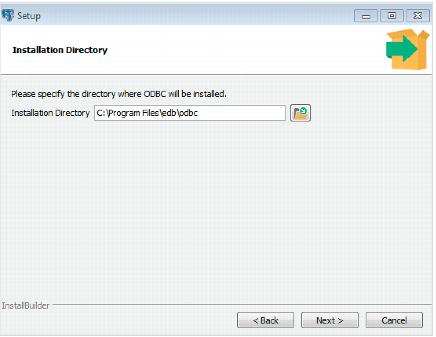
Use the Installation Directory dialog (see Figure 2.2) to specify the directory in which the connector will be installed, and click Next to continue.
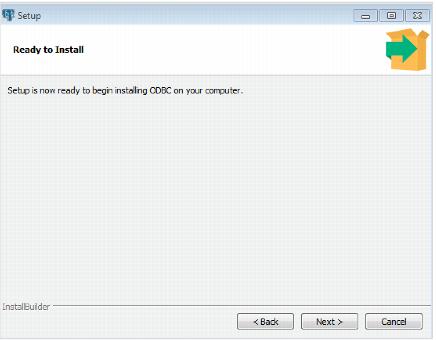
Click Next on the Ready to Install dialog (see Figure 2.3) to start the installation; popup dialogs confirm the progress of the installation wizard.
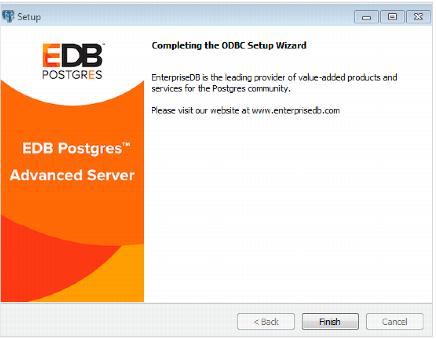
When the wizard informs you that it has completed the setup, click the Finish button to exit the dialog (see Figure 2.4).
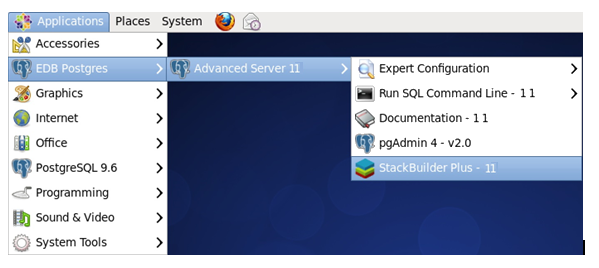
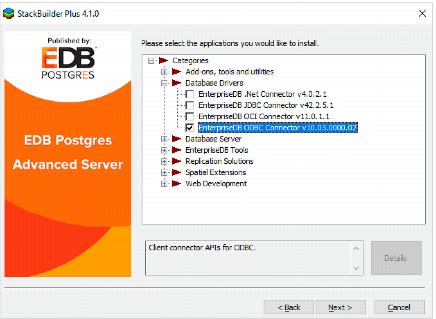
When StackBuilder Plus opens, follow the onscreen instructions. Select the EnterpriseDB ODBC Connector option from the Database Drivers node of the tree control (see Figure 2.6).
The following table describes the connection properties that you can specify through the dialogs in the graphical connection manager tools, or in the odbc.ini file that defines a named data source. The columns identify the connection property (as it appears in the ODBC Administrator dialogs), the corresponding keyword (as it appears in the odbc.ini file), the default value of the property, and a description of the connection property.
Database system. Either EnterpriseDB or PostgreSQL.
Use the Protocol option to specify rollback behavior.
0 - Don't rollback
1 - Rollback the transaction
2 - Rollback the statement
If enabled, the SQLColumns() function reports the OID column.
If enabled, the SQLStatistics() function reports that a unique index exists on each OID column.
If enabled, the SQLStatistics() function will report unique indexes. If not enabled, the SQLStatistics() function reports that indexes allow duplicate values.
If enabled, the driver will use server-side cursors. To enable UseDeclareFetch, specify a value of 1; to disable UseDeclareFetch, specify a value of 0.
If enabled, the driver parses simple SELECT statements when you call the SQLNumResultCols(), SQLDescribeCol() or SQLColAttributes() functions.
If enabled, the SQLCancel() function will call SQLFreeStmt(SQL_Close) on your behalf.
If enabled, the driver records its work in a log file. On Windows, the file name is C:\mylog_<process-id>; on Linux the file name is /tmp/mylog_<username><process-id>.log.
Determines how the SQLDescribeCol() and SQLColAttributes() functions compute the size of a column. Specify 0 to force the driver to report the maximum size allowed for the type; specify 1 to force the driver to report an unknown length or 2 to force the driver to search the result set to find the longest value. Do not specify 2 if you have enabled UseDeclareFetch.
If enabled, the driver treats TEXT columns as if they are of type SQL_LONGVARCHAR. If disabled, the driver treats TEXT columns as SQL_VARCHAR values.
If enabled, the driver treats values of unknown type as SQL_LONGVARCHAR values. If unchecked, the driver will treat values of unknown type as SQL_VARCHAR values. By default, values of unknown type are treated as Y values.
If enabled, the driver treats BOOL columns as SQL_CHAR values. If disabled, BOOL columns are treated as SQL_BIT values.
If enabled, the driver treats VARCHAR and BPCHAR values longer than MaxVarCharSize as SQL_LONGVARCHAR values
If TextAsLongVarChar is on, the driver reports TEXT values are MaxLongVarcharSize bytes long.
If UnknownAsLongVarChar is on, columns of unknown type are MaxLongVarcharSize bytes long; otherwise, they are reported to be MaxVarcharSize bytes in length.
Use the SysTablePrefixes field to specify a semi-colon delimited list of prefixes that indicate that a table is a system table. By default, the list contains dd_;.
If enabled, the SQLRowCount() function will return a single, cumulative row count for the entire array of parameter settings for an INSERT statement. If disabled, an individual row count will be returned for each parameter setting. By default, this option is disabled.
The LF<->CR/LF conversion option instructs the driver to convert line-feed characters to carriage-return/line-feed pairs when fetching character values from the server and convert carriage-return/line-feed pairs back to line-feed characters when sending character values to the server. By default, this option is enabled.
Permits positioned UPDATE and DELETE operations using the SQLSetPos() or SQLBulkOperations() functions.
If enabled, the driver treats BYTEA values as if they are of type SQL_LONGVARBINARY. If disabled, BYTEA values are treated as SQL_VARBINARY values.
If enabled, the driver treats BYTEA values as if they are large objects.
The Row Versioning option specifies if the driver should include the xmin column when reporting the columns in a table. The xmin value is the ID of the transaction that created the row. You must use row versioning if you plan to create cursors where SQL_CONCURRENCY = SQL_CONCUR_ROWVER.
Determines driver behavior if you try to retrieve information about a query without executing the query. If Yes, the driver declares a cursor for the query and fetches the meta-data from the cursor. If No, the driver executes the command as soon as you request any meta-data.
TrueIsMinus1 tells the driver to return BOOL values of TRUE as -1. If this option is not enabled, the driver will return BOOL values of TRUE as 1. The driver always returns BOOL values of FALSE as 0.
If enabled, the driver uses the PREPARE and EXECUTE commands to implement the Prepare/Execute model.
The value of BI determines how the driver treats BIGINT values:
If -5 as a SQL_BIGINT,
If 2 as a SQL_NUMERIC,
If 8 as a SQL_DOUBLE,
If 4 as a SQL_INTEGER,
If 12 as a SQL_VARCHAR,
If 0 (on an MS Jet client), as a SQL_NUMERIC,
If 0 on any other client, as a SQL_BIGINT.
0x1 - Forces the output of short-length formatted connection strings. Specify this option if you are using the MFC CDatabase class.
0x2 - Allows MS Access to recognize PostgreSQL's serial type as AutoNumber type.
0x4 - Return ANSI character types for the inquiries from applications. Specify this option for applications that have difficulty handling Unicode data.
0x8 - If set, NULL dates are reported as empty strings and empty strings are interpreted as NULL dates on input.
0x10 - Determines if SQLGetInfo returns information about all tables, or only accessible tables. If set, only information is returned for accessible tables.
0x20 - If set, each SQL command is processed in a separate network round-trip, otherwise, SQL commands are grouped into as few round-trips as possible to reduce network latency.
If libpq (and its dependencies) are installed in the same directory as the EDB-ODBC driver, enabling SSL Mode allows you to use SSL and other utilities.
If enabled, calls to SQL_TABLES only include user-accessible tables.
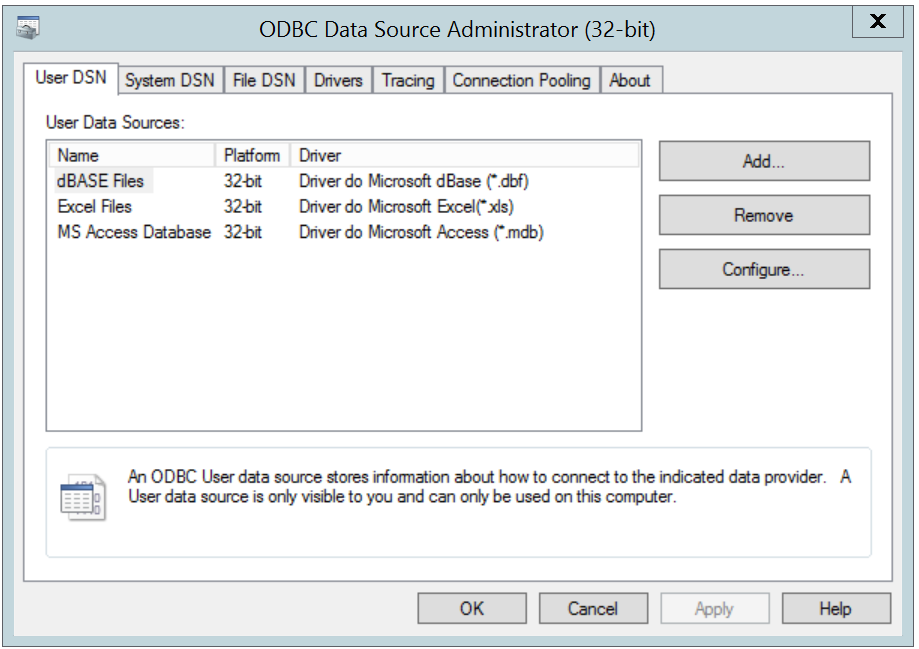
The Windows ODBC Data Source Administrator is a graphical interface that creates named data sources. You can open the ODBC Data Source Administrator (shown in Figure 2.2) by navigating to the Control Panel, opening the Administrative Tools menu, and double-clicking the appropriate ODBC Data Sources icon (32- or 64- bit).
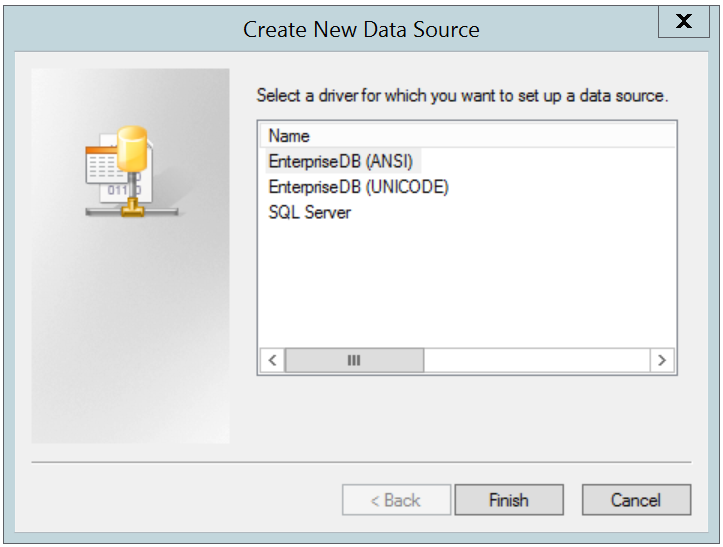
Click the Add button to open the Create New Data Source dialog (shown in Figure 2.3). Choose EnterpriseDB (ANSI) or EnterpriseDB (UNICODE) from the list of drivers and click Finish.
•
•
•
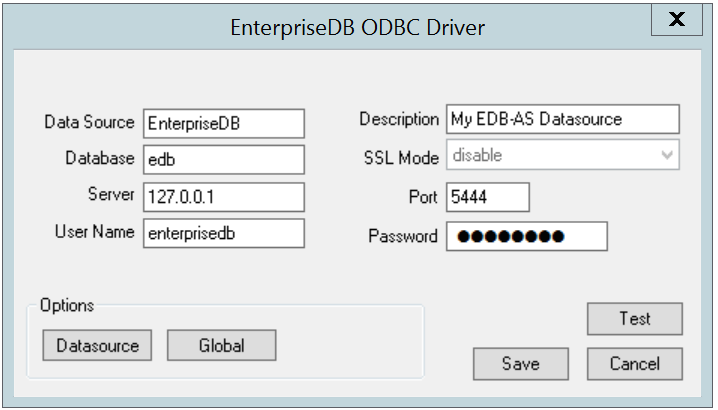
If libpq is installed in the same directory as the EDB-ODBC driver, the drop-down listbox next to the SSL Mode label will be active, allowing you to use SSL and other Advanced Server utilities.
•
Accept the default port number (5444), or enter an alternative number in the Port field.
Use the Datasource button (located in the Options box) to open the Advanced Options dialog (see Figure 2.5) and specify connection properties.
The Global button opens a dialog on which you can specify logging options for the EDB-ODBC driver (not the data source, but the driver itself).
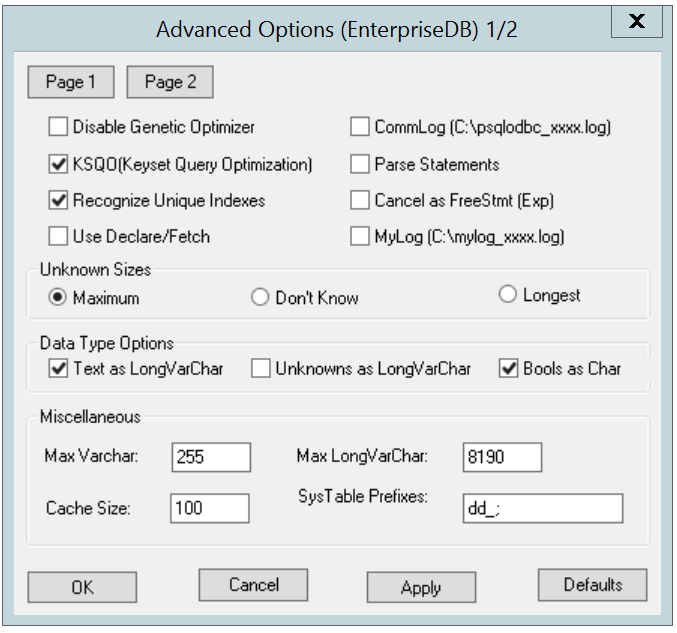
Figure 2.5 - Page 1 of the Advanced Options dialog.
•
Check the box next to Disable Genetic Optimizer to disable the genetic query optimizer. By default, the query optimizer is on.
•
Check the box next to KSQO (Keyset Query Optimization) to enable server-side support for keyset queries. By default, Keyset Query Optimization is on.
•
Check the box next to Recognize Unique Indexes to force the SQLStatistics() function to report unique indexes; if the option is not checked, the SQLStatistics() function will report that all indexes allow duplicate values. By default, Recognize Unique Indexes is on.
•
Check the box next to Use Declare/Fetch to specify that the driver should use server-side cursors whenever your application executes a SELECT command. By default, Use Declare/Fetch is off.
•
Check the box next to CommLog (C:\psqlodbc_xxxx.log) to record all client/server traffic in a log file. By default, logging is off.
•
Check the box next to Parse Statements to specify that the driver (rather than the server) should attempt to parse simple SELECT statements when you call the SQLNumResultCols(), SQLDescribeCol(), or SQLColAttributes() function. By default, this option is off.
•
Check the box next to Cancel as FreeStmt (Exp) to specify that the SQLCancel() function should call SQLFreeStmt(SQLClose) on your behalf. By default, this option is off.
•
Check the box next to MyLog (C:\mylog_xxxx.log) to record a detailed record of driver activity in a log file. The log file is named c:\mylog_process-id.log. By default, logging is off.
The radio buttons in the Unknown Sizes box specify how the SQLDescribeCol() and SQLColAttributes() functions compute the size of a column of unknown type (see Section 3.7, Supported Data Types for a list of known data types).
•
Choose the button next to Maximum to specify that the driver report the maximum size allowed for a VARCHAR or LONGVARCHAR (dependent on the Unknowns as LongVarChar setting). If Unknowns as LongVarChar is enabled, the driver returns the maximum size of a LONGVARCHAR (specified in the Max LongVarChar field in the Miscellaneous box). If Unknowns as LongVarChar is not enabled, the driver returns the size specified in the Max VarChar field (in the Miscellaneous box).
•
Choose the button next to Don’t know to specify that the driver report a length of "unknown".
•
Choose the button next to Longest to specify that the driver search the result set and report the longest value found. (Note: you should not specify Longest if UseDeclareFetch is enabled.)
The properties in the Data Type Options box determine how the driver treats columns of specific types:
•
Check the box next to Text as LongVarChar to treat TEXT values as if they are of type SQL_LONGVARCHAR. If the box is not checked, the driver will treat TEXT values as SQL_VARCHAR values. By default, TEXT values are treated as SQL_LONGVARCHAR values.
•
Check the box next to Unknowns as LongVarChar to specify that the driver treat values of unknown type as SQL_LONGVARCHAR values. If unchecked, the driver will treat values of unknown type as SQL_VARCHAR values. By default, values of unknown type are treated as SQL_VARCHAR values.
•
Check the box next to Bools as Char to specify that the driver treat BOOL values as SQL_CHAR values. If unchecked, BOOL values are treated as SQL_BIT values. By default, BOOL values are treated as SQL_CHAR values.
•
Indicate the maximum length allowed for a VARCHAR value in the Max VarChar field. By default, this value is set to 255.
•
Enter the maximum length allowed for a LONGVARCHAR value in the Max LongVarChar field. By default, this value is set to 8190.
•
Specify the number of rows fetched by the driver (when UseDeclareFetch is enabled) in the Cache Size field. The default value is 100.
•
Use the SysTablePrefixes field to specify a semi-colon delimited list of prefixes that indicate that a table is a system table. By default, the list contains dd_;.
Click the Apply button to apply any changes to the data source properties, or the Cancel button to exit the dialog without applying any changes. Choose the OK button to apply any changes to the dialog and exit.
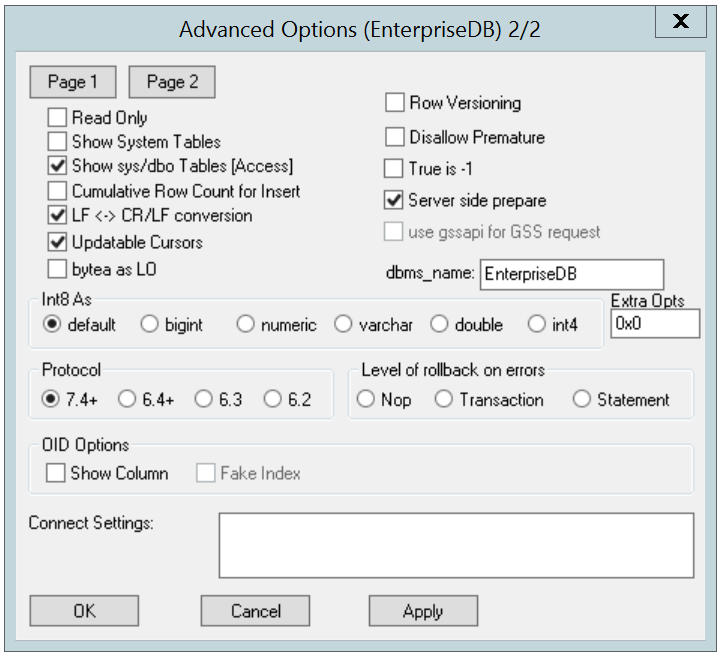
Select the Page 2 button (in the upper-left hand corner of the Advanced Options dialog) to access a second set of advanced options (shown in figure 2.6).
Figure 2.6 - Page 2 of the Advanced Options dialogs.
•
Check the box next to Read Only to prevent the driver from executing the following commands: INSERT, UPDATE, DELETE, CREATE, ALTER, DROP, GRANT, REVOKE or LOCK. Invoking the Read Only option also prevents any calls that use ODBC’s procedure call escape syntax (call=procedure-name?). By default, this option is off.
•
Check the box next to Show System Tables to include system tables in the result set of the SQLTables() function. If the option is enabled, the driver will include any table whose name starts with pg_ or any of the prefixes listed in the SysTablePrefixes field of Page 1 of the Advanced Options dialog. By default, this option is off.
•
Check the box next to Show sys/dbo Tables [Access] to access objects in the sys schema and dbo schema through the ODBC data source. By default, this option is enabled (checked).
•
Check the box next to Cumulative Row Count for Insert to cause a single, cumulative row count to be returned for the entire array of parameter settings for an INSERT statement when a call to the SQLRowCount() method is performed. If this option is not enabled (the box is not checked), then an individual row count is available for each parameter setting in the array, and thus, a call to SQLRowCount() returns the count for the last inserted row.
•
Check the box next to LF<->CR/LF conversion to instruct the driver to convert line-feed characters to carriage-return/line-feed pairs when fetching character values from the server and convert carriage-return/line-feed pairs back to line-feed characters when sending character values to the server. By default, this option is enabled.
•
Check the box next to Updatable Cursors to specify that the driver should permit positioned UPDATE and DELETE operations with the SQLSetPos() or SQLBulkOperations() functions. By default, this option is enabled.
•
Check the box next to bytea as LO to specify that the driver should treat BYTEA values as if they are SQL_LONGVARBINARY values. If the box is not checked, EDB-ODBC will treat BYTEA values as if they are SQL_VARBINARY values. By default, BYTEA values are treated as SQL_VARBINARY values.
•
Check the box next to Row Versioning to include the xmin column when reporting the columns in a table. The xmin column is the ID of the transaction that created the row. You must use row versioning if you plan to create cursors where SQL_CONCURRENCY = SQL_CONCUR_ROWVER. By default, Row Versioning is off.
•
Check the box next to Disallow Premature to specify that the driver should retrieve meta-data about a query (i.e., the number of columns in a result set, or the column types) without actually executing the query. If this option is not specified, the driver executes the query when you request meta-data about the query. By default, Disallow Premature is off.
•
Check the box next to True is -1 to tell the driver to return BOOL values of True as a -1. If this option is not enabled, the driver will return BOOL values of True as 1. The driver always returns BOOL values of False as 0.
•
Check the box next to Server side prepare to tell the driver to use the PREPARE and EXECUTE commands to implement the Prepare/Execute model. By default, this box is checked.
•
Check the box next to use gssapi for GSS request to instruct the driver to send a GSSAPI connection request to the server.
•
Enter the database system (either EnterpriseDB or PostgreSQL) in the dbms_name field. The value entered here is returned in the SQL_DBMS_NAME argument when the SQLGetInfo() function is called. The default is EnterpriseDB.
Use the radio buttons in the Int8 As box to specify how the driver should return BIGINT values to the client. Select the radio button next to default to specify the default type of NUMERIC if the client is MS Jet, BIGINT if the client is any other ODBC client. You can optionally specify that the driver return BIGINT values as a bigint (SQL_BIGINT), numeric (SQL_NUMERIC), varchar (SQL_VARCHAR), double (SQL_DOUBLE), or int4 (SQL_INTEGER).
The default value of the Extra Opts field is 0x0. Extra Opts may be:
If set, NULL dates are reported as empty strings and empty strings are interpreted as NULL dates on input.
Determines if SQLGetInfo returns information about all tables, or only accessible tables. If set, only information is returned for accessible tables.
The Protocol box contains radio buttons that tell the driver to interact with the server using a specific front-end/back-end protocol version. By default, the Protocol selected is 7.4+; you can optionally select from versions 6.4+, 6.3 or 6.2.
The Level of Rollback on errors box contains radio buttons that specify how the driver handles error handling:
The OID Options box contains options that control the way the driver exposes the OID column contained in some tables:
•
Check the box next to Show Column to include the OID column in the result set of the SQLColumns() function. If this box is not checked, the OID column is hidden from SQLColumns().
•
Check the box next to Fake Columns to specify that the SQLStatistics() function should report that a unique index exists on each OID column.
Use the Connect Settings field to specify a list of parameter assignments that the driver will use when opening this connection. Any configuration parameter that you can modify with a SET statement can be included in the semi-colon delimited list. For example:
When you’ve defined the connection properties for the named data source, click the Apply button to apply the options; you can optionally exit without saving any options by choosing Cancel. Select the OK button to save the options and exit.
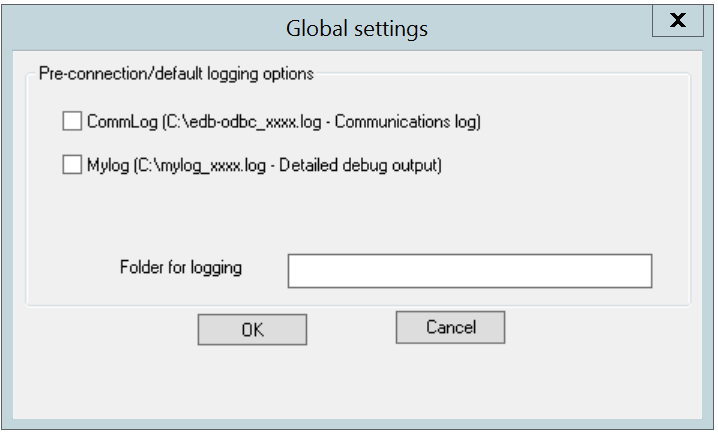
Choose the Global button (on the EnterpriseDB ODBC Driver dialog) to open the Global Settings dialog (shown in Figure 2.7). The options on this dialog control logging options for the EDB-ODBC driver. Use this dialog to enforce logging when the driver is used without a named data source, or for logging driver operations that occur before the connection string is parsed.
•
Check the box next to the CommLog field to record all client/server traffic in a log file. The logfile is named C:\psqlodbc_process-id where process-id is the name of the process in use.
•
Check the box next to the Mylog field to keep a logfile of the driver’s activity. The logfile is named c:\mylog_process-id where process-id is the name of the process in use.
•
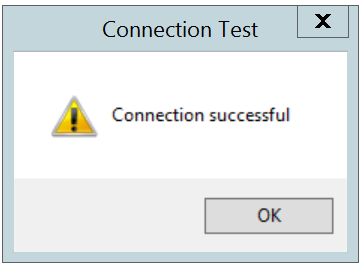
When you’ve entered the connection information for the named data source, click the Test button to verify that the driver manager can connect to the defined data source (see Figure 2.8).
Click the OK button to exit Connection Test dialog. If the connection is successful, click the Save button to save the named data source. If there are problems establishing a connection, adjust the parameters and test again.
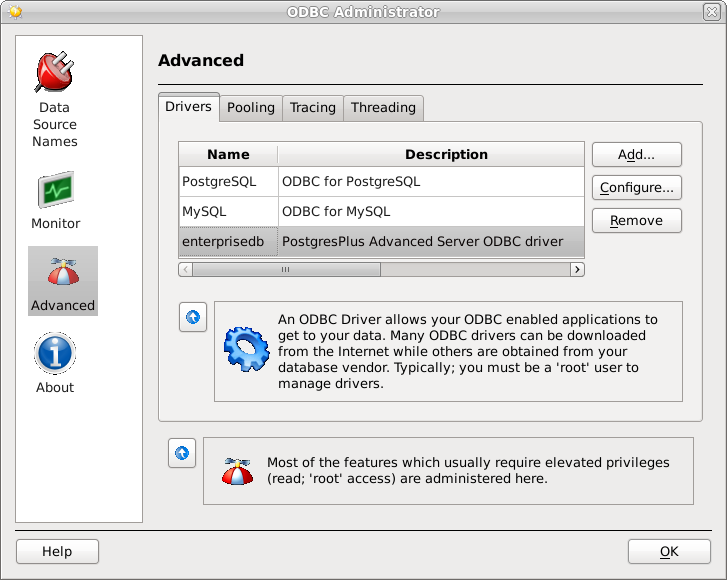
The Linux ODBC Administrator is a graphical tool that is distributed with unixODBC; you can use the ODBC Administrator to manage ODBC drivers and named resources. To add the ODBC Administrator to your system, open a terminal window, assume superuser privileges, and enter:
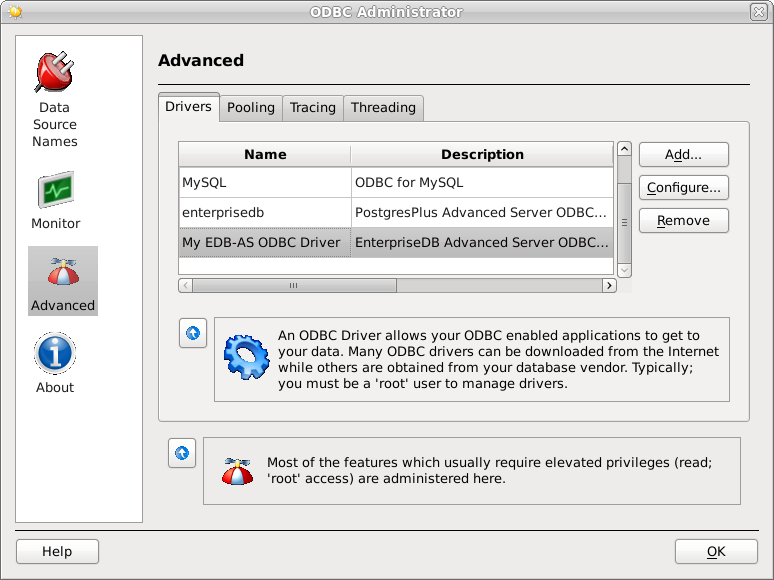
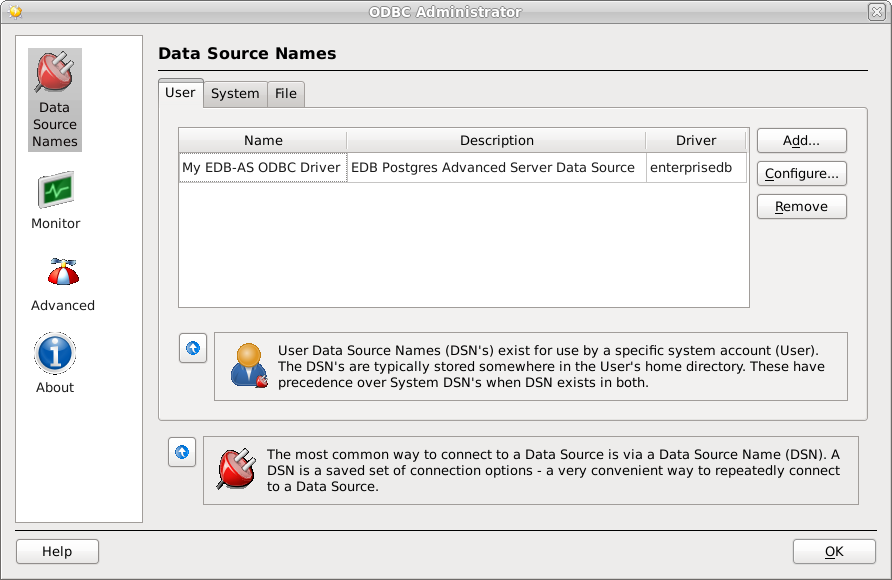
To invoke the ODBC Administrator (shown in Figure 2.9), open a terminal window and enter ODBCConfig.
When you install the Advanced Server Connectors component, the EDB-ODBC driver is added to the list of drivers in the ODBC Administrator. Click Advanced, and then select the Drivers tab to verify that the enterprisedb driver appears in the list (see Figure 2.10).
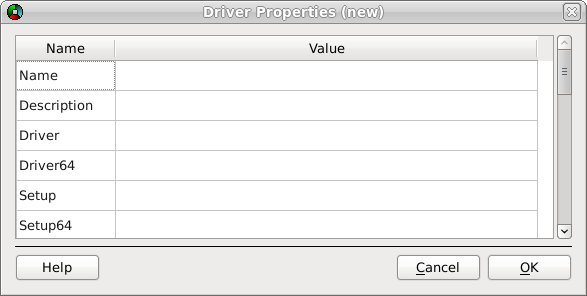
If the EDB-ODBC driver does not appear in the list of drivers, you can add it using the ODBC Administrator. To add a driver definition, select the Drivers tab, and click Add. The Driver Properties (new) window opens, as shown in Figure 2.11.
Figure 2.11 - The Driver Properties window.
Complete the Driver Properties window to register the EDB-ODBC driver with the driver manager:
•
•
Add the path to the location of the EDB-ODBC driver in the Driver field. By default, the complete path to the driver is:
•
Add the path to the location of the EDB-ODBC driver setup file in the Setup field. By default, the complete path to the driver setup file is:
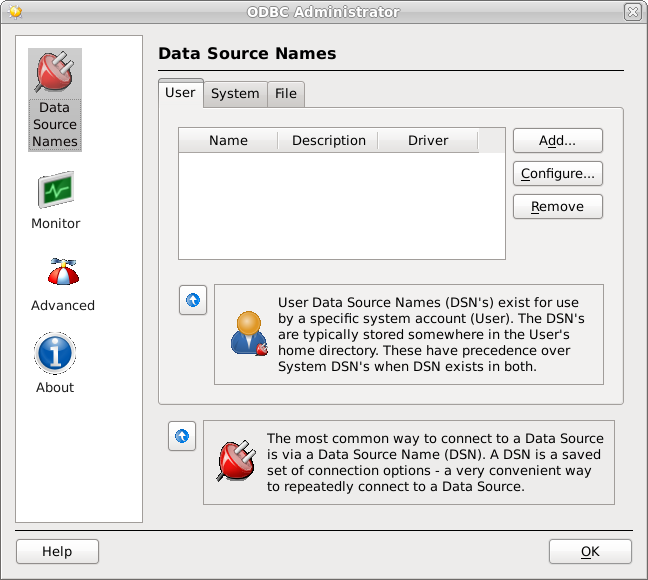
When you’ve described the driver properties for the EDB-ODBC driver, click OK. The ODBC Data Source Administrator window now includes the EDB-ODBC driver in the list of available ODBC drivers (Figure 2.12).
With the EDB-ODBC driver available to the driver manager, you can add a data source. Click the Data Source Names option in the left panel, and then choose the appropriate DSN tab for the type of data source name you would like to add:
•
Choose the User tab to add a named data source that is available only to the current user (the data source will be stored in ~user/.odbc.ini).
•
Choose the System tab add a named data source that is available to all users. All system data sources are stored in a single file (usually /etc/odbc.ini).
•
Choose the File tab to add a named data source that is available to all users, but that is stored in a file of your choosing.
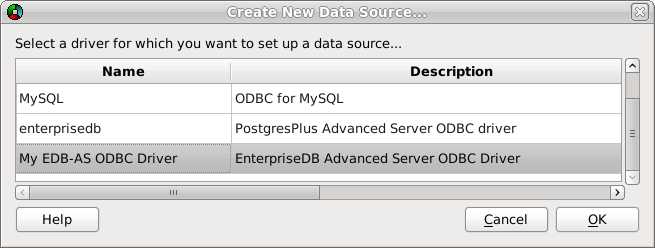
Select the appropriate tab and click Add. The Create a New Data Source… window opens, as shown in Figure 2.13.
Select the EDB-ODBC driver from the list, and click OK to open the Data Source Properties window.
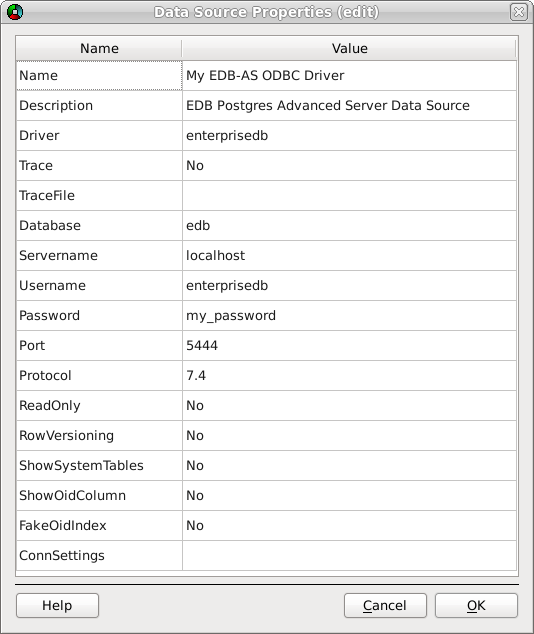
Figure 2.14 - The Data Source Properties window.
Complete the Data Source Properties (new) window (shown in Figure 2.14), specifying the connection properties for the EDB-ODBC driver.
•
The unixODBC driver includes a trace utility that records the sequence of calls made an ODBC application to a log file. Specify Yes in the Trace field to turn the trace utility on. Note that using the trace utility can slow down an application.
•
Use the TraceFile field to specify a file to receive information returned by the Trace utility.
•
Use the Protocol field to specify a front-end/back-end protocol version; the default value is 7.4. You can optionally select from protocol versions 7.4, 6.4, 6.3 or 6.2.
•
Use the ReadOnly field to specify Yes to prevent the driver from executing the following commands: INSERT, UPDATE, DELETE, CREATE, ALTER, DROP, GRANT, REVOKE or LOCK. Enabling the Read Only option also prevents any calls that use the ODBC procedure call escape syntax (call=procedure-name?). By default, ReadOnly is set to No.
•
Use the RowVersioning field to specify Yes if the driver should include the xmin column when reporting the columns in a table. The xmin column is the ID of the transaction that created the row. You must use row versioning if you plan to create cursors where SQL_CONCURRENCY = SQL_CONCUR_ROWVER. By default, Row Versioning is set to No.
•
Use the ShowSystemTables field to specify Yes if the driver should include system tables in the result set of the SQLTables() function. By default, this field is set to No.
•
Use the ShowOidColumn field to specify Yes if the driver should include the OID column in the result set of the SQLColumns() function. If ShowOidColumn is set to No, the OID column is hidden from SQLColumns(). By default, this option is set to No.
•
Use the FakeOidIndex field to specify Yes if the SQLStatistics() function should report that a unique index exists on each OID column. This is useful when your application needs a unique identifier and your table doesn’t include one. The default value is No.
•
Use the ConnSettings field to specify a list of parameter assignments that the driver will use when opening this connection.
•
SQLGetInfo() returns information about the EDB-ODBC driver and Advanced Server.
•
SQLGetEnvAttr() returns information about ODBC environment attributes.
•
SQLGetConnectAttr() returns information about attributes specific to an individual connection.
•
SQLGetStmtAttr() returns information about the attributes specific to an individual statement.
•
Use the SQLSetConnectAttr() function to set connection attributes.
•
Use the SQLSetEnvAttr() function to set environment attributes.
•
Use the SQLSetStmtAttr() function to set statement attributes.
The ODBC SQLGetInfo() function returns information about the EDB-ODBC driver and Advanced Server. You must have an open connection to call SQLGetInfo(), unless you specify SQL_ODBC_VER as the info_type. The signature for SQLGetInfo() is:
SQLHDBC conn_handle, // Input
SQLUSMALLINT info_type, // Input
SQLPOINTER info_pointer, // Output
SQLSMALLINT buffer_len, // Input
SQLSMALLINT *string_length_pointer // Output
The type of information SQLGetInfo() is retrieving.
If the info_type argument is SQL_DRIVER_HDESC or SQL_DRIVER_HSTMT, the info_pointer argument is both Input and Output.
buffer_len is the length of the allocated memory buffer pointed to by info_pointer. If info_pointer is NULL, buffer_len is ignored. If the returned value is a fixed size, buffer_len is ignored. buffer_len is only used if the requested value is returned in the form of a character string.
string_length_pointer is a pointer to an SQLSMALLINT value. SQLGetInfo() writes the size of the requested value in this integer.
A typical usage is to call SQLGetInfo() with a NULL info_pointer to obtain the length of the requested value, allocate the required number of bytes, and then call SQLGetInfo() again (providing the address of the newly allocated buffer) to obtain the actual value. The first call retrieves the number of bytes required to hold the value; the second call retrieves the value.
If the size of the returned value exceeds buffer_len, the information is truncated and NULL terminated. If the returned value is a fixed size, string_length is ignored (and the size of the requested value is not provided by SQLGetInfo()).
SQLGetInfo() writes information in one of the following formats:
•
a SQLUINTEGER bitmask
•
a SQLUINTEGER flag
•
a SQLUINTEGER binary value
•
a SQLUSMALLINT value
•
a NULL terminated character string
SQLGetInfo() returns SQL_SUCCESS, SQL_SUCCESS_WITH_INFO, SQL_ERROR, or SQL_INVALID_HANDLE.
SQL info_type Argument
Indicates if procedures returned by SQLProcedures()can be executed by the application.
Some procedures executed by the SQLProcedures() function may be executed by the application.
Indicates if the user has SELECT privileges on all table names returned by SQLTables().
prev. SQL_MAX_DRIVER_CONNECTIONS
Returns SQL_AF_ALL
Identifies the ALTER DOMAIN clauses supported by the server.
ALTER DOMAIN clauses are not supported.
Identifies the ALTER TABLE clauses supported by the server.
Returns SQL_AM_NONE
Returns SQL_BRC_EXPLICIT
Now SQL_QUALIFIER_LOCATION
Returns SQL_CL_START
Now SQL_QUALIFIER_NAME
Now SQL_QUALIFIER_NAME_SEPARATOR
Now SQL_QUALIFIER_TERM
Returns catalog
Now SQL_QUALIFIER USAGE
Returns SQL_CU_DML_STATEMENTS
Catalog names can be used in SELECT, INSERT, UPDATE, DELETE, SELECT FOR UPDATE and positioned UPDATE and DELETE statements.
Returns SQL_CB_NON_NULL
Concatenation of a NULL value and a non NULL value will result in a NULL value.
Indicates conversion support from the BIGINT type using the CONVERT function.
Indicates conversion support from the BINARY type using the CONVERT function.
Indicates conversion support from the BIT type using the CONVERT function.
Indicates conversion support from the CHAR type using the CONVERT function.
Indicates conversion support from the DECIMAL type using the CONVERT function.
Indicates conversion support from the DOUBLE type using the CONVERT function.
Indicates conversion support from, the FLOAT type using the CONVERT function.
Lists the conversion support from the INTEGER type using the CONVERT function.
Indicates conversion support from the INTERVAL_DAY_TIME type using the CONVERT function.
Indicates conversion support from the INTERVAL_YEAR_MONTH type using the CONVERT function.
Indicates conversion support for the LONG_VARBINARY type using the CONVERT function.
Indicates conversion support for the LONGVARCHAR type using the CONVERT function.
Indicates conversion support for the NUMERIC type using the CONVERT function.
Indicates conversion support for the REAL type using the CONVERT function.
Indicates conversion support for the SMALLINT type using the CONVERT function.
Indicates conversion support for TIME type using the CONVERT function.
Indicates conversion support for TIMESTAMP type using the CONVERT function.
Indicates conversion support for the TINYINT type using the CONVERT function.
Indicates conversion support for the VARBINARY type using the CONVERT function.
Indicates conversion support for VARCHAR type using the CONVERT function.
Indicates conversion support for the WCHAR type using the CONVERT function.
This info_type is valid only when using the Unicode driver.
Indicates conversion support for the WLONGVARCHAR type using the CONVERT function.
This info_type is valid only when using the Unicode driver.
Indicates conversion support for the WVARCHAR type using the CONVERT function.
This info_type is valid only when using the Unicode driver.
Returns SQL_CN_ANY
Indicates support for the CREATE ASSERTION statement.
The CREATE ASSERTION statement is not supported.
Indicates support for CREATE CHARACTER statement.
The CREATE CHARACTER statement is not supported.
Indicates support for the CREATE COLLATION.
The CREATE COLLATION statement is not supported.
Indicates support for the CREATE DOMAIN statement.
The CREATE DOMAIN statement is not supported.
Indicates support for the CREATE SCHEMA statement.
Indicates support for the CREATE TABLE statement.
Indicates support for the CREATE TRANSLATION statement.
The CREATE TRANSLATION statement is not supported.
Indicates support for the CREATE VIEW statement.
Returns SQL_CV_CREATE_VIEW
Indicates how a COMMIT operation affects the cursor.
Returns SQL_CB_PRESERVE
Indicates the DATETIME LITERALS supported by the server.
This info_type is not supported.
Returns the value given by the dbms_name parameter from the odbc.ini file on Linux or the dbms_name field of page 2 of the Advanced Options dialog box when defining a data source in Windows. The default is EnterpriseDB.
Returns TXN_READ_COMMITTED
Indicates support for the DESCRIBE INPUT statement.
The DESCRIBE INPUT statement is not supported.
Returns an SQLULEN value that contains the driver’s connection handle.
Returns an SQLULEN value that contains driver’s descriptor handle.
Returns an SQLULEN value that contains the driver’s environment handle.
Returns an SQLULEN value that contains the library handle (returned to the ODBC driver manager when the manager loaded the driver).
Returns an SQLULEN value that contains the driver’s statement handle.
Returns EDB-ODBC.DLL
Returns 03.50
Returns 9.0.0.6
Lists the DROP ASSERTION clauses supported by the server.
Lists the DROP CHARACTER clauses supported by the server.
Lists the DROP COLLATION clauses supported by the server.
Lists the DROP DOMAIN clauses supported by the server.
Lists the DROP SCHEMA clauses supported by the server.
Lists the DROP TABLE clauses supported by the server.
Lists the DROP TRANSLATION clauses supported by the server.
Lists the DROP VIEW clauses supported by the server.
Indicates FETCH order options (deprecated in ODBC 3.0).
Returns SQL_FILE_NOT_SUPPORTED
Returns SQL_CA1_NEXT
Indicates the relationship between a GROUP BY clause and columns in the SELECT list.
Returns SQL_GB_GROUP_BY_EQUALS_SELECT
Returns SQL_IC_LOWER
Indicates support for the CREATE INDEX statement.
Returns SQL_IK_NONE
Prev. SQL_ODBC_SQL_OPT_IEF
Returns SQL_LCK_NO_CHANGE
This info_type is currently unsupported.
prev. SQL_MAX_ACTIVE_STATEMENTS
A cursor name cannot exceed 32 characters in length.
prev. SQL_ACTIVE_CONNECTIONS
Identifiers cannot exceed 64 characters in length.
Now SQL_MAX_SCHEMA_NAME_LEN
Now SQL_MAX_CATALOG_NAME_LEN
Indicates whether the SQL_MAX_ROW_SIZE includes the length of any LONGVARCHAR or LONGVARBINARY columns in the row.
SQL_MAX_ROW_SIZE includes the length of any LONGVARCHAR or LONGVARBINARY columns in the row.
The maximum number of tables allowed in the FROM clause of a SELECT statement.
Indicates if the server needs the length of a LONG data value before receiving the value.
Indicates if the server supports NOT NULL values in columns.
Returns SQL_NNC_NON_NULL
Advanced Server does support NOT NULL values in columns.
Indicates where NULL values are located in a result set.
Returns SQL_NC_HIGH
The location of NULL values in a data set is determined by the ASC and DESC keywords; NULL values are sorted to the high end of the data set.
Returns SQL_OAC_LEVEL1
Returns SQL_OIC_CORE
Returns SQL_OSCC_NOT_COMPLIANT
The driver is not SAG CLI compliant.
Returns SQL_OSC_CORE
Now SQL_INTEGRITY
Returns 03.52.0000
Returns SQL_OJ_LEFT
prev. SQL_SCHEMA_TERM
Returns schema
Indicates if the columns in an ORDER BY clause must be included in the SELECT list.
Columns in an ORDER BY clause do not have to be in the SELECT list.
prev. SQL_SCHEMA_USAGE
Returns SQL_OU_DML_STATEMENTS
Returns SQL_PARC_BATCH
Returns SQL_PARC_NO_BATCH if a single, cumulative row count is available for the entire array.
Returns SQL_PAS_BATCH
Returns procedure
prev. SQL_CATALOG_LOCATION
Returns SQL_CL_START
prev. SQL_CATALOG_NAME
prev. SQL_CATALOG_NAME_SEPARATOR
prev. SQL_CATALOG_TERM
Returns catalog
prev. SQL_CATALOG_USAGE
Returns SQL_CU_DML_STATEMENTS
Catalog names can be used in SELECT, INSERT, UPDATE, DELETE, SELECT FOR UPDATE and positioned UPDATE and DELETE statements.
Returns SQL_CU_DML_STATEMENTS
Qualifiers can be used in all DML statements (SELECT, INSERT, UPDATE, DELETE, SELECT FOR UPDATE).
Returns SQL_IC_SENSITIVE
Returns catalog
Returns SQL_CL_START
Returns schema
The '\' character is used as an escape character for the '%' and '_' characters in search patterns.
Returns SQL_SC_SQL92_ENTRY
Indicates the supported GRANT statement clauses.
Identifies the predicates of a SELECT statement supported by the server.
Identifies the clauses in a REVOKE statement that are supported by the server.
Indicates the row value constructor expressions in a SELECT statement that are supported by the server.
Indicates the CLI standard the driver conforms to.
Indicates whether changes made to a static cursor by SQLSetPos() or UPDATE or DELETE statements are detected by the application.
Returns table
Returns SQL_TC_ALL
The publication year of the X/Open specification that the driver manager complies with.
You can use the ODBC SQLGetConnectAttr() and SQLSetConnectAttr() functions to retrieve or set the value of a connection attribute.
The SQLGetConnectAttr() function returns the current value of a connection attribute. The signature is:
SQLHDBC conn_handle, //Input
SQLINTEGER attribute, //Input
SQLPOINTER value_pointer, //Output
SQLINTEGER buffer_length, //Input
SQLINTEGER *string_length_pointer //Output
attribute identifies the attribute whose value you wish to retrieve.
If attribute is defined by ODBC and value_pointer points to a character string or binary buffer, buffer_length is the length of value_pointer. If value_pointer points to a fixed-size value (such as an integer), buffer_length is ignored.
If EDB-ODBC defines the attribute, SQLGetConnectAttr() sets the buffer_length parameter. buffer_length can be:
The result of SQL_LEN_BINARY_ATTR(length)
SQL_IS_INTEGER or SQL_IS_UINTEGER
A pointer to a SQLINTEGER that receives the number of bytes available to return in value_pointer. If value_pointer is NULL, string_length_pointer is not returned.
This function returns SQL_SUCCESS, SQL_SUCCESS_WITH_INFO, SQL_NO_DATA, SQL_ERROR or SQL_INVALID_HANDLE.
You can use the ODBC SQLSetConnectAttr() function to set the values of connection attributes. The signature of the function is:
SQLHDBC conn_handle, // Input
SQLINTEGER attribute, // Input
SQLPOINTER value_pointer, // Input
SQLINTEGER string_length, // Input
attribute identifies the attribute whose value you wish to set
A pointer to the value that the attribute will assume.
If attribute is defined by ODBC and value_pointer points to a binary buffer or character string, string_length is the length of value_pointer. If value_pointer points to a fixed-length value (such as an integer), string_length is ignored.
If EDB-ODBC defines the attribute, the application sets the string_length parameter. Possible string_length values are:
The result of SQL_LEN_BINARY_ATTR(length)
SQL_IS_INTEGER or SQL_IS_UINTEGER
SQLSetConnectAttr() returns SQL_SUCCESS, SQL_SUCCESS_WITH_INFO, SQL_ERROR, SQL_STILL_EXECUTING or SQL_INVALID_HANDLE.
You can call SQLSetConnectAttr() any time after the connection handle is allocated, until the time that the connection is closed with a call to SQLFreeHandle(). All attributes set by the call persist until the call to SQLFreeHandle().
You can use the ODBC SQLGetEnvAttr() and SQLSetEnvAttr() functions to retrieve or set the value of an environment attribute.
Use the SQLGetEnvAttr() function to find the current value of environment attributes on your system. The signature of the function is:
SQLHDBC env_handle, // Input
SQLINTEGER attribute, // Input
SQLPOINTER value_ptr, // Output
SQLINTEGER buffer_length, // Input
SQLINTEGER *string_length_pointer // Output
attribute identifies the attribute whose value you wish to retrieve.
If the attribute is a character string, buffer_length is the length of value_ptr. If the value of the attribute is not a character string, buffer_length is unused.
A pointer to a SQLINTEGER that receives the number of bytes available to return in value_pointer. If value_pointer is NULL, string_length_pointer is not returned.
This function returns SQL_SUCCESS, SQL_SUCCESS_WITH_INFO, SQL_NO_DATA, SQL_ERROR or SQL_INVALID_HANDLE.
You can use the SQLSetEnvAttr() function to set the values of environment attributes. The signature of the function is:
SQLHENV env_handle, //Input
SQLINTEGER attribute, //Input
SQLPOINTER value_pointer, //Input
SQLINTEGER string_length //Input
attribute identifies the attribute whose value you wish to set.
A pointer to the value assigned to the attribute. The value will be a NULL terminated character string or a 32 bit integer value depending on the specified attribute.
If value_pointer is a pointer to a binary buffer or character string, string_length is the length of value_pointer. If the value being assigned to the attribute is a character, string_length is the length of that character string. If value_pointer is NULL, string_length is not returned. If value_pointer is an integer, string_length is ignored.
SQLSetEnvAttr() returns SQL_SUCCESS, SQL_INVALID_HANDLE, SQL_ERROR or SQL_SUCCESS_WITH_INFO.
The application must call SQLSetEnvAttr() before allocating a connection handle; all values applied to environment attributes will persist until SQLFreeHandle() is called for the connection. ODBC version 3.x allows you to allocate multiple environment handles simultaneously.
Defaults to SQL_TRUE. Calls that set this attribute to SQL_FALSE return SQL_ERROR/SQLSTATEHYC00 (feature not implemented).
You can use the ODBC SQLGetStmtAttr() and SQLSetStmtAttr() functions to retrieve and set the value of a statement attribute.
SQLHDBC stmt_handle, //Input
SQLINTEGER attribute, //Input
SQLPOINTER value_ptr, //Output
SQLINTEGER buffer_length, //Input
SQLINTEGER *string_length_pointer //Output
attribute is the attribute value
If the attribute is defined by ODBC, buffer_length is the length of value_pointer (if value_pointer points to a character string or binary buffer). If value_pointer points to an integer, buffer_length is ignored.
If EDB-ODBC defines the attribute, the application sets the buffer_length parameter. buffer_length can be:
The result of SQL_LEN_BINARY_ATTR(length)
SQL_IS_INTEGER or SQL_IS_UINTEGER
A pointer to an SQLINTEGER that receives the number of bytes required to hold the requested value. If value_pointer is NULL, string_length_pointer is not returned.
This function returns SQL_SUCCESS, SQL_SUCCESS_WITH_INFO, SQL_ERROR or SQL_INVALID_HANDLE.
You can use the SQLSetStmtAttr() function to set the values of environment attributes. The signature is:
SQLHENV stmt_handle, //Input
SQLINTEGER attribute, //Input
SQLPOINTER value_pointer, //Input
SQLINTEGER string_length //Input
stmt_handle is the environment handle.
attribute identifies the statement attribute whose value you wish to set.
value_pointer is a pointer to the location in memory that holds the value that will be assigned to the attribute. value_pointer can be a pointer to:
•
A value of the type SQLLEN, SQLULEN or SQLUSMALLINT
•
A SQLUINTEGER value
•
A SQLULEN value
If attribute is defined by ODBC and value_pointer points to a binary buffer or character string, string_length is the length of value_pointer. If value_pointer points to an integer, string_length is ignored.
If EDB-ODBC defines the attribute, the application sets the string_length parameter. Possible string_length values are:
The result of SQL_LEN_BINARY_ATTR(length)
SQL_IS_INTEGER or SQL_IS_UINTEGER
The SQLGetDiagRec() function returns status and error information from a diagnostic record written by the ODBC functions that retrieve or set attribute values. The signature is:
SQLSMALLINT handle_type, // Input
SQLHANDLE handle, // Input
SQLSMALLINT record_number, // Input
SQLCHAR *SQLState_pointer, // Output
SQLINTEGER *native_error_pointer, // Output
SQLCHAR *error_text_pointer, // Output
SQLSMALLINT buffer_length, // Input
The handle type of the handle argument. handle_type must be one of the following:
•
SQL_HANDLE_ENV specifies an environment handle.
•
SQL_HANDLE_STMT specifies a statement handle.
•
SQL_HANDLE_DBC specifies a connection handle.
•
SQL_HANDLE_DESC specifies a descriptor handle.
The status record that the application is seeking information from (must be greater than or equal to 1).
Pointer to a memory buffer that receives the SQLState error code from the record.
The length of the error_text buffer.
Pointer to the buffer that receives the size (in characters) of the error_text_pointer field. If the number of characters in the error_text_pointer parameter exceeds the number available (in buffer_length), error_text_pointer will be truncated.
SQLGetDiagRec() returns SQL_SUCCESS, SQL_ERROR, SQL_INVALID_HANDLE, SQL_SUCCESS_WITH_DATA or SQL_NO_DATA
The following table lists the ODBC API functions; the right column specifies Yes if the API is supported by the EDB-ODBC driver. Use the ODBC SQLGetFunctions() function (specifying a function ID of SQL_API_ODBC3_ALL_FUNCTIONS) to return a current version of this list.