英語マニュアル
EDB Postgres Advanced Server
ODBCコネクタガイド

以下の説明では、 用語は、言語キーワード、ユーザー指定の値、リテラルなどの任意の単語または単語のグループを指します。用語の正確な意味は、それが使用される文脈によって異なります。
•
イタリック体のフォント は新しい用語を導入しています。通常、初めて定義した文で。
•
Fixed-width (mono-spaced) font は、 SQL コマンド、例で使用されている特定のテーブル名および列名、プログラミング言語のキーワード など、文字通りに指定する必要がある用語に使用され ます 。例えば、 SELECT * FROM emp;
•
Italic fixed-width font は、ユーザーが実際の使用法で値を置き換える必要がある用語に使用されます。例えば、 DELETE FROM table_name ;
•
角括弧[]は、囲まれた用語の1つまたはすべてを置換できることを示します。たとえば、 [ a | b ] 、「 a 」または「 b 」のいずれかを選択するか、または両方を選択しないことを意味します。
•
中括弧{}は、囲まれた選択肢のうち1つだけを指定する必要があることを示します。たとえば、 { a | b }正確に一つ「の意味a 」又は「 b 」を指定しなければなりません。
•
省略記号...は、前の用語が繰り返される可能性があることを示します。たとえば、 [ a | b ] ...は、シーケンス「 baaba 」があるかもしれないことを意味します。
•
•
の EDB-ODBCコネクタは、EDB Postgres Advanced ServerのグラフィカルインストーラまたはRPMインストーラと一緒に配布され、インストールされます。
Advanced Server用のリポジトリファイルを作成するパッケージの名前は edb-repoです。このパッケージは次の場所からダウンロードできます。
リポジトリ設定ファイルをダウンロードした後、スーパーユーザー特権を引き受け 、次のコマンドを使用してリポジトリ設定ファイルを作成します。
インストーラによって、 edb という名前のリポジトリ設定ファイルが作成されます 。 repo ;ファイルは/etc/yum.repos.dます。このファイルには、各EnterpriseDBリポジトリのエントリが含まれています。コネクタをインストールするには、 enterprisedb - toolsリポジトリのエントリを有効にする必要があります。
1。
baseurl仕様の user _ nameとpasswordプレースホルダをあなたのユーザ名とリポジトリのパスワードに置き換えてください。
2。
置き換え 0の隣にenabledして1 。
リポジトリー構成ファイルの内容を変更したら、 yum installコマンドを使用してコネクターをインストールできます。以下のコマンドを使用してください。
各コマンドは /etc/zypp/repos.dディレクトリにリポジトリ設定ファイルを作成します 。ファイル名は次のとおりです。
リポジトリ設定ファイルを作成したら、 zypper refreshコマンドを使用してSLESホスト上のメタデータを更新し、EnterpriseDBリポジトリを含めます。
入力を求められたら User NameとPassword 、EnterpriseDBのリポジトリ用の接続の資格情報を提供しています。認証情報が必要な場合は、EnterpriseDBに連絡してください。
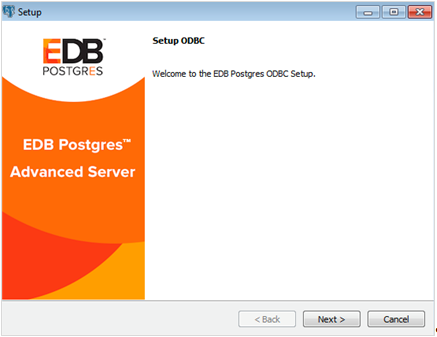
Language Selectionポップアップが開いたら、インストール言語を選択し、 OKをクリックしてSetupウィンドウに進みます(図2.1)。
C:¥Users¥susan¥AppData¥Local¥Temp¥VMwareDnD¥822adb5b¥スクリーンショット2018-11-26 at 6.10.26 AM.png
Nextをクリックして続けます。
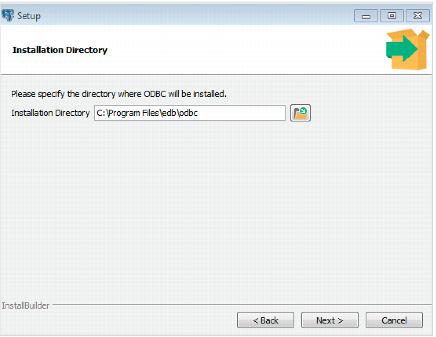
[ Installation Directory ]ダイアログ(図2.2を参照)を使用してコネクタをインストールするディレクトリを指定し、[ Nextへ]をクリックして続行します。
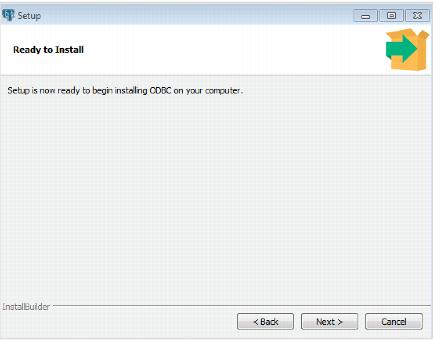
InstallのReadyダイアログ(図2.3参照)でNextをクリックし to Installを開始します。ポップアップダイアログがインストールウィザードの進行状況を確認します。
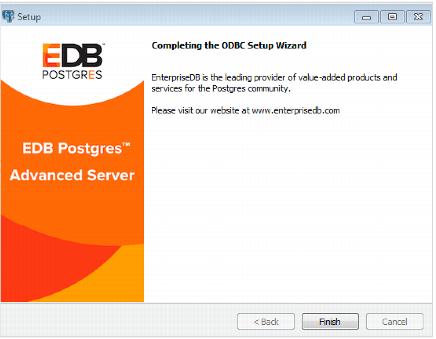
セットアップが完了したことがウィザードから通知されたら、[ Finish ]ボタンをクリックしてダイアログをFinishます(図2.4を参照)。
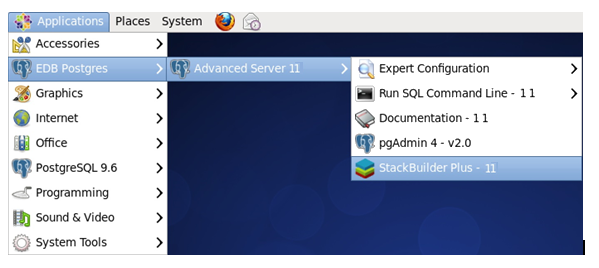
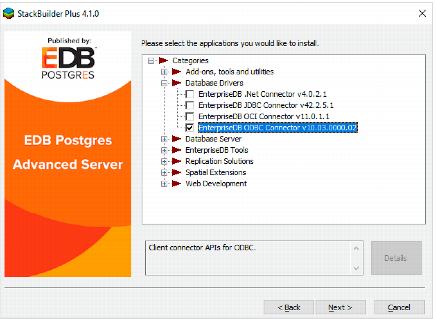
StackBuilder Plusが開いたら、画面上の指示に従います。ツリーコントロールの[ Database Driversノードから[ EnterpriseDB ODBC Connector ]オプションを選択します(図2.6を参照)。
データソースの最初の行はデータソース名です。名前は、大括弧で囲まれた固有のIDです。データソース名の後には 、データソースを構成する個々の接続プロパティを識別する一連の 'keyword=value 」ペアが続きます。
ODBC管理ユーティリティは、ODBC接続用の名前付きデータソースを作成します。ほとんどの場合、ODBC管理ユーティリティはオペレーティングシステムと一緒に配布されています(WindowsまたはunixODBCを使用している場合、このツールは ODBC Data Source Administrator と呼ばれ ODBC Data Source Administrator )。オペレーティングシステムにODBC管理者が含まれていない場合は、サードパーティのオプションをオンラインで利用できます。
次の表は、グラフィカル接続マネージャツールのダイアログ、または名前付きデータソースを定義するodbc.iniファイルで指定できる接続プロパティについて説明しています 。列は、接続プロパティ(ODBC Administratorダイアログに表示されるodbc.ini )、対応するキーワード( odbc.iniファイルに表示されるodbc.ini )、プロパティのデフォルト値、および接続プロパティの説明を識別します。
Database system. Either EnterpriseDB or PostgreSQL Database system. Either .
0
7.4
option to specify rollback behavior. Use the Protocol option to specify rollback behavior. Use the option to specify rollback behavior.
0 - Don't rollback
1 - Rollback the transaction
2 - Rollback the statement
1
No
No
No
If enabled, the SQLColumns() function reports the OID column.
No
If enabled, the SQLStatistics() function reports that a unique index exists on each OID column. function reports that a unique index exists on each column.
On
On
If enabled, the SQLStatistics() function will report unique indexes. If not enabled, the SQLStatistics() function reports that indexes allow duplicate values.
Off
If enabled, the driver will use server-side cursors. To enable UseDeclareFetch If enabled, the driver will use server-side cursors. To enable , specify a value of 1 , specify a value of ; to disable UseDeclareFetch ; to disable , specify a value of 0 , specify a value of .
Off
Off
If enabled, the driver parses simple statements when you call the SQLNumResultCols() , SQLDescribeCol() or SQLColAttributes() functions. statements when you call the If enabled, the driver parses simple SELECT statements when you call the If enabled, the driver parses simple functions.
Off
If enabled, the SQLCancel() function will call on your behalf. SQLFreeStmt(SQL_Close) on your behalf. SQLFreeStmt(SQL_Close) on your behalf.
Off
If enabled, the driver records its work in a log file. On Windows, the file name is C:\mylog_<process-id> ; on Linux the file name is /tmp/mylog_<username><process-id>.log .
SQLDescribeCol() and SQLColAttributes() functions compute the size of a column. Specify Determines how the functions compute the size of a column. Specify 0 to force the driver to report the maximum size allowed for the type; specify functions compute the size of a column. Specify to force the driver to report the maximum size allowed for the type; specify to force the driver to report an unknown length or to force the driver to report the maximum size allowed for the type; specify 1 to force the driver to report an unknown length or to force the driver to report the maximum size allowed for the type; specify to force the driver to search the result set to find the longest value. Do not specify 2 to force the driver to search the result set to find the longest value. Do not specify to force the driver to report the maximum size allowed for the type; specify to force the driver to search the result set to find the longest value. Do not specify UseDeclareFetch if you have enabled to force the driver to search the result set to find the longest value. Do not specify 2 to force the driver to search the result set to find the longest value. Do not specify .
If enabled, the driver treats TEXT columns as if they are of type SQL_LONGVARCHAR columns as if they are of type If enabled, the driver treats columns as if they are of type . If disabled, the driver treats TEXT columns as SQL_VARCHAR values. columns as SQL_VARCHAR values.
If enabled, the driver treats values of unknown type as SQL_LONGVARCHAR values. If unchecked, the driver will treat values of unknown type as If enabled, the driver treats values of unknown type as values. If unchecked, the driver will treat values of unknown type as SQL_VARCHAR values. By default, values of unknown type are treated as Y values. values. If unchecked, the driver will treat values of unknown type as SQL_VARCHAR values. By default, values of unknown type are treated as Y values.
On
If enabled, the driver treats BOOL columns as SQL_CHAR values. If disabled, columns as If enabled, the driver treats values. If disabled, BOOL columns are treated as SQL_BIT values. columns are treated as values.
255
If enabled, the driver treats VARCHAR and BPCHAR values longer than MaxVarCharSize as SQL_LONGVARCHAR values
If TextAsLongVarChar is on, the driver reports TEXT values are MaxLongVarcharSize bytes long.
UnknownAsLongVarChar is on, columns of unknown type are If is on, columns of unknown type are MaxLongVarcharSize bytes long; otherwise, they are reported to be MaxVarcharSize bytes in length. bytes long; otherwise, they are reported to be bytes in length.
100
UseDeclareFetch is enabled. Determines the number of rows fetched by the driver when is enabled.
SysTablePrefixes field to specify a semi-colon delimited list of prefixes that indicate that a table is a system table. By default, the list contains d Use the field to specify a semi-colon delimited list of prefixes that indicate that a table is a system table. By default, the list contains d d_; field to specify a semi-colon delimited list of prefixes that indicate that a table is a system table. By default, the list contains d d_; .
If enabled, the SQLRowCount() function will return a single, cumulative row count for the entire array of parameter settings for an INSERT statement. If disabled, an individual row count will be returned for each parameter setting. By default, this option is disabled. function will return a single, cumulative row count for the entire array of parameter settings for an statement. If disabled, an individual row count will be returned for each parameter setting. By default, this option is disabled.
The LF<->CR/LF conversion option instructs the driver to convert line-feed characters to carriage-return/line-feed pairs when fetching character values from the server and convert carriage-return/line-feed pairs back to line-feed characters when sending character values to the server. By default, this option is enabled.
Off
SQLSetPos() or SQLBulkOperations() functions. operations using the Permits positioned UPDATE and DELETE operations using the Permits positioned functions.
Off
If enabled, the driver treats BYTEA values as if they are of type SQL _ LONGVARBINARY values as if they are of type If enabled, the driver treats SQL . If disabled, BYTEA values are treated as SQL _ VARBINARY values. values are treated as SQL values.
If enabled, the driver treats BYTEA values as if they are large objects. If enabled, the driver treats values as if they are large objects.
Off
The Row Versioning option specifies if the driver should include the column when reporting the columns in a table. The The Row Versioning option specifies if the driver should include the xmin column when reporting the columns in a table. The The Row Versioning option specifies if the driver should include the column when reporting the columns in a table. The xmin value is the ID of the transaction that created the row. You must use row versioning if you plan to create cursors where SQL_CONCURRENCY = SQL_CONCUR_ROWVER value is the ID of the transaction that created the row. You must use row versioning if you plan to create cursors where .
Determines driver behavior if you try to retrieve information about a query without executing the query. If Yes , the driver declares a cursor for the query and fetches the meta-data from the cursor. If No , the driver declares a cursor for the query and fetches the meta-data from the cursor. If , the driver executes the command as soon as you request any meta-data.
TrueIsMinus1 tells the driver to return BOOL values of TRUE as -1 . If this option is not enabled, the driver will return 1 as TRUE BOOL values of . If this option is not enabled, the driver will return values of . The driver always returns 0 as FALSE BOOL values of . The driver always returns .
If enabled, the driver uses the PREPARE and EXECUTE commands to implement the Prepare/Execute model.
BI
0
BI The value of determines how the driver treats BIGINT values: determines how the driver treats values:
SQL_BIGINT as a If - 5 If - ,
SQL_NUMERIC as a 2 If ,
SQL_DOUBLE as a 8 If ,
SQL_INTEGER as a 4 If ,
SQL_VARCHAR as a 12 If ,
If 0 (on an MS Jet client), as a SQL_NUMERIC ,
on any other client, as a 0 If on any other client, as a SQL_BIGINT on any other client, as a .
AB
0x0
0x1 - Forces the output of short-length formatted connection strings. Specify this option if you are using the MFC CDatabase class.
0x2 - Allows MS Access to recognize PostgreSQL's serial type as AutoNumber type. - Allows MS Access to recognize PostgreSQL's serial type as AutoNumber type.
0x4 - Return ANSI character types for the inquiries from applications. Specify this option for applications that have difficulty handling Unicode data.
0x8 - If set, NULL dates are reported as empty strings and empty strings are interpreted as dates on input. NULL dates on input. dates are reported as empty strings and empty strings are interpreted as NULL dates on input.
0x10 - Determines if SQLGetInfo returns information about all tables, or only accessible tables. If set, only information is returned for accessible tables. - Determines if returns information about all tables, or only accessible tables. If set, only information is returned for accessible tables.
0x20 - If set, each SQL command is processed in a separate network round-trip, otherwise, SQL commands are grouped into as few round-trips as possible to reduce network latency.
Lie
Off
Off
If libpq (and its dependencies) are installed in the same directory as the EDB-ODBC driver, enabling SSL Mode allows you to use SSL and other utilities.
CX
BDE
If enabled, calls to SQL_TABLES If enabled, calls to only include user-accessible tables.
Windows ODBC Data Source Administratorは、名前付きデータソースを作成するグラフィカルインターフェイスです。 Control Panel移動してControl Panel Administrative Tools ]メニューを開き、適切な[ ODBC Data Sources ]アイコン(32- or 64- bit)をダブルクリックすると、 ODBC Data Source Administrator (図2.2を参照)を開くことができます。
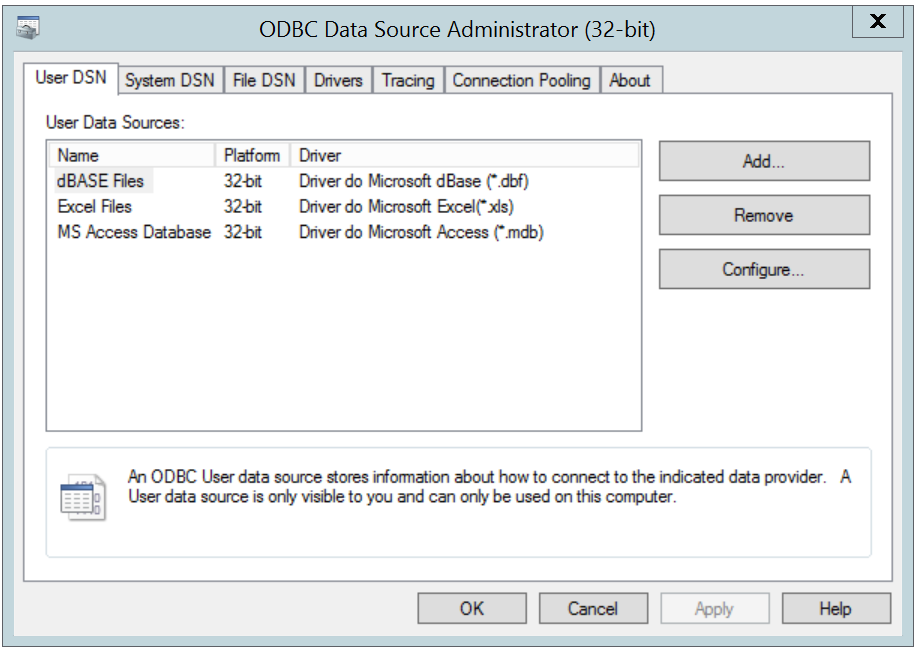
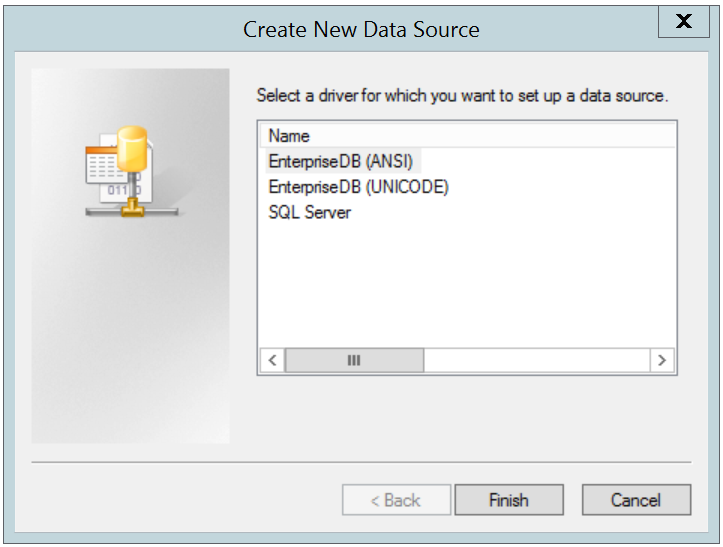
[ Add ]ボタンをクリックして[ Create New Data Source ]ダイアログを開きCreate New Data Source (図2.3を参照)。ドライバの一覧から[ EnterpriseDB (ANSI)または[ EnterpriseDB (UNICODE) ]を選択し、[ Finish ]をクリックします。
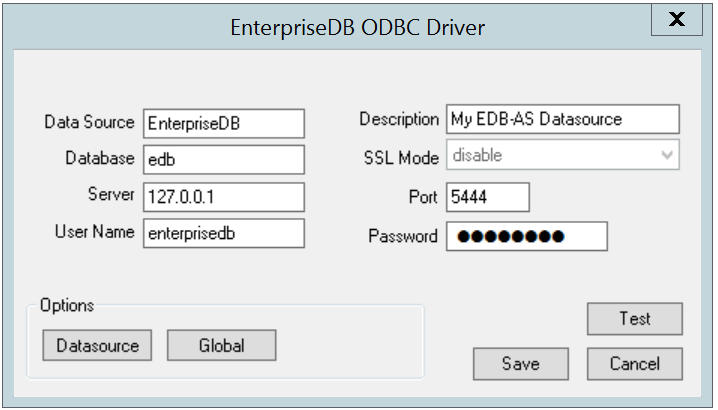
•
「 Databaseフィールドにデータベース名を入力します。
•
User Nameフィールドにユーザーの名前を入力します。
•
libpqがEDB-ODBCドライバと同じディレクトリにインストールされている場合は、 SSL 横にあるドロップダウンリストボックス Mode ラベルがアクティブになり、SSLやその他のAdvanced Serverユーティリティを使用できるようになります。
•
デフォルトのポート番号( 5444 ) をそのまま使用するか、または[ Portフィールドに別の番号を入力します。
•
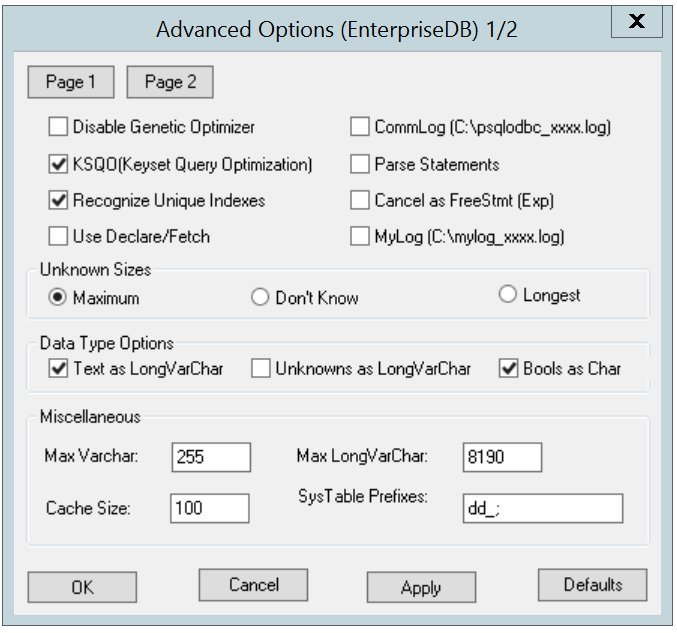
使用する Datasource (にあるボタンOptions開くためのボックスを) Advanced Options ]ダイアログ(図2.5を参照)と接続プロパティを指定します。
[ Global ]ボタンをクリックすると、EDB-ODBCドライバ(データソースではなくドライバ自体)のロギングオプションを指定できるダイアログが開きます。
図2.5 - Advanced Optionsダイアログの1ページ
•
遺伝的クエリDisable Genetic Optimizerを無効にするには、[遺伝Disable Genetic Optimizerを無効にする]の横のチェックボックスを Disable Genetic Optimizerます。デフォルトでは、クエリオプティマイザはonです。
•
KSQO (Keyset Query Optimization) 横にあるチェックボックスをオンにして、キーセットクエリに対するサーバー側のサポートを有効にします。デフォルトでは、 Keyset Query Optimizationはonます。
•
SQLStatistics()関数が固有索引を報告するようにするには、「 Recognize Unique Indexes 横のボックスをチェックします。このオプションがチェックされていない場合、 SQLStatistics()関数はすべてのインデックスが重複値を許可することを報告します。既定では、[ Recognize Unique Indexesはonます。
•
アプリケーションがSELECTコマンドを実行するたびにドライバがサーバー側のカーソルを使用するように指定するには、[ Use Declare/Fetch を Use Declare/Fetch 横のボックスをオンにします 。デフォルトでは、 Use Declare/Fetchはoffです。
•
CommLog (C:\psqlodbc_xxxx.log) 横のチェックボックスをオンにして、すべてのクライアント/サーバートラフィックをログファイルに記録します。デフォルトでは、ロギングはoffです。
•
SQLNumResultCols() 、 SQLDescribeCol() 、またはSQLColAttributes()関数を呼び出すときに、(サーバーではなく)ドライバーが単純なSELECTステートメントの解析を試みるように指定するには、「 Parse Statements 横のボックスをチェックします 。デフォルトでは、このオプションはoffです。
•
SQLCancel()関数がユーザーに代わってSQLFreeStmt(SQLClose)を呼び出すように指定するには、 SQLCancel() Cancel as FreeStmt (Exp) 横のボックスをオンにします。デフォルトでは、このオプションはoffです。
•
MyLog (C:\mylog_xxxx.log) 横のボックスをチェックして 、ドライバの活動の詳細な記録をログファイルに記録します。ログファイルの名前はc:\mylog_ process-id .logです。デフォルトでは、ロギングはoffです。
Unknown Sizesボックスのラジオボタンは、 SQLDescribeCol()およびSQLColAttributes()関数が未知の型の列のサイズを計算する方法を指定しSQLDescribeCol()既知のデータ型の一覧については、セクション3.7、 サポートされるデータ型を参照)。
•
[ Maximum ]の横にあるボタンを選択して、ドライバがVARCHARまたはLONGVARCHAR許可されている最大サイズを報告するように指定します( Unknowns as LongVarChar設定によって異なります)。 Unknowns as LongVarCharが有効な場合、ドライバはLONGVARCHAR最大サイズ( MiscellaneousボックスのMax LongVarCharフィールドで指定)を返します。 [ Unknowns as LongVarCharが有効になっていない場合、ドライバは([ Miscellaneousボックスの)[ Max VarCharフィールドで指定されたサイズを返します。
•
次へ]ボタンを選択して Don't know指定するには、そのドライバレポート「不明」の長さ。
•
[ Longest ]の横にあるボタンを選択して、ドライバが結果セットを検索し、見つかった最長の値を報告するように指定します。 (注: UseDeclareFetchが有効になっている場合は、 Longest指定しないでください。)
[ Data Type Optionsボックスのプロパティは、ドライバが特定の型の列をどのように扱うかを決定します。
•
Text as LongVarChar 横のチェックボックスをオンにして、 TEXT値がSQL_LONGVARCHAR型であるかのように扱います。このボックスがチェックされていない場合、ドライバはTEXT値をSQL_VARCHAR値としてSQL_VARCHARます。デフォルトでは、 TEXT値はSQL_LONGVARCHAR値として扱われます。
•
Unknowns as LongVarChar 横のボックスをオンにして、ドライバーが不明なタイプの値をSQL_LONGVARCHAR値として扱うように指定します。オフにすると、ドライバは未知の型の値をSQL_VARCHAR値としてSQL_VARCHARます。デフォルトでは、未知のタイプの値はSQL_VARCHAR値として扱われます。
•
[ Bools as Char 横のボックスをオンにして、ドライバがBOOL値をSQL_CHAR値として扱うように指定します。オフにすると、 BOOL値はSQL_BIT値として扱われます。デフォルトでは、 BOOL値はSQL_CHAR値として扱われます。
•
Max VarCharフィールドにVARCHAR値に許容される最大長を Max VarCharます。デフォルトでは、この値は255設定されています。
•
Max LongVarCharフィールドに、 LONGVARCHAR値に許容される最大長を入力します。デフォルトでは、この値は8190設定されています。
•
[ Cache Sizeフィールドで、 ( UseDeclareFetchが有効になっているときに ) ドライバによってフェッチされる行数を指定します。デフォルト値は100です。
•
SysTablePrefixesフィールドを使用して、テーブルがシステムテーブルであることを示す、コロンで区切られたプレフィックスのリストを指定します。デフォルトでは、リストにはdd_;が含まれてdd_; 。
[ Apply ]ボタンをクリックしてデータソースのプロパティに変更を適用するか、[ Cancel ]ボタンをクリックして変更を適用せずにダイアログを終了します。ダイアログに変更を適用して終了するには、[ OK ]ボタンをクリックします。
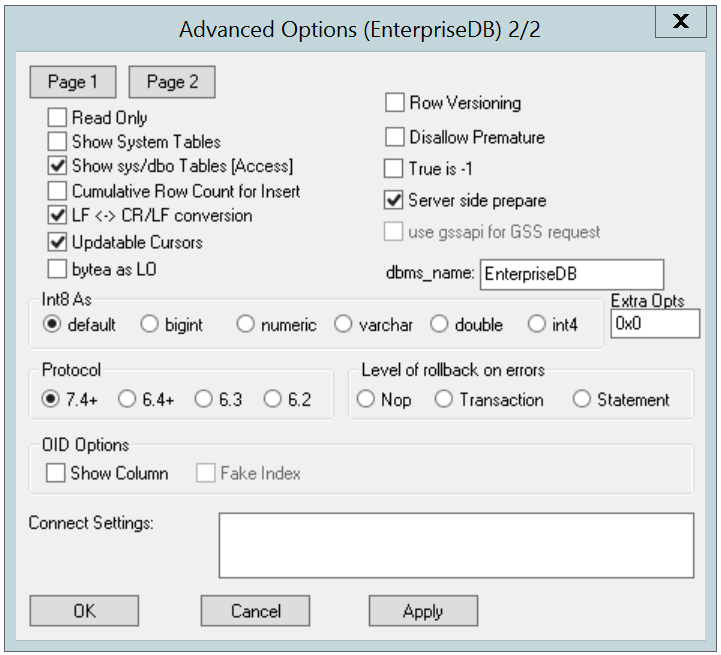
[ Advanced Options ]ダイアログボックスの左上隅にある[ Page 2 ]ボタンを選択して 、2番目の詳細オプションセットにアクセスします(図2.6を参照)。
図2.6 - Advanced Optionsダイアログの2ページ
•
[ Read Only 横にあるチェックボックス Read Onlyにすると、ドライバは次のコマンドを実行できなくなりますINSERT 、 UPDATE 、 DELETE 、 CREATE 、 ALTER 、 DROP 、 GRANT 、 REVOKEまたはLOCK 。 Read Onlyオプションを呼び出すと、ODBCのプロシージャコールエスケープ構文( call=procedure-name? )を使用する呼び出しも禁止されます。デフォルトでは、このオプションはオフです。
•
SQLTables()関数の結果セットにShow System Tablesを含めるには、[システムテーブルのShow System Tables 横のチェックボックスをオンにします 。このオプションが有効になっていると、ドライバは名前がpg_始まるテーブル、またはAdvanced OptionsダイアログのPage 1のSysTablePrefixesフィールドにリストされた任意のプレフィックスをSysTablePrefixesます。デフォルトでは、このオプションはオフです。
•
ODBCデータソースを介してsysスキーマおよびdboスキーマ内のオブジェクトにアクセスするには、 Show sys/dbo Tables [Access] を Show sys/dbo Tables [Access] 横のチェックボックスをオンにします 。デフォルトでは、このオプションは有効(オン)になっています。
•
SQLRowCount()メソッドの呼び出しが実行されたときにINSERTステートメントのパラメーター設定の配列全体に対して単一の累積行数が戻されるようにするには、「 Cumulative Row Count for Insert 横のボックスをチェックします 。このオプションが有効になっていない(ボックスがチェックされていない)場合は、配列内の各パラメーター設定に対して個別の行数が使用可能になるため、 SQLRowCount()呼び出しは最後に挿入された行の数を返します。
•
LF<->CR/LF変換の隣のボックスをチェックして 、サーバから文字値を取得するときにラインフィード文字をキャリッジリターン/ラインフィードペアに変換し、キャリッジリターン/ラインフィードペアを変換するようにドライバに指示します。文字値をサーバに送信するときに文字を改行する。デフォルトでは、このオプションは有効になっています。
•
Updatable Cursors 横のボックスをチェックして、ドライバーがSQLSetPos()またはSQLBulkOperations()関数を使用した位置付けUPDATEおよびDELETE操作を許可するように指定します。デフォルトでは、このオプションは有効になっています。
•
bytea as LO 横のボックス bytea as LO チェックし、ドライバーがBYTEA値をSQL_LONGVARBINARY値であるかのように扱うように指定します。このボックスがチェックされていない場合、EDB-ODBCはBYTEA値をBYTEA値であるかのようにSQL_VARBINARYます。デフォルトでは、 BYTEA値は次のように扱われSQL_VARBINARY値。
•
テーブル内の列をレポートするときにxmin列を含めるには、[ Row Versioning 横にあるチェックボックスをオンにします。 xmin列は、行を作成したトランザクションのIDです。 SQL_CONCURRENCY = SQL_CONCUR_ROWVERカーソルを作成する予定の場合は、行のバージョン管理を使用する必要があります。デフォルトでは、 Row Versioningはオフです。
•
ドライバが実際にクエリを実行せずにクエリに関するメタデータ(結果セット内の列数、または列タイプ)を取得するように指定するには、[ Disallow Premature未使用]の横のチェックボックスをオンにします。このオプションが指定されていない場合は、クエリに関するメタデータを要求したときにドライバがクエリを実行します。デフォルトでは、 Disallow Prematureは無効です。
•
次のチェックボックスをオンに True is -1を返すためにドライバーに指示するBOOL値Trueとして-1 。このオプションが有効になっていない場合、ドライバは1としてTrue BOOL値を返します。ドライバは常に0としてFalse BOOL値を返します。
•
Server side prepare 横にあるチェックボックスをオンにして、ドライバにPREPAREコマンドとEXECUTEコマンドを使用してPrepare/Executeモデルを実装するように指示します。デフォルトでは、このチェックボックスはオンになっています。
•
use 横のチェックボックスをオンにします gssapi for GSS request サーバにGSSAPI接続要求を送信するためのドライバを指示します。
•
dbms_nameフィールドにデータベースシステム( EnterpriseDBまたはPostgreSQL )を入力します 。ここに入力された値は、 SQLGetInfo()関数が呼び出されたときにSQL_DBMS_NAME引数に返されます。デフォルトはEnterpriseDBです。
Int8 Asボックスのラジオボタンを使用して 、ドライバがBIGINT値をクライアントに返す方法を指定します。 default横にあるラジオボタンを選択して、デフォルトのタイプを指定します。 クライアントがMS Jetの場合は NUMERIC 、クライアントが 他のODBCクライアントの場合は BIGINT 。ドライバーがBIGINT値をbigint ( SQL_BIGINT )、 numeric ( SQL_NUMERIC )、 varchar ( SQL_VARCHAR )、 double ( SQL_DOUBLE )、またはint4 ( SQL_INTEGER )として返すようにオプションで指定できます。
Extra Opts フィールド のデフォルト値 は 0x0 です。 Extra Opts は次のとおりです。
0x1
0x2
0x4
0x8
If set, NULL dates are reported as empty strings and empty strings are interpreted as dates on input. NULL dates on input. dates are reported as empty strings and empty strings are interpreted as NULL dates on input.
SQLGetInfo returns information about all tables, or only accessible tables. If set, only information is returned for accessible tables. Determines if returns information about all tables, or only accessible tables. If set, only information is returned for accessible tables.
[ Protocolボックスには、特定のフロントエンド/バックエンドプロトコルバージョンを使用してサーバーと対話するようにドライバーに指示するラジオボタンが含まれています。デフォルトでは、選択されているProtocolは7.4+です。必要に応じて、バージョン6.4+ 、 6.3または6.2から選択できます。
[ Level of Rollback on errors の Level of Rollback on errorsボックスには、ドライバがエラー処理を処理する方法を指定するラジオボタンが含まれています。
Nop
[ OID Optionsボックスには、一部のテーブルに含まれるOID列をドライバが公開する方法を制御するオプションが含まれています。
•
「 Show Column 横のボックスをチェックして 、 SQLColumns()関数の結果セットにOID列を含めます。このボックスがチェックされていない場合、 OID列はSQLColumns()から隠されます。
•
Fake Columns 横のボックスをチェックして、 SQLStatistics()関数が各OID列に固有の索引が存在することを報告するようにOIDます。
使用する Connect Settingsこの接続を開くときに、ドライバが使用するパラメータの割り当てのリストを指定するには、フィールドを。 SETステートメントで変更できる構成パラメーターはすべて、セミコロンで区切ったリストに含めることができます。例えば:
名前付きデータソースの接続プロパティを定義したら、[ Apply ]ボタンをクリックしてオプションを適用します。 Cancelを選択すると、オプションを保存せずにオプションで終了することができます。 [ OK ]ボタンを選択してオプションを保存して終了します。
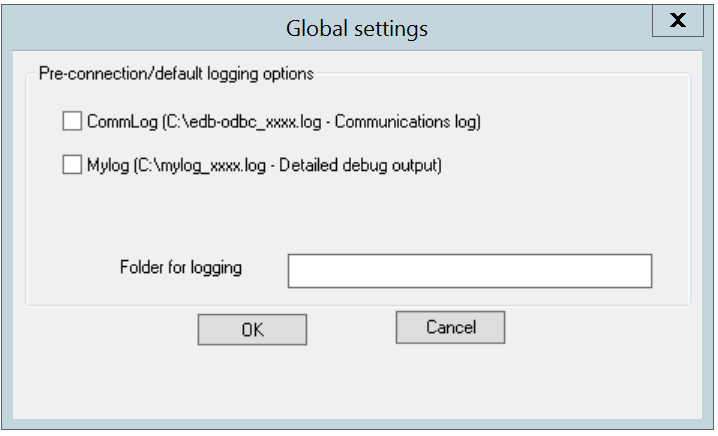
[ Global ]ボタン([ EnterpriseDB ODBC Driver ]ダイアログ)を選択して [ Global Settings ]ダイアログを開きます(図2.7)。このダイアログのオプションは、EDB-ODBCドライバのログ記録オプションを制御します。このダイアログを使用して、名前付きデータソースなしでドライバが使用されている場合、または接続文字列が解析される前に発生したドライバ操作のログを記録する場合に、ログを記録します。
•
CommLogフィールドの横にあるチェックボックスをオンにして、すべてのクライアント/サーバートラフィックをログファイルに記録します。ログファイルの名前はC:\psqlodbc_ process-idここで、 process-idは使用中のプロセスの名前です。
•
ドライバのアクティビティのログファイルを保存するには、 Mylogフィールドの横にあるチェックボックスをオンにします 。ログファイルの名前はc:\mylog_ process-idここで、 process-idは使用中のプロセスの名前です。
•
[ログ for logging する Folderフィールドでログファイルの場所を指定します。
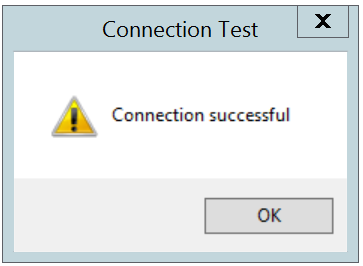
名前付きデータソースの接続情報を入力したら、[ Test ]ボタンをクリックして、ドライバマネージャが定義済みのデータソースに接続できることを確認します(図2.8を参照)。
[OK]ボタンをクリックして[ Connection Test ]ダイアログを閉じます。接続が成功したら、[ Save ]ボタンをクリックして名前付きデータソースを保存しSave 。接続の確立に問題がある場合は、パラメータを調整してもう一度テストしてください。
Linux ODBC Administratorは、unixODBCとともに配布されているグラフィカルツールです。 ODBC Administratorを使用して、 ODBC Administratorドライバと名前付きリソースを管理できます。 ODBCアドミニストレータをシステムに追加するには、ターミナルウィンドウを開き、スーパーユーザ特権を引き継ぎ、次のように入力します。
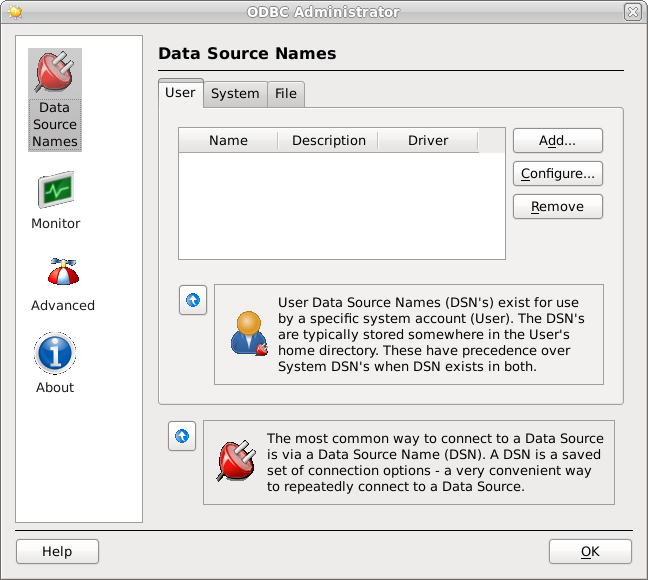
ODBC Administrator を起動するには (図2.9を参照)、ターミナルウィンドウを開き、 ODBCConfig.と入力しODBCConfig.
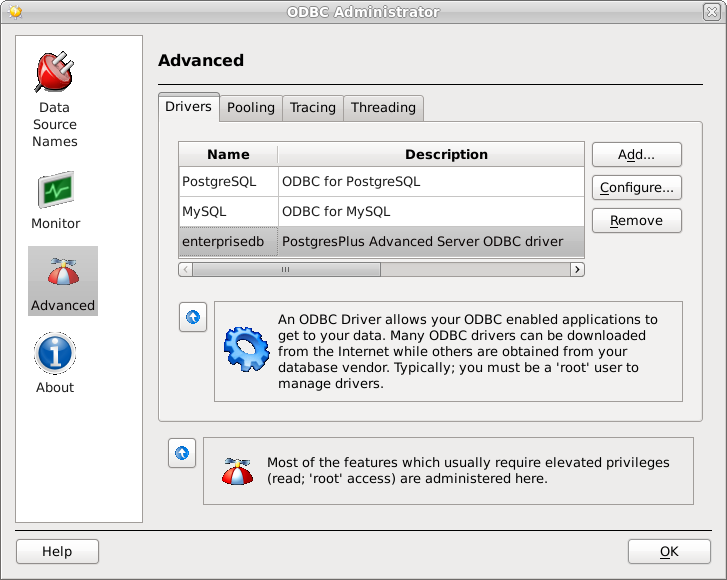
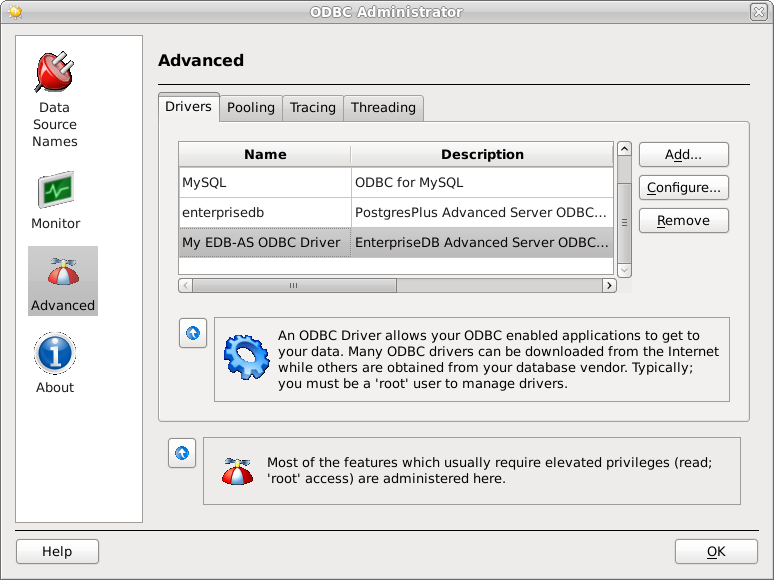
Advanced Server Connectorsコンポーネントをインストールすると、EDB-ODBCドライバがODBCアドミニストレータのドライバの一覧に追加されます。 [ Advanced設定]をクリックし、[ Drivers ]タブを選択して、 enterprisedbドライバがリストに表示されていることを確認します(図2.10を参照)。
EDB-ODBCドライバがドライバの一覧に表示されていない場合は、 ODBC Administrator を使用して追加でき ODBC Administrator 。ドライバ定義を追加するには、[ Drivers ]タブを選択して[ Add ] Addクリックします。図2.11に示すように、 Driver Properties (new)ウィンドウが開きます。
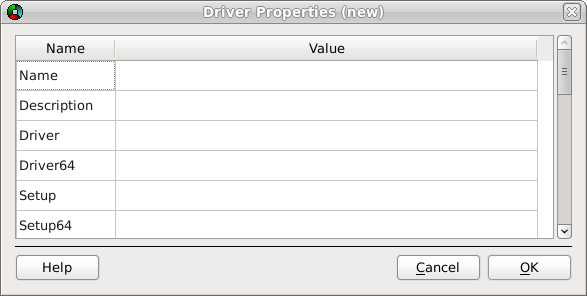
図2.11 - Driver Propertiesウィンドウ
完了 Driver PropertiesドライバマネージャとEDB-ODBCドライバを登録するウィンドウを:
•
ドライバの一意の名前を[ Nameフィールドに追加します。
•
Descriptionフィールドにドライバの説明を追加します。
•
[ DriverフィールドにEDB-ODBCドライバの場所へのパスを追加します 。デフォルトでは、ドライバへの絶対パスは次のとおりです。
•
SetupフィールドにEDB-ODBCドライバの設定ファイルの場所へのパスを追加します 。デフォルトでは、ドライバセットアップファイルへの絶対パスは次のとおりです。
EDB-ODBCドライバのドライバプロパティを説明したら、[ OK ]をクリックします 。 [ODBCデータソースアドミニストレータ]ウィンドウの使用可能なODBCドライバのリストにEDB-ODBCドライバが追加されました(図2.12)。
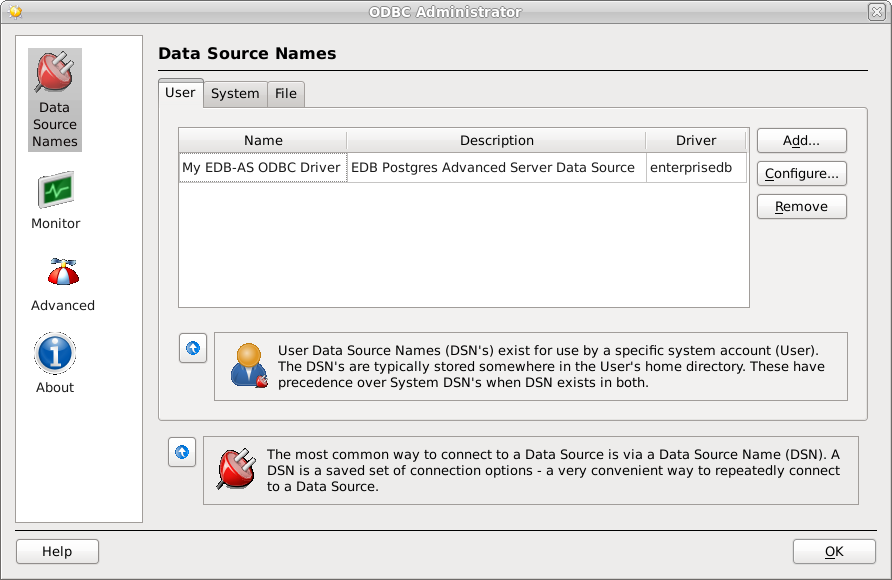
ドライバマネージャがEDB-ODBCドライバを利用できるようになったら、データソースを追加できます。左側のパネルの[ Data Source Names ]オプションをクリックし、追加するデータソース名の種類に適した[DSN]タブを選択します。
•
選択して User現在のユーザーのみ(データソースが中に保存されるまで利用可能であるというデータソースを追加するには、タブを~ user /.odbc.ini )。
•
[ System ]タブを選択して、すべてのユーザーが利用できる名前付きデータソースを追加します。すべてのシステムデータソースは単一のファイル(通常は/etc/odbc.ini )に保存されています。
•
File ]タブを選択して、すべてのユーザーが利用できる名前付きデータソースを追加しますが、それは選択したファイルに保存されています。
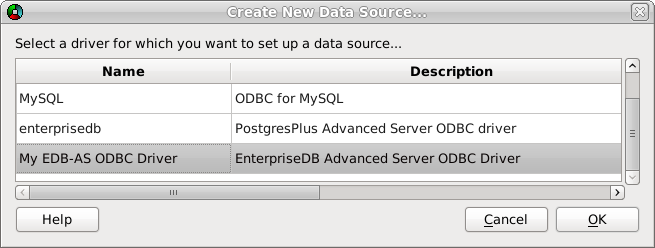
Select the appropriate tab and click Add Select the appropriate tab and click . The window opens, as shown in Figure 2.13. a New Data Source… . The Create window opens, as shown in Figure 2.13.
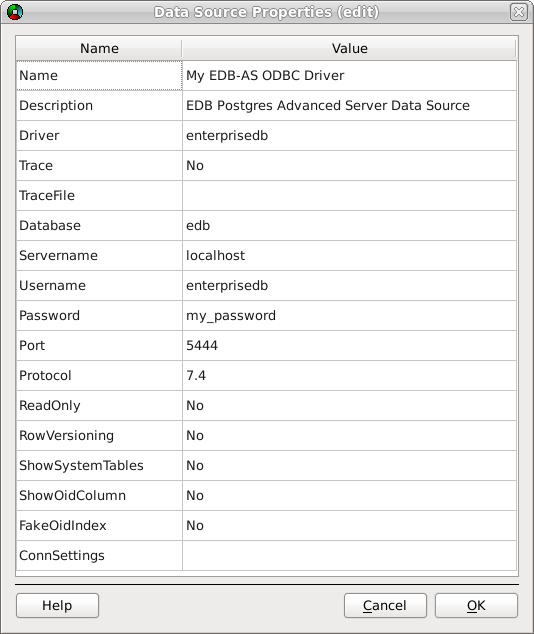
Figure 2.14 - The Data Source Properties window.
window (shown in Figure 2.14), specifying the connection properties for the EDB-ODBC driver. Complete the Data Source Properties (new) window (shown in Figure 2.14), specifying the connection properties for the EDB-ODBC driver.
•
The unixODBC driver includes a trace utility that records the sequence of calls made an ODBC application to a log file. Specify Trace field to turn the trace utility on. Note that using the trace utility can slow down an application. Yes in the The unixODBC driver includes a trace utility that records the sequence of calls made an ODBC application to a log file. Specify field to turn the trace utility on. Note that using the trace utility can slow down an application.
•
TraceFile field to specify a file to receive information returned by the Use the field to specify a file to receive information returned by the Trace utility. field to specify a file to receive information returned by the utility.
•
Protocol field to specify a front-end/back-end protocol version; the default value is Use the field to specify a front-end/back-end protocol version; the default value is 7.4 . You can optionally select from protocol versions 7.4 , 6.4 , 6.3 or 6.2 .
•
Use the ReadOnly field to specify Yes to 、次のコマンドを実行するからドライバを防ぐINSERT 、 UPDATE 、 DELETE 、 CREATE 、 ALTER 、 DROP 、 GRANT 、 REVOKEまたはLOCK 。 [ Read Only ]オプションを有効にすると、ODBCプロシージャコールエスケープ構文( call=procedure-name? )を使用する呼び出しも禁止されます。デフォルトでは、 ReadOnlyはNo設定されてNoます。
•
テーブルの列をレポートするときにif the driver should xmin列if the driver should含めるif the driver shouldがあるif the driver should Use the RowVersioning field to specify Use the Yes field to specifyします。 xmin列は、行を作成したトランザクションのIDです。 SQL_CONCURRENCY = SQL_CONCUR_ROWVERカーソルを作成する予定の場合は、行のバージョン管理を使用する必要があります。デフォルトでは、 Row VersioningはNo設定されてNoます。
•
if the driver should SQLTables()関数の結果セットにシステムテーブルif the driver should含めるif the driver shouldがあるif the driver should Use the ShowSystemTables field to specify Use the Yes field to specify 。デフォルトでは、このフィールドはNo設定されてNoます。
•
if the driver should SQLColumns()関数の結果セットにOID列if the driver should含めるif the driver shouldがあるif the driver should Use the ShowOidColumn field to specify Use the Yes field to specify 。 ShowOidColumnがNoに設定されている場合、 OID列はSQLColumns()から隠されます。デフォルトでは、このオプションはNo設定されてNoます。
•
SQLStatistics()関数が各OID列に固有の索引が存在することを報告する必要がある場合はUse the FakeOidIndex field to Use the Yes field to指定します。あなたのアプリケーションがユニークな識別子を必要としていて、あなたのテーブルがそれを含んでいないとき、これは役に立ちます。デフォルト値はNoです。
•
ConnSettingsフィールドを使用して、この接続を開くときにドライバが使用するパラメータ割り当てのリストを指定します。
•
SQLGetInfo()は、EDB-ODBCドライバとAdvanced Serverに関する情報を返します。
•
SQLGetEnvAttr()は、ODBC環境属性に関する情報を返します。
•
SQLGetConnectAttr()は、個々の接続に固有の属性に関する情報を返します。
•
SQLGetStmtAttr()は、個々のステートメントに固有の属性に関する情報を返します。
•
接続属性を設定するには、 SQLSetConnectAttr()関数を使用します。
•
SQLSetEnvAttr()関数を使用して環境属性を設定します。
•
ステートメント属性を設定するには、 SQLSetStmtAttr()関数を使用してください 。
ODBC SQLGetInfo()関数は、EDB-ODBCドライバとAdvanced Serverに関する情報を返します。 SQL_ODBC_VERとしてSQL_ODBC_VERを指定しない限り、 SQLGetInfo()を呼び出すにはオープン接続が必要info_type 。 SQLGetInfo()のシグネチャは次のとおりです。
(
SQLHDBC conn_handle , // Input
SQLUSMALLINT info_type , // Input
SQLPOINTER info_pointer , // Output
SQLSMALLINT buffer_len , // Input
SQLSMALLINT * string_length_pointer // Output
);
SQLGetInfo() is retrieving. The type of information is retrieving.
If the info_type argument is SQL_DRIVER_HDESC or SQL_DRIVER_HSTMT , the info_pointer argument is both Input and Output .
buffer_len is the length of the allocated memory buffer pointed to by buffer_len is the length of the allocated memory buffer pointed to by info_pointer . If info_pointer is NULL . If , buffer_len is ignored. If the returned value is a fixed size, buffer_len is ignored. buffer_len is only used if the requested value is returned in the form of a character string.
string_length_pointer is a pointer to an SQLSMALLINT value. is a pointer to an value. SQLGetInfo() writes the size of the requested value in this integer.
A typical usage is to call with a NULL with a SQLGetInfo() A typical usage is to call info_pointer to obtain the length of the requested value, allocate the required number of bytes, and then call SQLGetInfo() again (providing the address of the newly allocated buffer) to obtain the actual value. The first call retrieves the number of bytes required to hold the value; the second call retrieves the value. to obtain the length of the requested value, allocate the required number of bytes, and then call SQLGetInfo() again (providing the address of the newly allocated buffer) to obtain the actual value. The first call retrieves the number of bytes required to hold the value; the second call retrieves the value.
If the size of the returned value exceeds buffer_len If the size of the returned value exceeds , the information is truncated and NULL terminated. If the returned value is a fixed size, string_length is ignored (and the size of the requested value is not provided by SQLGetInfo() is ignored (and the size of the requested value is not provided by ).
SQLGetInfo() s information in one of the following formats:書き込みs information in one of the following formats:
•
SQLUINTEGERビットマスク
•
SQLUINTEGERフラグ
•
SQLUINTEGERバイナリ値
•
SQLUSMALLINT値
•
NULL終端文字列
SQLGetInfo()返しSQL_SUCCESS 、 SQL_SUCCESS_WITH_INFO 、 SQL_ERROR 、またはSQL_INVALID_HANDLE 。
SQL info_type Argument
SQLProcedures() Indicates if procedures returned by can be executed by the application. Indicates if procedures returned by can be executed by the application.
SQLProcedures() function may be executed by the application. Some procedures executed by the function may be executed by the application.
Indicates if the user has SQLTables(). privileges on all table names returned by SELECT privileges on all table names returned by Indicates if the user has SQLTables().
prev. SQL_MAX_DRIVER_CONNECTIONS
SQL_AF_ALL Returns
clauses supported by the server. Identifies the ALTER DOMAIN clauses supported by the server. Identifies the clauses supported by the server.
ALTER DOMAIN clauses are not supported.
clauses supported by the server. Identifies the ALTER TABLE clauses supported by the server. Identifies the clauses supported by the server.
SQL_AM_NONE Returns SQL_AM_NONE
SQL_BRC_EXPLICIT Returns SQL_BRC_EXPLICIT
Now SQL_QUALIFIER_LOCATION
SQL_CL_START Returns
Now SQL_QUALIFIER_NAME
Now SQL_QUALIFIER_NAME_SEPARATOR
Returns ' . '
Now SQL_QUALIFIER_TERM
catalog Returns
Now SQL_QUALIFIER USAGE
SQL_CU_DML_STATEMENTS Returns SQL_CU_DML_STATEMENTS
Catalog names can be used in SELECT , INSERT , UPDATE , DELETE , SELECT Catalog names can be used in FOR UPDATE and positioned UPDATE and DELETE statements.
SQL_CB_NON_NULL Returns
Concatenation of a NULL value and a non NULL value will result in a NULL value.
CONVERT function. type using the Indicates conversion support from the BIGINT type using the Indicates conversion support from the function.
CONVERT function. type using the Indicates conversion support from the BINARY type using the Indicates conversion support from the function.
CONVERT function. type using the Indicates conversion support from the BIT type using the Indicates conversion support from the function.
CONVERT function. type using the Indicates conversion support from the CHAR type using the Indicates conversion support from the function.
CONVERT function. type using the Indicates conversion support from the DECIMAL type using the Indicates conversion support from the function.
CONVERT function. type using the Indicates conversion support from the DOUBLE type using the Indicates conversion support from the function.
CONVERT function. type using the FLOAT type using the Indicates conversion support from, the function.
CONVERT function. type using the Lists the conversion support from the INTEGER type using the Lists the conversion support from the function.
CONVERT function. type using the Indicates conversion support from the INTERVAL_DAY_TIME type using the Indicates conversion support from the function.
CONVERT function. type using the Indicates conversion support from the INTERVAL_YEAR_MONTH type using the Indicates conversion support from the function.
CONVERT function. type using the Indicates conversion support for the LONG_VARBINARY type using the Indicates conversion support for the function.
CONVERT function. type using the Indicates conversion support for the LONGVARCHAR type using the Indicates conversion support for the function.
CONVERT function. type using the Indicates conversion support for the NUMERIC type using the Indicates conversion support for the function.
CONVERT function. type using the Indicates conversion support for the REAL type using the Indicates conversion support for the function.
CONVERT function. type using the Indicates conversion support for the SMALLINT type using the Indicates conversion support for the function.
CONVERT function. type using the TIME type using the Indicates conversion support for function.
CONVERT function. type using the TIMESTAMP type using the Indicates conversion support for function.
CONVERT function. type using the Indicates conversion support for the TINYINT type using the Indicates conversion support for the function.
CONVERT function. type using the Indicates conversion support for the VARBINARY type using the Indicates conversion support for the function.
CONVERT function. type using the VARCHAR type using the Indicates conversion support for function.
CONVERT function. type using the Indicates conversion support for the WCHAR type using the Indicates conversion support for the function.
This info_type is valid only when using the Unicode driver.
CONVERT function. type using the Indicates conversion support for the WLONGVARCHAR type using the Indicates conversion support for the function.
This info_type is valid only when using the Unicode driver.
CONVERT function. type using the Indicates conversion support for the WVARCHAR type using the Indicates conversion support for the function.
This info_type is valid only when using the Unicode driver.
Returns SQL_CN_ANY
CREATE ASSERTION statement. Indicates support for the statement.
The CREATE ASSERTION statement is not supported.
CREATE CHARACTER statement. Indicates support for statement.
The CREATE CHARACTER statement is not supported.
CREATE COLLATION. Indicates support for the CREATE COLLATION.
The CREATE COLLATION statement is not supported.
CREATE DOMAIN statement. Indicates support for the statement.
The CREATE DOMAIN statement is not supported.
CREATE SCHEMA statement. Indicates support for the statement.
CREATE TABLE statement. Indicates support for the statement.
CREATE TRANSLATION statement. Indicates support for the statement.
The CREATE TRANSLATION statement is not supported.
CREATE VIEW statement. Indicates support for the statement.
SQL_CV_CREATE_VIEW Returns SQL_CV_CREATE_VIEW
COMMIT operation affects the cursor. Indicates how a operation affects the cursor.
SQL_CB_PRESERVE Returns SQL_CB_PRESERVE
ROLLBACK operation. Indicates the server behavior after a operation.
SQL_CB_PRESERVE Returns SQL_CB_PRESERVE
supported by the server. Indicates the DATETIME LITERALS Indicates the supported by the server.
This info_type is not supported.
file on Linux or the odbc.ini file on Linux or the dbms_name parameter from the file on Linux or the dialog box when defining a data source in Windows. The default is Advanced Options dialog box when defining a data source in Windows. The default is field of page 2 of the dialog box when defining a data source in Windows. The default is dbms_name field of page 2 of the Returns the value given by the dialog box when defining a data source in Windows. The default is EnterpriseDB .
TXN_READ_COMMITTED Returns
DESCRIBE INPUT statement. Indicates support for the statement.
The DESCRIBE INPUT statement is not supported.
value that contains the driver's connection handle. SQLULEN value that contains the driver's connection handle. Returns an value that contains the driver's connection handle.
value that contains driver's descriptor handle. SQLULEN value that contains driver's descriptor handle. Returns an value that contains driver's descriptor handle.
value that contains the driver's environment handle. SQLULEN value that contains the driver's environment handle. Returns an value that contains the driver's environment handle.
value that contains the library handle (returned to the ODBC driver manager when the manager loaded the driver). SQLULEN value that contains the library handle (returned to the ODBC driver manager when the manager loaded the driver). Returns an value that contains the library handle (returned to the ODBC driver manager when the manager loaded the driver).
value that contains the driver's statement handle. SQLULEN value that contains the driver's statement handle. Returns an value that contains the driver's statement handle.
EDB-ODBC.DLL Returns
03.50 Returns
9.0.0.6 Returns
clauses supported by the server. Lists the DROP ASSERTION clauses supported by the server. Lists the clauses supported by the server.
clauses supported by the server. Lists the DROP CHARACTER clauses supported by the server. Lists the clauses supported by the server.
clauses supported by the server. Lists the DROP COLLATION clauses supported by the server. Lists the clauses supported by the server.
clauses supported by the server. Lists the DROP DOMAIN clauses supported by the server. Lists the clauses supported by the server.
clauses supported by the server. Lists the DROP SCHEMA clauses supported by the server. Lists the clauses supported by the server.
clauses supported by the server. Lists the DROP TABLE clauses supported by the server. Lists the clauses supported by the server.
clauses supported by the server. Lists the DROP TRANSLATION clauses supported by the server. Lists the clauses supported by the server.
clauses supported by the server. Lists the DROP VIEW clauses supported by the server. Lists the clauses supported by the server.
ORDER BY. Indicates server support for ORDER BY.
FETCH order options (deprecated in ODBC 3.0). Indicates order options (deprecated in ODBC 3.0).
SQL_FILE_NOT_SUPPORTED Returns SQL_FILE_NOT_SUPPORTED
SQL_CA1_NEXT Returns SQL_CA1_NEXT
SQLGetData. Lists supported extensions to SQLGetData.
GROUP BY clause and columns in the SELECT list. clause and columns in the Indicates the relationship between a list.
SQL_GB_GROUP_BY_EQUALS_SELECT Returns SQL_GB_GROUP_BY_EQUALS_SELECT
SQL_IC_LOWER Returns SQL_IC_LOWER
CREATE INDEX statement. Indicates support for the statement.
SQL_IK_NONE Returns SQL_IK_NONE
INFORMATION_SCHEMA. Lists the views supported in the INFORMATION_SCHEMA.
Prev. SQL_ODBC_SQL_OPT_IEF
INSERT statement. Indicates level of support for the statement.
"" Returns
LIKE predicates. Indicates support for an escape character in predicates.
SQL_LCK_NO_CHANGE Returns SQL_LCK_NO_CHANGE
This info_type is currently unsupported.
64 Returns
prev. SQL_MAX_ACTIVE_STATEMENTS
32 Returns
A cursor name cannot exceed 32 characters in length. A cursor name cannot exceed characters in length.
prev. SQL_ACTIVE_CONNECTIONS
64 Returns
Identifiers cannot exceed characters in length. Identifiers cannot exceed 64 characters in length.
Now SQL_MAX_SCHEMA_NAME_LEN
64 Returns
Now SQL_MAX_CATALOG_NAME_LEN
SQL_MAX_ROW_SIZE columns in the row. LONGVARCHAR columns in the row. or LONGVARBINARY columns in the row. includes the length of any Indicates whether the columns in the row.
SQL_ MAX_ROW_SIZE includes the length of any LONGVARCHAR or LONGVARBINARY columns in the row.
64 Returns
64 Returns
SELECT statement. FROM clause of a The maximum number of tables allowed in the statement.
data value before receiving the value. Indicates if the server needs the length of a LONG data value before receiving the value. Indicates if the server needs the length of a data value before receiving the value.
Indicates if the server supports values in columns. NOT NULL values in columns. Indicates if the server supports values in columns.
SQL_NNC_NON_NULL Returns
Advanced Server does support values in columns. NOT NULL values in columns. Advanced Server does support values in columns.
values are located in a result set. NULL values are located in a result set. Indicates where values are located in a result set.
SQL_NC_HIGH Returns
values in a data set is determined by the The location of NULL values in a data set is determined by the The location of values in a data set is determined by the ASC keywords; and DESC keywords; values in a data set is determined by the keywords; NULL values are sorted to the high end of the data set.
SQL_OAC_LEVEL1 Returns
SQL_OIC_CORE Returns
SQL_OSCC_NOT_COMPLIANT Returns SQL_OSCC_NOT_COMPLIANT
The driver is not SAG CLI compliant. The driver is not compliant.
SQL_OSC_CORE Returns SQL_OSC_CORE
Now SQL_INTEGRITY
03.52.0000 Returns
SQL_OJ_LEFT Returns
prev. SQL_SCHEMA_TERM
schema Returns
ORDER BY clause must be included in the Indicates if the columns in an SELECT list. clause must be included in the Indicates if the columns in an list.
ORDER BY clause do not have to be in the Columns in an clause do not have to be in the SELECT list. clause do not have to be in the list.
prev. SQL_SCHEMA_USAGE
SQL_OU_DML_STATEMENTS Returns SQL_OU_DML_STATEMENTS
SQL_PARC_BATCH Returns
if a single, cumulative row count is available for the entire array. SQL_PARC_NO_BATCH Returns if a single, cumulative row count is available for the entire array.
SQL_PAS_BATCH Returns SQL_PAS_BATCH
Returns procedure
prev. SQL_CATALOG_LOCATION
SQL_CL_START Returns
prev. SQL_CATALOG_NAME
prev. SQL_CATALOG_NAME_SEPARATOR
Returns ' . '
prev. SQL_CATALOG_TERM
catalog Returns
prev. SQL_CATALOG_USAGE
SQL_CU_DML_STATEMENTS Returns SQL_CU_DML_STATEMENTS
Catalog names can be used in SELECT , INSERT , UPDATE , DELETE , SELECT Catalog names can be used in FOR UPDATE and positioned UPDATE and DELETE statements.
Now
SQL_CU_DML_STATEMENTS Returns SQL_CU_DML_STATEMENTS
SQL_IC_SENSITIVE Returns
Now
catalog Returns
SQL_CL_START Returns
schema Returns
' characters in search patterns. ' character is used as an escape character for the ' The ' \ ' character is used as an escape character for the ' % ' and ' _ ' characters in search patterns. ' character is used as an escape character for the ' ' characters in search patterns.
SQL_SC_SQL92_ENTRY Returns SQL_SC_SQL92_ENTRY
Indicates the supported GRANT statement clauses. Indicates the supported statement clauses.
statement supported by the server. Identifies the predicates of a SELECT statement supported by the server. Identifies the predicates of a statement supported by the server.
statement that are supported by the server. REVOKE statement that are supported by the server. Identifies the clauses in a statement that are supported by the server.
statement that are supported by the server. SELECT statement that are supported by the server. Indicates the row value constructor expressions in a statement that are supported by the server.
standard the driver conforms to. Indicates the CLI standard the driver conforms to. Indicates the standard the driver conforms to.
SQLSetPos() or UPDATE or DELETE statements are detected by the application. Indicates whether changes made to a static cursor by statements are detected by the application. Indicates whether changes made to a static cursor by statements are detected by the application.
Returns table
TIMESTAMPADD scalar function. Indicates the timestamp intervals supported by the server for the scalar function.
TIMESTAMPDIFF scalar function. Indicates the timestamp intervals supported by the server for the scalar function.
SQL_TC_ALL Returns SQL_TC_ALL
UNION clause. Indicates server support for the clause.
specification that the driver manager complies with. X/Open specification that the driver manager complies with. The publication year of the specification that the driver manager complies with.
ODBCの SQLGetConnectAttr()およびSQLSetConnectAttr()関数を使用して、接続属性の値を取得または設定できます。
SQLGetConnectAttr()関数は、接続属性の現在の値を返します。署名は次のとおりです。
(
SQLHDBC conn_handle, //Input
SQLINTEGER attribute, //Input
SQLPOINTER value_pointer, //Output
SQLINTEGER buffer_length, //Input
SQLINTEGER * string_length_pointer //Output
);
attributeは、値を取得したい属性を識別します。
場合 attribute ODBCによって定義されるvalue_pointer文字列またはバイナリバッファを指し、 buffer_lengthの長さであるvalue_pointer 。 value_pointerが固定サイズの値(整数など)をbuffer_lengthている場合、 buffer_lengthは無視されます。
EDB-ODBCが属性を定義している場合、 SQLGetConnectAttr()はbuffer_lengthパラメーターを設定します。 buffer_lengthは次のいずれかになります。
SQL_LEN_BINARY_ATTR(length) The result of
SQL_IS_INTEGER or SQL_IS_UINTEGER
value_pointerに戻すために使用可能なバイト数を受け取るSQLINTEGER へのポインター 。場合value_pointerあるNULL 、 string_length_pointer返されません。
この関数は返します SQL_SUCCESS 、 SQL_SUCCESS_WITH_INFO 、 SQL_NO_DATA 、 SQL_ERRORまたはSQL_INVALID_HANDLE.
NO
NO
NO
NO
NO
NO
YES
NO
NO
NO
NO
NO
NO
NO
NO
NO
YES
ODBC SQLSetConnectAttr()関数を使用して 、接続属性の値を設定できます。関数のシグネチャは次のとおりです。
(
SQLHDBC conn_handle , // Input
SQLINTEGER attribute , // Input
SQLPOINTER value_pointer , // Input
SQLINTEGER string_length , // Input
);
attributeは、値を設定したい属性を識別します。
attributeが想定する値へのポインタ 。
attributeがODBCおよびvalue_pointerによって定義されている場合 、バイナリバッファまたは文字列を指しstring_lengthの長さであるvalue_pointer 。 value_pointerが固定長の値(整数など)をstring_lengthている場合、 string_lengthは無視されます。
EDB-ODBCが属性を定義している場合、アプリケーションは string_lengthパラメーターを設定します。可能なstring_length値は次のstring_lengthです。
SQL_LEN_BINARY_ATTR(length) The result of
SQL_IS_INTEGER or SQL_IS_UINTEGER
SQLSetConnectAttr()戻りSQL_SUCCESS 、 SQL_SUCCESS_WITH_INFO 、 SQL_ERROR 、 SQL_STILL_EXECUTINGまたはSQL_INVALID_HANDLE.
SQLSetConnectAttr()は、接続ハンドルが割り振られてから、 SQLFreeHandle().呼び出しで接続がクローズされるまでの間、いつでも呼び出すことができます SQLFreeHandle().呼び出しによって設定されたすべての属性は、 SQLFreeHandle()呼び出しまで持続します。
ODBC SQLGetEnvAttr()およびSQLSetEnvAttr()関数を使用して、環境属性の値を検索または設定することができます。
SQLGetEnvAttr()関数を使用して、システムの環境属性の現在の値を見つけます。関数のシグネチャは次のとおりです。
(
SQLHDBC env_handle , // Input
SQLINTEGER attribute , // Input
SQLPOINTER value_ptr , // Output
SQLINTEGER buffer_length , // Input
SQLINTEGER * string_length_pointer // Output
);
attributeは、値を取得したい属性を識別します。
属性が文字列である場合は、 buffer_lengthの長さであるvalue_ptr 。属性の値が文字ストリングではない場合、 buffer_lengthは未使用です。
value_pointerに戻すために使用可能なバイト数を受け取るSQLINTEGER へのポインター 。場合value_pointerあるNULL 、 string_length_pointer返されません。
この関数は返します SQL_SUCCESS 、 SQL_SUCCESS_WITH_INFO 、 SQL_NO_DATA 、 SQL_ERRORまたはSQL_INVALID_HANDLE.
SQLSetEnvAttr()関数を使用して環境属性の値を設定できます。関数のシグネチャは次のとおりです。
(
SQLHENV env_handle , //Input
SQLINTEGER attribute , //Input
SQLPOINTER value_pointer , //Input
SQLINTEGER string_length //Input
);
attributeは、値を設定したい属性を識別します。
attribute 割り当てられた値へのポインタ 。指定されたattribute応じて、値はNULL終了文字ストリングまたは32ビット整数値になりattribute 。
場合 value_pointerバイナリバッファまたは文字列へのポインタであり、 string_lengthの長さであるvalue_pointer 。属性に割り当てられている値が文字の場合、 string_lengthはその文字ストリングの長さです。場合value_pointerあるNULL 、 string_length返されません。 value_pointerが整数の場合、 string_lengthは無視されます。
SQLSetEnvAttr()戻りSQL_SUCCESS 、 SQL_INVALID_HANDLE 、 SQL_ERRORまたはSQL_SUCCESS_WITH_INFO 。
アプリケーションは接続ハンドルを割り振る前にSQLSetEnvAttr() 呼び出す必要があります 。環境属性に適用されたすべての値は、接続に対してSQLFreeHandle()が呼び出されるまで存続します。 ODBCバージョン3.xでは、複数の環境ハンドルを同時に割り当てることができます。
Defaults to SQL_TRUE. Calls that set this attribute to SQL_FALSE Calls that set this attribute to SQL_FALSE SQL_ERROR/SQLSTATEHYC00 (feature not implemented). SQL_ERROR/SQLSTATEHYC00 (feature not implemented). return Calls that set this attribute to (feature not implemented).
ODBCの SQLGetStmtAttr()およびSQLSetStmtAttr()関数を使用して、ステートメント属性の値を検索および設定することができます。
(
SQLHDBC stmt_handle, //Input
SQLINTEGER attribute, //Input
SQLPOINTER value_ptr, //Output
SQLINTEGER buffer_length, //Input
SQLINTEGER * string_length_pointer //Output
);
attributeは属性値です
属性はODBCによって定義されている場合、 buffer_lengthの長さであるvalue_pointer (場合value_pointer文字列またはバイナリバッファにポイント)。場合value_pointer整数を指し、 buffer_length無視されます。
EDB-ODBCが属性を定義している場合、アプリケーションは buffer_lengthパラメーターを設定します。 buffer_lengthは次のいずれかになります。
SQL_LEN_BINARY_ATTR(length) The result of
SQL_IS_INTEGER or SQL_IS_UINTEGER
要求された値を保持するのに必要なバイト数を受け取るSQLINTEGER へのポインター 。場合value_pointerあるNULL 、 string_length_pointer返されません。
この関数は返します SQL_SUCCESS 、 SQL_SUCCESS_WITH_INFO 、 SQL_ERRORまたはSQL_INVALID_HANDLE.
YES
YES
NO
YES
YES
YES
YES
NO
YES
YES
YES
NO
NO
NO
YES
NO
YES
YES
YES
YES
YES
YES
NO
NO
YES
NO
YES
YES
YES
YES
YES
NO
YES
YES
SQLSetStmtAttr()関数を使用して環境属性の値を設定できます。署名は次のとおりです。
(
SQLHENV stmt_handle , //Input
SQLINTEGER attribute , //Input
SQLPOINTER value_pointer , //Input
SQLINTEGER string_length //Input
);
stmt_handleは環境ハンドルです。
attributeは、値を設定したいステートメント属性を識別します。
value_pointerは、属性に割り当てられる値を保持するメモリ内の場所へのポインタです。 value_pointerは、次のものへのポインタです。
•
SQLLEN 、 SQLULENまたはSQLUSMALLINT 型の値
•
SQLUINTEGER値
•
SQLULEN値
attributeがODBCおよびvalue_pointerによって定義されている場合 、バイナリバッファまたは文字列を指しstring_lengthの長さであるvalue_pointer 。場合value_pointer整数を指し、 string_length無視されます。
EDB-ODBCが属性を定義している場合、アプリケーションは string_lengthパラメーターを設定します。可能なstring_length値は次のstring_lengthです。
SQL_LEN_BINARY_ATTR(length) The result of
SQL_IS_INTEGER or SQL_IS_UINTEGER
SQLGetDiagRec()関数は、属性値を取得または設定するODBC関数によって書かれた診断レコードのステータスとエラー情報を返します。署名は次のとおりです。
SQLSMALLINT handle_type , // Input
SQLHANDLE handle , // Input
SQLSMALLINT record_number , // Input
SQLCHAR * SQLState_pointer , // Output
SQLINTEGER * native_error_pointer , // Output
SQLCHAR * error_text_pointer , // Output
SQLSMALLINT buffer_length , // Input
handle argument The handle type of the . handle_type must be one of the following:
•
SQL_HANDLE_ENVは環境ハンドルを指定します。
•
SQL_HANDLE_STMTはステートメント・ハンドルを指定します。
•
SQL_HANDLE_DBCは接続ハンドルを指定します。
•
SQL_HANDLE_DESCは記述子ハンドルを指定します。
Th e status record that the application is seeking information from (must be greater than or equal to 1).
error code from the record. SQLState error code from the record. Pointer to a memory buffer that receives the error code from the record.
error_text buffer. The length of the buffer.
error_text_pointer field. If the number of characters in the Pointer to the buffer that receives the size (in characters) of the field. If the number of characters in the error_text_pointer parameter exceeds the number available (in buffer_length ), error_text_pointer will be truncated.
SQLGetDiagRec()戻りSQL_SUCCESS 、 SQL_ERROR 、 SQL_INVALID_HANDLE 、 SQL_SUCCESS_WITH_DATAまたはSQL_NO_DATA
次の表はODBC API関数の一覧です。 APIがEDB-ODBCドライバーによってサポートされている場合、右側の列は Yes 指定します 。 ODBC SQLGetFunctions()関数( SQL_API_ODBC3_ALL_FUNCTIONS関数IDを指定SQLGetFunctions()使用して、このリストの現在のバージョンを返します。
Yes
Yes
Yes
Yes
Yes
Yes
Yes
Yes
Yes
Yes
Yes
Yes
Yes
Yes
Yes
Yes
Yes
Yes
Yes
Yes
Yes
Yes
Yes
Yes
Yes
Yes
Yes
Yes
Yes
Yes
Yes
Yes
Yes
Yes
Yes
Yes
Yes
Yes
No
No
Yes
No
Yes
Yes
Yes
Yes
Yes
Yes
Yes
Yes
Yes
Yes
No
Yes
Yes
Yes
Yes
Yes
Yes
Yes
Yes
Yes
Yes
Yes
Yes
Yes
Yes
Yes
Yes
Yes
Yes
Yes
Yes
No
Yes
Yes
Yes