
Iron Bank#
EDB Postgres for Kubernetes(PG4K) is available on Iron Bank . As you can read in the overview page :
Iron Bank is the DoD’s source for hardened containers. > > [… snipped …] > > Iron Bank ultimately is for anyone to consume or contribute. However, we specifically target the following personas: > > - DoD organizations wishing to consume hardened containers and Iron Banks BoE (Body of Evidence) for each container > - DoD organizations wishing to help contribute to containers (e.g. bug fixes, new applications, updates) > - DoD Authorization Officials wishing to understand the risks associated with applications > - Commercial vendors wishing to bring their application to the DoD
Iron Bank is a part of DoD’s Platform One .
You will need your Iron Bank credentials to access the Iron Bank page for EDB Postgres for Kubernetes .
Pulling the EDB PG4K and operand images from Iron Bank#
The images are pulled from the separate Iron Bank container registry . To be able to pull images from the Iron Bank registry, please follow the instructions from Iron Bank .
Specifically, you will need to use your registry1
credentials to pull images.
To find the desired operator or operand images, we recommend to use the
search tool to look with the string enterprisedb , and filter by
Tags , looking for stable , as shown in the image. From there,
you can get the instruction to pull the image:
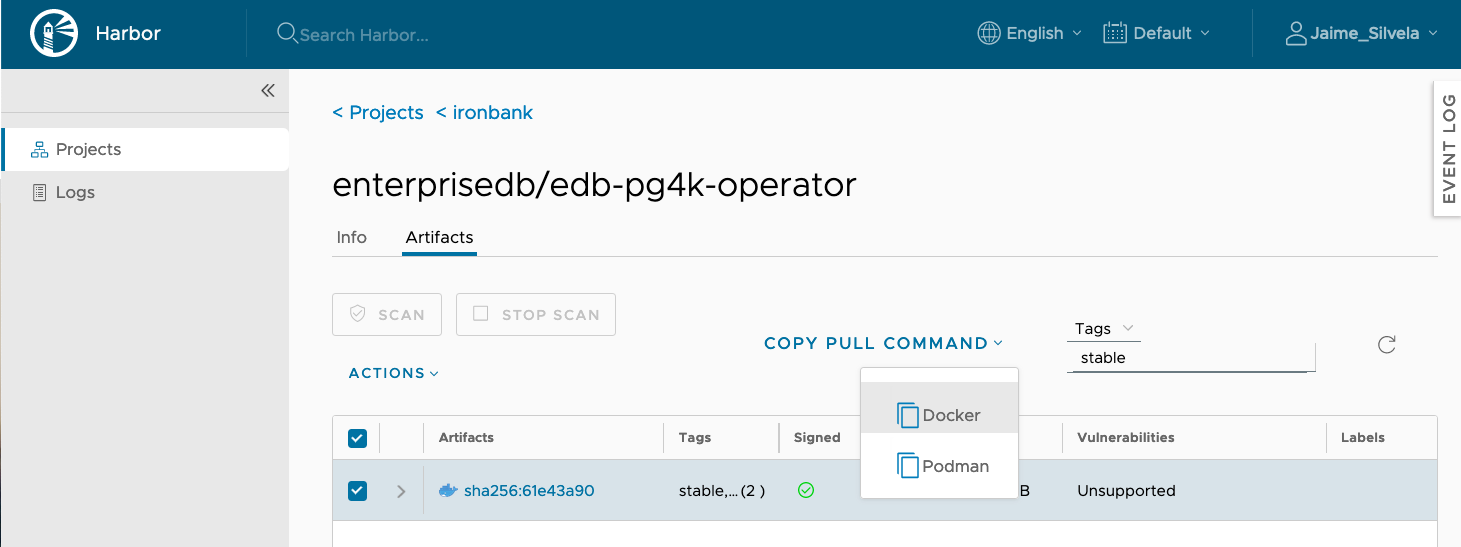
pulling-ironbank-images#
For example, to pull the EPAS16 operand from Ironbank, you can run:
docker pull registry1.dso.mil/ironbank/enterprisedb/edb-postgres-advanced-16:16
If you want to pick a more specific tag or use a specific SHA, you need to find it from the Harbor page .
Installing the PG4K operator using the Iron Bank image#
For installation, you will need a deployment manifest that points to
your Iron Bank image. You can take the deployment manifest from the
installation instructions for EDB PG4K . For example, for the 1.22.0 release, the manifest is
available at
https://get.enterprisedb.io/cnp/postgresql-operator-1.22.0.yaml .
There are a couple of places where you will need to set the image path
for the IronBank image.
apiVersion: apps/v1
kind: Deployment
metadata:
  labels:
    app.kubernetes.io/name: cloud-native-postgresql
  name: postgresql-operator-controller-manager
  namespace: postgresql-operator-system
spec:
  [… snipped …]
  template:
    metadata:
      labels:
        app.kubernetes.io/name: cloud-native-postgresql
    spec:
      containers:
      - args:
        - controller
          [… snipped …]
        env:
        - name: PULL_SECRET_NAME
          value: postgresql-operator-pull-secret
        - name: OPERATOR_IMAGE_NAME
          value: <INSERT-YOUR-OPERATOR-IMAGE>

        [… snipped …]
        image: <INSERT-YOUR-OPERATOR-IMAGE>
If you wish for the operator to be deployed from Iron Bank directly, you will need to create and set the pull secret with the credentials to the registry, as described above.
It may be easier to get the image from Iron Bank with the instructions on the site, and from there, re-tag and publish it to a local registry, or push it directly to your Kubernetes nodes.
Once you have this in place, you can apply your manifest normally with
kubectl apply -f , as described in the installation instructions .
Deploying clusters with EPAS operands using IronBank images#
To deploy a cluster using the EPAS operand you must reference the
Ironbank operand image appropriately in the Cluster resource YAML.
For example, to deploy a PG4K Cluster using the EPAS 16 operand:
Create or edit a
Clusterresource YAML file with the following content:
apiVersion: postgresql.k8s.enterprisedb.io/v1
kind: Cluster
metadata:
  name: cluster-example-full
spec:
  imageName: registry1.dso.mil/ironbank/enterprisedb/edb-postgres-advanced-17:17
  imagePullSecrets:
    - name: my_ironbank_secret
Apply the YAML:
kubectl apply -f <filename>
Verify the status of the resource:
kubectl get clusters