Building the toolkit.properties file
Migration Toolkit uses the configuration and connection information
stored in the toolkit.properties file during the migration process
to identify and connect to the source and target databases.
On Linux, the toolkit.properties file is located in
/usr/edb/migrationtoolkit/etc.
On Windows, the file is located in C:\Program Files\edb\mtk\etc.
The figure shows a sample toolkit.properties file:
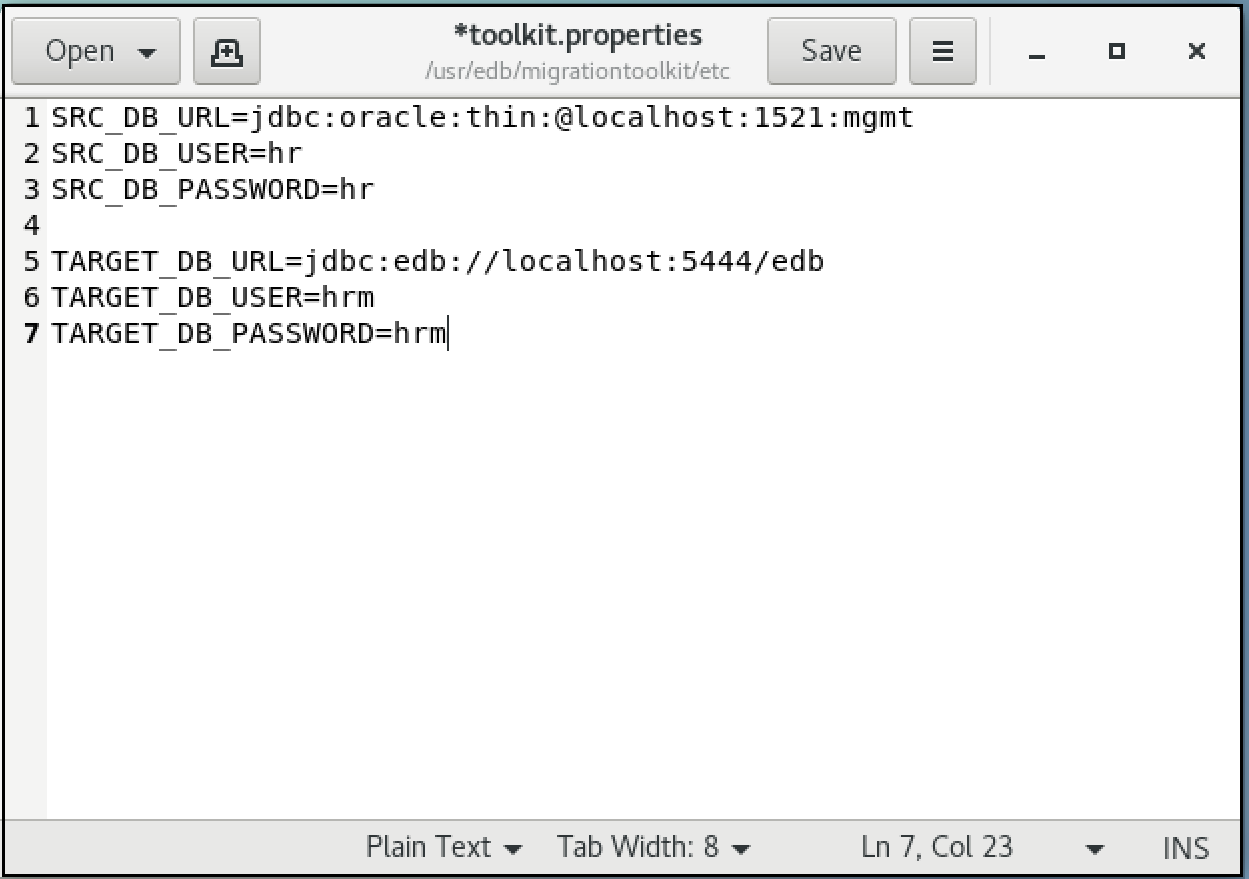
A typical toolkit.properties file.
Before executing Migration Toolkit commands, modify the
toolkit.properties file with the editor of your choice. Update the
file to include the following information:
`SRC_DB_URL` specifies how Migration Toolkit connects to the source database. Details on forming the URL for each source database follows.
`SRC_DB_USER` specifies a user name (with sufficient privileges) in the source database.
`SRC_DB_PASSWORD` specifies the password of the source database user.
`TARGET_DB_URL` specifies the JDBC URL of the target database.
`TARGET_DB_USER` specifies the name of a privileged target database user.
`TARGET_DB_PASSWORD` specifies the password of the target database user.
For specifying a target database on BigAnimal, see Defining target information for BigAnimal.
Defining an Advanced Server URL
Migration Toolkit helps with migration from the following platforms to Advanced Server:
OraclePostgreSQLMySQLSybaseSQL Server
For a definitive list of the objects migrated from each database type, refer to Functionality overview.
Migration Toolkit reads connection specifications for the source and the
target database from the toolkit.properties file. Connection
information for each must include:
The URL of the database
The name of a privileged user
The password associated with the specified user
The URL conforms to JDBC standards and takes the form:
{TARGET_DB_URL|SRC_DB_URL}=jdbc:edb://<host>:<port><database_id>
An Advanced Server URL contains the following information:
`jdbc` — The protocol is always `jdbc`.
`edb` — If you're using Advanced Server, specify `edb` for the subprotocol value.
`<host>` — The name or IP address of the host where the Postgres instance is running.
`<port>` — The port number that the Advanced Server database listener is monitoring. The default port number is 5444.
`<database_id>` — The name of the source or target database.
`{TARGET_DB_USER|SRC_DB_USER}` — Specifies a user with privileges to create each type of object migrated. If migrating data into a table, the specified user might also require insert, truncate, and references privileges for each target table.`{TARGET_DB_PASSWORD|SRC_DB_PASSWORD}` — Set to the password of the privileged Advanced Server user.
Defining a PostgreSQL URL
Migration Toolkit helps with migration from the following platforms to PostgreSQL:
OracleAdvanced Server
MySQLSQL Server
For a definitive list of the objects migrated from each database type, refer to Functionality overview.
Migration Toolkit reads connection specifications for the source and the
target database from the toolkit.properties file. Connection
information for each must include:
The URL of the database
The name of a privileged user
The password associated with the specified user
A PostgreSQL URL conforms to JDBC standards and takes the form:
{SRC_DB_URL|TARGET_DB_URL}=jdbc:postgresql://<host>:<port>/<database_id>
The URL contains the following information:
`jdbc` — The protocol is always `jdbc`.
`postgresql` — If you're using PostgreSQL, specify `postgresql` for the subprotocol value.
`<host>` — The name or IP address of the host where the Postgres instance is running.
`<port>` — The port number that the Postgres database listener is monitoring. The default port number is 5432.
`<<database_id>` — The name of the source or target database.
`{SRC_DB_USER|TARGET_DB_USER}` — Specify a user with privileges to create each type of object migrated. If migrating data into a table, the specified user might also need insert, truncate, and references privileges for each target table.`{SRC_DB_PASSWORD|TARGET_DB_PASSWORD}` — Set to the password of the privileged PostgreSQL user.
Defining a BigAnimal URL
Migration Toolkit helps with migration from the following platforms to BigAnimal:
OracleAdvanced Server
PostgreSQLMySQLSQL Server
Migration Toolkit reads connection specifications for the source and the
target database from the toolkit.properties file. Connection
information for each must include:
The URL of the database
The name of a privileged user
The password associated with the specified user
When migrating to BigAnimal, TARGET_DB_URL takes the form of a JDBC
URL. For example:
The URL contains the following information:
`jdbc` — The protocol is always `jdbc`.
`postgres_type` — The subprotocol is the Postgres type. Specify `edb` if you're using Advanced Server or `postgresql` if you're using PostgreSQL.
`<host_name>` — The host name of your cluster. You can copy it from the **Host** field on the **Connect** tab in the BigAnimal portal.
`<port>` — The port number that the database listener is monitoring. You can copy it from the **Port** field on the **Connect** tab in the BigAnimal portal.
`<database_id>` — The name of the target database. Set this to the name of the database in your cluster that you want to use as your migration target database. The name of the default database for your cluster is shown in the **Dbname** field on the **Connect** tab in the BigAnimal portal. Often a separate database is created for use as the migration target.
`TARGET_DB_USER` — Specifies the name of a privileged database user. You can copy it from the **User** field on the **Connect** tab in the BigAnimal portal.
`TARGET_DB_PASSWORD` — Contains the password of the specified user.
`sslmode` — Either "require" or "verify-full". See [Recommended settings for SSL mode](../../../biganimal/latest/using_cluster/02_connect_to_cluster/#recommended-settings-for-ssl-mode). Listed at the end of the **Service URI** value on the **Connect** tab in the BigAnimal portal.
Defining an Oracle URL
Migration Toolkit helps with migration from an Oracle database to a
PostgreSQL or Advanced Server database. When migrating from Oracle, you
must specify connection specifications for the Oracle source database in
the toolkit.properties file. The connection information must
include:
The URL of the Oracle database
The name of a privileged user
The password associated with the specified user
When migrating from an Oracle database, SRC_DB_URL must contain a JDBC URL, specified in one of two forms. The first form is:
jdbc:oracle:thin:@<host_name>:<port>:<database_id>
The second form is:
jdbc:oracle:thin:@//<host_name>:<port>{<database_id|service_name>}
An Oracle URL contains the following information:
`jdbc` — The protocol is always `jdbc`.
`oracle` — The subprotocol is always `oracle`.
`thin` — The driver type. Specify a driver type of `thin`.
`<host_name>` — The name or IP address of the host where the Oracle server is running.
`<port>` — The port number that the Oracle database listener is monitoring.
`<database_id>` — The database SID of the Oracle database.
`<service_name>` — The name of the Oracle service.
`SRC_DB_USER` — Specifies the name of a privileged Oracle user. The Oracle user needs DBA privilege to migrate objects from Oracle to Advanced Server. The DBA privilege can be granted to the Oracle user with the Oracle `GRANT DBA TO user` command to ensure all of the desired database objects are migrated.
`SRC_DB_PASSWORD` — Contains the password of the specified user.
Defining a MySQL URL
Migration Toolkit helps with migration from a MySQL database to an
Advanced Server or PostgreSQL database. When migrating from MySQL, you
must specify connection specifications for the MySQL source database in
the toolkit.properties file. The connection information must
include:
The URL of the source database
The name of a privileged user
The password associated with the specified user
When migrating from MySQL, SRC_DB_URL takes the form of a JDBC URL.
For example:
jdbc:mysql://<host_name>[:<port>]/<database_id>
The URL contains the following information:
`jdbc` — The protocol is always `jdbc`.
`mysql` — The subprotocol is always `mysql`.
`<host_name>` — The name or IP address of the host where the source server is running.
`[<port>]` — The port number that the MySQL database listener is monitoring.
`<database_id>` — The name of the source database.
`SRC_DB_USER` — Specifies the name of a privileged MySQL user.
`SRC_DB_PASSWORD` — Contains the password of the specified user.
!!! Note * - If datatype tinyInt(1) is used to store byte values
other than 0 and 1 in the MySQL source database, make sure to append the
optional parameter ?tinyInt1isBit=false in the MySQL Connector/J
JDBC Driver URL.
Due to a bug in the MySQL Connector/J JDBC Driver 8.0.26, the migration of foreign key constraints fails in certain cases. EDB recommends that you don’t use this driver for migrating data using Migration Toolkit. You can use MySQL Connector/J JDBC Driver 8.0.25 driver instead.
For detailed information about this bug, see the [MySQL bug report](https://bugs.mysql.com/bug.php?id=95280).
TINYINT(1) is mapped to BIT(1) in PostgreSQL/EDB Postgres
Advanced Server (which might not be expected in some cases). But as the
MySQL JDBC driver reports it as BIT(1), Migration Toolkit maps it to
BIT(1) in PostgreSQL/EDB Postgres Advanced Server.
Unlike TINYINT(1) that can hold the values -128 to 127, BIT(1)
can hold only 0 and 1. So if you’re storing any value other than 0 and 1
in this field, you might need to change the default behavior of the
MySQL JDBC driver so that the driver reports it as TINYINT.
To change this behavior, set the following URL option in the connection string:
jdbc:mysql://localhost:3306/world?tinyInt1isBit=false
In this case, the JDBC driver reports TINYINT(1) as TINYINT and
is mapped to SMALLINT in the target PostgreSQL/EDB Postgres Advanced
Server.
Defining a Sybase URL
Migration Toolkit helps with migration from a Sybase database to an
Advanced Server database. When migrating from Sybase, you must specify
connection specifications for the Sybase source database in the
toolkit.properties file. The connection information must include:
The URL of the source database
The name of a privileged user
The password associated with the specified user
When migrating from Sybase, SRC_DB_URL takes the form of a JTDS URL.
For example:
jdbc:jtds:sybase://<host_name>[:<port>]/<database_id>
A Sybase URL contains the following information:
`jdbc` — The protocol is always `jdbc`.
`jtds` — The driver name is always `jtds`.
`sybase` — The server type is always `sybase`.
`<host_name>` — The name or IP address of the host where the source server is running.
`<port>` — The port number that the Sybase database listener is monitoring.
`<database_id>` — The name of the source database.
`SRC_DB_USER` — Specifies the name of a privileged Sybase user.
`SRC_DB_PASSWORD` — Contains the password of the specified user.
Defining a SQL Server URL
Migration Toolkit helps with migration from an SQL Server database to a PostgreSQL or Advanced Server database. Migration Toolkit supports migration of the following object definitions:
SchemasTablesTable data
ConstraintsIndexes
Migration Toolkit reads connection specifications for the source
database from the toolkit.properties file. The connection
information must include:
The URL of the source database
The name of a privileged user
The password associated with the specified user
If you’re connecting to a SQL Server database, SRC_DB_URL takes the
form of a JTDS URL. For example:
jdbc:jtds:sqlserver:\<server_name>\[:<port>]\<database_id>
A SQL server URL contains the following information:
`jdbc` — The protocol is always `jdbc`.
`jtds` — The driver name is always `jtds`.
`sqlserver` — The server type is always `sqlserver`.
`<server_name>` — The name or IP address of the host where the source server is running.
`<port>` — The port number that the source database listener is monitoring.
`<database_id>` — The name of the source database.
`SRC_DB_USER` — Specifies the name of a privileged SQL Server user.
`SRC_DB_PASSWORD` — Contains the password of the specified user.