
Managing alerts#
PEMクライアントの Manage Alerts タブを使用して、アラートを定義、コピー、または管理します。 [ Manage Alerts ]タブを開くには、 Management > Alerts > Manage Alerts を選択します。
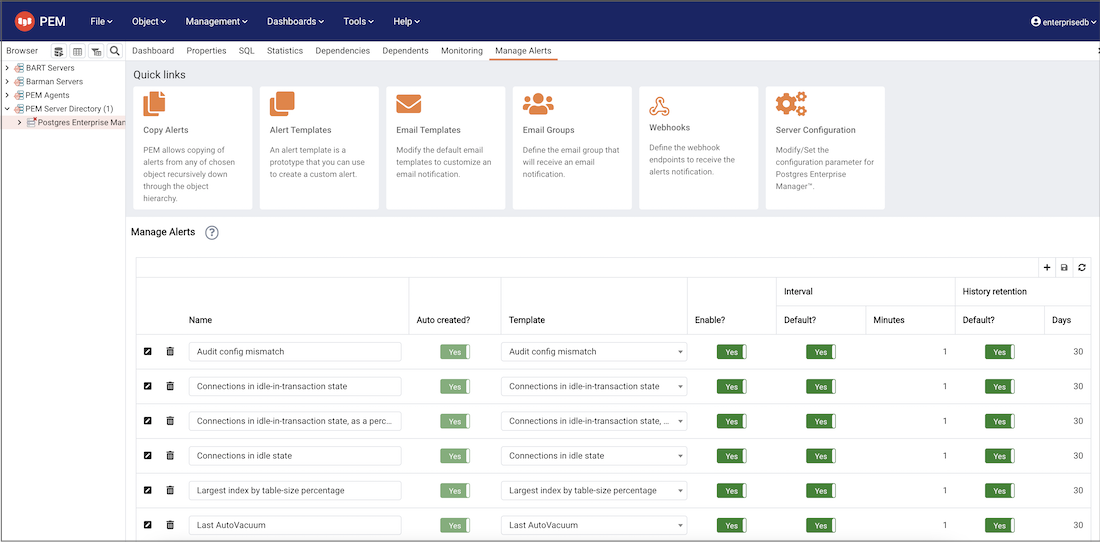
The Manage Alerts tab#
クイックリンクツールバーを使用して、アラートを管理するためのダイアログボックスとタブを開きます。
Copy Alerts を選択してCopy Alert Configurationダイアログボックスを開き、アラート定義をコピーします。
Alert Templates を選択して[ Alert Template ]タブを開き、アラートテンプレートを変更または作成します。
Send the notifications を選択して[ Email Template ]ダイアログボックスを開き、デフォルトのメールテンプレートを変更してメール通知をカスタマイズします。
Send the notifications を選択して[ Send the notifications ]タブを開き、メールグループを変更または作成します。
Webhooks を選択して[ Webhooks ]タブを開き、Webhookエンドポイントを作成または管理します。
Server Configurations を選択してServer Configurationダイアログボックスを開き、サーバー構成設定を確認または変更します。
Manage Alerts タブのAlertsセクションのテーブルを使用して、新しいアラートを作成するか、既存のアラートを管理します。