M1
A Postgres cluster with a primary and a streaming replica, one Barman server, and any number of additional replicas cascaded from the first one. This architecture is suitable for production and is also suited to testing, demonstrating and learning due to its simplicity and ability to be configured with no proprietary components.
If you select subscription-only EDB software with this architecture it will be sourced from EDB Repos 2.0 and you will need to provide a token. See How TPA uses 2ndQuadrant and EDB repositories
for more detail on this topic.
Default layout
By default, the primary has one read-only replica attached in the same location; the replica, in turn, has one cascaded replica attached in a different location, where the Barman server is also configured to take backups from the primary.
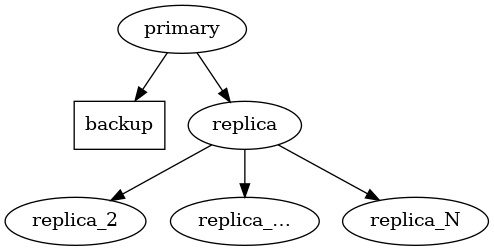
Cluster with cascading replication
If there is an even number of Postgres nodes, the Barman node is additionally configured as a witness. This ensures that the number of nodes is always odd, which is convenient when enabling automatic failover.
Application and backup failover
The M1 architecture implements failover management in that it ensures that a replica will be promoted to take the place of the primary should the primary become unavailable. However it doesnotprovideanyautomaticfacilitytorerouteapplicationtraffictotheprimary . If you require, automatic failover of application traffic you will need to configure this at the application itself (for example using multi-host connections) or by using an appropriate proxy or load balancer and the facilities offered by your selected failover manager.
The above is also true of the connection between the backup node and the
primary created by TPA. The backup will not be automatically adjusted to
target the new primary in the event of failover, instead it will remain
connected to the original primary. If you are performing a manual
failover and wish to connect the backup to the new primary, you may
simply re-run tpaexec deploy . If you wish to automatically change
the backup source, you should implement this using your selected
failover manager as noted above.
Cluster configuration
Overview of configuration options
An example invocation of tpaexec configure for this architecture is
shown below.
tpaexec configure ~/clusters/m1 \
         --architecture M1 \
         --platform aws --region eu-west-1 --instance-type t3.micro \
         --distribution Debian \
         --postgresql 14 \
         --failover-manager repmgr
You can list all available options using the help command.
tpaexec configure --architecture M1 --help
The tables below describe the mandatory options for M1 and additional important options. More detail on the options is provided in the following section.
Mandatory Options
Parameter |
Description |
|---|---|
–architecture (-a) |
Must be set to M1. |
Postgres flavour and version (e.g. –postgresql 15) |
A valid tpaexec-configure . |
One of: * –failover-manager {efm, repmgr, patroni} * –enable-efm * –enable-repmgr * –enable-patroni |
Select the failover manager from tpaexec-configure , tpaexec-configure and tpaexec-configure . |
Additional Options
Parameter |
Description |
Behaviour if omitted |
|---|---|---|
–platform |
One of aws, docker, bare. |
Defaults to aws. |
–num-cascaded-replicas |
The number of cascaded replicas from the first replica. |
Defaults to 1. |
–enable-haproxy |
2 additional nodes will be added as a load balancer layer.<br/>Only supported with Patroni as the failover manager. |
HAproxy nodes will not be added to the cluster. |
–patroni-dcs |
Select the Distributed Configuration Store backend for patroni.<br/>Only option is etcd at this time. <br/>Only supported with Patroni as the failover manager. |
Defaults to etcd. |
More detail about M1 configuration
You may optionally specify --num-cascaded-replicas N to request N
cascaded replicas (including 0 for none; default: 1).
You may also specify any of the options described by tpaexec help configure-options .