Importing Postgres databases
This section describes how to import one or more existing PostgreSQL databases inside a brand new CloudNativePG cluster.
The import operation is based on the concept of online logical backups
in PostgreSQL, and relies on pg_dump via a network connection to the
origin host, and pg_restore . Thanks to native Multi-Version
Concurrency Control (MVCC) and snapshots, PostgreSQL enables taking
consistent backups over the network, in a concurrent manner, without
stopping any write activity.
Logical backups are also the most common, flexible and reliable technique to perform major upgrades of PostgreSQL versions.
As a result, the instructions in this section are suitable for both:
importing one or more databases from an existing PostgreSQL instance, even outside Kubernetes
importing the database from any PostgreSQL version to one that is either the same or newer, enabling major upgrades of PostgreSQL (e.g. from version 13.x to version 17.x)
Warning
When performing major upgrades of PostgreSQL you are responsible for making sure that applications are compatible with the new version and that the upgrade path of the objects contained in the database (including extensions) is feasible.
In both cases, the operation is performed on a consistent snapshot of the origin database.
Note
For this reason we suggest to stop write operations on the source before the final import in the Cluster resource, as changes done to the source database after the start of the backup will not be in the destination cluster - hence why this feature is referred to as "offline import" or "offline major upgrade".
How it works
Conceptually, the import requires you to create a new cluster from
scratch (destination cluster), using the Bootstrap an empty cluster (`initdb ) <Bootstrap an empty cluster (initdb )>` , and then
complete the initdb.import subsection to import objects from an
existing Postgres cluster (source cluster). As per PostgreSQL
recommendation, we suggest that the PostgreSQL major version of the
destination cluster is greater or equal than the one of the source
cluster.
CloudNativePG provides two main ways to import objects from the source cluster into the destination cluster:
microservice approach: the destination cluster is designed to host a single application database owned by the specified application user, as recommended by the CloudNativePG project
monolith approach: the destination cluster is designed to host multiple databases and different users, imported from the source cluster
The first import method is available via the microservice type, the
second via the monolith type.
Warning
It is your responsibility to ensure that the destination cluster can access the source cluster with a superuser or a user having enough privileges to take a logical backup with pg_dump . Please refer to the PostgreSQL documentation on `pg_dump <https://www.postgresql.org/docs/current/app-pgdump.html>`_
for further information.
The microservice type
With the microservice approach, you can specify a single database you want to import from the source cluster into the destination cluster. The operation is performed in 4 steps:
initdbbootstrap of the new clusterexport of the selected database (in
initdb.import.databases) usingpg_dump -Fdimport of the database using
pg_restore --no-acl --no-ownerinto theinitdb.database(application database) owned by theinitdb.ownerusercleanup of the database dump file
optional execution of the user defined SQL queries in the application database via the
postImportApplicationSQLparameterexecution of
ANALYZE VERBOSEon the imported database
In the figure below, a single PostgreSQL cluster containing N databases is imported into separate CloudNativePG clusters, with each cluster using a microservice import for one of the N source databases.
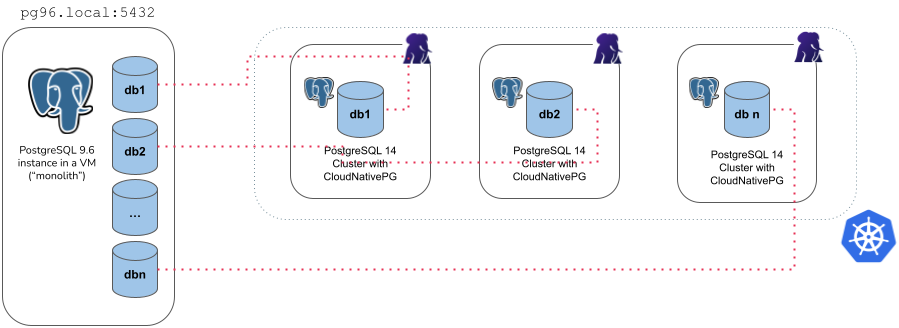
Example of microservice import type
For example, the YAML below creates a new 3 instance PostgreSQL cluster
(latest available major version at the time the operator was released)
called cluster-microservice that imports the angus database from
the cluster-pg96 cluster (with the unsupported PostgreSQL 9.6), by
connecting to the postgres database using the postgres user, via
the password stored in the cluster-pg96-superuser secret.
apiVersion: postgresql.cnpg.io/v1
kind: Cluster
metadata:
  name: cluster-microservice
spec:
  instances: 3

  bootstrap:
    initdb:
      import:
        type: microservice
        databases:
          - angus
        source:
          externalCluster: cluster-pg96
        #postImportApplicationSQL:
        #- |
        #  INSERT YOUR SQL QUERIES HERE
  storage:
    size: 1Gi
  externalClusters:
    - name: cluster-pg96
      connectionParameters:
        # Use the correct IP or host name for the source database
        host: pg96.local
        user: postgres
        dbname: postgres
      password:
        name: cluster-pg96-superuser
        key: password
Warning
The example above deliberately uses a source database running a version of PostgreSQL that is not supported anymore by the Community, and consequently by CloudNativePG. Data export from the source instance is performed using the version of pg_dump in the destination cluster, which must be a supported one, and equal or greater than the source one. Based on our experience, this way of exporting data should work on older and unsupported versions of Postgres too, giving you the chance to move your legacy data to a better system, inside Kubernetes. This is the main reason why we used 9.6 in the examples of this section. We'd be interested to hear from you, should you experience any issues in this area.
There are a few things you need to be aware of when using the
microservice type:
It requires an
externalClusterthat points to an existing PostgreSQL instance containing the data to import (for more information, please refer to The `externalClusters section <The externalClusters section>` )Traffic must be allowed between the Kubernetes cluster and the
externalClusterduring the operationConnection to the source database must be granted with the specified user that needs to run
pg_dumpand read roles information (superuser is OK)Currently, the
pg_dump -Fdresult is stored temporarily inside thedumpsfolder in thePGDATAvolume, so there should be enough available space to temporarily contain the dump result on the assigned node, as well as the restored data and indexes. Once the import operation is completed, this folder is automatically deleted by the operator.Only one database can be specified inside the
initdb.import.databasesarrayRoles are not imported - and as such they cannot be specified inside
initdb.import.roles
Tip
The microservice approach adheres to CloudNativePG conventions and defaults for the destination cluster. If you do not set initdb.database or initdb.owner for the destination cluster, both parameters will default to app .
The monolith type
With the monolith approach, you can specify a set of roles and databases you want to import from the source cluster into the destination cluster. The operation is performed in the following steps:
initdbbootstrap of the new clusterexport and import of the selected roles
export of the selected databases (in
initdb.import.databases), one at a time, usingpg_dump -Fdcreate each of the selected databases and import data using
pg_restorerun
ANALYZEon each imported databasecleanup of the database dump files
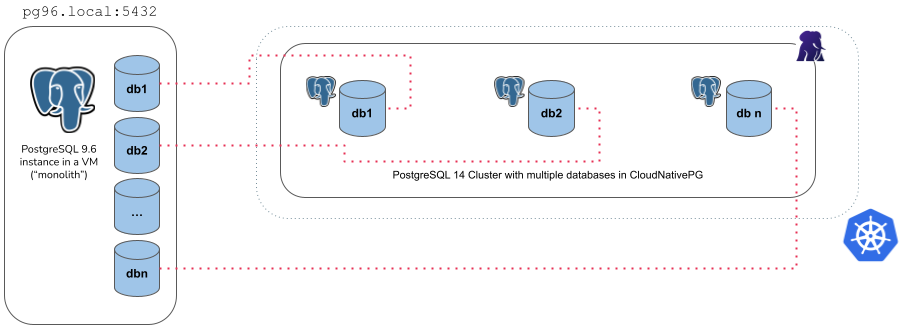
Example of monolith import type
For example, the YAML below creates a new 3 instance PostgreSQL cluster
(latest available major version at the time the operator was released)
called cluster-monolith that imports the accountant and the
bank_user roles, as well as the accounting , banking ,
resort databases from the cluster-pg96 cluster (with the
unsupported PostgreSQL 9.6), by connecting to the postgres database
using the postgres user, via the password stored in the
cluster-pg96-superuser secret.
apiVersion: postgresql.cnpg.io/v1
kind: Cluster
metadata:
  name: cluster-monolith
spec:
  instances: 3
  bootstrap:
    initdb:
      import:
        type: monolith
        databases:
          - accounting
          - banking
          - resort
        roles:
          - accountant
          - bank_user
        source:
          externalCluster: cluster-pg96
  storage:
    size: 1Gi
  externalClusters:
    - name: cluster-pg96
      connectionParameters:
        # Use the correct IP or host name for the source database
        host: pg96.local
        user: postgres
        dbname: postgres
        sslmode: require
      password:
        name: cluster-pg96-superuser
        key: password
There are a few things you need to be aware of when using the
monolith type:
It requires an
externalClusterthat points to an existing PostgreSQL instance containing the data to import (for more information, please refer to The `externalClusters section <The externalClusters section>` )Traffic must be allowed between the Kubernetes cluster and the
externalClusterduring the operationConnection to the source database must be granted with the specified user that needs to run
pg_dumpand retrieve roles information (superuser is OK)Currently, the
pg_dump -Fdresult is stored temporarily inside thedumpsfolder in thePGDATAvolume of the destination cluster’s instances, so there should be enough available space to temporarily contain the dump result on the assigned node, as well as the restored data and indexes. Once the import operation is completed, this folder is automatically deleted by the operator.At least one database to be specified in the
initdb.import.databasesarrayAny role that is required by the imported databases must be specified inside
initdb.import.roles, with the limitations below:The following roles, if present, are not imported:
postgres,streaming_replica,cnpg_pooler_pgbouncerThe
SUPERUSERoption is removed from any imported role
Wildcard
"*"can be used as the only element in thedatabasesand/orrolesarrays to import every object of the kind; When matching databases the wildcard will ignore thepostgresdatabase, template databases and those databases not allowing connectionsAfter the clone procedure is done,
ANALYZE VERBOSEis executed for every database.The
postImportApplicationSQLfield is not supported
Tip
The databases and their owners are preserved exactly as they exist in the source cluster—no app database or user will be created during import. If your bootstrap.initdb stanza specifies custom database and owner values that do not match any of the databases or users being imported, the instance manager will create a new, empty application database and owner role with those specified names, while leaving the imported databases and owners unchanged.
A practical example
There is nothing to stop you from using the monolith approach to
import a single database. It is interesting to see how the results of
doing so would differ from using the microservice approach.
Given a source cluster, for example the following, with a database named
mydb owned by role me :
apiVersion: postgresql.cnpg.io/v1
kind: Cluster
metadata:
  name: cluster-example
spec:
  instances: 1

  postgresql:
    pg_hba:
      - host all all all trust

  storage:
    size: 1Gi

  bootstrap:
    initdb:
      database: mydb
      owner: me
We can import it via microservice :
apiVersion: postgresql.cnpg.io/v1
kind: Cluster
metadata:
  name: cluster-example-microservice
spec:
  instances: 1

  storage:
    size: 1Gi

  bootstrap:
    initdb:
      import:
        type: microservice
        databases:
          - mydb
        source:
          externalCluster: cluster-example

  externalClusters:
    - name: cluster-example
      connectionParameters:
        host: cluster-example-rw
        dbname: postgres
as well as via monolith:
apiVersion: postgresql.cnpg.io/v1
kind: Cluster
metadata:
  name: cluster-example-monolith
spec:
  instances: 1

  storage:
    size: 1Gi

  bootstrap:
    initdb:
      import:
        type: monolith
        databases:
          - mydb
        roles:
          - me
        source:
          externalCluster: cluster-example

  externalClusters:
    - name: cluster-example
      connectionParameters:
        host: cluster-example-rw
        dbname: postgres
In both cases, the database’s contents will be imported, but:
In the microservice case, the imported database’s name and owner both become
app, or whichever configuration for the fieldsdatabaseandownerare set in thebootstrap.initdbstanza.In the monolith case, the database and owner are kept exactly as in the source cluster, i.e.
mydbandmerespectively. Noappdatabase nor user will be created. If there are custom settings fordatabaseandownerin thebootstrap.initdbstanza that don’t match the source databases/owners to import, the instance manager will create a new empty application database and owner role, but will leave the imported databases/owners intact.
Import optimizations
During the logical import of a database, CloudNativePG optimizes the configuration of PostgreSQL in order to prioritize speed versus data durability, by forcing:
archive_modetoofffsynctoofffull_page_writestooffmax_wal_sendersto0wal_leveltominimal
Before completing the import job, CloudNativePG restores the expected
configuration, then runs initdb --sync-only to ensure that data is
permanently written on disk.
Note
WAL archiving, if requested, and WAL level will be honored after the database import process has completed. Similarly, replicas will be cloned after the bootstrap phase, when the actual cluster resource starts.
There are other optimizations you can do during the import phase.
Although this topic is beyond the scope of CloudNativePG, we recommend
that you reduce unnecessary writes in the checkpoint area by tuning
Postgres GUCs like shared_buffers , max_wal_size ,
checkpoint_timeout directly in the Cluster configuration.
Customizing pg_dump and pg_restore behavior
You can customize the behavior of pg_dump and pg_restore by
specifying additional options using the pgDumpExtraOptions and
pgRestoreExtraOptions parameters. This is especially useful for
improving performance or managing import/export complexity.
For example, enabling parallel jobs can significantly speed up data transfer:
bootstrap:
  initdb:
    import:
      type: microservice
      databases:
      - app
      source:
        externalCluster: cluster-example
      pgDumpExtraOptions:
      - --jobs=2
      pgRestoreExtraOptions:
      - --jobs=2
Stage-Specific pg_restore options
For more granular control over the import process, CloudNativePG
supports stage-specific pg_restore options for the following phases:
pre-data– e.g., schema definitionsdata– e.g., table contentspost-data– e.g., indexes, constraints and triggers
By specifying options for each phase, you can optimize parallelism and apply flags tailored to the nature of the objects being restored.
bootstrap:
  initdb:
    import:
      type: microservice
      schemaOnly: false
      databases:
        - mynewdb
      source:
        externalCluster: sourcedb-external
      pgRestorePredataOptions:
        - --jobs=1
      pgRestoreDataOptions:
        - --jobs=4
      pgRestorePostdataOptions:
        - --jobs=2
In the example above:
--jobs=1is applied to thepre-datastage to preserve the ordering of schema creation.--jobs=4increases parallelism during thedatastage, speeding up large data imports.--jobs=2balances performance and dependency handling in thepost-datastage.
These stage-specific settings are particularly valuable for large databases or resource-sensitive environments where tuning concurrency can significantly improve performance.
Note
When provided, stage-specific options take precedence over the general pgRestoreExtraOptions .
Warning
The pgDumpExtraOptions , pgRestoreExtraOptions , and all stage-specific restore options (pgRestorePredataOptions , pgRestoreDataOptions , pgRestorePostdataOptions ) are passed directly to the underlying PostgreSQL tools without validation by the operator. Certain flags may conflict with the operator’s intended functionality or design. Use these options with caution and always test them thoroughly in a safe, controlled environment before applying them in production.
Online Import and Upgrades
Logical replication offers a powerful way to import any PostgreSQL database accessible over the network using the following approach:
Import Bootstrap with Schema-Only Option: Initialize the schema in the target database before replication begins.
``Subscription`` Resource: Set up continuous replication to synchronize data changes.
This technique can also be leveraged for performing major PostgreSQL upgrades with minimal downtime, making it ideal for seamless migrations and system upgrades.
For more details, including limitations and best practices, refer to the Logical Replication Publications section in the documentation.