Failover Manager
Failover Manager (EFM) is a high-availability module from EnterpriseDB that enables a Postgres primary node (or agent) to automatically failover to a standby node in the event of a software or hardware failure on the primary.
Traditionally, a cluster is a single instance of Postgres managing multiple databases. In this documentation, the term cluster refers to a Failover Manager cluster. A Failover Manager cluster consists of the following nodes (or agents) that reside on servers in a cloud, or on a traditional network, and communicate using the JGroups toolkit.
A primary node - The primary node is the primary database server that is servicing database clients.
One or more standby nodes - A standby node is a streaming replication server associated with the primary node.
A witness node - The witness node confirms assertions of either the primary or a standby in a failover scenario. A cluster doesn't need a dedicated witness node if the cluster contains three or more nodes. If you don't have a third cluster member that is a database host, you can add a dedicated witness node. A cluster can include more than one witness node.
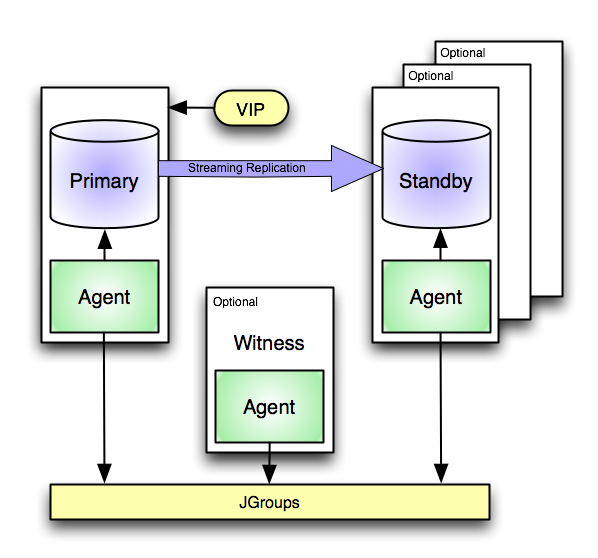
A Failover Manager scenario employing a virtual IP address
When a non-witness agent starts, it connects to the local database and checks the state of the database:
If the agent can't reach the database, it starts in idle mode.
If it finds that the database is in recovery, the agent assumes the role of standby.
If the database isn't in recovery, the agent assumes the role of primary.
In the event of a failover, Failover Manager attempts to ensure that the promoted standby is the most up-to-date standby in the cluster. Data loss is possible if the standby node is not in sync with the primary node.
JGroups provides technology that allows Failover Manager to create clusters whose member nodes can communicate with each other and detect node failures.
The figure illustrates a Failover Manager cluster that uses a virtual IP address. You can use a load balancer in place of a virtual IP address if you provide your own script to reconfigure the load balancer whenever databases are added or removed. You can also choose to enable native EFM-Pgpool integration for high availability.
- Version 4.4
- Version 4.3
- Version 4.2
- Version 4.1
- Version 4.0
- Choosing a deployment architecture
- Prerequisites
- Installing Failover Manager
- Upgrading an existing cluster
- Configuring streaming replication
- Configuring Failover Manager
- Configuring SSL authentication on a Failover Manager cluster
- Using Failover Manager
- Using the efm utility
- Monitoring a Failover Manager cluster
- Controlling the Failover Manager service
- Controlling logging
- Notifications
- Supported failover and failure scenarios
- Troubleshooting
- Creating a Failover Manager cluster