
Monitoring Barman#
Barman Backup and Recovery Managerは、ビジネスクリティカルな環境でのPostgreSQLサーバーのリモートバックアップとディザスターリカバリーのためのオープンソース管理ツールです。 PostgreSQLのポイント インタイム リカバリーテクノロジーに依存しているため、DBAはバックアップの完全なカタログと、複数のリモートサーバーのリカバリフェーズを1つの場所からリモートで管理できます。詳細については、 Monitoring Barman を参照してください。
バージョン8.4以降、PEMコンソールを介してBarmanサーバーをモニタできるようになりました。
Barmanをモニタリングするための前提条件#
BarmanサーバーをPEMコンソールに追加する前に
BarmanホストにBarmanを手動でインストールして構成する必要があります。 Barmanのインストールと構成の詳細については、 Monitoring Barman を参照してください。
Barmanホストにpg-backup-apiツールをインストールします。インストールの詳細については、 pg-backup-api を参照してください。
Barmanサーバーの構成#
次を使用してBarmanサーバーを構成および編集できます。
PEM Webクライアント
pemworkerコマンドライン
PEM Webクライアントを使用する#
構成#
Create –BARMAN Serverダイアログボックスを使用して、既存のBarmanサーバーをPEMサーバーに登録できます。ダイアログボックスを開くには、BARMAN Serversノードを右クリックし、 Create-BARMAN Server を選択します。
General タブを使用して、 Barmanサーバーの一般的なプロパティを説明します。
Name フィールドを使用して、サーバーの名前を指定します。名前は、ブラウザツリー内のサーバーを識別します。
URL フィールドを使用して、 BarmanがインストールされているホストのURLを指定します。
Team フィールドを使用して、PostgreSQLロール名を指定します。このロールのメンバーであるPEMユーザー、最初にサーバーを作成した人、またはPEMサーバーのスーパーユーザー権限を持つPEMユーザーのみが、PEMにログオンするとこのサーバーを表示できます。このフィールドを空白のままにした場合、すべてのPEMユーザーにサーバーが表示されます。
[ PEM Agent ]タブを使用して、PEMエージェントの接続の詳細を指定します。
Bound Agent フィールドを使用して、 Barmanサーバーとして構成するエージェントを選択します。 BarmanでサポートされているPEMエージェントのみがリストされています。
Probe Frequency フィールドを使用して、指定した間隔でプローブを実行する秒数を指定します。
Hearbeat フィールドを使用して、PEMエージェントの可用性を秒単位で確認する間隔を指定します。
注釈
Barmanサーバーを登録した後、PEMエージェントを再起動する必要があります。
編集#
Barmanサーバーを編集するには、ブラウザツリーからサーバーを右クリックし、 プロパティ を選択します。
PEM Agent タブを使用して、バインドされたエージェント、プローブ周波数、およびハートビートを変更します。 Barmanサーバーの所有者のみが[ PEMエージェント ]タブのフィールドを変更できます。
Information タブを使用して、 Barmanサーバーに関する詳細情報を表示します。このタブには、 Barman関連のプローブが実行されるたびに値が設定されます。
Configuration タブを使用して、 Barmanサーバーの構成設定を表示します。このタブには、 Barman関連のプローブが実行されるたびに値が設定されます。
pemworkerコマンドラインを使用する#
pemworker
コマンドラインオプションを使用してBarmanサーバーを構成できます。
asheshvashi@pem:~/PEM/agent$ ./pemworker --update-barman --help
./pemworker --update-barman [barman-update-options]

barman-update-options:
  --id <barman-id> (ID for the existing BARMAN API pg-backup-api)
  --api-url <url> (URL of the BARMAN API pg-backup-api)
  --probe-execution-frequency <interval> (Default: 30, Probe the BARMAN API pg-backup-api at regular interval in seconds and fetch the metrics.)
  --heartbeat-interval <interval> (Default: 10, Ping the BARMAN API pg-backup-api status API at a regular interval in seconds for checking its availability.)
  --ssl-crt <certificate_file> (SSL certificate file for the BARMAN API.)
  --ssl-key <key_file> (Private SSL key for the BARMAN API.)
  --ssl-ca-cert <ca_file> (CA certificate to verify peer against the BARMAN API.)
  --config-file/-c <config_file> (Path to the agent configuration file.)

asheshvashi@pem:~/PEM/agent$ ./pemworker --unregister-barman --help
./pemworker --unregister-barman [barman-unregistration-options]

barman-unregistration-options:
  --id <barman-id> (ID for the existing BARMAN API, registered with the PEM Server.pg-backup-api)
  --config-file/-c <config_file> (Path to the agent configuration file.)

asheshvashi@pem:~/PEM/agent$ ./pemworker --register-barman --help
./pemworker --register-barman [barman-registration-options]

barman-registration-options:
  --api-url <url> (URL of the BARMAN API pg-backup-api)
  --description <name> (Description to show on the UI User interface for the BARMAN API.)
  --probe-execution-frequency <interval> (Default: 30, Probe the BARMAN API pg-backup-api at regular interval in seconds and fetch the metrics.)
  --heartbeat-interval <interval> (Default: 10, Ping the BARMAN API pg-backup-api status API at a regular interval in seconds for checking its availability.)
  --ssl-crt <certificate_file> (SSL certificate file for the BARMAN API.)
  --ssl-key <key_file> (Private SSL key for the BARMAN API.)
  --ssl-ca-cert <ca_file> (CA certificate to verify peer against the BARMAN API.)
  --team <database-role> (Specify the name of the database group role, on the PEM backend database server, that should have access to this BARMAN API Server.)
  --owner <database-user> (Specify the name of the database user, on the PEM backend database server, who will own the BARMAN API Server.)
  --config-file/-c <config_file> (Path to the agent configuration file.)
注釈
Barmanサーバーを登録した後、PEMエージェントを再起動する必要があります。
PEMダッシュボードでのBarmanサーバーの詳細の表示#
Barmanサーバーが構成されると、そのBarmanサーバーのバックアップ全体とサーバー関連の詳細をPEMダッシュボードで表示できます。
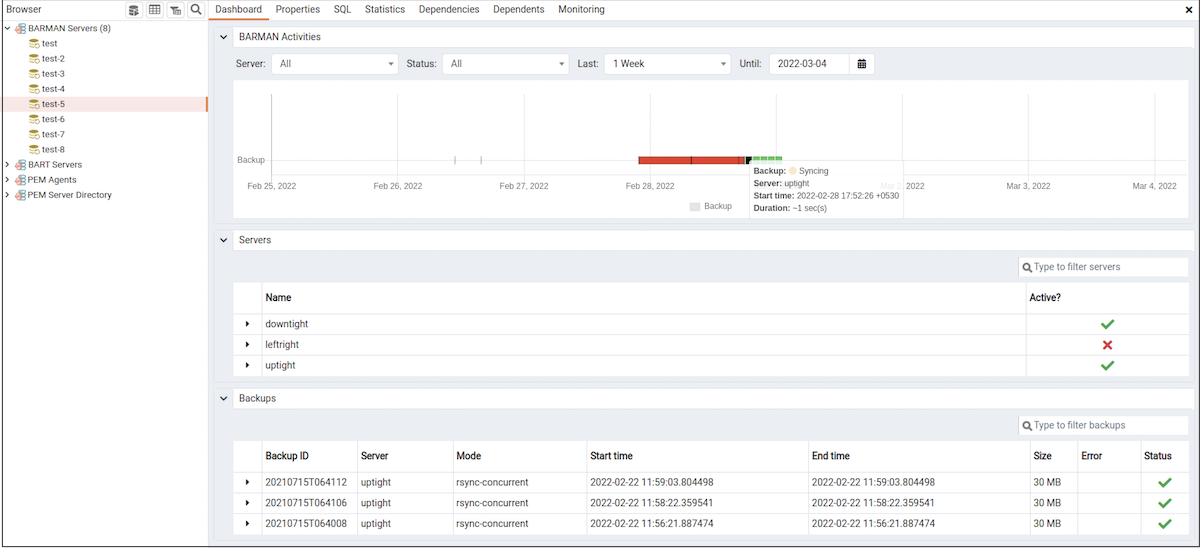
BARMAN dashboard#
監視対象のBarmanサーバーを選択すると、関連するすべてのデータベースサーバーの詳細とそのアクティビティがBarmanアクティビティパネルのダッシュボードにグラフとして表示されます。フィルタボックスで指定した任意の基準データベースサーバー、ステータス、期間、または日付に基づいてアクティビティを選択できます。
[ Servers ]パネルには、そのBarmanサーバーによって管理されているすべてのデータベースサーバーのリストがアクティブなステータスとともに表示されます。
[ Backups
]パネルには、そのBarmanサーバーによって管理されているすべてのデータベースサーバーのバックアップのリストが表示されます。リストをフィルタリングして、データベースサーバーの詳細を表示できます。フィルタボックスで指定した基準でリストをフィルタリングすることもできます。通常、このフィルタは、列の下にリストされている任意の種類の文字列値日付、時刻、サイズを除きます。たとえば、tar
と入力してリストをフィルタリングし、tar形式のバックアップのみを表示できます。
バックアップの詳細には、バックアップID、サーバー、モード、開始時刻、終了時刻、サイズ、エラー、ステータス列が含まれます。