
Managing Postgres servers#
Starting and stopping monitored database servers#
PEM lets you start up and shut down managed server instances with the PEM client. To configure a server to allow PEM to manage the service, complete the Server Registration dialog box. Use the dialog box to register the database server with a PEM agent, which is the local agent installed on the same host as the database server. You can also:
Specify the Store on PEM Server option on the Properties dialog box.
Specify the name of a service script in the Service ID field on the Advanced tab:
For EDB Postgres Advanced Server, the service name is
edb-as-<x>orppas-<x>.For PostgreSQL, the service name is
postgresql-<x>.
Where <x> indicates the server version number.
After connecting to the server, you can start or stop the server by selecting the server name in the tree and selecting Tools > Queue Server Startup or Tools > Queue Server Shutdown.
Modifying the pg_hba.conf file#
Entries in the pg_hba.conf file control network authentication and
authorization. The pg_hba.conf file on the PEM server host must
allow connections between the PEM server and PEM-HTTPD, the PEM agent,
and the monitored servers.
The PEM server installation process prompts you for the IP address and
connection information for hosts for PEM to monitored. This information
is added to the top of the pg_hba.conf file of the PEM backing
database.
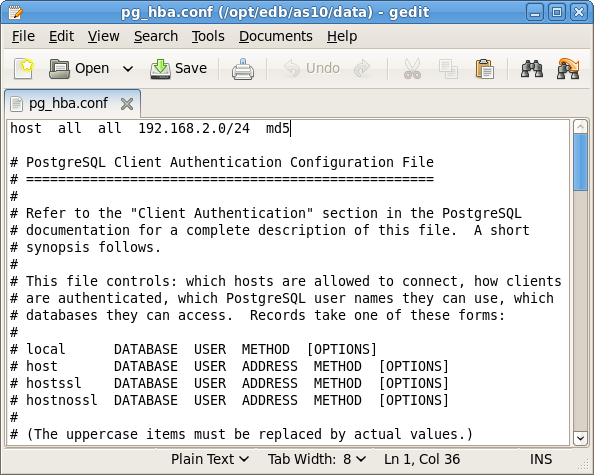
PEM entries in the pg_hba.conf file#
You might also need to manually modify the pg_hba.conf file to allow
connections between the PEM server and other components. For example, if
your PEM-HTTPD installation isn’t on the same host as the PEM server,
you must modify the pg_hba.conf file on the PEM server host to allow
PEM-HTTPD to connect to the server.
By default, the pg_hba.conf file resides in the data directory,
under your Postgres installation. For example, on an EDB Postgres
Advanced Server 10 host, the default location of pg_hba.conf is:
/var/lib/edb/as10/data/pg_hba.conf
You can modify the pg_hba.conf file with your editor of choice.
After modifying the file, reload the server for changes to take effect.
The following example shows a pg_hba.conf entry that allows an md5
password authenticated connection from a user named postgres to the
postgres database on the host where pg_hba.conf resides. The
connection is coming from an IP address of 192.168.10.102:
#  TYPE     DATABASE        USER        CIDR-ADDRESS         METHOD

#  IPv4 local connections:

 host     postgres       postgres    192.168.10.102/32       md5
You can specify the address of a network host or a network address
range. For example, if you want to allow connections from servers with
the addresses 192.168.10.23, 192.168.10.76, and 192.168.10.184, enter a
CIDR-ADDRESS of 192.168.10.0/24 to allow connections from all of the
hosts in that network:
#  TYPE     DATABASE        USER        CIDR-ADDRESS       METHOD

#  IPv4 local connections:

  host      postgres         all       192.168.10.0/24       md5
For more information about formatting a pg_hba.conf file entry, see
the PostgreSQL core documentation .
Before you can connect to a Postgres server with PEM, you must ensure
that the pg_hba.conf file on both servers allows the connection. If
you receive an error when connecting to the database server, modify the
pg_hba.conf file, adding an entry that allows the connection.
Creating and maintaining databases and objects#
Each instance of a Postgres server manages one or more databases. Each user must provide authentication information to connect to the database before accessing the information it contains. The PEM client lets you create and manage databases and the objects that comprise a database, such as tables, indexes, and stored procedures.
To create a database in PEM, right-click any managed server’s Databases node and select Create > Database. After defining a database, you can create objects in the new database.
For example, to create a table, right-click a Tables node and select Create > Table. Specify the attributes of the table in the New Table dialog box.
PEM provides similar dialog boxes for creating and managing other database objects such as:
Tables
Indexes
Stored procedures
Functions
Triggers
Views
Constraints
Each object type is listed in the tree. Right-click the node that corresponds to an object type to access the Create menu and create an object. To perform administrative tasks for the selected object, select Properties from the context menu of a named node.
Template Linux service script#
A service script for the database server allows the PEM server to start, stop, or restart the database server. Doing so might be necessary when performing configuration management, certificate management, and other administrative tasks. Service scripts are platform specific.
The Postgres server on which the PEM server resides must contain a service script. Postgres installers in Windows generated by EDB create a service script for you. If you’re using a Postgres server from another source like native packages, you must provide a service script.
Note
On Rocky Linux or RHEL 8.x, the service script resides in /usr/lib/systemd/system .
For information about customizing a Postgres service, see the PostgreSQL documentation .